The enterprise Linux landscape continues to evolve, and AlmaLinux OS 10.1, codenamed “Heliotrope Lion,” has just entered the arena with some impressive credentials. Released on November 24, 2025, this latest iteration brings significant enhancements that could make it the go-to choice for organizations seeking a reliable, free alternative to Red Hat Enterprise Linux. In this comprehensive AlmaLinux OS 10.1 review, we’ll dive deep into what makes this distribution stand out in 2025.
What Is AlmaLinux OS 10.1?
AlmaLinux OS 10.1 represents the first point release in the AlmaLinux 10 series, built on the robust foundation of kernel 6.12 LTS. As a community-driven, open-source operating system, AlmaLinux maintains binary compatibility with Red Hat Enterprise Linux while offering unique advantages that appeal to both enterprise users and individual developers.
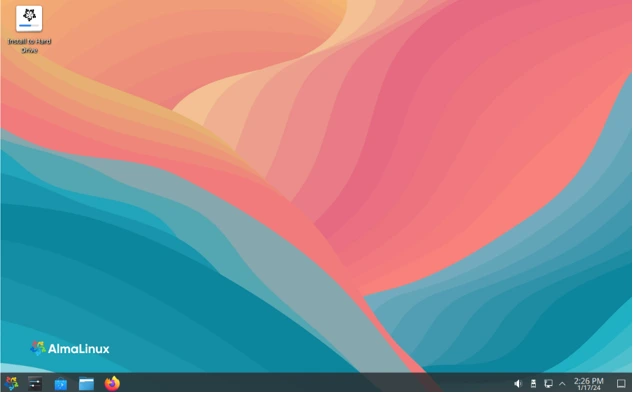
The AlmaLinux OS Foundation governs this forever-free distribution, ensuring it remains independent from any single corporate entity. This governance model provides transparency and community ownership that many organizations find reassuring when making long-term infrastructure decisions.
The Standout Features of AlmaLinux OS 10.1
Btrfs Filesystem Support: A Game-Changer
One of the most significant additions in this AlmaLinux OS 10.1 review is the introduction of full Btrfs filesystem support. Unlike Red Hat, which deprecated Btrfs support years ago in favor of XFS with LVM, AlmaLinux has taken a bold step forward by enabling both kernel and userspace components for Btrfs.
Users can now install AlmaLinux OS directly onto a Btrfs filesystem from the very beginning of the installation process. While the initial implementation focuses on installer and storage management stack integration, the AlmaLinux team has indicated that broader Btrfs tooling support will arrive in upcoming updates. This feature alone sets AlmaLinux apart from its upstream source and competing distributions.
Extended Hardware Compatibility
AlmaLinux OS 10.1 shines when it comes to hardware support. The distribution has reintroduced support for more than 150 devices that were removed from upstream RHEL. This includes legacy hardware from major manufacturers:
- Dell PERC storage controllers (2, 2/Si, 3/Si, 3/Di)
- Adaptec Advanced Raid Products
- HP NetRAID and Smart Array controllers
- IBM ServeRAID and ICP SCSI devices
- QLogic iSCSI HBA and Fibre Channel adapters
- Emulex OneConnect adapters
- Mellanox network adapters
- Broadcom MegaRAID controllers
- LSI MPT SAS controllers
This extended hardware compatibility means organizations with existing infrastructure don’t need to undergo costly hardware refreshes just to adopt the latest enterprise Linux version.
x86-64-v2 Architecture Support
While Red Hat Enterprise Linux 10 has moved to an x86-64-v3 baseline, effectively dropping support for numerous older but still functional CPUs, AlmaLinux takes a more inclusive approach. The distribution provides x86-64-v3 optimized binaries by default but also offers a complete x86-64-v2 architecture build.
This decision extends the life of existing hardware by another decade, allowing organizations to continue receiving security updates without forced hardware upgrades. The AlmaLinux team even rebuilds EPEL (Extra Packages for Enterprise Linux) for x86-64-v2 users, demonstrating their commitment to supporting legacy systems.
Development Tools and Compiler Updates
For developers and DevOps teams, AlmaLinux OS 10.1 delivers comprehensive toolchain updates:
Compiler Updates:
- GCC updated to version 14.3.1
- GCC Toolset 15 with GCC 15.1 and modernized GNU Binutils 2.44
- LLVM Toolset advanced to version 20.1.8
- Rust Toolset upgraded to 1.88.0
- Go Toolset moved to version 1.24
- GNU C Library updated to 2.39
Performance and Debugging Tools:
- GDB 16.3 for enhanced debugging capabilities
- Valgrind 3.25.1 for memory debugging
- SystemTap 5.3 for dynamic instrumentation
- Bpftrace 0.23.5 for advanced tracing
- PCP 6.3.7 and Grafana 10.2.6 for performance monitoring
These updates ensure developers have access to the latest tools for building, debugging, and optimizing applications on AlmaLinux OS 10.1.
Security Enhancements: Post-Quantum Ready
Security remains a top priority in this release, with AlmaLinux OS 10.1 introducing several critical improvements:
Post-Quantum Cryptography
AlmaLinux OS 10.1 implements system-wide post-quantum cryptography algorithms enabled by default. OpenSSL 3.5 now includes support for:
- ML-KEM (Module-Lattice-Based Key-Encapsulation Mechanism)
- ML-DSA (Module-Lattice-Based Digital Signature Algorithm)
- SLH-DSA (Stateless Hash-Based Digital Signature Algorithm)
This forward-thinking approach prepares organizations for the quantum computing era, ensuring encrypted data remains secure against future threats.
Enhanced Security Components
The distribution includes updated versions of critical security components:
- SELinux policies version 42.1.7 for robust mandatory access control
- OpenSSL 3.5.1 with the aforementioned post-quantum algorithms
- SSSD 2.11.1 for improved authentication services
- Keylime 0.2.7 with Initial Device Identity and Initial Attestation Key support
- RPMv6 signatures allowing multiple signatures per package
Additionally, the selinux-policy-extra package will arrive within the CRB repository, designed to improve EPEL software compatibility with SELinux policies.
Container and Virtualization Stack
Modern infrastructure relies heavily on containers and virtualization, and AlmaLinux OS 10.1 delivers comprehensive updates in this area:
Container Tools:
- Podman 5.6.0 for advanced container management
- Buildah 1.41.4 for building OCI containers
- Updated container images including Platform and UBI alternatives
Virtualization Components:
- Libvirt 11.5 for virtualization management
- QEMU-KVM 10.0 for hardware virtualization
- KVM support for IBM POWER architecture (tech preview)
- SPICE support re-enabled for both server and client applications
The inclusion of KVM support for IBM POWER addresses specific community needs, particularly for organizations like the Oregon State University Open Source Lab that depend on this functionality.
Networking and Infrastructure Updates
AlmaLinux OS 10.1 brings networking tools up to date with modern requirements:
- NetworkManager 1.54 for network configuration management
- iproute 6.14 for advanced IP routing
- ethtool 6.15 for Ethernet device configuration
- rsyslog 8.2506.0 for system logging
These updates ensure compatibility with the latest networking standards and provide administrators with powerful tools for managing complex network configurations.
Application and Runtime Updates
The distribution includes updates across a wide range of applications and runtime environments:
Programming Languages:
- Python 3.12.11 with improved performance
- Node.js 24 for modern JavaScript development
- Ruby 3.3 for web applications
- PHP 8.3 for server-side scripting
- Perl 5.40 for system administration
Web Servers and Databases:
- Apache HTTP Server 2.4.63 for web hosting
- nginx 1.26 for high-performance web serving
- Samba 4.22.4 for file sharing services
- MariaDB 10.11 and MySQL 8.4 for database management
- PostgreSQL 16 for advanced database features
Graphics and Display:
- Mesa 25.0.7 for graphics rendering
- Frame pointers enabled by default for better performance profiling
CRB Repository Enabled by Default
A significant improvement in AlmaLinux OS 10.1 is the default enablement of the CodeReady Builder (CRB) repository. This repository contains additional libraries, SDKs, and development tools that many applications require but aren’t part of the core RHEL distribution.
By enabling CRB by default, AlmaLinux reduces friction for administrators and developers who previously had to manually activate this repository. This decision streamlines the installation process for development tools and EPEL packages, reducing configuration time and potential compatibility issues.
AlmaLinux OS 10.1 vs. Competitors
AlmaLinux vs. Rocky Linux
In the battle of CentOS replacements, AlmaLinux and Rocky Linux both offer compelling features. However, several factors differentiate AlmaLinux OS 10.1:
Binary Compatibility Approach: AlmaLinux focuses on Application Binary Interface compatibility with RHEL, providing flexibility in source code usage. Rocky Linux aims for bug-for-bug binary compatibility, which can create compliance challenges given Red Hat’s licensing restrictions.
Hardware Support: AlmaLinux’s extended device driver support gives it an edge for organizations with diverse or legacy hardware infrastructure.
Filesystem Options: The Btrfs support in AlmaLinux OS 10.1 provides modern filesystem capabilities that Rocky Linux doesn’t currently offer.
Governance: AlmaLinux operates under a non-profit foundation with diverse community representation, while Rocky Linux functions through a public benefit corporation with more centralized control.
AlmaLinux vs. RHEL
Performance benchmarks consistently show that AlmaLinux OS 10.1 performs identically to RHEL 10.1 since both share the same core components. The key differences lie in:
Cost: AlmaLinux remains completely free with no licensing fees, while RHEL requires paid subscriptions.
Community Governance: AlmaLinux’s community-driven model provides transparency that some organizations prefer over Red Hat’s corporate structure.
Additional Features: Btrfs support, extended hardware compatibility, and x86-64-v2 builds give AlmaLinux advantages for specific use cases.
Support Options: While RHEL provides direct Red Hat support, AlmaLinux users can access community support or third-party commercial support through partners.
Support Lifecycle and Long-Term Stability
AlmaLinux OS 10 follows the same extended lifecycle as RHEL 10:
- Active Support: Until May 31, 2030
- Security Support: Until May 31, 2035
This 10-year security support window provides organizations with predictable maintenance schedules and long-term stability for mission-critical systems. Minor version updates become end-of-life when the next minor version releases, encouraging users to stay current with the latest patches and improvements.
Getting Started with AlmaLinux OS 10.1
Ready to try AlmaLinux OS 10.1? Here’s how to get started:
Download Options
Visit the official AlmaLinux website at almalinux.org to download installation ISOs. Choose from three options:
Boot ISO: Ideal for network installations where you download packages during setup. This is the smallest download and perfect for experienced administrators.
Minimal ISO: A self-contained offline installation with minimal packages. Great for servers and systems without reliable internet during installation.
DVD ISO: Complete installation with the full package set. Best for offline installations or when you need a comprehensive package selection immediately available.
Installation Process
AlmaLinux OS 10.1 uses the Anaconda installer, familiar to anyone who has worked with Red Hat-based distributions. The process is straightforward:
- Download your preferred ISO for your architecture (x86_64, ARM64, PowerPC, or IBM Z)
- Create a bootable USB drive or burn to DVD
- Boot from the installation media
- Follow the graphical installer to configure storage, networking, and packages
- Set up user accounts and security settings
- Complete the installation and reboot
Upgrading from AlmaLinux 10.0
If you’re already running AlmaLinux 10.0, upgrading is remarkably simple:
sudo dnf update
This single command updates all packages to 10.1 versions while preserving your configurations and data.
Migrating from Other Distributions
For organizations moving from CentOS 7 or other Enterprise Linux distributions, AlmaLinux provides the ELevate utility. This migration tool simplifies the transition process and helps you move to AlmaLinux OS 10.1 with minimal disruption.
Documentation and Support Resources
Access comprehensive documentation through:
- Official AlmaLinux documentation portal
- Community forums for peer support
- AlmaLinux Community Chat (Mattermost)
- GitHub repositories for issue tracking
- Reddit community for discussions
Whether you’re migrating from CentOS, evaluating RHEL alternatives, or building new infrastructure, AlmaLinux OS 10.1 provides the enterprise-grade foundation you need with the support resources to ensure success.
Real-World Performance
Independent benchmarks conducted on AMD EPYC 9755 2P servers demonstrate that AlmaLinux OS 10.1 performs on par with RHEL 10.1 across a comprehensive suite of server workloads. This performance parity confirms that choosing AlmaLinux doesn’t mean sacrificing speed or efficiency.
The distribution excels in:
- Web server performance with Apache and nginx
- Database operations with MariaDB, MySQL, and PostgreSQL
- Container workloads with Podman and QEMU-KVM
- Compilation and build processes with updated compiler toolchains
Frame pointers enabled by default enhance system-wide real-time tracing and profiling, allowing administrators to optimize performance for specific workloads without recompiling packages.
Community and Ecosystem
AlmaLinux has built an impressive ecosystem of partners and supporters:
Major Partners:
- Microsoft Azure
- Amazon Web Services
- CloudLinux
- Dell Technologies
- Liquid Web
The active community provides support through multiple channels:
- AlmaLinux Community Chat (Mattermost)
- AlmaLinux Forums
- Reddit community
- GitHub repositories
- Bug tracking system
This robust community support network ensures users can find help quickly when issues arise, complementing the availability of commercial support options from various vendors.
Use Cases and Target Audience
AlmaLinux OS 10.1 serves diverse use cases across multiple sectors:
- Web Hosting: Stable, secure platform for hosting providers and managed service providers
- Enterprise Infrastructure: Long-term support for mission-critical business applications
- Development Environments: Modern toolchains for software development teams
- Cloud Deployments: Seamless integration with major cloud platforms
- Educational Institutions: Free, reliable platform for academic computing
- Research Organizations: Extended hardware support for diverse research equipment
- Legacy Systems: x86-64-v2 support extends the life of existing hardware
Potential Drawbacks to Consider
While AlmaLinux OS 10.1 excels in many areas, potential users should consider:
Enterprise Application Certification: Some third-party vendors may not officially certify their applications on AlmaLinux, though ABI compatibility generally ensures functionality.
Commercial Support Options: While available through partners, direct support isn’t as comprehensive as Red Hat’s enterprise support offerings.
Btrfs Maturity: While Btrfs support is a significant addition, the implementation is still evolving, and users should monitor development for production-critical deployments.
Minor Version Lifecycle: Each minor version reaches end-of-life when the next version releases, requiring regular updates to maintain support.
Conclusion: Is AlmaLinux OS 10.1 the Best Free Enterprise Linux for 2025?
After this comprehensive AlmaLinux OS 10.1 review, the answer depends on your specific needs, but for many organizations, AlmaLinux OS 10.1 represents an exceptional choice for enterprise Linux in 2025.
Choose AlmaLinux OS 10.1 if you:
- Need a free, community-governed enterprise Linux distribution
- Want extended hardware support for legacy systems
- Require modern filesystem options like Btrfs
- Value x86-64-v2 support for older but functional hardware
- Prefer community-driven development with transparent governance
- Seek RHEL compatibility without licensing costs
- Need post-quantum cryptography for future-proof security
Consider alternatives if you:
- Require official Red Hat enterprise support
- Need guaranteed third-party application certification
- Depend on vendor-specific features unique to RHEL
- Prefer bug-for-bug binary compatibility over ABI compatibility
The combination of Btrfs support, extended hardware compatibility, modern development tools, robust security features, and community governance makes AlmaLinux OS 10.1 a compelling choice for organizations seeking enterprise-grade Linux without the associated costs. With a support lifecycle extending to 2035, adopting AlmaLinux OS 10.1 today positions your infrastructure for long-term stability and success.
For most use cases requiring enterprise Linux in 2025, AlmaLinux OS 10.1 deserves serious consideration as potentially the best free alternative available. Its thoughtful additions beyond RHEL compatibility, combined with rock-solid stability and performance, make it an outstanding choice for organizations of all sizes.
The 10-year support lifecycle, active community, and forward-thinking features like post-quantum cryptography ensure that choosing AlmaLinux OS 10.1 today positions your infrastructure for long-term success. Whether you’re a startup building your first production environment, an enterprise seeking cost-effective alternatives to commercial Linux, or an educational institution managing diverse hardware, AlmaLinux OS 10.1 delivers enterprise-grade reliability without the enterprise price tag.
Disclaimer
This AlmaLinux OS 10.1 review is provided for informational purposes only and is based on publicly available information and official documentation as of November 2025. Technical specifications, features, and performance may vary based on hardware configurations and use cases. Readers should conduct their own testing and evaluation before deploying AlmaLinux OS 10.1 in production environments. The author is not affiliated with AlmaLinux OS Foundation or any commercial entity mentioned in this review. Always consult official documentation and qualified IT professionals for critical infrastructure decisions.
Also Read
Ultramarine Linux 43 Review: The Fedora Remix That Finally “Just Works” in 2025