Drauger OS Review The Ultimate Linux Distro for Gamers in 2025
If you’re a gamer looking to break free from Windows or macOS, or just curious about what Linux offers for gaming in 2025, you’ve likely heard of Drauger OS. This Ubuntu-based Linux distribution is designed specifically for gamers, promising high performance, low latency, and a streamlined experience tailored for gaming. But does it deliver on these claims?
In this comprehensive Drauger OS Review, we’ll explore its features, performance, setup process, and quirks to determine if it’s the ultimate Linux distro for gamers this year. Let’s dive into what makes Drauger OS 7.7 Nzambi, the latest stable release, stand out in the gaming world.
What Is Drauger OS?
Drauger OS is an open-source, Ubuntu-based Linux distribution built from the ground up for gamers. Unlike general-purpose distros like Ubuntu or Fedora, Drauger OS eliminates unnecessary bloat and focuses on delivering a lean, performance-driven environment for gaming. Based on Ubuntu’s Long-Term Support (LTS) releases, it ensures stability and security updates for up to five years. The current stable version, as of July 2025, is Drauger OS 7.7 Nzambi, released on July 22, 2024, marking a significant milestone with its switch to the KDE Plasma desktop environment and Wayland by default.
Led by Thomas Castleman (aka Batcastle), the Drauger OS team aims to provide a platform where gamers can achieve top-notch performance without compromising security. With a custom low-latency kernel, pre-installed gaming tools like Steam and Lutris, and a console-like experience, Drauger OS is engineered to get you gaming quickly. Let’s break down why this distro is generating buzz in the Linux gaming community.
Why Choose Drauger OS for Gaming?
1. Performance Optimized for Gaming
Drauger OS is all about performance. It uses a custom-compiled Xanmod kernel, replacing the earlier Liquorix kernel, with a scheduling frequency increased from 250Hz to 1000Hz. This reduces latency and boosts responsiveness, which is critical for fast-paced games. User feedback on Reddit highlights noticeable improvements in frame rates and reduced screen tearing compared to stock Ubuntu or other distros. For example, games like Metro: Redux have been reported to achieve a steady 60 FPS on Drauger OS, compared to 40 FPS on other distributions.
The distro also includes optimizations like reduced swappiness (prioritizing RAM over swap) and an intelligent library preloader to speed up game loading times. These tweaks make Drauger OS a compelling choice for gamers looking to squeeze every ounce of performance from their hardware.
2. KDE Plasma Desktop with Wayland
A major change in Drauger OS 7.7 Nzambi is the switch from the lightweight Xfce desktop to KDE Plasma, with Wayland as the default display server. This shift, announced in the stable release on July 22, 2024, brings a more modern and visually polished interface, better suited for high-resolution displays and modern gaming setups. KDE Plasma is still lightweight compared to GNOME, ensuring that system resources are reserved for gaming rather than the desktop environment.
However, some users have reported issues with Wayland, such as blank screens or cursor problems in the Plasma Wayland session, particularly in Beta 1 and 2. While these issues have been addressed in the stable release, the Drauger OS team recommends sticking with Xfce or X11 sessions for stability if you encounter problems. The default KDE Plasma setup features a dark theme with red accents, giving it a gamer-friendly aesthetic, though some may find the transition from Xfce’s simplicity jarring.
3. Pre-Installed Gaming Ecosystem
Drauger OS 7.7 comes ready for gaming with a robust set of pre-installed tools:
- Steam: Installed by default, with a prompt to set it up during the first boot.
- Lutris: A platform for managing games from Steam, Epic Games Store, GOG, and more.
- PlayOnLinux: A Wine frontend for running Windows games on Linux.
- Wine and DXVK: Tools for seamless Windows game compatibility, with DXVK providing Vulkan-based DirectX translation.
- GameHub: A unified interface for organizing games across platforms.
- Heroic Games Launcher: Now available via the apt repositories for Epic Games support.
These tools are configured for plug-and-play functionality, minimizing setup time. For instance, Reddit users have praised the distro’s out-of-the-box controller support, with Xbox and PlayStation controllers working instantly. However, for optimal Lutris performance, you may need to install specific video drivers, such as meta-vulkan-drivers for i386, via Synaptic Package Manager.
4. Controller Compatibility
Drauger OS excels in controller support, offering plug-and-play compatibility for Xbox, Xbox 360, and select PlayStation controllers. This makes it ideal for gamers who prefer controllers for titles like Rocket League or Elden Ring. The seamless integration ensures you can jump into games without fiddling with configurations, a significant advantage for console-like gaming on a PC.
5. Security and Stability
Built on Ubuntu LTS, Drauger OS inherits five years of security updates, ensuring a secure and stable platform. The developers prioritize balancing performance with security, avoiding optimizations that could introduce vulnerabilities. For example, a 2022 Telegram post highlighted a swift response to a policykit-1 vulnerability (CVE-2021-4034), with updates rolled out to both Drauger OS 7.5.1 and 7.6. This commitment to security is reassuring for gamers who want a reliable system.
Setting Up Drauger OS 7.7 Nzambi
System Requirements for Installing Drauger OS
Drauger OS is designed to run on modest hardware, making it accessible for gamers with older systems. The minimum requirements are:
- 64-bit processor (no 32-bit support)
- 4 GB of RAM
- 32 GB of storage
- Graphics card supporting 1024×768 resolution
- 3 USB 2.0 ports (for installation USB, keyboard, and mouse)
- 1 display port (HDMI, DisplayPort, VGA, or DVI)
For modern games, a quad-core 64-bit processor at 2.2 GHz, 8 GB of RAM, and a capable GPU (e.g., AMD Radeon RX 6800) are recommended.
Installation Process Drauger OS 7.7
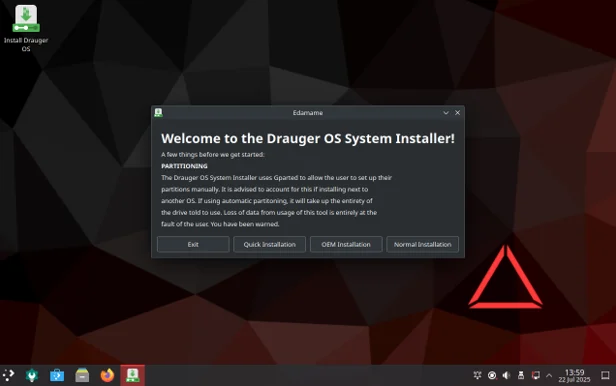
Downloading Drauger OS 7.7 is straightforward. The 3.7 GB ISO is available from the official website (https://draugeros.org/download) via direct download or torrent. Use a tool like Balena Etcher to burn the ISO to a USB drive (8 GB minimum), then boot into the live environment to try or install the OS.
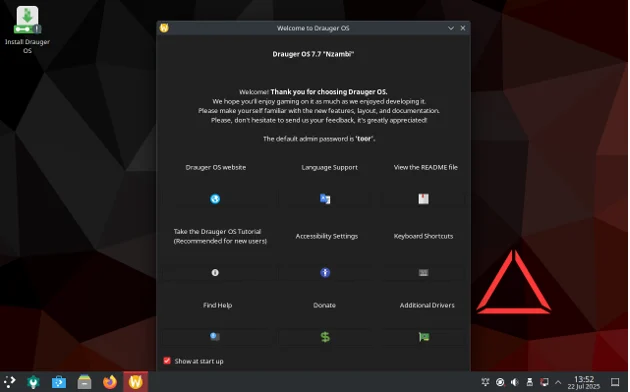
The installation uses a custom Python-based installer, which some users have found less user-friendly than Ubuntu’s Ubiquity or Calamares. Issues like partitioning errors or NVIDIA driver installation failures were reported in earlier versions, but the stable 7.7 release has resolved many of these. You may still need to configure partitions manually using GParted, and the default root password is “toor.” Be cautious with system updates, as some have caused boot issues in the past.
A notable issue is that Drauger OS 7.7 does not boot via Ventoy, likely due to its use of systemd-boot instead of GRUB or ISOLINUX. The developers are investigating this, but for now, a dedicated USB drive is required.
First Boot and Setup
On first boot, a welcome app guides you through the KDE Plasma desktop and prompts you to install Steam. The live session is limited to about 3 GB of system memory, which can restrict game testing. Once installed, however, the system feels responsive, and the pre-installed tools make gaming setup effortless. Flatpak support has been improved in 7.7, with issues from Beta 2 (e.g., inability to install Flatpaks) resolved, allowing seamless management of Flatpak packages.
Performance: Does Drauger OS 7.7 Deliver?
Drauger OS 7.7 Nzambi delivers impressive gaming performance. The Xanmod kernel and optimizations like GameMode (which prioritizes resources for games) result in higher frame rates and lower latency. A 2020 Medium review of an earlier version noted that Metro: Redux averaged 60 FPS on Drauger OS compared to 40 FPS on other distros, and recent user feedback suggests 7.7 maintains this edge.
The switch to PipeWire from PulseAudio enhances audio performance, offering lower latency and better compatibility with modern audio setups. I found no audio lag or crackling during gameplay, a common issue with less optimized distros. However, some games in the live session may misidentify graphics cards, and occasional Flatpak issues persist, though these are less prevalent in the stable 7.7 release.
Pros and Cons of Drauger OS 7.7
Pros
- Gaming-Centric: Pre-installed Steam, Lutris, and Wine simplify setup.
- High Performance: Xanmod kernel and GameMode deliver excellent frame rates and low latency.
- Modern Desktop: KDE Plasma with Wayland offers a polished, gamer-friendly interface.
- Controller Support: Seamless compatibility with Xbox and PlayStation controllers.
- Stable and Secure: Ubuntu LTS base ensures five years of updates.
- Community-Driven: Active support on Reddit, Discord, and Telegram.
Cons
- Gaming-Only Focus: Lacks productivity apps like LibreOffice.
- Installer Quirks: Custom installer may require manual partitioning.
- Ventoy Incompatibility: Cannot boot via Ventoy, requiring a dedicated USB.
- Wayland Issues: Some users report blank screens or cursor issues in Wayland sessions.
- No In-Place Upgrades: Fresh installs are required for major version updates.
How Does Drauger OS Compare to Other Gaming Distros?
Drauger OS 7.7 faces competition from other gaming-focused Linux distros in 2025:
- SteamOS: Valve’s SteamOS is ideal for Steam Deck and living room gaming but lacks flexibility for non-Steam games. Drauger OS supports multiple platforms and offers a full desktop experience.
- Pop!_OS: System76’s Pop!_OS is a versatile distro with strong gaming support but requires more manual setup for gaming tools compared to Drauger OS’s out-of-the-box readiness.
- Ubuntu GamePack: This Ubuntu-based distro includes gaming tools but is heavier due to its GNOME desktop and productivity apps, making it less optimized for gaming.
- Garuda Linux: Arch-based Garuda Linux uses a Zen kernel and gaming tools but is less beginner-friendly due to its rolling release model.
Drauger OS stands out for its gaming focus, ease of use, and performance optimizations, making it a top choice for gamers who want a console-like experience with PC flexibility.
Community and Support
Drauger OS is a community-driven project with active support on Reddit (r/DraugerOS), Discord, and Telegram. Thomas Castleman frequently engages with users, addressing feedback and announcing updates, such as the 7.7 stable release. The project also hosts a podcast, a unique feature among Linux distros, sharing development insights. Contributions in code (Python, BASH, C++), documentation, or donations are welcomed, with details on the GitHub page and official website.
Is Drauger OS 7.7 Right for You?
Drauger OS 7.7 Nzambi is ideal if:
- You’re a gamer prioritizing performance and ease of use.
- You want a lightweight, gaming-focused system with modern KDE Plasma.
- You use controllers and value plug-and-play support.
- You’re comfortable with basic Linux tasks like manual partitioning.
It may not suit you if:
- You need a general-purpose OS for productivity or multimedia.
- You’re new to Linux and prefer a more polished installer.
- You rely on Ventoy for multi-distro booting.
Final Verdict: The Ultimate Gaming Distro in 2025?
In this Drauger OS Review, we’ve seen that Drauger OS 7.7 Nzambi delivers on its promise as a gaming-focused Linux distro. Its Xanmod kernel, KDE Plasma desktop, and pre-installed gaming tools provide a high-performance, user-friendly experience. While minor issues like Ventoy incompatibility and occasional Wayland bugs persist, the stable release has ironed out many beta-phase quirks, making it a robust choice for gamers. With Linux gaming thriving in 2025, thanks to Proton, Wine, and Lutris, Drauger OS offers a console-like experience with PC versatility. Download it from https://draugeros.org and see if it’s the ultimate gaming distro for you.
Have you tried Drauger OS 7.7? Share your experience in the comments and let us know how it stacks up against other gaming distros!
Disclaimer
This Drauger OS Review is based on the latest information about Drauger OS 7.7 Nzambi as of July 2025, sourced from official channels and user feedback. Performance may vary based on hardware and updates. Check https://draugeros.org for the latest details. This review is for informational purposes only, and we are not affiliated with Drauger OS. Test the OS in a live environment and back up data before installation, as risks like data loss may occur. Use at your own discretion.
Also Read
Why Regata OS 25 Maverick is the Ultimate Linux Distro for Gamers in 2025
About the Author