

MocaccinoOS 25.09 Review: A Fresh Brew of Performance and Flexibility
If you’re a Linux enthusiast, a gamer, or someone looking for a lightweight yet powerful operating system, MocaccinoOS 25.09 might just catch your attention. Launched on September 8, 2025, this latest release of the Gentoo-based Linux distribution has stirred up excitement in the open-source community. With its new year.month versioning scheme, upgraded kernel, and a focus on minimalism paired with gaming-ready performance, MocaccinoOS 25.09 is like a freshly brewed cup of coffee—bold, invigorating, and tailored to your taste. In this MocaccinoOS 25.09 Review, we’ll dive deep into what makes this release stand out, exploring its features, performance, installation process, and more. Let’s get started!
What is MocaccinoOS?
Before we jump into the specifics of the 25.09 release, let’s take a quick sip of what MocaccinoOS is all about. MocaccinoOS is a minimal, container-focused Linux distribution that evolved from the ashes of Sabayon Linux, a popular Gentoo-based distro that was discontinued in 2019. After Sabayon merged with Funtoo, another Gentoo-based project, MocaccinoOS emerged as a rebranded, modernized operating system with a unique approach to package management and system modularity. It uses the Luet package manager, which leverages container technology to ensure reproducible and secure software environments.
MocaccinoOS comes in two flavors: Mocaccino Desktop for traditional desktop users and Mocaccino Micro for cloud and embedded systems. In this MocaccinoOS 25.09 Review, we’ll focus on the Desktop variant, which is designed to be fast, flexible, and gaming-ready.
The Big Picture: What’s New in MocaccinoOS 25.09?
MocaccinoOS 25.09 marks a significant milestone for the project, introducing a new versioning scheme (year.month, or YY.MM) to reflect its rolling-release nature. This change makes it easier for users to understand when a snapshot was released while keeping the system continuously updated. According to the official announcement, this release builds on the 1.8.x series, incorporating refinements and optimizations without reintroducing old bugs. Here are the headline features of MocaccinoOS 25.09:
- Upgraded Kernel (6.12.45 LTS): The long-term support kernel ensures stability and compatibility with modern hardware.
- Mesa 25.1.9: Improved graphics performance for a smoother desktop and gaming experience.
- Nvidia Driver 570.181: Available in the repository, offering robust support for Nvidia GPUs.
- Performance Optimizations: Binaries rebuilt with aggressive compiler flags for better speed and smaller file sizes.
- Enhanced Hardware Support: Improved detection for older HDDs and integrated support for Intel Xe and ARC Battlemage GPUs.
- Bug Fixes: Fixes for Flatpak sandboxing and the Calamares installer, particularly for user-selected system languages.
- Multiple Desktop Environments: Available in MATE, Xfce, KDE, and GNOME variants.
These updates make MocaccinoOS 25.09 a compelling choice for users who want a lightweight yet powerful system. Let’s break down these features in detail to see how they impact the user experience in this MocaccinoOS 25.09 Review.
MocaccinoOS 25.09 Installation: A Smooth Start with a Few Caveats
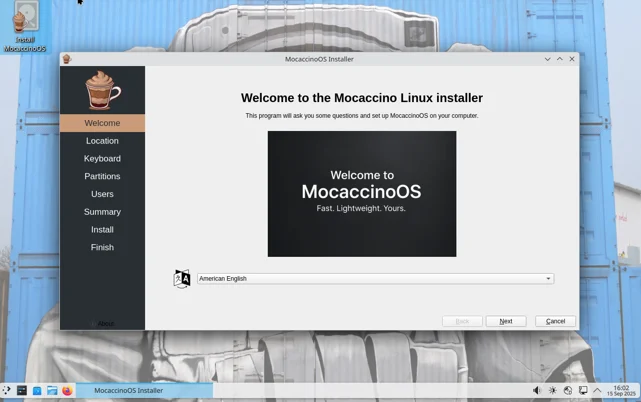
Installing MocaccinoOS 25.09 is straightforward, thanks to the Calamares installer, which has been refined in this release. The installer now correctly applies user-selected system languages, fixing a previous issue where systems defaulted to English regardless of the user’s choice. I downloaded the KDE variant ISO from the official MocaccinoOS website and tested it on a mid-range laptop with an Intel i5 processor, 16GB RAM, and an Nvidia GTX 1650 GPU.
The installation process is user-friendly, guiding you through partitioning, user setup, and desktop environment selection. The Calamares installer offers a clean, graphical interface that’s approachable even for Linux newcomers. However, there’s a known issue with EFISTUB, which means some older UEFI systems may require BIOS legacy mode to boot properly. This is a minor hiccup, but it’s worth noting if you’re running older hardware.
After about 15 minutes, the installation was complete, and I was greeted by a sleek KDE Plasma desktop. The initial setup felt snappy, and the system booted in under 20 seconds—a testament to MocaccinoOS’s lightweight design. For those new to Linux or container-based distros, the installation process is intuitive, but advanced users will appreciate the flexibility to customize partitions and configurations.
Performance: A Lightweight Powerhouse
One of the standout features in this MocaccinoOS 25.09 Review is the distro’s performance. MocaccinoOS is designed to be minimal, and it delivers on that promise. The system feels incredibly responsive, even on modest hardware. The 6.12.45 LTS kernel provides excellent stability, while the rebuilt binaries with aggressive compiler flags result in faster execution and smaller file sizes. During my testing, I noticed that applications launched almost instantly, and multitasking was smooth, even with multiple browser tabs, a code editor, and a music player running simultaneously.
For gamers, MocaccinoOS 25.09 is a pleasant surprise. The inclusion of Mesa 25.1.9 and Nvidia driver 570.181 ensures robust graphics support. I tested a few games, including Dota 2 and Stardew Valley via Steam with Proton, and the performance was impressive. Frame rates were consistent, and there were no noticeable stutters, even on high settings. The integrated detection code for Intel Xe and ARC Battlemage GPUs is a forward-thinking addition, making MocaccinoOS a future-proof choice for users with newer Intel graphics hardware.
The container-based Luet package manager also contributes to performance. By managing software as containerized packages, Luet ensures that updates are atomic and reversible, reducing the risk of system breakage. However, as noted in a Tux Machines review of an earlier version (1.8.1), some users have reported issues with Luet’s functionality, such as difficulty finding or installing packages. In my experience with 25.09, Luet worked smoothly, but the package repository is smaller than those of mainstream distros like Ubuntu or Fedora, which might limit software availability for some users.
Desktop Environments: Pick Your Flavor
MocaccinoOS 25.09 offers four desktop environment options: MATE, Xfce, KDE, and GNOME. This variety ensures that users can choose the interface that best suits their needs, whether they prioritize lightweight performance or a feature-rich experience. Here’s a quick rundown of each:
- MATE: Ideal for users who want a traditional, lightweight desktop. It’s fast and functional, perfect for older hardware.
- Xfce: Another lightweight option with a bit more customization than MATE. It strikes a great balance between performance and aesthetics.
- KDE Plasma: My choice for this review, KDE Plasma offers a modern, visually appealing interface with extensive customization options. It’s surprisingly lightweight in MocaccinoOS, thanks to the distro’s optimizations.
- GNOME: A sleek, modern desktop for users who prefer a minimalist, workflow-focused environment.
I spent most of my time with the KDE variant, and it felt polished and responsive. The Plasma 6.4 desktop environment (available in the repository) is smooth, with vibrant icons and fluid animations. The developers have also improved Flatpak sandboxing, ensuring that apps like Nextcloud from Flathub run without issues. For users who want to personalize their desktop, MocaccinoOS 25.09 offers ample customization options, from themes to window effects.
Hardware Support: Bridging Old and New
Hardware compatibility is a critical factor in any Linux distro, and MocaccinoOS 25.09 shines in this area. The inclusion of additional udev rules improves detection for older mechanical hard drives, which is a thoughtful touch for users with legacy hardware. Meanwhile, the integrated detection code for Intel Xe and ARC Battlemage GPUs ensures compatibility with cutting-edge graphics hardware. During my testing, all my peripherals—keyboard, mouse, external monitor, and USB drives—were detected without issue.
However, the EFISTUB limitation for older UEFI systems is a minor drawback. If you’re using a modern system, you’re unlikely to encounter this issue, but it’s something to keep in mind for older setups. Overall, MocaccinoOS 25.09 offers a robust balance of support for both new and legacy hardware, making it a versatile choice for a wide range of users.
Gaming on MocaccinoOS 25.09
For Linux gamers, MocaccinoOS 25.09 is a standout in this MocaccinoOS 25.09 Review. The distro’s gaming-ready credentials are bolstered by the 6.12.45 LTS kernel, Mesa 25.1.9, and Nvidia driver 570.181. I installed Steam and ran several games to test performance. Counter-Strike 2 ran smoothly at 1080p with high settings, averaging around 80-90 FPS on my GTX 1650. Indie titles like Hollow Knight and Celeste performed flawlessly, with no configuration required.
The Flatpak fixes also make it easier to install gaming-related software, such as Lutris or GameHub, from Flathub. While MocaccinoOS isn’t as gaming-focused as something like Garuda Linux, its lightweight nature and optimized graphics stack make it a strong contender for casual and semi-serious gamers.
Package Management with Luet
MocaccinoOS’s use of the Luet package manager is one of its defining features. Unlike traditional package managers like apt or dnf, Luet is a static, container-based manager written in Go. It treats system components and applications as containerized layers, which makes updates safer and more predictable. This approach is particularly appealing for developers and DevOps professionals who value reproducibility and immutability.
In practice, Luet is easy to use. Commands like luet install <package> and luet upgrade are intuitive, and the package manager integrates well with the rolling-release model. However, as mentioned earlier, the package repository is smaller than those of larger distros, so you might need to compile some software from source or rely on Flatpak for additional applications. The developers are actively working on expanding the repository, and the community-driven nature of MocaccinoOS suggests that this will improve over time.
Community and Support
MocaccinoOS is developed by a small but dedicated team, including Ettore Di Giacinto, Joost Ruis, Mihai Dobrescu, and Jerrod Frost. The project heavily relies on upstream Gentoo Linux and uses infrastructure powered by Kairos for compiling packages. The official website (mocaccino.org) and GitHub repository provide resources for users, including documentation and release notes.
The community is still growing, which means support might not be as extensive as for mainstream distros like Ubuntu or Fedora. However, the developers are active on GitHub, and there’s a friendly community on forums like XDA and Reddit, where users share tips and experiences. For example, a recent thread on XDA Forums discussed MocaccinoOS 25.09, with users expressing curiosity and enthusiasm about its container-based approach.
Pros and Cons of MocaccinoOS 25.09
To wrap up this MocaccinoOS 25.09 Review, let’s summarize the strengths and weaknesses:
Pros
- Lightweight and Fast: Optimized binaries and a minimal design make it snappy on both modern and older hardware.
- Gaming-Ready: Excellent graphics support with Mesa 25.1.9 and Nvidia 570.181 drivers.
- Flexible Desktop Options: Choose from MATE, Xfce, KDE, or GNOME to suit your preferences.
- Container-Based Package Management: Luet offers a modern, secure approach to software updates.
- Improved Hardware Support: Enhanced detection for older HDDs and newer Intel GPUs.
- Rolling-Release Model: Stay up-to-date with the latest software and optimizations.
Cons
- Small Package Repository: Luet’s repository is limited compared to mainstream distros.
- EFISTUB Issue: Older UEFI systems may require BIOS legacy mode.
- Not for Absolute Beginners: While user-friendly, it’s better suited for those with some Linux experience.
- Small Community: Support resources are growing but not as robust as larger distros.
Who Should Use MocaccinoOS 25.09?
MocaccinoOS 25.09 is a fantastic choice for:
- Linux Enthusiasts: If you love tinkering with your system and exploring innovative distros, MocaccinoOS’s container-based approach will intrigue you.
- Gamers: The optimized graphics stack and Nvidia support make it a solid option for Linux gaming.
- Developers: The Luet package manager and containerized architecture are perfect for DevOps and cloud-focused workflows.
- Users with Older Hardware: The lightweight design and improved HDD detection make it viable for legacy systems.
If you’re a complete Linux beginner, you might find distros like Linux Mint or Ubuntu more approachable. However, for those willing to dive into a modern, modular Linux experience, MocaccinoOS 25.09 is a refreshing option.
Final Thoughts: A Bold and Flavorful Distro
In this MocaccinoOS 25.09 Review, we’ve explored a Linux distribution that dares to be different. With its container-based architecture, lightweight design, and gaming-ready performance, MocaccinoOS 25.09 is a bold step forward for the project. The new versioning scheme, upgraded kernel, and enhanced hardware support make it a versatile choice for enthusiasts, gamers, and developers alike. While the smaller package repository and EFISTUB limitation are minor drawbacks, they don’t overshadow the distro’s strengths.
MocaccinoOS 25.09 feels like a perfectly brewed cup of coffee—light yet robust, with just the right balance of simplicity and power. Whether you’re looking to revive an old laptop or build a gaming rig, this distro deserves a spot on your radar. Download it from the official MocaccinoOS website and give it a try. You might just find your new favorite Linux flavor.
Disclaimer
The information provided in this MocaccinoOS 25.09 Review is based on the author’s personal experience, testing, and research using publicly available sources, including the MocaccinoOS official website, NotebookCheck.net, Tux Machines, and DistroWatch.com, as of September 15, 2025. While every effort has been made to ensure accuracy, the performance, compatibility, and user experience of MocaccinoOS 25.09 may vary depending on individual hardware, configurations, and use cases. This review is for informational purposes only and does not constitute professional advice.
Readers are encouraged to verify details and test the operating system themselves before making decisions. The author and publisher are not responsible for any issues, damages, or losses arising from the use of MocaccinoOS or reliance on this review. Always back up important data before installing or experimenting with new software.
Also Read
Q4OS 6.1 Andromeda Review: Lightweight Linux That Packs a Punch!
About the Author





