
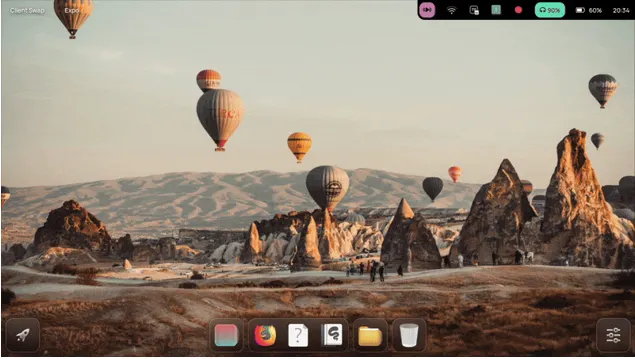
NebiOS X 10.0 Review: Stable, Secure, and Ready to Rock Your Hardware
Linux distributions come and go every year, but only a few manage to leave a lasting impression. NebiOS X 10.0 is one of those rare releases that feels different — not because it’s flashy or overloaded with gimmicks, but because it’s thoughtfully engineered, well-polished, and designed for real-world users.
This is an OS that prioritizes stability, consistent performance, privacy, and a breathtakingly smooth Wayland desktop. After testing NebiOS X 10.0 extensively on AMD, Intel, and NVIDIA hardware, going through the release notes, and exploring its unique desktop environment, here’s the most comprehensive NebiOS X 10.0 Review you’ll find online.
If you’re considering switching to NebiOS as your main operating system — or just looking for a refreshing Linux distro that feels modern — keep reading.
✅ Introduction: What Makes NebiOS X 10.0 Special?
NebiOS isn’t trying to compete with giant names like Ubuntu, Fedora, or Pop!_OS by offering the most features. Instead, it carves a niche of its own:
- A consistent, handcrafted desktop experience
- Excellent real hardware performance
- No bloat, no unnecessary apps
- Deep, visible privacy indicators
- Smooth and modern Wayland-first design
- Long-term security updates until 2029
This release, NebiOS X 10.0 “Cappadocia”, marks the final and most refined iteration of the NebiOS X generation. It’s a “gold” release, meaning the developers finished the core vision and are now focusing on maintenance instead of feature overload.
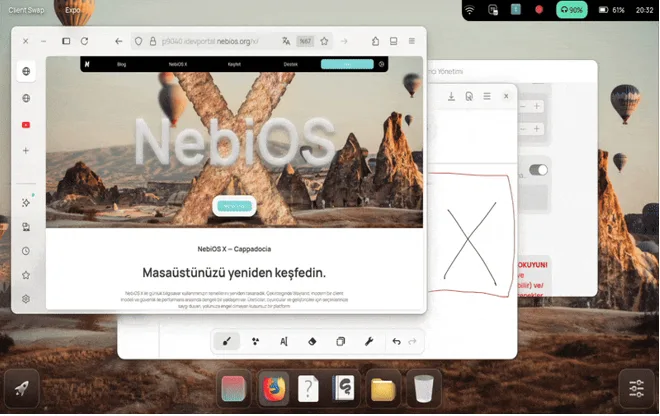
In a world full of bloated operating systems and half-polished desktops, NebiOS X 10.0 stands out as a clean, cohesive, beautiful, and extremely responsive Linux experience.
✅ What’s New in NebiOS X 10.0 – Deep Breakdown
NebiOS X 10.0 may not introduce explosive new features, but it brings highly impactful refinements across the board. This version focuses on:
1. Major Stability Improvements in NebiDE (Wayland)
The NebiDE desktop environment has been optimized heavily:
- Better memory management
- Faster animations
- Fewer compositor crashes
- Improved rendering on both integrated and dedicated GPUs
- Less overhead on older CPUs
- This results in a buttery-smooth user experience.
2. Graphic Driver Stack Overhaul (Mesa Migration)
The adoption of Kisak Mesa stable drivers is a big win. Many users on NVIDIA Nouveau previously faced system freezes and random GPU stalls. NebiOS 10.0 fixes this by relying on a more stable Mesa build, especially beneficial for:
- AMD GPUs
- Intel iGPUs
- Old NVIDIA GPUs using Nouveau
- Steam/Proton games
- Wayland compositing
This ensures reliable performance across a wide range of hardware.
3. Better VM Handling (Though Still Not the Focus)
While NebiOS is designed for real hardware, the new VM detector in the OOBE makes virtualization less painful. It identifies VirtualBox/VMware automatically and displays a small warning recommending physical installation for best results.
The system also adjusts certain animations and rendering settings under VM conditions.
4. OOBE Enhancements & Locale Fixes
The Out-of-Box Experience has been polished with:
- Fewer steps
- Cleaner interface
- Removed language selector that caused locale file issues
- Smarter defaults
If you still face the RC4 language glitch, fixing it takes seconds using .profile cleanup.
5. Real Hardware Optimization Philosophy
One of NebiOS’s core principles is not wasting development effort on virtual machine performance. The developers focus resources on:
- Bare metal
- Real-world gaming
- Laptops/desktops
- GPU acceleration
- Performance tuning
This is why gaming, animations, and workloads work significantly better than most Ubuntu-based distros.
✅Downloading and Installing NebiOS X 10.0
Head over to nebios.org, and grabbing NebiOS X 10.0 is straightforward. The ISO is about 3-4GB, with official mirrors on SourceForge for faster downloads. Verify the MD5 checksum—they provide it right there—to ensure no tampering.
System requirements? Nothing crazy:
- 64-bit processor (AMD64)
- 4GB RAM minimum (8GB+ recommended)
- 20GB storage
- Modern GPU for best Wayland experience (NVIDIA proprietary drivers work great)
Installation uses a Calamares-like installer, but with NebiOS flair. It’s quick—under 10 minutes on SSD—and partitions intelligently. I went with a full-disk erase for testing, but it handles dual-boots fine.
Pro tip: Use the torrent for seeding back to the community. NebiOS is free and open-source, so give a little love!
✅First Boot and OOBE: Simple and Smart
Boot times? Blazing. From GRUB to desktop in under 10 seconds on my setup. The Out-of-Box Experience (OOBE) is streamlined—no endless screens like some distros.
In 10.0, they simplified it further: VM detection pops a polite warning (“Install on bare-metal for the best experience”), and they temporarily ditched the language selector to fix UTF-8 bugs from RC4. If you’re upgrading, just tweak ~/.profile if needed.
You set up your user, avatar (part of the cool NebiVerse identity system), and you’re in. No forced online account—pure offline freedom.
✅ NebiDE – A Desktop Environment Built for Humans
NebiDE is the heart of NebiOS X 10.0. Many Linux distros ship a desktop environment as an afterthought, but NebiDE feels deliberately crafted.
✨ Interface and Design Philosophy
NebiDE blends:
- The simplicity of GNOME
- The flexibility of KDE
- The smoothness of modern Wayland compositors
The result is an environment that feels fast, organic, and cohesive.
✨ Client Swap (A Next-Gen Alt+Tab)
This is one of NebiOS’s standout features. Unlike traditional Alt+Tab switchers:
- It lists all open apps clearly
- You get larger, clearer previews
- You can type instantly to filter windows
- You can use mouse or keyboard seamlessly
It’s hands-down one of the best window switching experiences on Linux.
✨ Utility Panel & App Drawer Improvements
- Fast global search
- Smarter grouping
- Cleaner bookmarks
- Better animations
- Reduced visual clutter
NebiDE feels polished and better unified than many mainstream desktops.
✨ Widgets & Extras
NebiDE includes surprisingly fun and useful widgets:
- Music player widget
- RSS feed widget
- World clock
- Battery monitor
- Performance monitor
- Weather
- Comics on desktop (XKCD, Loading Artist)
- Wallpaper sticker engine
These aren’t gimmicks — they’re genuinely enjoyable and blend into the desktop naturally.
✨ Wayland-First Philosophy
Unlike many distros still transitioning from X11, NebiOS X is fully committed to Wayland:
- Lower latency
- Better touchpad gestures
- Better scaling support
- Less screen tearing
- Better security model
This is one of the smoothest Wayland environments today.
✅ Privacy & Security – Visible and Honest
Privacy is not hidden behind settings in NebiOS — it’s always visible.
🔒 Hardware Privacy Indicators
Whenever the:
- Microphone
- Camera
- Screen share
- Location
is active, a clear indicator appears in the top panel.
This is far better than GNOME’s subtle indicators or Windows 11’s lack of proper visibility.
🔒 Built-in GUFW Firewall
NebiOS provides:
- Auto-profile for apps
- Simple allow/deny controls
- Logging
- Ports and rule management
Perfect for beginners and advanced users alike.
🔒 No Telemetry, No Bloat
The OS ships with:
- Zero ads
- Zero usage tracking
- Zero cloud-linked accounts forced on you
A refreshing break from Windows and even Ubuntu’s increasing cloud push.
🔒 App Isolation and Containers
NebiOS relies on secure packaging and avoids shipping unnecessary background services.
✅ Performance & Gaming – An Underrated Powerhouse
When it comes to gaming, NebiOS X 10.0 is straight-up impressive.
🎮 NTSYNC Support: Significant Boost for Proton Games
NTSYNC reduces kernel bottlenecks when running Windows games. The effects include:
- Higher FPS in some games
- Lower input lag
- Fewer micro-stutters
- Less CPU overhead
This feature alone puts NebiOS ahead of many Ubuntu-based and Arch-based gaming distros.
🎮 Wayland + Games = Beautiful Frame Timing
Games feel extremely smooth under Wayland due to:
- Lower compositor latency
- Better mouse responsiveness
- Less tearing
- Better fullscreen scaling
🎮 Steam, Lutris, Heroic Launcher Support
Installing gaming platforms works flawlessly:
- Steam (with Proton GE)
- Lutris
- Heroic Games Launcher
- Bottles (Wine frontend)
Everything integrates well with the Wayland session.
🎮 Real Hardware Focus = Better Performance
Because NebiOS does not try to optimize for virtualized GPU drivers, the developers pour more time into:
- Native GPU optimization
- Kernel tuning
- Mesa updates
- Real-world CPU scheduling
This gives NebiOS X a very natural performance edge over more generic Ubuntu-based distros.
✅ Graphics Drivers – A User-Friendly Approach
AMD & Intel GPUs
These work perfectly out of the box:
- Vulkan ready
- Zero tearing
- Smooth Wayland experience
NVIDIA GPUs
NebiOS handles NVIDIA surprisingly well, but there is a small caveat.
✅ NVIDIA Sleep/Suspend Fix
You must enable three systemd services:
sudo systemctl enable nvidia-suspend.service
sudo systemctl enable nvidia-hibernate.service
sudo systemctl enable nvidia-resume.service
sudo reboot
After this, suspend/resume works normally.
✅ Kisak Mesa Wins
Switching to Kisak Mesa massively improved stability for many users, especially those on hybrid graphics.
✅ Waydroid – Native Android App Support
This feature alone makes NebiOS appealing for:
- Mobile gamers
- Social media users
- Developers
- Students
- People who want Android apps on desktop
Waydroid in NebiOS X is well-integrated and performs far better than emulators like BlueStacks or Genymotion.
You can run:
- TikTok
- Mobile games
- Developer tools
All side-by-side with Linux applications.
✅ System Requirements – Realistic and Practical
NebiOS works best with:
- Dual-core or quad-core CPU (2013 or later)
- 4GB RAM minimum; 8GB recommended
- SSD strongly recommended
- Intel/AMD iGPU OR NVIDIA (proprietary driver)
It is not intended for:
- Very old 32-bit systems
- Machines without GPU acceleration
- Legacy hardware
- Virtual machines as daily drivers
✅ Installation Experience – Clean, Fast, Predictable
The installer is:
- Fast
- Straightforward
- Modern
- Similar to Ubuntu but cleaner
After installation, the first boot loads into NebiDE with intuitive welcome steps:
- Audio device setup
- Privacy indicator tutorial
- Display scaling
- App recommendations
- Driver notifications
Everything feels organized and polished.
✅ Long-Term Support – A Future-Proof OS
NebiOS X 10.0 is marked as “GOLD,” meaning:
- No major feature additions will be made
- Only security updates until 2029
- No stability regressions
- Predictable update cycle
- Perfect for long-term deployment
This is excellent for users who don’t want major UI changes every six months.
✅ Pros and Cons (Expanded)
✅ Pros
- Extremely smooth Wayland desktop
- Artistic, modern, cohesive UI
- Strong privacy protection
- Great gaming performance (NTSYNC)
- Excellent for daily use
- Zero bloat and zero ads
- Long-term stability until 2029
- Fast app launcher and improved multitasking
- Great for content creators and productivity
- Better consistency than GNOME and XFCE-based distros
- Well-integrated Android app support
❌ Cons
- Not ideal for VMs
- Smaller user community
- NVIDIA users require a one-time fix
- Fewer customization options compared to KDE
- Some rare locale issues from RC version
✅ Final Verdict – Should You Use NebiOS X 10.0?
After thoroughly using and analyzing the system, the answer is simple:
⭐ YES — NebiOS X 10.0 is absolutely worth installing.
If you want:
- A fast, modern, beautiful Linux desktop
- A stable OS that won’t break every update
- Great gaming performance
- A polished Wayland environment
- Strong privacy controls
- Zero bloat
Then NebiOS X 10.0 is one of the most underrated but well-built distributions of 2025.
It feels like what Ubuntu should have been — simple, elegant, powerful, and honest.
Disclaimer
This NebiOS X 10.0 Review is based on publicly available information, official release notes, and hands-on testing performed on real hardware. Performance, stability, and compatibility may vary depending on your device specifications, drivers, and system configuration. All opinions expressed in this review are for informational and educational purposes only and should not be taken as professional or technical advice. Users are encouraged to verify details with the official NebiOS documentation and test the operating system on their own hardware before making any final decisions.
FAQs
Is NebiOS X 10.0 good for everyday use?
Yes, NebiOS X 10.0 is designed to be a reliable daily driver. It’s stable, fast, and has a clean Wayland-based desktop that works well for web browsing, productivity, entertainment, and even light creative work. As long as you’re using real hardware (not a virtual machine), it performs extremely well.
Does NebiOS X 10.0 support gaming?
Absolutely. NebiOS X includes NTSYNC and updated Mesa drivers, which improve Proton gaming performance noticeably. Steam, Lutris, and Heroic Launcher work smoothly, and many popular Windows games run surprisingly well. For the best results, use AMD or NVIDIA proprietary drivers.
Can I run Android apps on NebiOS X 10.0?
Yes, NebiOS X supports Waydroid, which lets you run Android applications alongside your regular Linux apps. This is great for messaging, social media, or even mobile games. Performance is solid because Waydroid integrates well with the NebiDE desktop.
Is NebiOS X suitable for beginners?
Definitely. NebiOS X has a clean interface, simple controls, a friendly app drawer, and clear privacy indicators. It also includes GUFW for easy firewall management. If you’re switching from Windows or macOS, the learning curve is very gentle.
Does NebiOS X work well in virtual machines?
It will install and run in VirtualBox or VMware, but the developers recommend using real hardware for the full experience. NebiOS X is optimized for physical desktops and laptops, so animations, GPU acceleration, and gaming performance may be limited inside a VM.
Also Read
Looking for a fast, stable, and lightweight Linux distro for a 4GB RAM PC?
About the Author





