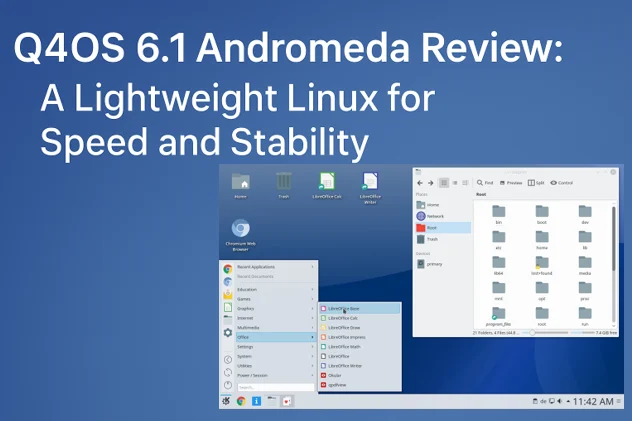
Q4OS 6.1 Andromeda Review A Lightweight Linux for Speed and Stability
In the ever-evolving world of Linux distributions, finding a system that balances performance, stability, and user-friendliness can be a challenge. Enter Q4OS 6.1 Andromeda, a lightweight, Debian-based operating system that promises to deliver a rock-solid experience with a focus on speed and customization. Released on September 12, 2025, Q4OS 6.1 Andromeda is the latest stable version of this unique distribution, offering long-term support (LTS) and a choice between modern KDE Plasma and retro Trinity Desktop Environment (TDE).
In this comprehensive Q4OS 6.1 Andromeda Review, we’ll dive deep into its features, performance, usability, and why it’s an excellent choice for both newcomers and seasoned Linux users.
What is Q4OS 6.1 Andromeda?
Q4OS 6.1 Andromeda is a lightweight Linux distribution built on the robust foundation of Debian 13.1 “Trixie.” It’s designed to be fast, efficient, and highly customizable, catering to users who value stability and performance over bloated features. With a focus on providing a lean operating system, Q4OS eliminates unnecessary applications and processes, making it ideal for older hardware, modern systems, and everyone in between.
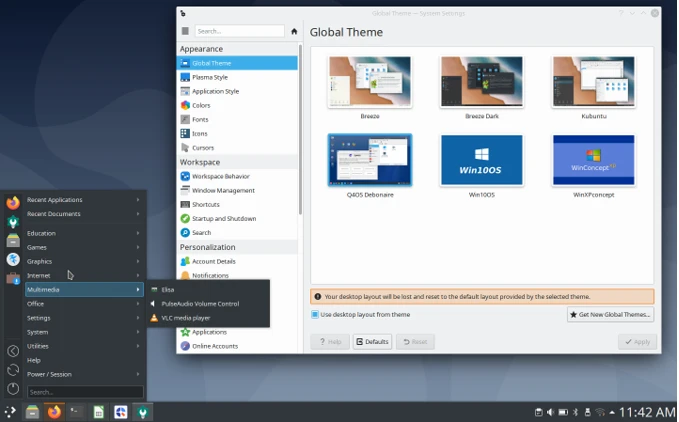
The standout feature of Q4OS 6.1 Andromeda is its dual-desktop environment approach. Users can choose between the modern KDE Plasma 6.3.6 for a sleek, feature-rich interface or the lightweight Trinity Desktop Environment (TDE) 14.1.5, which revives the classic KDE 3.5 experience. This flexibility makes Q4OS a versatile option for users seeking either a contemporary or nostalgic desktop experience. Additionally, its long-term support ensures free security patches and software updates for at least five years, with potential commercial support extending up to a decade.
In this Q4OS 6.1 Andromeda Review, we’ll explore its key features, installation process, performance, customization options, and how it stacks up against other lightweight Linux distributions.
Key Features of Q4OS 6.1 Andromeda
1. Debian 13.1 “Trixie” Base
Q4OS 6.1 Andromeda is built on Debian 13.1, ensuring a stable and reliable foundation. Powered by the Linux 6.12 LTS kernel, it incorporates the latest updates and security patches from Debian’s Trixie branch. This makes it suitable for production environments where uptime and security are critical. The Debian base also means access to a vast repository of software, allowing users to install their favorite applications with ease.
2. Dual Desktop Environments: KDE Plasma and Trinity
One of the most unique aspects of Q4OS 6.1 Andromeda is its support for two distinct desktop environments:
- KDE Plasma 6.3.6: A modern, visually appealing desktop with customizable widgets, advanced features, and a polished user interface. It’s ideal for users who want a contemporary Linux experience with smooth animations and a robust set of tools.
- Trinity Desktop Environment (TDE) 14.1.5: A lightweight, retro-styled desktop that mimics the look and feel of KDE 3.5. It’s perfect for users with older hardware or those who prefer a classic, Windows XP-like interface.
The ability to switch between these desktops seamlessly is a game-changer. Q4OS’s Desktop Profiler tool allows users to export and import customized desktop profiles, making it easy to replicate setups across multiple systems.
3. Lightweight and Efficient
Q4OS 6.1 Andromeda is designed to be lean and fast. The Trinity desktop requires just a 500MHz CPU, 512MB RAM, and 6GB of disk space, making it one of the most lightweight options available. Even the more resource-intensive Plasma desktop runs smoothly on systems with a 1GHz CPU, 2GB RAM, and 8GB disk space. This efficiency is achieved through Q4OS’s unique tools, which allow users to eliminate superfluous packages and optimize system performance.
4. Windows-Like Experience with XPQ4 Theme
For users transitioning from Windows, Q4OS offers the XPQ4 theme, which replicates the look and feel of Windows XP, 7, 8, or 10. Combined with the Bourbon menu in the Trinity desktop, it provides a familiar interface that eases the learning curve for Linux newcomers. The ability to install Q4OS alongside Windows via a setup wizard further enhances its appeal for dual-boot enthusiasts.
5. Long-Term Support (LTS)
As an LTS release, Q4OS 6.1 Andromeda is supported with free security patches and software updates for at least five years, with the possibility of extended commercial support for up to 10 years. This makes it an excellent choice for businesses, schools, and individuals who need a reliable, long-term solution.
6. Q4OS-Specific Tools
Q4OS includes several proprietary tools to enhance usability:
- Desktop Profiler: Allows users to create, export, and import customized desktop configurations.
- Q4OS Software Centre: Simplifies the installation of popular applications.
- Q4OS Welcome Screen: Guides users through initial setup and tweaks.
- S4 Snapshot: Enables users to create live USBs of their customized Q4OS installations for easy transfer to other systems.
These tools make Q4OS accessible to beginners while offering advanced users the flexibility to tailor their systems.
Q4OS 6.1 Andromeda Installation and Setup
Installing Q4OS 6.1 Andromeda is straightforward, thanks to its user-friendly installer. The distribution offers live media for both KDE Plasma and Trinity editions, allowing users to test the system without committing to an installation. The live ISO files are available for 64-bit/x64 systems, with sizes of approximately 1.7GB for the live media. An ARM64 version is planned for future release, but 32-bit support is limited to the older Q4OS 5.8 Aquarius for legacy hardware.
The installation process is fast and efficient, leveraging Debian’s installer with a Q4OS twist. The data copy phase is remarkably quick, often completing in under two minutes, though the bootloader setup may take slightly longer. Users should note that the installer does not automatically label partitions, so some familiarity with disk management is helpful. For those installing alongside Windows, Q4OS provides a unique Windows setup wizard that simplifies the process, making it as easy as installing a standard application.
Once installed, the Q4OS Welcome Screen guides users through initial configuration, including language settings, software installation, and desktop customization. The system boots quickly, with reports of 18-second boot times on older hardware, showcasing its efficiency.
Performance and Resource Usage
Performance is where Q4OS 6.1 Andromeda truly shines. On a 2009 laptop with a dual-core processor, the Trinity desktop idles at approximately 300MB of RAM and 4% CPU usage, making it one of the most resource-efficient distributions available. Even the Plasma desktop, which is more demanding, performs admirably on modern hardware, with smooth animations and responsive performance.
The distribution’s power management is noteworthy, with detailed metrics like power consumption in watts displayed for advanced users. On older hardware, Q4OS achieves impressive battery life, with reports of up to two hours on an eight-year-old laptop battery. This efficiency is a testament to Q4OS’s lean design and Debian’s lightweight kernel.
For users with low-end devices, the Trinity desktop is a standout, offering a lightweight yet fully functional experience. The Plasma desktop, while more resource-intensive, still runs efficiently on systems with modest specifications, making Q4OS a versatile choice for a wide range of hardware.
Customization and User Experience
Q4OS 6.1 Andromeda excels in customization. The Desktop Profiler tool allows users to fine-tune their desktop environment, export configurations, and apply them to new installations. This is particularly useful for IT administrators or users who manage multiple systems. The ability to switch between KDE Plasma and Trinity desktops at login provides unparalleled flexibility, catering to diverse user preferences.
The XPQ4 theme and Bourbon menu create a Windows-like experience, which is a significant advantage for users transitioning from Microsoft’s ecosystem. The inclusion of Dolphin as the default file manager in the Plasma edition and Konqueror in the Trinity edition adds to the user-friendly experience. Users can also install additional desktop environments like XFCE with ease, further enhancing customization options.
The Q4OS Software Centre simplifies software installation, offering a curated list of popular applications like LibreOffice, Google Chrome, and Skype. Debian’s extensive repositories ensure that users have access to thousands of additional packages, making Q4OS a highly adaptable platform.
Who is Q4OS 6.1 Andromeda For?
Q4OS 6.1 Andromeda is a versatile distribution that appeals to a broad audience:
- Windows Users: The XPQ4 theme and Windows setup wizard make it an excellent choice for those transitioning from Windows, especially on older hardware.
- Linux Newcomers: The intuitive Welcome Screen, Software Centre, and familiar interface lower the barrier to entry for beginners.
- Power Users: Advanced users will appreciate the Desktop Profiler, S4 Snapshot, and access to Debian’s repositories for extensive customization.
- Businesses and Schools: The LTS support, stability, and low hardware requirements make Q4OS ideal for institutional use.
- Retro Enthusiasts: The Trinity desktop offers a nostalgic KDE 3.5 experience for users who prefer a classic interface.
Pros and Cons of Q4OS 6.1 Andromeda
Pros
- Lightweight and efficient, ideal for older hardware.
- Dual desktop environments (KDE Plasma and Trinity) for flexibility.
- Long-term support with up to 10 years of updates.
- Windows-like interface with XPQ4 theme eases the transition for new users.
- Fast installation and excellent performance.
- Robust Q4OS tools for customization and system management.
Cons
- No 32-bit support for Andromeda; users must rely on Q4OS 5.8 Aquarius for legacy systems.
- ARM64 version not yet available at launch.
- Limited pre-installed applications, requiring users to install additional software.
- Partition labeling in the installer could be improved for beginners.
- Comparison with Other Lightweight Linux Distributions
When compared to other lightweight Linux distributions like Linux Lite, MX Linux, and Lubuntu, Q4OS 6.1 Andromeda stands out for its dual-desktop approach and Windows-like experience. While MX Linux offers a similar focus on performance and customization, it lacks the unique XPQ4 theme and Windows setup wizard that make Q4OS so accessible to beginners. Linux Lite is user-friendly but leans heavily on the XFCE desktop, which may not appeal to users seeking a KDE-based experience. Lubuntu, with its LXQt desktop, is lightweight but doesn’t offer the same level of desktop environment flexibility as Q4OS.
The LTS support and Debian base give Q4OS an edge in stability and longevity, making it a strong contender for users who prioritize reliability over frequent updates. However, those seeking a rolling-release model may prefer distributions like openSUSE Tumbleweed or Arch Linux.
User Feedback and Community Reception
The Q4OS community has largely praised the 6.1 Andromeda release. Users on SourceForge and the Q4OS Forum highlight its speed, ease of installation, and compatibility with older hardware. One user noted, “Q4OS is the only distro that works out of the box without too many hiccups. It’s a relatively fast distro, easy install, based on the stable Debian repositories.” Another user transitioning from Windows remarked, “I like stuff to just work, and for this purpose, Q4OS is perfect. I could switch over without any problem.”
However, some users have expressed a desire for a rolling-release model, and others have noted that the lack of pre-installed applications requires additional setup. Despite these minor critiques, Q4OS enjoys a strong reputation for delivering a balanced, customizable, and stable Linux experience.
Conclusion
In this Q4OS 6.1 Andromeda Review, we’ve explored why this lightweight Linux distribution is a compelling choice for users seeking speed, stability, and customization. Built on Debian 13.1 “Trixie” and powered by the Linux 6.12 LTS kernel, Q4OS 6.1 Andromeda offers a robust and efficient platform for a wide range of users. Its dual-desktop approach, featuring KDE Plasma 6.3.6 and Trinity 14.1.5, provides unmatched flexibility, while the XPQ4 theme and Windows setup wizard make it accessible to newcomers.
Whether you’re reviving an old laptop, setting up a modern workstation, or seeking a reliable LTS distribution for institutional use, Q4OS 6.1 Andromeda delivers. Its proprietary tools, lean design, and long-term support make it a standout in the crowded Linux landscape. While it may lack 32-bit support and a rolling-release model, its performance and versatility more than compensate.
If you’re looking for a Linux distribution that combines the best of modern and classic desktop experiences, Q4OS 6.1 Andromeda is worth a try. Download it from the official Q4OS website, test the live media, and experience a lightweight Linux that prioritizes speed and stability.
Disclaimer
The information provided in this Q4OS 6.1 Andromeda Review is based on official data from the Q4OS website, community feedback, and general knowledge available as of September 13, 2025. While every effort has been made to ensure accuracy, the content reflects the author’s observations and opinions and should not be considered an official endorsement or comprehensive technical documentation of Q4OS 6.1 Andromeda.
Users are encouraged to verify system requirements, compatibility, and features directly from the official Q4OS website before installing or using the operating system. The author and publisher are not responsible for any issues, damages, or data loss that may arise from the use of Q4OS or reliance on the information provided in this review. Always back up important data and consult official documentation for critical applications.
Also Read
Top 5 Linux for Cybersecurity Pros in 2025!
About the Author