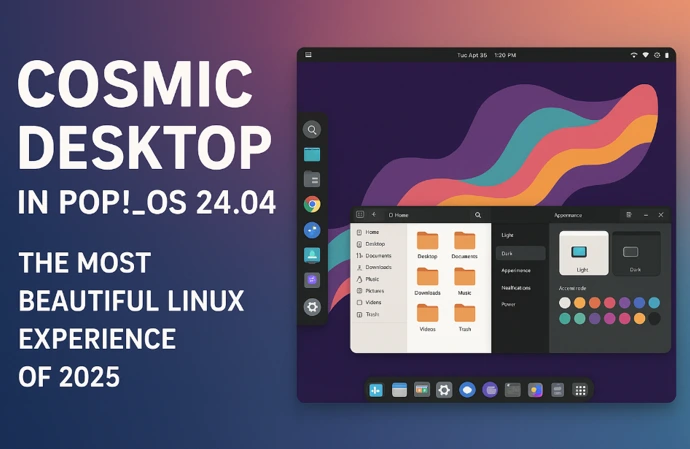
After more than three years of dedicated development, System76 has finally unveiled what many are calling the most beautiful and innovative Linux desktop experience of 2025. The release of Pop!_OS 24.04 LTS on December 11, 2025, marks a monumental milestone in Linux desktop computing, introducing the world to COSMIC Desktop Environment 1.0 – a completely redesigned, Rust-powered desktop that’s redefining what users can expect from their Linux experience.
The Journey to COSMIC Desktop in Pop!_OS 24.04
The story of COSMIC Desktop in Pop!_OS 24.04 begins in 2021, when System76 made a bold decision that would reshape the future of Linux desktop environments. Frustrated by the limitations of GNOME extensions and disagreements with GNOME developers about the desktop experience, System76’s team embarked on an ambitious journey to build an entirely new desktop environment from the ground up.
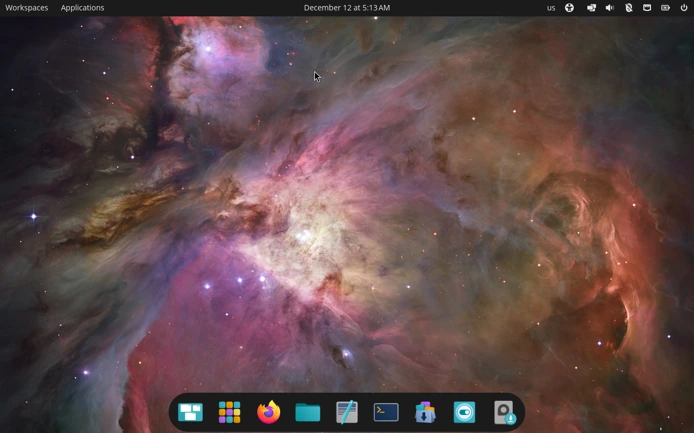
Unlike incremental updates we’re used to seeing in the Linux world, COSMIC Desktop in Pop!_OS 24.04 represents a complete reimagining of the desktop experience. System76 didn’t take shortcuts or modify existing code – they built everything from scratch using Rust, a memory-safe programming language known for its performance and security benefits.
Carl Richell, System76’s Founder and CEO, expressed the significance of this achievement: the company has built a complete desktop environment for the open source community, marking not just a product release but a contribution to the broader Linux ecosystem.
What Makes COSMIC Desktop in Pop!_OS 24.04 Special?
Built with Rust for Superior Performance and Security
At the heart of COSMIC Desktop in Pop!_OS 24.04 lies Rust, a programming language that brings game-changing advantages to the desktop environment. As a Wayland-native desktop environment built in Rust, COSMIC eliminates vulnerabilities like keylogging and input spoofing, and benefits from Rust’s memory safety guarantees that dramatically reduce common attack surfaces, like buffer overflows and use-after-free bugs.
The choice of Rust wasn’t arbitrary. System76 selected this modern programming language for its readability, stability, maintainability, and memory safety. In an era where many computer vulnerabilities stem from memory-related issues, Rust makes it remarkably easy to write secure, memory-safe code. The result? COSMIC Desktop in Pop!_OS 24.04 delivers faster application launches, smoother system operations, and enhanced security right out of the box.
Technical Foundation That Powers Excellence
Pop!_OS 24.04 LTS builds upon a solid technical foundation. Pop!_OS 24.04 LTS is based on Ubuntu 24.04 LTS but runs on a newer Linux kernel (6.17), alongside Mesa 25.1 graphics drivers (or for those needing them, the NVIDIA 580 series). This combination ensures that users get the latest hardware support while maintaining the stability that comes with an LTS release.
The operating system has access to Ubuntu’s extensive repositories alongside Flathub support out of the box, giving users an enormous selection of applications to choose from. Whether you’re a developer, creative professional, or everyday user, COSMIC Desktop in Pop!_OS 24.04 has the software ecosystem to support your needs.
Revolutionary Tiling System: Work Smarter, Not Harder
One of the most impressive features of COSMIC Desktop in Pop!_OS 24.04 is its revolutionary tiling window management system. Unlike traditional desktop environments where you manually resize and arrange windows, COSMIC’s tiling system intelligently organizes your workspace for maximum productivity.
Seamless Tiling and Floating Modes
COSMIC Desktop in Pop!_OS 24.04 introduces a flexible tiling system that can be toggled per workspace or per display. You can have some workspaces configured for traditional floating windows while others use automatic tiling – perfect for adapting to different workflows throughout your day.
The tiling system supports both keyboard-driven and mouse-driven workflows, eliminating the need for a dedicated “adjustment mode” that previous versions required. At any point, you can simply use Shift + Super + Arrows to rearrange your selected window, group, or stack, and use Super + Arrows to select a different window to be moved.
Intelligent Window Grouping and Stacking
COSMIC Desktop in Pop!_OS 24.04 introduces sophisticated window grouping and stacking features. Groups are visually indicated by subtle outlines, and you can move, rotate, or resize windows within a group simultaneously. Window stacks function like tabs in a web browser, allowing you to combine multiple windows from one or more applications into a single organized space.
When you’re adjusting windows, visual hints appear to show exactly where your window will be placed. This intuitive system makes creating complex layouts effortless – want three windows in equal thirds? Simply move your window in the intended direction, and COSMIC figures out the rest.
Advanced Workspace Management
Workspaces can be horizontal or vertical, pinned, moved between displays, or reordered entirely. This level of flexibility in COSMIC Desktop in Pop!_OS 24.04 empowers users to create workspace configurations that match their natural workflow rather than forcing them to adapt to rigid constraints.
You can dedicate different workspaces to specific tasks – one for development, another for communication, a third for creative work. The smooth animations and instant switching between workspaces make multitasking feel effortless. Dynamic workspaces automatically adjust to your needs, creating new spaces when needed and removing empty ones.
COSMIC Launcher: Your Command Center
Press the Super key in COSMIC Desktop in Pop!_OS 24.04, and you’re greeted with one of the most powerful launchers in Linux desktop history. The COSMIC Launcher isn’t just an application starter – it’s a comprehensive command center that adapts to your needs.
Navigation is faster through COSMIC Launcher, which opens with the Super key for app launching, switching, web searches, GitHub queries, calculations, and direct command execution.
Need to do a quick calculation? Type your formula in the launcher. Want to search the web? Just start typing your query. Looking for a specific file? The launcher can help with that too. Every search result is accessible via global shortcuts (Ctrl+1, Ctrl+2, etc.), making keyboard-driven navigation incredibly efficient.
Unprecedented Customization Capabilities
If there’s one area where COSMIC Desktop in Pop!_OS 24.04 truly shines, it’s customization. System76 has built flexibility into the very foundation of this desktop environment, allowing users to create a workspace that feels uniquely theirs.
Comprehensive Theme System
The theming system in COSMIC Desktop in Pop!_OS 24.04 goes beyond simple color changes. You can customize application backgrounds, interface text palette tints, neutral palette tints, and accent colors. Switch between dark and light modes with ease, or create custom themes that reflect your personal aesthetic.
Want a minimalist, professional look? Configure subtle grays and blues. Prefer vibrant, energetic colors? Go wild with bold accent colors and contrasting palettes. The system maintains readability regardless of your color choices, ensuring your beautiful desktop remains functional.
Panel and Dock Flexibility
COSMIC Desktop in Pop!_OS 24.04 offers unprecedented control over your desktop layout. Choose between panel-plus-dock and single-panel layouts. Arrange applets like workspace indicators, system controls, notifications, and media players exactly where you want them.
The panel can be customized with different levels of opacity, creating stunning transparent or semi-transparent effects that let your wallpaper shine through. Adjust corner radii, spacing, and other visual elements to create a look that’s distinctly yours. Some users report that creating transparent panels and docks gives COSMIC an absolutely stunning appearance.
Perfect Integration with Existing Applications
One of the most impressive achievements of COSMIC Desktop in Pop!_OS 24.04 is how seamlessly it integrates with existing GTK and Qt applications. System76’s developers have performed what seems like wizardry – both GTK apps like GIMP and Qt applications like Krita look nearly identical to native Rust applications. The consistency across different toolkit applications is remarkable, eliminating the visual dissonance that often plagues multi-toolkit desktop environments.
Native COSMIC Applications: Built for Performance
COSMIC Desktop in Pop!_OS 24.04 ships with a complete suite of native applications, all written in Rust for optimal performance and integration.
COSMIC Files: Your Intelligent File Manager
COSMIC Files goes beyond basic file management. It includes keyboard shortcuts for power users, built-in file archiving functions, and a comprehensive preview feature. Navigation feels snappy and responsive, with smooth animations that don’t get in your way.
COSMIC Terminal: Power User’s Dream
Built using code from Alacritty and featuring a custom renderer, COSMIC Terminal supports bidirectional text, theming, and GPU rendering. A unique feature allows you to divide a terminal window into multiple panes, perfect for monitoring multiple processes or comparing outputs side-by-side.
COSMIC Text Editor: Simple Yet Powerful
COSMIC Edit supports bidirectional text, ligatures, emoji, and includes programming-oriented features like line highlighting and Git integration. It strikes the perfect balance between simplicity for quick edits and power for serious coding sessions.
COSMIC Store: Your Application Hub
The COSMIC Store provides an all-in-one solution for browsing and installing applications from Flathub. It’s fast, intuitive, and includes convenient system component updates. The clean interface makes discovering new applications a pleasure rather than a chore.
Multi-Monitor Excellence
COSMIC Desktop in Pop!_OS 24.04 handles multi-monitor setups with grace and intelligence. Multi-display setups benefit from automatic scaling based on pixel density, persistent configuration, and clean fallback behavior when displays are unplugged.
If you unplug an external display, COSMIC gracefully handles the transition, reorganizing your workspaces without losing your window arrangements. When you reconnect, everything returns to exactly how you configured it. The per-display scaling ensures that text and UI elements look crisp whether you’re using a 4K monitor or a standard HD display.
Enhanced Graphics Support
System76 has paid special attention to graphics support in COSMIC Desktop in Pop!_OS 24.04. The desktop environment includes robust support for HiDPI displays, HDR content, and fractional scaling. These features ensure that COSMIC looks stunning on any display, from budget monitors to high-end professional displays.
Hybrid Graphics Intelligence
For laptop users with hybrid graphics setups, COSMIC Desktop in Pop!_OS 24.04 introduces intelligent GPU management. Applications that request discrete GPU power automatically run on the correct GPU, maximizing battery life without sacrificing performance when you need it. Users can also manually select which GPU to use by right-clicking on application icons – a simple but powerful feature.
The improved NVIDIA support deserves special mention. COSMIC provides a smooth experience for NVIDIA GPU users, with the NVIDIA 580 series drivers included in the distribution. This attention to hardware compatibility ensures that users can focus on their work rather than troubleshooting driver issues.
ARM Architecture Support: Expanding Horizons
New Pop!_OS 24.04 LTS for ARM computers is officially supported on the System76 Thelio Astra desktop with community support for non-System76 hardware enabled by Tow-Boot. This expansion to ARM architecture demonstrates System76’s commitment to supporting diverse hardware platforms and positions COSMIC Desktop for the future of computing.
Installation and Refresh Options
Getting started with COSMIC Desktop in Pop!_OS 24.04 is straightforward. The operating system is available in standard and NVIDIA-optimized images, with the standard download weighing in at 2.76GB.
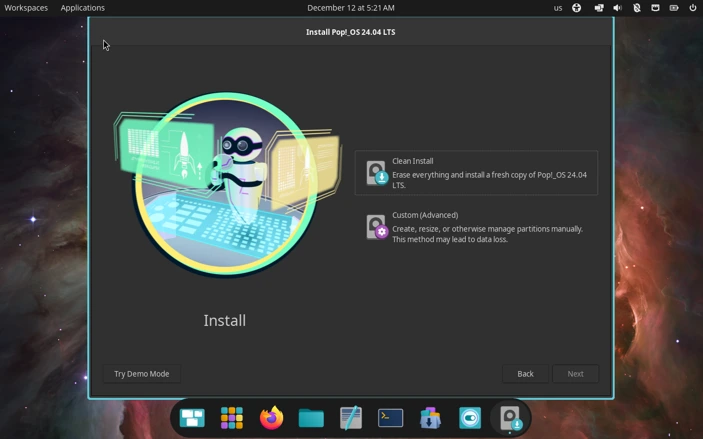
One particularly thoughtful feature is the new Refresh Install option. This allows you to reinstall the system while preserving user files, settings, and Flatpak applications – perfect for troubleshooting or starting fresh without losing your personalized configuration.
Full-disk encryption is now enabled by default, providing enhanced security without requiring users to navigate complex setup options. This reflects System76’s philosophy of making powerful features accessible to everyone, not just technical experts.
Performance That You Can Feel
The performance benefits of Rust and careful engineering in COSMIC Desktop in Pop!_OS 24.04 aren’t just theoretical – users consistently report noticeable improvements in responsiveness and smoothness compared to other desktop environments.
Application launches feel instant. Switching between workspaces is silky smooth. Animations are fluid without being gratuitous. The entire desktop feels snappy and responsive, even on modest hardware. This performance advantage comes from Rust’s zero-cost abstractions and memory safety without garbage collection, translating to faster operations throughout the system.
Early users and reviewers have confirmed that COSMIC outperforms many established desktop environments in responsiveness and resource efficiency. For a first major release, this level of polish is remarkable.
The Philosophy Behind COSMIC Desktop in Pop!_OS 24.04
What truly sets COSMIC Desktop in Pop!_OS 24.04 apart isn’t just its technical achievements – it’s the philosophy that guided its creation. System76 built COSMIC on the principle that the best open source projects empower people not just to use them, but to build with them.
The desktop environment is modular and composable, designed to be adapted by anyone who wants to create their own unique Linux experience. Other distributions like Fedora, Arch Linux, NixOS, and openSUSE Tumbleweed have already begun incorporating COSMIC, demonstrating the broader impact of System76’s work.
COSMIC represents a harmony between convenience, customization, and efficiency. It doesn’t force users to choose between a polished, user-friendly experience and deep customization options – it delivers both.
Real-World Usage: What Users Are Saying
Since the release of COSMIC Desktop in Pop!_OS 24.04, the Linux community has been buzzing with excitement. Users praise the intuitive workflow, the beautiful aesthetics, and the productivity improvements. Many describe it as a “breath of fresh air” compared to traditional desktop environments.
Some users who tested earlier alpha and beta versions reported initial bugs, as expected with such an ambitious project. However, those same users note dramatic improvements with each release and express excitement about returning to test the stable version. The rapid iteration and commitment to quality from System76’s development team have built considerable goodwill in the community.
A Few Considerations
While COSMIC Desktop in Pop!_OS 24.04 represents an impressive achievement, it’s worth noting that this is a first major release. System76 doesn’t claim perfection – instead, they position this as the foundation for future development. Some features are still being refined, and occasional bugs may surface as users explore edge cases.
The desktop is Wayland-native, which brings benefits like improved security and better multi-monitor support. However, X11 applications run through XWayland, which generally works well but may occasionally present compatibility quirks. Some advanced features, like drag-and-drop between Wayland and X11 applications, are still being developed.
Accessibility features continue to improve, with screen reader support and other assistive technologies receiving ongoing attention. System76 has demonstrated commitment to making COSMIC accessible to all users, not just those without disabilities.
The Future of COSMIC Desktop
System76 has indicated that future Pop!_OS releases, starting with Pop!_OS 26.04 LTS, will align more closely with Ubuntu LTS release timing. This suggests a commitment to regular updates and continuous improvement of COSMIC Desktop.
The development roadmap includes enhancements to accessibility features, additional customization options, and refinements to existing functionality. The community-driven nature of the project means that user feedback directly influences future development priorities.
Why COSMIC Desktop in Pop!_OS 24.04 Matters
The release of COSMIC Desktop in Pop!_OS 24.04 represents more than just another Linux distribution update. It demonstrates that the open source community can create desktop environments that rival or exceed proprietary alternatives in beauty, functionality, and innovation.
System76 has proven that starting from scratch, guided by modern programming practices and user-centered design principles, can yield remarkable results. COSMIC challenges the notion that Linux desktop environments must compromise between polish and flexibility.
For users frustrated by the limitations of traditional desktop environments, COSMIC offers a genuine alternative. For developers seeking a modern, extensible platform, COSMIC provides the tools and framework to build innovative experiences. For the broader Linux community, COSMIC represents a significant contribution that will influence desktop computing for years to come.
Getting Started with COSMIC Desktop in Pop!_OS 24.04
Ready to experience the most beautiful Linux desktop of 2025? Getting started is simple:
- Download: Visit the System76 downloads page and grab the Pop!_OS 24.04 LTS ISO (choose the standard or NVIDIA-optimized version based on your hardware)
- Create Bootable Media: Use tools like Popsicle (included in Pop!_OS), Etcher, or Rufus to create a bootable USB drive
- Install or Test: Boot from the USB to try COSMIC Desktop without installing, or proceed with a full installation
- Customize: Dive into the Settings app and make COSMIC truly yours
Existing Pop!_OS 22.04 users can upgrade using the command-line upgrade tool, though backing up your system first is always recommended for major version transitions.
Conclusion: A New Era for Linux Desktop Computing
COSMIC Desktop in Pop!_OS 24.04 represents a watershed moment in Linux desktop history. It proves that innovation, careful engineering, and commitment to user experience can create something truly special. The combination of Rust’s performance and safety benefits, thoughtful design decisions, and deep customization options results in a desktop environment that feels both modern and timeless.
Whether you’re a developer seeking a productivity powerhouse, a creative professional needing a beautiful and functional workspace, or an everyday user wanting a Linux experience that “just works” while looking stunning, COSMIC Desktop in Pop!_OS 24.04 delivers.
After three years of development, countless hours of engineering, and unwavering commitment to quality, System76 has given the Linux community something extraordinary. COSMIC Desktop in Pop!_OS 24.04 isn’t just the most beautiful Linux experience of 2025 – it’s a glimpse into the future of desktop computing.
The stars have aligned, and COSMIC has arrived. Welcome to the future of Linux desktop computing.
Pop!_OS 24.04 LTS with COSMIC Desktop is available now as a free download from System76’s official website. The operating system is open source and backed by long-term support, making it an excellent choice for both personal and professional use.
Frequently Asked Questions
Can I upgrade from Pop!_OS 22.04 to 24.04 with COSMIC Desktop?
Yes, existing Pop!_OS 22.04 users can upgrade to Pop!_OS 24.04 using the command-line upgrade tool. However, it’s highly recommended to backup all your important data before performing a major version upgrade. Alternatively, you can perform a fresh installation or use the new Refresh Install option to preserve your files and settings.
Will COSMIC Desktop work with my NVIDIA graphics card?
Absolutely! Pop!_OS 24.04 offers a dedicated NVIDIA-optimized ISO that includes the NVIDIA 580 series drivers. COSMIC Desktop includes intelligent GPU management for hybrid graphics setups, and you can even right-click on application icons to manually select which GPU to use. System76 has made significant efforts to ensure smooth NVIDIA compatibility.
Can I install COSMIC Desktop on other Linux distributions?
Yes! While COSMIC Desktop was developed for Pop!_OS, it’s fully open source and designed to be distribution-agnostic. Several distributions including Fedora, Arch Linux, NixOS, and openSUSE Tumbleweed have already begun packaging COSMIC. Check your distribution’s repositories or community forums for availability and installation instructions.
Is COSMIC Desktop suitable for beginners or only for advanced users?
COSMIC Desktop is designed for everyone! While it offers powerful features like tiling window management and extensive customization, it’s also incredibly user-friendly out of the box. Beginners can use it like any traditional desktop with floating windows, while power users can take advantage of keyboard shortcuts and advanced tiling features. The interface is intuitive and doesn’t require technical knowledge to get started.
What are the minimum system requirements for COSMIC Desktop in Pop!_OS 24.04?
Pop!_OS 24.04 with COSMIC Desktop is surprisingly efficient. The recommended specifications include a recent 64-bit processor, 4GB of RAM (8GB recommended for comfortable multitasking), 20GB of storage space, and support for UEFI firmware. Thanks to Rust’s performance optimizations, COSMIC runs smoothly even on modest hardware while delivering a beautiful and responsive experience.
Also Read
How Linux OS Benefits Business: Complete 2025 Guide