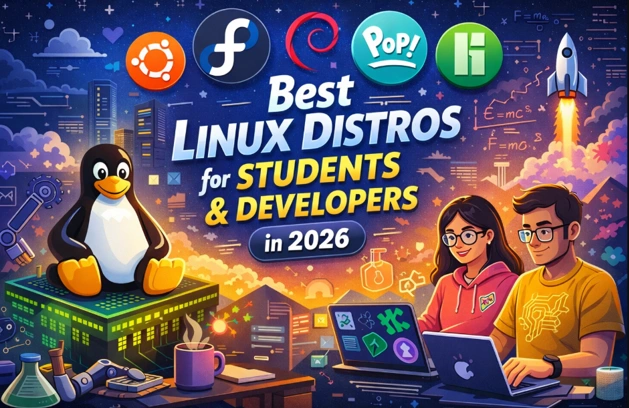
Whether you’re a computer science student learning to code your first “Hello World” or a seasoned software engineer building complex applications, choosing the right Linux distribution can make a significant difference in your productivity and learning experience. As we navigate through December 2025 and look ahead to 2026, the Linux landscape has evolved with exciting new features, enhanced security, and improved developer tools that make these operating systems more powerful than ever.
In this comprehensive guide, we’ll explore the best Linux distros for students and developers in 2026, examining their strengths, unique features, and why they deserve a place on your machine.
Why Linux Matters for Students and Developers
Before diving into specific distributions, let’s understand why Linux has become the go-to platform for development work. Linux powers the backbone of modern technology infrastructure—from web servers and cloud computing platforms to mobile devices and supercomputers. According to recent data, Linux holds approximately 3.93% of the global desktop market share, but its influence extends far beyond these numbers.
For developers, Linux offers several compelling advantages:
Complete Control: Unlike proprietary operating systems, Linux gives you full access to configure, customize, and optimize your environment exactly how you need it.
Powerful Command Line: The terminal is a developer’s best friend, allowing direct communication with your system to run programs, manage files, and automate repetitive tasks efficiently.
Native Development Tools: Most programming languages, frameworks, and development tools were originally designed for Unix-like environments, making Linux the natural habitat for software development.
Free and Open Source: Zero licensing costs mean students can learn and experiment without financial barriers, while the open-source nature ensures transparency and community-driven improvements.
Our Selection Criteria: How We Chose These Distributions
Selecting the best Linux distros for students and developers in 2026 required careful evaluation across multiple dimensions. We didn’t just pick popular names—each distribution in this guide was assessed against specific criteria that matter most to educational and development workflows.
Community Support and Documentation: Distributions must have active communities, comprehensive documentation, and readily available troubleshooting resources. Students and developers need quick answers when problems arise, especially during critical project deadlines.
Software Availability: Access to development tools, programming languages, IDEs, and libraries is essential. We prioritized distributions with extensive package repositories and easy installation of popular development environments.
System Stability and Reliability: A stable operating system that doesn’t crash during important work is non-negotiable. We evaluated each distribution’s track record for reliability and system stability under development workloads.
Hardware Compatibility: Modern hardware support, including WiFi adapters, graphics cards (especially NVIDIA and AMD), touchpads, and peripherals. Distributions that work well out-of-the-box scored higher.
Performance and Resource Efficiency: Development work often involves running multiple applications simultaneously—IDEs, browsers with dozens of tabs, terminals, Docker containers, and more. Efficient resource usage ensures smooth multitasking.
Update Frequency and Support Timeline: We considered both bleeding-edge distributions with frequent updates and long-term support releases for different user preferences and project requirements.
Developer-Specific Features: Built-in development tools, container support, virtualization capabilities, programming language versions, and specialized features like GPU support for machine learning scored additional points.
Learning Value: For students, we evaluated how well each distribution helps build foundational Linux knowledge and system administration skills that translate to professional environments.
Ease of Installation and Setup: Time spent fighting with installation is time not spent learning or coding. Distributions with streamlined installation processes and good hardware detection received preference.
Security Features: Built-in security mechanisms, update policies, and track records for handling security vulnerabilities were carefully considered, as students and developers often handle sensitive code and data.
Each distribution featured in this guide excels in multiple areas while offering unique advantages for specific use cases, ensuring there’s an ideal option regardless of your experience level, hardware, or development focus.
The Top Linux Distros for Students and Developers in 2026
Before diving into detailed reviews, here’s a quick comparison table to help you identify which distribution best matches your needs:
| Distribution | Best For | Difficulty | Release Model | Support Period | Desktop Environment | Key Strength |
|---|---|---|---|---|---|---|
| Ubuntu 24.04 LTS | Beginners, Students, Long-term Stability | Easy | LTS (Every 2 years) | 12 years (with Ubuntu Pro) | GNOME 46 | Massive community support |
| Fedora 43 | Advanced Users, Latest Tech | Moderate | Every 6 months | 13 months | GNOME 49 (Wayland-only) | Cutting-edge features |
| Pop!_OS | ML/AI Developers, NVIDIA Users | Easy | Rolling (Ubuntu-based) | Follows Ubuntu LTS | COSMIC / GNOME | Superior GPU support |
| Debian 13 | Server Development, Sysadmins | Moderate–Hard | Every 2–3 years | 3–5 years | Multiple options | Rock-solid stability |
| Manjaro | Customization Enthusiasts | Moderate | Rolling Release | Continuous | KDE, XFCE, GNOME | AUR access + user-friendly |
| Linux Mint | Windows Migrants, Complete Beginners | Very Easy | Follows Ubuntu LTS | 5 years | Cinnamon | Familiar Windows-like experience |
1. Ubuntu 24.04 LTS: The Gold Standard for Stability
Best For: Students seeking reliability, developers needing long-term stability, anyone wanting extensive community support

Ubuntu remains the most popular Linux distribution worldwide, with over 20 million users, and for good reason. The Ubuntu 24.04 LTS (Noble Numbat), released in April 2024, represents a significant milestone with an unprecedented 12-year support commitment through Ubuntu Pro (free for personal use covering up to five machines).
What Makes Ubuntu 24.04 LTS Special:
The latest LTS release comes with the Linux 6.8 kernel, providing improved syscall performance, better hardware support for newer Intel Comet Lake and Tiger Lake CPUs, and enhanced support for AMD Navi GPUs. Frame pointers are now enabled by default on all 64-bit architectures, allowing performance engineers to create accurate flame graphs for system profiling and optimization.
The distribution features GNOME 46, bringing a modern, responsive interface with improved animations and touchscreen support. Ubuntu 24.04 introduces a completely redesigned Flutter-based installer that makes the installation process smoother and more intuitive. The new App Center provides a sleek user experience for software management, while quarter tiling support allows you to snap windows to screen corners for better multitasking.
Developer-Friendly Features:
Ubuntu 24.04 LTS includes Python 3.12, Ruby 3.2, PHP 8.3, and Go 1.22, ensuring developers have access to the latest language features. The introduction of .NET 8 with TCK-certified Java support demonstrates Ubuntu’s commitment to diverse development ecosystems. Intel QuickAssist Technology (Intel QAT) integration for the first time in an LTS enables accelerated encryption and compression, reducing CPU utilization for networking and storage applications.
Security enhancements include TPM-backed full disk encryption (in experimental form), improved AppArmor confinement for Snap packages, and restrictions on unprivileged user namespaces to protect against kernel exploits. The unified kernel merges low-latency features into the default kernel, reducing task scheduling delays significantly.
Why Students Love It:
The massive Ubuntu community means solutions to virtually any problem are just a web search away. The extensive documentation, tutorials, and Stack Overflow answers make learning Linux approachable. The five-year standard support (extending to 12 years with free Ubuntu Pro) means students can install it at the start of their academic journey and rely on it throughout their studies without major version upgrades.
2. Fedora Workstation 43: Cutting-Edge Innovation
Best For: Developers who want the latest technologies, those working with AI/ML, enthusiasts who enjoy staying current
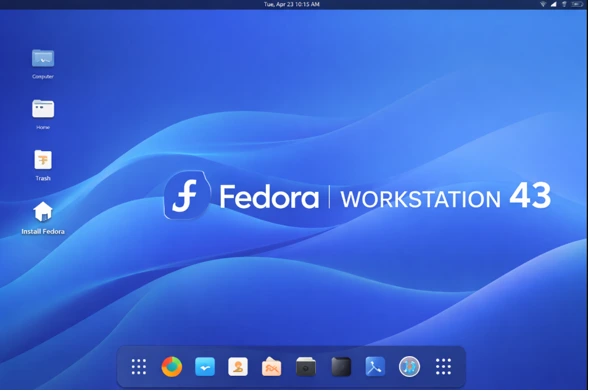
Fedora Workstation boldly proclaims it is “created for developers,” and it lives up to this promise. Fedora 43, released on October 28, 2025, brings bleeding-edge features while maintaining the reliability developers need. Notably, it’s the distribution of choice for Linux kernel creator Linus Torvalds himself.
What’s New in Fedora 43:
The distribution features GNOME 49 with enhanced performance and modern design elements. In a bold move, Fedora 43 completely removes GNOME X11 packages from the repositories, making Wayland the only display server option for GNOME users. This Wayland-only approach delivers smoother animations, better touchscreen support, and improved security through complete session isolation.
The Anaconda WebUI installer is now the default for all Spins, providing a unified, modern installation experience across all Fedora desktop variants. The installer has switched from DNF4 to DNF5 internally, offering better debugging support and improved package management performance. DNF5 continues to be faster, smaller, and more efficient than its predecessor.
Fedora 43 introduces RPM 6.0, bringing significant security improvements to the package management foundation. OpenPGP keys are now referred to by fingerprint instead of short key IDs, making package verification more reliable and secure. The new version supports multiple signatures per package and OpenPGP v6 keys, including post-quantum cryptography support for future-proofing security.
The distribution features a stunning new day and night wallpaper inspired by Sally Ride’s legacy, the first American woman in space. The design reflects bright, colorful mid-century space art and retro futurism, perfectly representing her work in STEM.
Developer Tooling Excellence:
Fedora 43 provides Python 3.14 (early adoption), Go 1.25 with built-in leak detection, and updated GNU toolchain with GCC 15.2, Binutils 2.45, glibc 2.42, and GDB 17.1. These cutting-edge compiler optimizations and debugging tools ensure developers have access to the latest features and performance improvements. The distribution includes AMD ROCm for GPU computing, making it excellent for AI and machine learning development. The Fedora Developer Portal offers dedicated guides for web, command-line, desktop, and mobile app development, with excellent sections on hardware programming including Arduino.
The distribution ships with SELinux enabled by default, providing robust security through strict access controls. Fedora’s upstream-first philosophy means contributions flow directly to the broader Linux ecosystem, ensuring your work benefits everyone.
Considerations:
Fedora’s six-month release cycle means more frequent updates compared to Ubuntu’s LTS model. Each version receives approximately 13 months of support, requiring users to upgrade roughly twice a year. This rapid pace ensures access to cutting-edge features but may feel demanding for those who prefer set-and-forget stability.
3. Pop!_OS: The Developer-Focused Ubuntu Alternative
Best For: Machine learning developers, creators needing GPU support, those wanting better out-of-the-box experience
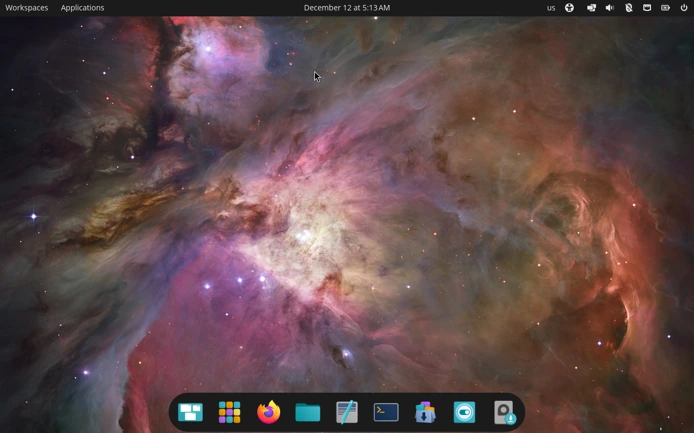
System76, a Linux computer manufacturer, created Pop!_OS as an Ubuntu-based distribution specifically designed for developers, makers, and computer science professionals. What began as a GNOME-based system has evolved with Pop!_OS now developing its own COSMIC desktop environment written in Rust.
Standout Features:
Hybrid GPU support is Pop!_OS’s killer feature. The automatic switching between integrated and dedicated GPUs optimizes both power consumption and performance—crucial for developers working with AI, machine learning, or graphics-intensive applications. The tiling window manager improves multitasking by automatically organizing windows without manual resizing, perfect for developers juggling multiple code editors, terminals, and browser windows simultaneously.
The built-in recovery partition simplifies system recovery without external media, providing peace of mind for developers who experiment with system configurations. The distribution offers hundreds of informative video tutorials and comprehensive help articles, making it exceptionally beginner-friendly.
System76’s COSMIC desktop enhancement adds tiling window management capabilities to GNOME, significantly improving workflow efficiency. Advanced keyboard shortcuts and workspace management features streamline the developer experience, allowing you to focus on coding rather than window management.
Why It Excels for Development:
Pop!_OS comes optimized for scientific computing and development workloads. The distribution includes gaming optimizations that also benefit development tools requiring graphics acceleration. Since it’s Ubuntu-based, you get access to Ubuntu’s massive software repository and .deb packages while enjoying Pop!_OS’s refinements.
The focus on GPU support makes it particularly attractive for students and developers working with neural networks, data science, computer vision, or game development. The system feels polished and professional, with careful attention to user experience details.
4. Debian 13 “Trixie”: The Rock-Solid Foundation
Best For: Server development, students learning system administration, those prioritizing stability over novelty

Debian is the grandfather of many popular distributions—Ubuntu itself is built on Debian. Released on August 9, 2025, Debian 13 “Trixie” (with version 13.1 following on September 6, 2025) continues the distribution’s legendary reputation for stability and reliability.
Debian’s Philosophy:
Debian includes only software that meets the Debian Free Software Guidelines, ensuring all included programs are truly open source. Packages undergo careful selection and testing before inclusion in the stable branch. While this means some software may be slightly dated compared to cutting-edge distributions, it dramatically reduces the chance of system instability.
The distribution boasts over 60,000 packages in its repositories, covering virtually any software need. This massive collection means developers rarely need to compile software from source or add third-party repositories.
Developer Benefits:
Debian’s website includes extensive programming documentation, with dedicated chapters on creating scripts, compiling code, and using Autoconf for cross-distribution compatibility. The predictable release cycle and long-term support make it ideal for production environments and learning system administration.
The distribution serves as an excellent base for Docker and Kubernetes projects, with many official Docker images built on Debian. Its minimal bloat and efficient resource usage make it perfect for server deployments and development containers.
Educational Value:
For computer science students, Debian provides an excellent learning platform for understanding Linux fundamentals. The distribution’s conservative approach means you’re learning stable, established practices rather than bleeding-edge features that might change quickly. The apt package management system is straightforward and well-documented, making it easy to understand package dependencies and system management.
5. Manjaro: Arch Linux Made Accessible
Best For: Intermediate users wanting cutting-edge software, those interested in the Arch ecosystem, customization enthusiasts
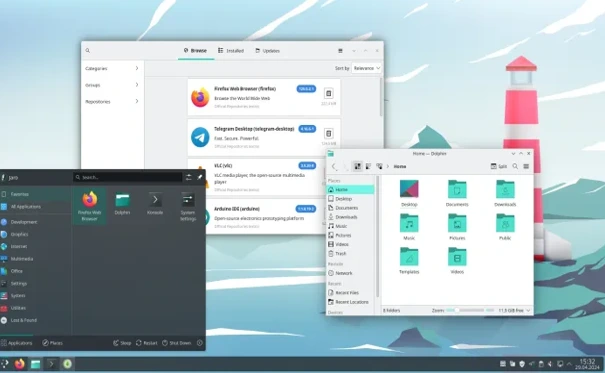
Manjaro bridges the gap between Arch Linux’s power and user-friendliness, making the Arch experience accessible without the traditionally steep learning curve. The distribution offers rolling releases, meaning continuous updates keep your software current without requiring full version upgrades.
Key Advantages:
Access to the Arch User Repository (AUR) is Manjaro’s superpower. The AUR contains user-maintained packages for nearly any software imaginable—if it exists for Linux, it’s probably in the AUR. This massive software availability means developers can easily install specialized tools and libraries without compilation or complex installation procedures.
Manjaro provides multiple desktop editions including XFCE, KDE Plasma, and GNOME, allowing you to choose the environment that best suits your workflow. Automatic hardware detection and driver installation support a wide range of devices out-of-the-box, including graphics cards and wireless adapters that sometimes frustrate other distributions.
Developer Experience:
The rolling release model ensures you always have access to the latest development tools, libraries, and programming language versions. This is particularly beneficial for developers who need cutting-edge features or want to work with the newest versions of frameworks and tools.
Graphical package managers and system utilities make maintenance easier than traditional Arch Linux, though the distribution still provides the flexibility and control Arch users appreciate. The Manjaro community is active and helpful, with forums and wikis providing extensive documentation.
Considerations:
Rolling releases require more active system maintenance compared to point-release distributions. The frequent updates mean you should regularly dedicate time to updating and occasionally troubleshooting compatibility issues. Manjaro is less stable than LTS-focused distributions, though more stable than running Arch directly.
6. Linux Mint: The Windows-to-Linux Bridge
Best For: Students transitioning from Windows, beginners wanting a familiar experience, those seeking simplicity
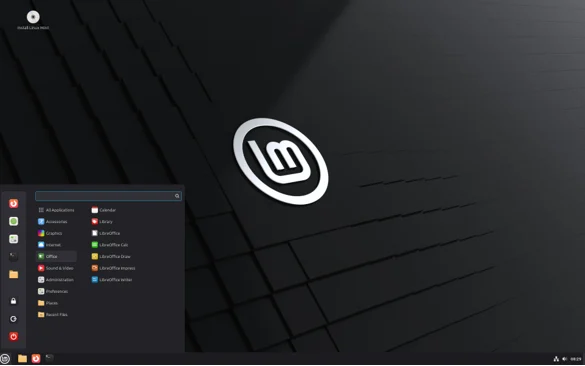
Linux Mint has earned its reputation as one of the most user-friendly distributions available. Based on Ubuntu, it aims to provide a complete out-of-the-box experience with media codecs, browser plugins, DVD playback support, and Java pre-installed.
What Makes Mint Special:
The Cinnamon desktop environment feels immediately familiar to Windows users, significantly reducing the learning curve for students making their first Linux transition. The interface is intuitive and polished, with careful attention to usability. The Timeshift backup tool comes pre-installed, providing an easy safety net for system snapshots and recovery.
Mint comes with essential applications pre-configured and ready to use. Unlike some distributions that require hunting for codecs or configuring media playback, Mint works immediately for common tasks like watching videos, playing music, and viewing PDFs.
Student-Friendly Features:
The Software Manager provides an easy-to-browse catalog of applications with ratings and reviews. The Update Manager clearly explains what updates are available and their importance level, helping new users understand system maintenance. Comprehensive documentation and tutorials make learning Linux concepts straightforward.
Since Mint is compatible with Ubuntu software repositories, students can easily find software recommendations and installation instructions that work on their system. The distribution’s stability and predictability make it excellent for students who need their computer to just work so they can focus on their coursework.
Development Capabilities:
Don’t let Mint’s user-friendliness fool you—it’s fully capable for development work. All standard programming tools, IDEs, and development environments install easily. The familiar interface means less time learning the operating system and more time learning to code.
Choosing the Right Distribution for Your Needs
With so many excellent options, how do you choose? Consider these factors:
Experience Level: Complete beginners should consider Linux Mint or Ubuntu for their user-friendly interfaces and extensive support resources. Intermediate users might enjoy Pop!_OS or Manjaro for their additional features and flexibility. Advanced users comfortable with troubleshooting can explore Debian or Fedora.
Support Timeline: Students planning multi-year projects should consider Ubuntu 24.04 LTS (12-year support) or Debian (typically 3-5 years). Developers comfortable with more frequent updates might prefer Fedora’s six-month cycle or Manjaro’s rolling releases.
Hardware Considerations: Systems with NVIDIA graphics cards benefit from Pop!_OS’s excellent GPU support. Older or lower-spec computers run well on Linux Mint’s efficient Cinnamon desktop. Bleeding-edge hardware gets better support in Fedora’s newer kernels.
Development Focus: AI and machine learning developers should consider Pop!_OS or Fedora for their GPU support and updated libraries. Web developers can thrive on any distribution, though Ubuntu’s popularity means more deployment similarity. Systems programmers might appreciate Debian’s stable foundation or Fedora’s cutting-edge tools.
Learning Goals: Students wanting to understand Linux deeply should try Debian or Manjaro, which expose more system internals. Those focused on application development rather than operating system knowledge might prefer Ubuntu or Mint’s hands-off approach.
Essential Setup Tips for Developer Productivity
Regardless of which distribution you choose, these tips will enhance your development experience:
Install Development Tools Early: Most distributions include basic development packages, but you’ll likely need additional tools. Install build-essential (Ubuntu/Debian) or development-tools (Fedora) groups to get compilers, libraries, and build tools.
Set Up Version Control: Install Git immediately and configure your name and email. Create accounts on GitHub, GitLab, or similar platforms for code hosting and collaboration.
Explore Package Management: Learn your distribution’s package manager thoroughly (apt, dnf, pacman). Understanding how to search for, install, update, and remove software is fundamental to Linux proficiency.
Configure Your Terminal: Invest time customizing your terminal with a good shell (zsh with oh-my-zsh is popular), helpful aliases, and productivity tools like tmux for session management.
Use Virtual Environments: For Python development, always use virtual environments to isolate project dependencies. Consider Docker or Podman for containerized development environments.
Enable Automatic Security Updates: Configure unattended upgrades for security patches to keep your system secure without manual intervention.
Back Up Regularly: Set up automated backups of your home directory and important configuration files. Many distributions include backup tools—use them.
The Future of Linux for Education and Development
As we look toward 2026, several trends are shaping the Linux ecosystem for students and developers:
Improved Hardware Support: Graphics drivers, particularly for NVIDIA cards, continue improving. Fedora 41’s Secure Boot support for NVIDIA drivers exemplifies this progress.
AI and Machine Learning Integration: Distributions are increasingly optimizing for AI workloads, with packages like PyTorch, TensorFlow, and AMD ROCm becoming standard inclusions.
Containerization Focus: The rise of immutable distributions and container-focused workflows reflects modern development practices. Technologies like Flatpak and container runtimes are becoming standard.
Enhanced Security: Features like TPM-backed encryption, improved SELinux policies, and stronger default security settings make Linux distributions more secure by default.
Better Desktop Experiences: Modern desktop environments like GNOME 46, KDE Plasma, and the new COSMIC desktop provide polished, responsive interfaces that rival proprietary operating systems.
Conclusion: Your Journey Starts Here
The best Linux distros for students and developers in 2026 offer unprecedented combinations of power, usability, and flexibility. Whether you choose Ubuntu’s stability, Fedora’s innovation, Pop!_OS’s developer focus, Debian’s reliability, Manjaro’s flexibility, or Mint’s approachability, you’re making an excellent choice for your educational and professional journey.
Remember that the “best” distribution is ultimately the one that works best for your specific needs, hardware, and preferences. Many developers try several distributions before settling on their favorite, and that exploration is part of the learning process. The Linux community values experimentation and learning, so don’t be afraid to test different options in virtual machines before committing.
As Linux continues evolving, these distributions will keep improving with better tools, enhanced security, and more sophisticated features. By choosing any of these excellent Linux distros for students and developers in 2026, you’re positioning yourself at the forefront of modern software development with tools used by professionals worldwide.
Start your Linux journey today, and join millions of students and developers who have discovered the power, flexibility, and freedom that these remarkable operating systems provide.
Frequently Asked Questions
Can I switch between Linux distributions without losing my data?
Yes, your personal files in /home can be preserved during installation. Always back up important data first, and consider keeping /home on a separate partition for easier distribution switching.
Do I need to know command line to use Linux as a developer?
While graphical tools exist, command line proficiency significantly enhances productivity and is essential for professional development work. Most distributions make it easy to learn gradually through excellent documentation and supportive communities.
Which Linux distro is best for learning programming from scratch?
Ubuntu or Linux Mint are excellent for beginners due to their user-friendly interfaces and extensive documentation. They allow you to focus on learning programming without battling operating system complexity.
Can I run my favorite development tools on Linux?
Most development tools either have native Linux versions or excellent alternatives. VS Code, IntelliJ IDEA, PyCharm, Eclipse, and virtually all command-line tools run perfectly on Linux.
How much disk space do I need for development on Linux?
A minimum of 25-30 GB is recommended, but 50-100 GB provides comfortable space for multiple development environments, IDEs, and projects. Consider your specific development needs when allocating space.
Will my university software work on Linux?
Most academic software either has Linux versions or runs well through compatibility layers. Check your specific course requirements, and consider dual-booting with Windows if necessary for specialized proprietary software.
Can I game on Linux development machines?
Yes, Linux gaming has improved dramatically. Pop!_OS excels at gaming thanks to excellent GPU driver support, and Proton (built into Steam) allows thousands of Windows games to run on Linux with minimal performance loss.
Disclaimer
This article contains information about Linux distributions current as of December 2025. Software versions, features, and system requirements may change as distributions release updates. Always verify the latest information on official distribution websites before installation. The recommendations provided are based on general use cases and may vary depending on individual hardware configurations and specific requirements.
Quick Linux Selection Guide
If you want a broader overview of upcoming and trending distributions, check out our in-depth guide on new Linux distros you should try in 2026 .
- 👉 First-time Linux user? → Linux Mint or Ubuntu 24.04 LTS
- 👉 Need the latest development tools? → Fedora 43 or Manjaro
- 👉 Working with AI / Machine Learning? → Pop!_OS or Fedora 43
- 👉 Building servers or containers? → Debian 13 or Ubuntu 24.04 LTS
- 👉 Want maximum customization? → Manjaro or Debian 13
- 👉 Need it to “just work”? → Linux Mint or Pop!_OS