Nobody saw this coming. Apple — a company that built its identity on charging premium prices — just released a $599 laptop. No, it’s not a refurbished unit. It’s not a limited student deal buried in fine print. The MacBook Neo is a brand-new, aluminum-body Mac laptop with a Retina display, full macOS Tahoe, and Apple Intelligence support. And the question on everyone’s mind is the same: would you buy a $599 MacBook?
That’s not a rhetorical question. In this review, we’re going to answer it honestly — covering every spec, every trade-off, and every reason you should or shouldn’t pull out your credit card. No fan service. No brand worship. Just the full picture.
What Is the MacBook Neo?
Apple officially announced the MacBook Neo on March 4, 2026, with units shipping on March 11, 2026. At $599, it’s the most affordable Mac laptop Apple has ever made — nearly half the price of the MacBook Air M5, which sits at $1,099. For students, the education pricing drops it further to $499.
It comes in two configurations:
- $599 — 256GB storage, 8GB RAM
- $699 — 512GB storage, 8GB RAM
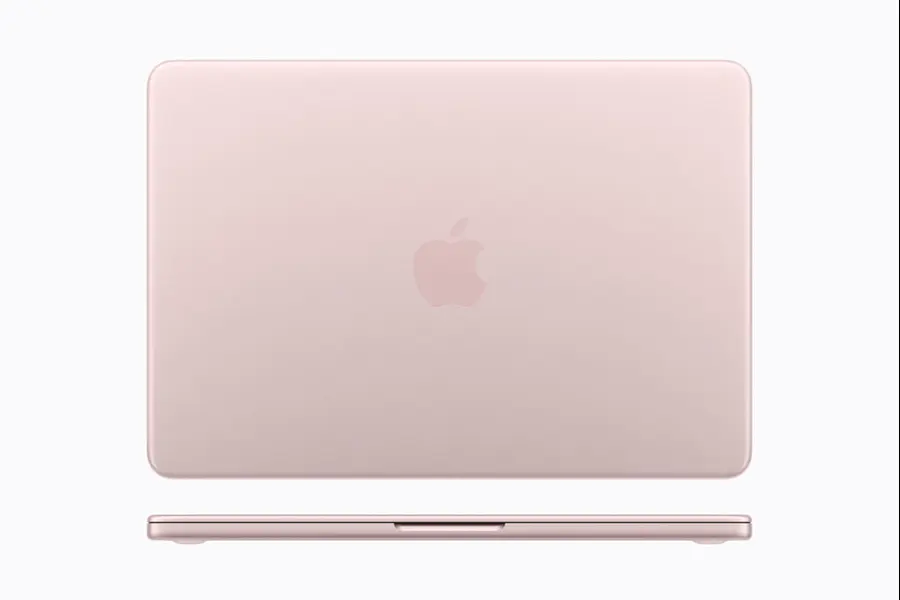
Four colors are available: Blush (rose pink), Indigo (dark blue), Silver, and Citrus (yellow-green). Apple is clearly targeting students and first-time Mac buyers with these fun, personality-forward color options.

The machine runs a 13-inch Liquid Retina display, sits in an aluminum unibody enclosure, and is powered by the Apple A18 Pro chip — the same processor inside the iPhone 16 Pro. That last detail is both the most exciting and the most controversial part of this whole product.
Performance: An iPhone Chip in a MacBook — Does It Actually Work?
The A18 Pro is built on TSMC’s second-generation 3nm process. It features a 6-core CPU (2 performance + 4 efficiency cores), 5-core GPU, and a 16-core Neural Engine. These are the same internals that made the iPhone 16 Pro feel snappy in every real-world scenario.
Apple claims the MacBook Neo is:
- Up to 50% faster for everyday tasks compared to laptops running Intel Core Ultra 5
- Up to 3x faster for on-device AI workloads than competing budget Windows machines
- Capable of running Apple Intelligence features entirely on-device
Early Geekbench scores published on March 5, 2026, show single-core results around 3,461 and multi-core around 8,668 — virtually identical to an iPhone 16 Pro, which makes sense given the hardware is identical.
For casual, everyday computing — web browsing, documents, email, video calls, YouTube, light photo editing — this chip absolutely delivers. You’ll never feel a stutter opening apps or jumping between tabs.
Where it gets complicated is with heavier workloads. The RAM is fixed at 8GB with no upgrade path whatsoever (the A18 Pro’s InFO-PoP packaging physically bonds the DRAM to the SoC). Heavy Final Cut Pro timelines, large Lightroom catalogs, Xcode compilations, and running multiple memory-hungry apps simultaneously will cause macOS to start swapping to the SSD, slowing things down noticeably. The 8GB ceiling is real, and it’s the biggest limitation of this machine.
Quick take: For students and casual users, performance is more than adequate. For power users or creatives, 8GB in 2026 is a genuine problem.
Display and Build Quality: Surprisingly Premium
The 13-inch Liquid Retina display offers 2408 x 1506 resolution, 500 nits brightness, anti-reflective coating, and support for 1 billion colors. That matches the MacBook Air’s brightness spec and looks great for everyday use.

What it doesn’t have compared to higher-end Macs:
- No ProMotion (60Hz only, not 120Hz)
- sRGB color gamut instead of P3 wide color
- No True Tone ambient light adjustment
For most people — Netflix, YouTube, Zoom calls, document work — these missing specs won’t register. Photographers and video professionals will notice the sRGB limitation, but they’re not the target audience here.
Interestingly, the MacBook Neo has no notch. It uses uniform bezels all around, similar to an iPad, which many users will actually prefer over the notch on the MacBook Air. At 2.7 pounds and 0.5 inches thick, it’s genuinely pocketable and light. The aluminum build feels solid — this does not feel like a budget product when you pick it up.
Battery Life: One of the Strongest Arguments for This Machine
Apple claims up to 16 hours of wireless web browsing — a number that puts most budget Windows laptops to shame. The A18 Pro’s mobile-optimized efficiency, inherited from years of Apple designing iPhone chips to stretch battery life, translates surprisingly well to a laptop context.
Independent reviewers (Apple Insider, March 2026) reported real-world figures closer to 11 hours of web browsing, while the MacBook Air M5 hits around 15 hours in similar conditions. Still, 11 real-world hours comfortably outlasts most Windows competitors in this price bracket.
The downside: no fast charging. The MacBook Neo ships with a 20-watt USB-C charger — the same wattage as some iPhones. A full charge from zero takes noticeably longer than it would on a MacBook Air, which supports up to 67W charging.
The Compromises: What Apple Cut to Hit $599
This is the part most reviews gloss over. Apple made deliberate cuts to hit this price point, and you deserve to know every single one of them before you buy.
- No backlit keyboard — Typing in a dark room, on a plane, or in a dimly lit lecture hall is genuinely difficult. Macworld called this a “glaring omission” for a 2026 laptop, and they’re right.
- 8GB RAM, non-upgradable — The industry standard for new laptops is 16GB in 2026. You cannot upgrade this later.
- One USB-C port runs at USB 2.0 speeds (480Mbps) — The A18 Pro only supports one high-speed I/O controller. If you plug an external SSD into the wrong port, transfers will be painfully slow.
- No Touch ID on the $599 base model — The fingerprint sensor is reserved for the $699 model. The base model has a plain lock button.
- No MagSafe — Apple’s magnetic charging connector is absent. You charge via USB-C, which also uses up one of your two ports.
- No Force Touch trackpad — Standard click trackpad only, not the pressure-sensitive Force Touch version on the Air and Pro.
- sRGB display, not P3 wide color — Colors won’t pop as vividly as on higher-end Macs.
- No True Tone — The display doesn’t adapt its white balance to ambient lighting.
- No Thunderbolt 4 — Limited docking station compatibility and no high-speed external display output.
Are these deal-breakers? For a student writing essays and watching lectures, probably not. For a working professional — several of them absolutely are.
Full Comparison Table
| Feature | MacBook Neo $599 | MacBook Air M5 $1,099 | Budget Windows ~$600 | Chromebook ~$300–$500 |
|---|---|---|---|---|
| Processor | A18 Pro (6-core) | M5 (10-core) | Intel Core Ultra 5 | Intel / MediaTek |
| RAM | 8GB (fixed) | 16GB (up to 32GB) | 8–16GB | 4–8GB |
| Storage | 256GB / 512GB | 256GB – 2TB | 256GB – 1TB SSD | 64 – 256GB eMMC / SSD |
| Display | 13″ Liquid Retina, 500 nits | 13.6″ Liquid Retina, 500 nits | 1080p IPS (varies) | 1080p IPS (varies) |
| Battery Life | Up to 16 hrs | Up to 18 hrs | 8 – 12 hrs | 10 – 14 hrs |
| Build Material | Aluminum | Aluminum | Plastic / Aluminum mix | Plastic |
| Touch ID | No ($599) / Yes ($699) | Yes | Windows Hello / None | No |
| Backlit Keyboard | No | Yes | Yes (most models) | Varies |
| Ports | 2x USB-C (1x USB 2.0) | 2x Thunderbolt 4 + MagSafe | USB-A + USB-C + HDMI | USB-C + USB-A |
| Operating System | macOS Tahoe | macOS Tahoe | Windows 11 | ChromeOS |
| AI Features | Apple Intelligence | Apple Intelligence | Copilot+ | Google Gemini |
| Education Price | $499 | $999 | Varies | $200 – $350 |
| Weight | 2.7 lbs / 1.22 kg | 2.7 lbs / 1.22 kg | ~3 – 4 lbs | ~2.5 – 3 lbs |
| Colors | Blush, Indigo, Silver, Citrus | Midnight, Starlight, Sky Blue, Purple | Black / Silver | Black / Grey |
Specs current as of March 2026. Prices may vary by retailer.
Pros and Cons: The Honest Scorecard
✅ MacBook Neo Pros
- Starting price of $599 — Apple’s most affordable Mac laptop ever
- A18 Pro chip delivers smooth performance for everyday tasks
- Up to 16-hour battery life (web browsing) — longer than most budget Windows laptops
- Full aluminum build gives a premium feel uncommon in budget laptops
- 13-inch Liquid Retina display with 500 nits brightness and 1B colors
- Runs the full macOS Tahoe experience
- Complete support for Apple Intelligence AI features
- Deep iPhone ecosystem integration (AirDrop, Handoff, Universal Clipboard)
- 4 vibrant color options — the most colorful MacBook lineup yet
- Up to 3× faster AI workloads than many Intel budget laptops
- 60% recycled materials — Apple’s lowest-carbon Mac
- $499 education pricing makes it attractive for students
- Wi-Fi 6E, Bluetooth 6, and 1080p FaceTime HD camera included
❌ MacBook Neo Cons
- RAM fixed at 8GB — no upgrade option
- No backlit keyboard, surprising for a modern laptop
- Base model lacks Touch ID; fingerprint unlock costs $100 more
- One USB-C port limited to USB 2.0 speeds (480 Mbps)
- No Thunderbolt 4 support for high-speed accessories
- No MagSafe charging — one port always occupied
- Missing Force Touch trackpad found on higher-end Macs
- No fast charging compared to MacBook Air
- Real-world battery (~11 hrs) may fall short of Apple’s 16-hour claim
- A18 Pro is an iPhone chip — long-term Mac software support uncertain
- May struggle with heavy creative workloads (video editing, large RAW files)
- Supports only one external display (4K @ 60Hz)
The Ecosystem Angle: Apple’s Real Play Here
Apple’s deeper goal with the MacBook Neo isn’t just to sell affordable laptops. It’s to pull tens of millions of iPhone users — who’ve never owned a Mac — into the wider Apple ecosystem. And the integration really is excellent. iPhone Mirroring lets you use your iPhone directly from your Mac’s screen. Universal Clipboard means you copy on your phone and paste on your laptop without thinking about it. AirDrop, iMessage, FaceTime — everything just works together in a way that no Windows laptop can replicate for iPhone users.
Apple Intelligence is fully supported, including Writing Tools, Clean Up in Photos, Genmoji, and more — all running on-device via the 16-core Neural Engine. This is a genuine differentiator against budget Windows machines, many of which require specific certified hardware to unlock Copilot+ features.
The MacBook Neo runs full macOS Tahoe — every Mac app works, the full App Store is available, iCloud syncs seamlessly. For $599, you’re getting the complete Mac experience. That’s not nothing.
Sustainability Worth Noting
Apple highlighted that the MacBook Neo is its lowest-carbon Mac to date. It contains 60% recycled materials — the highest of any Apple product — including 90% recycled aluminum in the enclosure and 100% recycled cobalt in the battery. If environmental impact factors into your buying decisions, that’s a meaningful data point.
Final Verdict: Would You Buy a $599 MacBook?
So, back to the question that started this whole review: would you buy a $599 MacBook?
The answer depends entirely on who you are.
If you’re a student, a first-time Mac buyer, or someone whose laptop needs sit firmly in the everyday category — yes, you probably should. The MacBook Neo offers genuine premium quality, real macOS, and Apple Intelligence at a price Apple has never offered before. The missing backlit keyboard stings, and 8GB RAM is a ceiling you’ll eventually feel, but for day-to-day computing it’s an outstanding deal.
If you’re a working creative, a developer, or someone who regularly pushes their machine — walk past the $599 tag and spend the extra $500 on a MacBook Air M5. The Neo’s hardware limitations will frustrate you within months.
Apple has done something genuinely surprising here. The MacBook Neo isn’t a gimmick or a stripped-down product designed to disappoint you into upgrading. It’s a real Mac with deliberate trade-offs, priced to open Apple’s ecosystem to an entirely new group of buyers. Futurum Group analysts called it “Apple’s most strategic move in years,” and from a competitive standpoint, it’s hard to disagree.
Quick Facts: MacBook Neo (March 2026)
| MacBook Neo Specs | Details |
|---|---|
| Starting Price | $599 (256GB) · $699 (512GB) · $499 Education |
| Chip | Apple A18 Pro — 6-core CPU, 5-core GPU, 16-core Neural Engine |
| RAM | 8GB unified memory (fixed, non-upgradable) |
| Display | 13-inch Liquid Retina, 2408 × 1506 resolution, 500 nits brightness |
| Battery | Up to 16 hours web browsing (Apple claim) |
| Ports | 2× USB-C (1× USB 3 / 1× USB 2.0), 1× Headphone Jack |
| Weight | 2.7 lbs / 1.22 kg |
| Colors | Blush, Indigo, Silver, Citrus |
| Availability | March 11, 2026 (Pre-orders open) |
| Operating System | macOS Tahoe with full Apple Intelligence support |
Disclaimer
This blog post is written for informational purposes only. All product specifications, pricing, and availability details are based on official Apple announcements and publicly available data as of March 2026. Prices may vary by region, retailer, or over time. This review does not constitute financial or purchasing advice.
We are not affiliated with, sponsored by, or compensated by Apple Inc. or any other brand mentioned in this post. All trademarks and product names belong to their respective owners. Always verify current pricing and specs directly with the manufacturer before making a purchase decision.
Also Read
TR Word: Free Online Word Processor — No Login, No Cloud, Works in Your Browser