

If you’ve been following the Linux world lately, you’ve probably noticed that the PrismLinux vs Ubuntu debate is heating up in 2026. Both distros have made major moves this year — Ubuntu dropped one of its biggest LTS releases ever, and PrismLinux just shipped a version that turns heads in the Arch-based community. So which one should you actually run on your machine?
This guide gives you the real answer, based on May 2026 release data — no fluff, no filler. Whether you’re a daily-driver desktop user, a developer, or someone who just wants their computer to work without drama, this comparison will help you make a clear decision.
Quick Overview: What Are These Distros?
PrismLinux
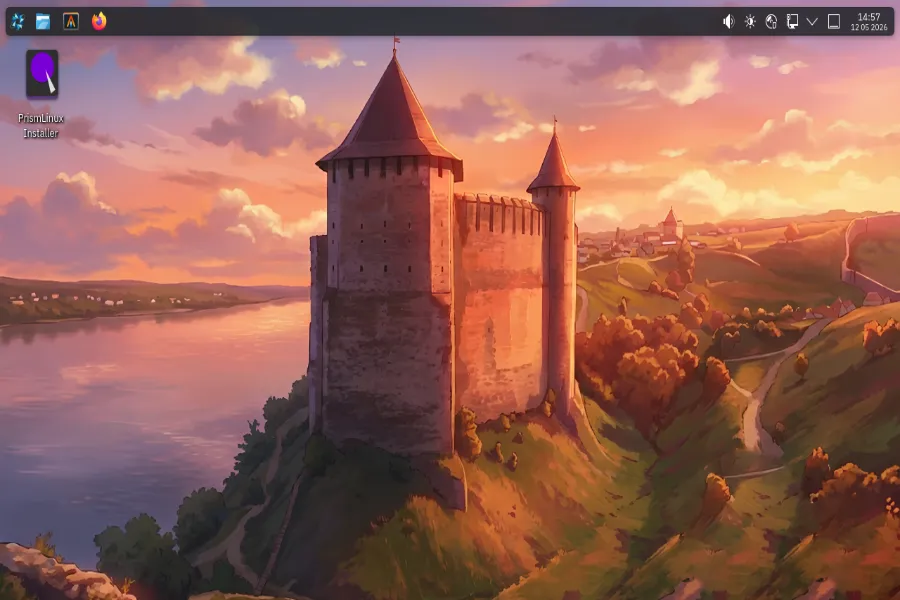
PrismLinux is a rolling-release, Arch-based Linux distribution originally developed in Ukraine. Its core philosophy is speed, minimalism, and flexibility. It ships as a LiveCD with a graphical installer and lets you choose from multiple desktop environments right out of the gate. The project has quietly grown a dedicated following among users who want Arch’s power without the DIY headache.
The latest stable release as of writing is PrismLinux 2026.05.05, dropped just days ago on May 5, 2026. It’s a substantial update that includes Linux kernel 7.0, GNOME 50 support, a fully redesigned installer, and xLibre migration — alongside a KDE Plasma-based LiveCD with Wayland and auto-login enabled by default.
Ubuntu 26.04 LTS (Resolute Raccoon)
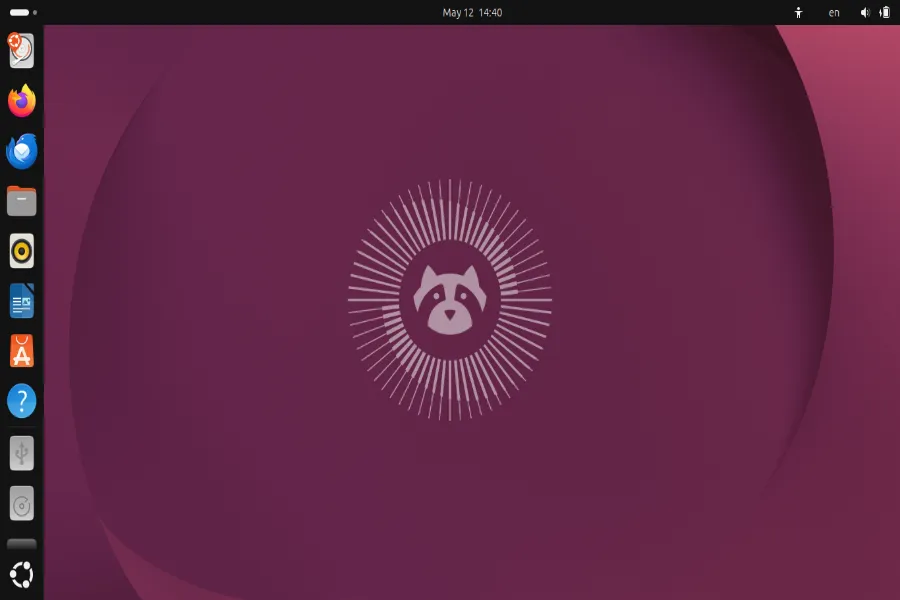
Ubuntu barely needs an introduction. Maintained by Canonical, it’s the go-to distro for millions of users worldwide — from first-timers on a hand-me-down laptop to enterprise data centers running critical workloads. Ubuntu 26.04 LTS, codenamed Resolute Raccoon, was released on April 23, 2026. It’s a Long-Term Support release, which means five years of free security updates baked in (until April 2031) with up to ten years available through Ubuntu Pro.
This release is a big one: Linux kernel 7.0, GNOME 50, a fully Wayland-only desktop (X.org is finally retired), Rust-based system components, and support for ARM64 desktop hardware officially for the first time.
PrismLinux vs Ubuntu: Head-to-Head Comparison Table
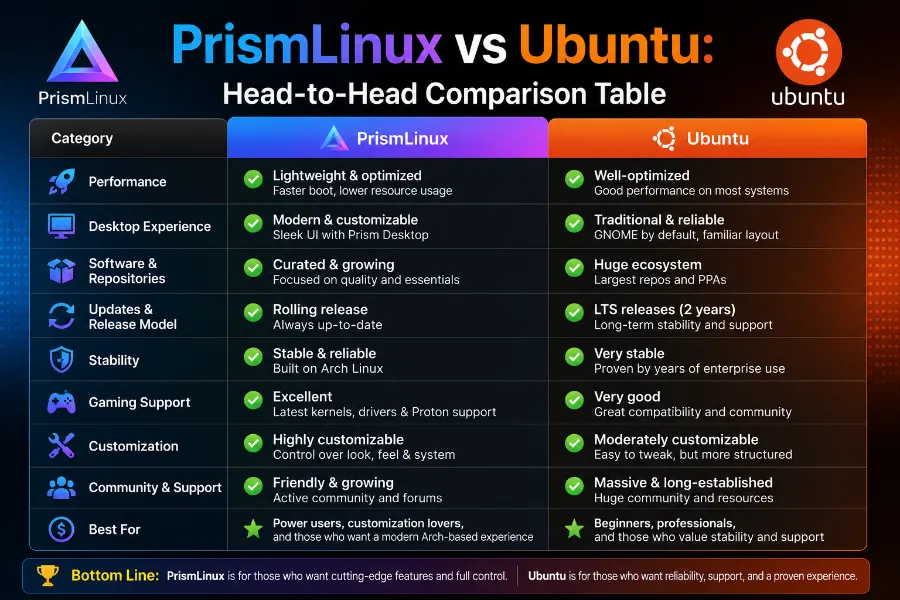
| Feature | PrismLinux 2026.05.05 | Ubuntu 26.04 LTS |
|---|---|---|
| Base | Arch Linux | Debian |
| Release Model | Rolling Release | Fixed (LTS every 2 years) |
| Kernel | Linux 7.0 | Linux 7.0 |
| Default Desktop | KDE Plasma (LiveCD) / GNOME 50 | GNOME 50 |
| Display Protocol | Wayland (default) | Wayland-only |
| Package Manager | Pacman + AUR | APT + Snap |
| ISO Size | ~2.5 GB | ~5.7 GB (Desktop) |
| RAM (Minimum) | 2 GB (8 GB recommended) | 6 GB (recommended) |
| Storage (Minimum) | 30 GB | 25 GB |
| Support Lifespan | Rolling (no EOL) | 5 years (10 with Pro) |
| Target Audience | Power users, enthusiasts | Everyone from beginners to enterprise |
| NVIDIA Support | Improved (2026.03.05+) | Full driver support out of box |
| Gaming | Strong (Liquorix/Zen kernel options) | Solid (NTSYNC + Proton support) |
| ARM64 Desktop ISO | No | Yes (new in 26.04) |
Installation Experience
PrismLinux
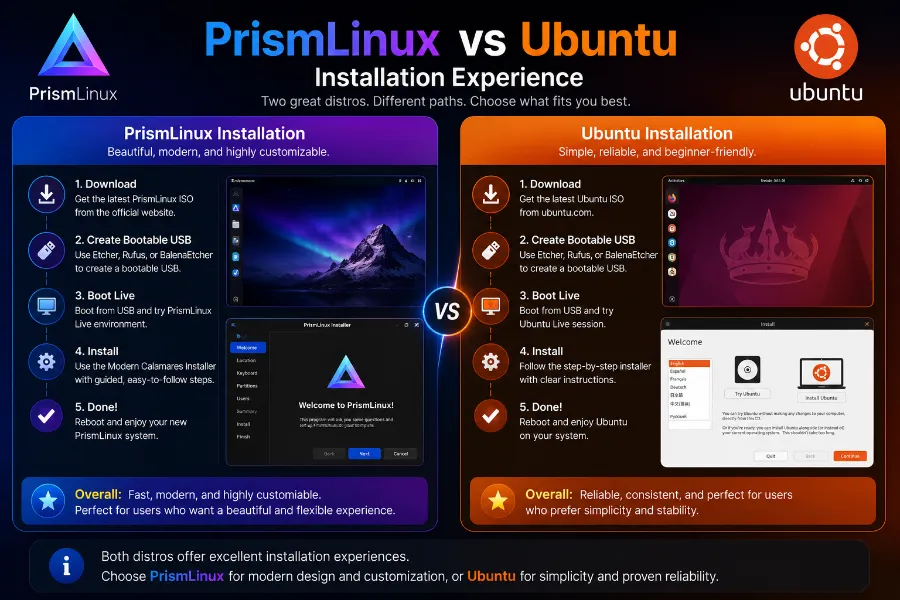
Installation has come a long way. The 2026.03.05 release overhauled the installer with a full migration to Electrobun, and the 2026.05.05 release solidified that with a clean redesign renamed the PrismLinux Installer (previously called Crystallize GUI). The LiveCD boots into a KDE Plasma environment with Wayland and auto-login, which feels modern and polished right from first boot.
Language support has expanded to include Russian, German, and more, making the setup experience accessible globally. Hyprland desktop support was added in a February hotfix, showing that the team actively responds to community requests.
That said, PrismLinux is still aimed squarely at users who are comfortable with Linux. If this is your first rodeo, the Arch roots mean you’ll need to understand what you’re choosing — even with a GUI installer.
Ubuntu
Ubuntu 26.04 ships with a significantly improved graphical installer. It now handles TPM-based full-disk encryption during setup, has automated wireless network configuration support, and replaced the old initramfs-tools with Dracut as the default initramfs generator. For first-time Linux users, Ubuntu is still the easiest large distro to get onto a machine.
The App Center also got a welcome fix — you can once again install local .deb packages through it, which had been a friction point in recent versions.
Winner: Ubuntu, for sheer accessibility. PrismLinux is close if you already know Linux, but Ubuntu’s installer is still the more foolproof experience.
Desktop Experience and UI
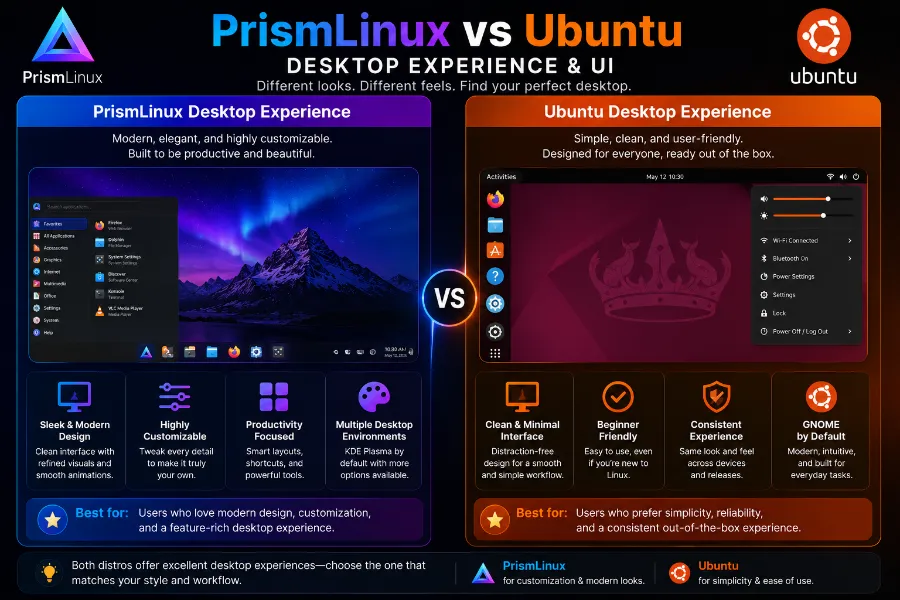
Both distros ship GNOME 50 as a supported (or default) desktop, but the experience differs significantly in practice.
PrismLinux
PrismLinux’s LiveCD boots into KDE Plasma with Wayland, giving you a feature-rich and highly customizable desktop from day one. GNOME 50 support is available as an option. The Fish shell is now configured at the system level with a clean custom prompt — Starship has been dropped in favor of a simpler setup. New CLI utilities like prism-clean, prism-update, prism-arch-check, and prism-rate-mirrors are now baked into the system for easier maintenance.
The overall feel is snappy and minimal. There’s no bloat, no preinstalled apps you didn’t ask for.
Ubuntu
Ubuntu sticks with GNOME 50 as the default, and it’s fully Wayland-only now — the legacy X.org session has been removed from GDM entirely. XWayland remains for backward compatibility, so older apps don’t break, but the session itself is pure Wayland. This brings smoother visuals, per-monitor scaling, native touch and gesture support, and eliminates screen tearing.
New visual touches include a refreshed boot animation, a revamped quick settings menu, and new default wallpapers. The Showtime video player replaces Totem, and the Resources app replaces System Monitor and Power Statistics.
Winner: Tie. Power users will prefer PrismLinux’s flexibility with KDE or tiling WMs like Hyprland. General desktop users will feel right at home with Ubuntu’s polished GNOME 50.
Performance
This is where PrismLinux genuinely shines.
PrismLinux is built around performance from the ground up. It ships with the Liquorix and Zen kernel options pre-configured — both of which prioritize responsiveness and are especially popular among gamers and users who want lower input latency. The rolling-release model means you get package updates and kernel patches as they land, not on a fixed two-year schedule.
Ubuntu 26.04 is no slouch either. Linux kernel 7.0 brings improved I/O performance, better EXT4/Btrfs/XFS handling, and the new sched_ext framework that lets developers implement custom eBPF-based scheduling policies. The NTSYNC driver is now included, which meaningfully boosts Windows game performance through Wine and Proton. For mainstream workloads, Ubuntu is fast and well-optimized.
But for raw, tuned, day-to-day desktop snappiness on mid-range hardware, PrismLinux has the edge — especially on machines with less than 8 GB of RAM.
Winner: PrismLinux, for performance-focused users and those on lighter hardware.
Software and Package Management
PrismLinux
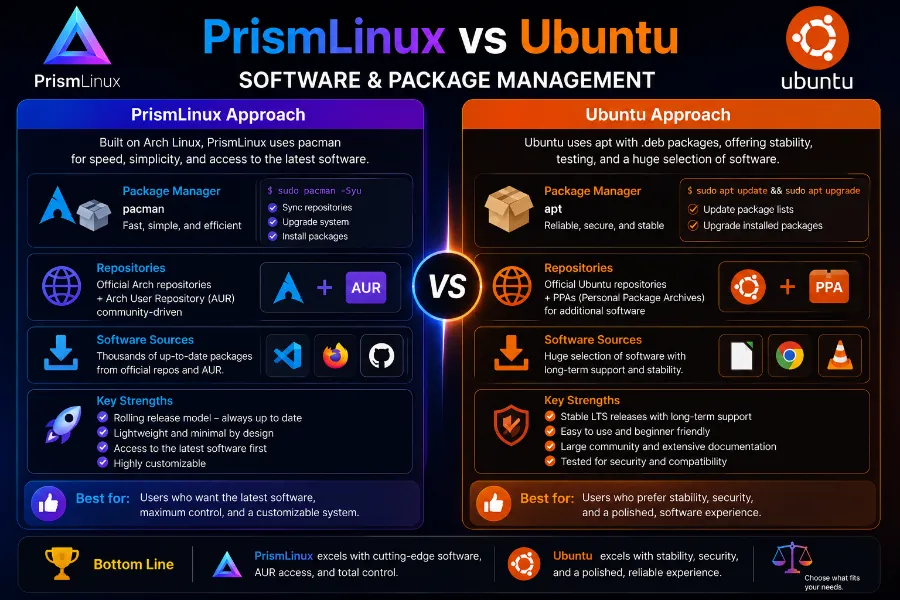
Being Arch-based, PrismLinux gives you access to the AUR (Arch User Repository) — arguably the most comprehensive software repository in the Linux ecosystem. Nearly any application you can think of is one yay command away. Pacman is fast, and the rolling-release model means you’re always running current software.
The team has also announced a custom package manager currently in development, which could make package management even more seamless in future releases.
Ubuntu
Ubuntu relies on APT for its deb-based packages, which is rock-solid, mature, and well-documented. Ubuntu 26.04 updates APT to version 3.1 with an improved dependency resolver. The new apt history-list, apt history-undo, and apt history-rollback commands are genuinely useful additions for anyone who’s ever installed something and immediately regretted it.
Ubuntu also uses Snap packages, which are containerized and update independently from the rest of the system. The App Center now supports local .deb installs again, which is a practical fix.
The main downside is that Snap packages can feel slower to launch and have a reputation (fair or unfair) for being heavier. For some software categories, you’ll find fresher packages in the AUR than in Ubuntu’s repositories.
Winner: PrismLinux for software availability and freshness. Ubuntu wins on stability and documentation.
Security and Long-Term Support
Ubuntu 26.04 LTS takes security seriously, and the 2026 release makes that very clear:
- TPM-based full-disk encryption is now enabled by default during installation
- sudo-rs (a Rust-based reimplementation of sudo) replaces the classic sudo, adding memory safety at a foundational system level
- AppArmor prompts users for permission when snap applications try sensitive operations
- Memory-safe Rust components now appear in new kernel drivers and subsystems
- Ubuntu Pro users get up to 10 years of security coverage with Kernel Livepatch (no-reboot kernel patching), now extended to ARM64 for the first time
PrismLinux, being rolling-release, applies security patches faster than any fixed-release distro. But it has no formal LTS guarantee, no enterprise support tier, and no equivalent to Ubuntu Pro for organizations that need documented compliance.
For personal use, the rolling model is often just as secure — sometimes more so. For business or production environments, Ubuntu’s structured support makes it the clear choice.
Winner: Ubuntu, for enterprise and long-term security needs. Personal users can trust PrismLinux’s rolling updates.
Gaming
Both distros run Linux games well in 2026, but they take different approaches.
PrismLinux ships with Liquorix and Zen kernel options, both of which are tuned for gaming responsiveness. The AUR gives gamers access to Proton-GE, Lutris, Heroic Games Launcher, and any other tool they want — often before it makes it into other distros. Hyprland support also appeals to gamers who want ultra-low-latency compositing.
Ubuntu 26.04 has made real strides with gaming. The NTSYNC driver is now in the kernel, improving Windows game compatibility through Wine and Proton. Mesa 26.0 ships with Vulkan 1.4 support and improved ray tracing on AMD’s RADV driver. Steam and Proton setups work well out of the box.
For casual gamers on Ubuntu, everything mostly just works. For enthusiast gamers who want to tune every component, PrismLinux gives you the tools to do it.
Winner: PrismLinux (for enthusiasts), Ubuntu (for casual “plug-and-play” gaming).
Who Should Use PrismLinux?
PrismLinux is a great fit if you:
- Already have Linux experience and are comfortable with Arch-style systems
- Want a fast, lightweight desktop that you control
- Use a mid-range or older machine where Ubuntu’s 6 GB RAM minimum feels heavy
- Want the AUR’s massive software library
- Prefer KDE Plasma or Hyprland over GNOME
- Like staying on the bleeding edge of package versions
- Game seriously and want kernel-level performance tuning
Who Should Use Ubuntu?
Ubuntu 26.04 LTS is the better pick if you:
- Are new to Linux or switching from Windows/macOS
- Need a stable, supported platform for work or a development environment
- Run a server or production workload that needs guaranteed long-term support
- Want ARM64 desktop support (new in 26.04)
- Need enterprise features like Ubuntu Pro, Livepatch, or FIPs compliance
- Prefer GNOME and don’t want to configure much
- Want the peace of mind that security updates are tested and delivered predictably
Pros and Cons
PrismLinux — Pros
- Lightweight and fast, even on modest hardware
- Rolling releases mean you always have current software
- Full AUR access — the largest user-maintained repo in Linux
- Multiple DE choices including KDE Plasma, GNOME, Hyprland
- Optimized kernel options (Liquorix, Zen) for gaming and responsiveness
- Quick iteration — meaningful releases every few weeks
PrismLinux — Cons
- Steeper learning curve, not ideal for Linux newcomers
- No formal long-term support or enterprise tier
- Smaller community compared to Ubuntu
- Custom package manager still in development (not yet available)
- Less hardware vendor support documentation compared to Ubuntu
Ubuntu 26.04 LTS — Pros
- Best-in-class installation experience for all skill levels
- 5-year LTS support (10 with Ubuntu Pro)
- Strong enterprise ecosystem — Canonical, cloud providers, hardware vendors all certify on Ubuntu
- Memory-safe system components (Rust in kernel, sudo-rs)
- TPM-based disk encryption by default
- Official ARM64 desktop ISO
- Massive community and documentation
Ubuntu 26.04 LTS — Cons
- APT + Snap combination can feel inconsistent
- Snap packages sometimes launch slower and use more disk space
- Less flexible for power users who want deep control
- 6 GB RAM minimum is heavier than lightweight alternatives
- Rolling-release freshness requires waiting for the next LTS for major updates
Final Verdict: PrismLinux vs Ubuntu in 2026
The honest answer is that there’s no universal winner in the PrismLinux vs Ubuntu debate — it depends on what you’re actually trying to do.
Choose PrismLinux if you’re a Linux enthusiast who wants a snappy, current, AUR-powered Arch distro without building everything from scratch. The 2026.05.05 release with kernel 7.0, GNOME 50, and a redesigned installer shows that the project is maturing fast.
Choose Ubuntu 26.04 LTS if you need reliability, structured support, a polished out-of-the-box experience, or you’re running anything in a production or enterprise context. Resolute Raccoon is one of the strongest Ubuntu LTS releases in years, and it deserves that reputation.
Both distros ship Linux 7.0. Both support GNOME 50. Both have made real strides on hardware compatibility and gaming in 2026. The difference comes down to your philosophy: Do you want a living, breathing system that you shape over time? PrismLinux. Do you want a solid foundation you can trust and forget about for five years? Ubuntu.
Frequently Asked Questions
Is PrismLinux better than Ubuntu for beginners?
No — Ubuntu is significantly easier for beginners due to its polished installer, larger community, and extensive documentation. PrismLinux suits users who are already comfortable with Linux.
Does PrismLinux run on old hardware?
Yes. PrismLinux requires only 2 GB of RAM (8 GB recommended) and 30 GB of storage, making it lighter than Ubuntu 26.04, which recommends at least 6 GB RAM for comfortable use.
Is Ubuntu 26.04 LTS free to use?
Yes, Ubuntu 26.04 LTS is completely free to download and use. Ubuntu Pro (which extends support to 10 years) is also free for personal use on up to five machines.
Does PrismLinux have NVIDIA support?
Yes. NVIDIA support was meaningfully improved starting with the 2026.03.05 release, and the driver setup is more straightforward than it used to be on Arch-based systems.
Which is better for gaming — PrismLinux or Ubuntu?
PrismLinux has the edge for enthusiast gamers thanks to its Liquorix/Zen kernel options and AUR access. Ubuntu 26.04 is the better pick for casual gamers who want Steam and Proton to work without any configuration.
Does Ubuntu 26.04 still support X11?
No. Ubuntu 26.04 LTS has fully removed the X.org login session from GDM. The desktop is now Wayland-only, though XWayland is included for backward compatibility with older applications.
How often does PrismLinux release updates?
PrismLinux is a rolling-release distribution, meaning packages are updated continuously. Major ISO releases have been happening roughly every 1–2 months throughout 2026.
Can I use PrismLinux as a daily driver?
Absolutely. Many users run PrismLinux as their primary OS. As with any rolling-release Arch-based system, occasional manual intervention may be needed during major system updates, but day-to-day use is stable.
Disclaimer
This article is for informational purposes only. The information presented is based on publicly available release data as of May 2026 and may change over time. We are not affiliated with, endorsed by, or sponsored by PrismLinux, Canonical, or Ubuntu. All product names and trademarks belong to their respective owners. Always refer to the official documentation before making any software decisions.


