

After 14 years of community-driven development, the Linux Lite team has officially dropped its biggest release yet. Linux Lite 8.0 Final Officially Released Based on Ubuntu LTS — specifically Ubuntu 26.04 LTS (codenamed “Resolute”) — and this one is a real statement. We’re not talking about a minor version bump or a fresh coat of paint. Series 8 is a ground-up rebuild that touches almost every part of the operating system, from the installer to the kernel to the default apps.
If you’ve been on the fence about trying Linux Lite, or if you’re already a Series 7 user wondering whether the upgrade is worth it — this post breaks down everything that changed, why it matters, and how to get started.
What Is Linux Lite, and Why Does It Matter?
Linux Lite is a free, open-source Linux distribution built specifically for people who are new to Linux, running older hardware, or just want a fast, no-nonsense desktop. It’s based on Ubuntu LTS, which means it inherits long-term security support and a massive software ecosystem — but without the heavier resource demands of a full GNOME or KDE environment.
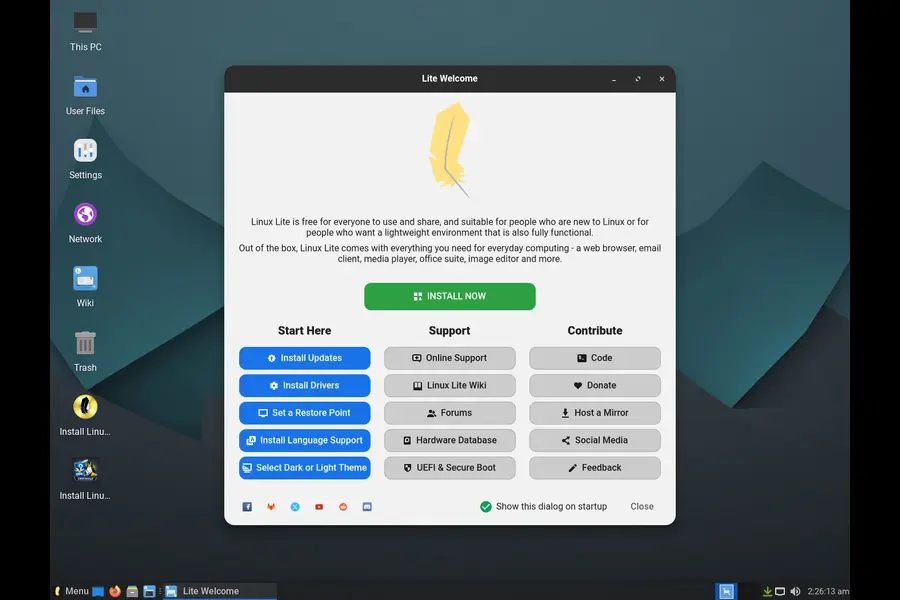
The project uses the XFCE desktop environment paired with LightDM, keeping things lightweight and snappy even on machines with modest specs. Over the years it’s quietly built one of the friendliest communities in the Linux world.
Series 8 marks 14 years since the project began, and the team describes this as “Linux Lite’s largest development cycle ever.” That claim holds up when you look at what’s actually changed.
Linux Lite 8.0 — Core Details at a Glance
| Detail | Information |
|---|---|
| Release Name | Linux Lite 8.0 Final |
| Base System | Ubuntu 26.04 LTS (Resolute) |
| Codename | Hematite |
| Desktop Environment | XFCE with LightDM |
| Kernel | Linux Lite Kernel 7.0 (Custom) |
| ISO Download Size | 2.36 GB |
| Architecture | 64-bit Only |
| Secure Boot Support | Not Supported (Secure Boot must be disabled before installation) |
The New Calamares Installer Replaces Ubiquity
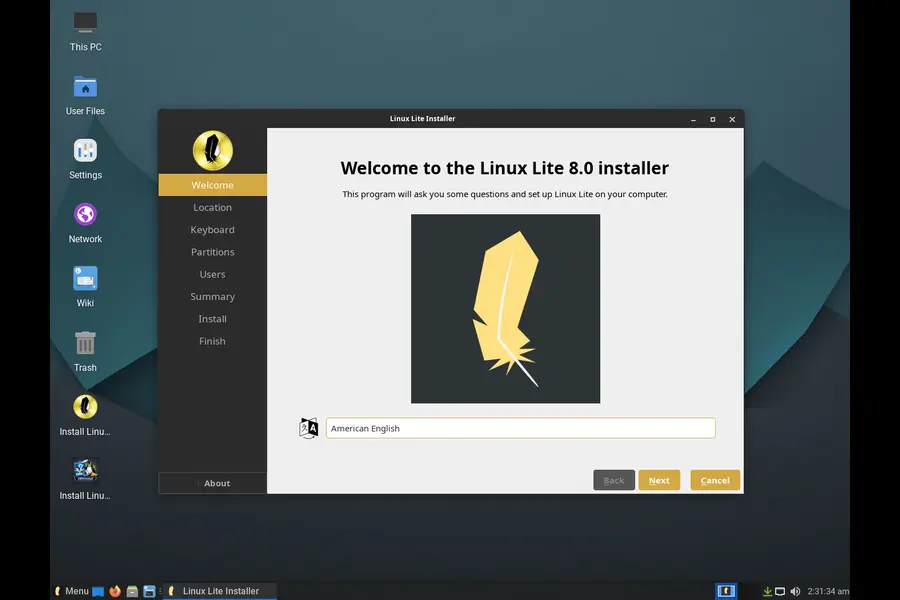
One of the most visible changes for anyone doing a fresh install is the switch from Ubiquity to Calamares. If you’ve tried to install other distros in the past, you’ve probably already encountered Calamares — it’s clean, modern, and gets you from ISO to working desktop without confusion.
The Linux Lite implementation adds their own branding, welcome page, and an installer slideshow that’s been translated into 25 languages. There’s also a dedicated OEM mode, which lets small shops and resellers pre-install Linux Lite on machines before handing them to customers.
A few practical notes:
- No internet required during installation
- APT defaults to a mirror matching the city you select during setup
- Installer log is stored at /root/.cache/calamares/session.log for troubleshooting
- BTRFS and XFS filesystem options are now available from the installer, in addition to the standard EXT4
The Ubiquity installer served its purpose for years, but Calamares is simply a better experience in 2026. This is a welcome change.
Custom Performance Kernels — A Standout Feature
This is where Series 8 gets genuinely interesting for power users. Linux Lite 8.0 ships with two custom-built kernels developed specifically for the distro:
linuxlite — Default Desktop Kernel
The kernel every installation boots into by default. It prioritizes responsive, smooth performance for everyday use — web browsing, office work, media playback, and general tasks. It uses dynamic preemption, which balances throughput and responsiveness and can switch between modes at runtime.
linuxlite-gaming — Optional Gaming Kernel
A step further. This one uses full preemption, allowing the kernel to interrupt almost any running task immediately. The result is lower input lag and better frame delivery for games and audio/video production work. You can install it at any time without removing the default kernel.
Both kernels include:
- The EEVDF scheduler as a base
- BORE (Burst-Oriented Response Enhancer) scheduler modification — this tracks how long tasks run in short, intense bursts and uses that data to boost the priority of responsive, interactive work. Translation: your desktop stays snappy even when something is hammering the CPU in the background.
Managing these kernels is handled through the new Lite Kernel Manager, which also includes a built-in benchmarking tool. Users can upload scores to a central leaderboard at linuxliteos.com/benchmark.php, which should be an interesting community resource once it fills up.
Full technical details for the custom kernels are documented on separate pages at the Linux Lite website — there’s enough there to keep performance enthusiasts busy.
A Suite of Brand-New Applications
This is where Series 8 really separates itself from a routine release. The team has built an entire suite of new in-house applications from scratch, mostly written in Python and GTK4. Here’s a rundown of what’s new:
Lite Game Center
Probably the most talked-about addition. Hit one button and it installs Steam, Lutris, Proton, Wine, game controller support, and several popular utilities — all in one go. If you prefer to pick and choose, you can install components individually. Getting Linux gaming set up used to mean a trip through terminal commands and forum guides. This makes it a few clicks.
Lite Driver Manager
A fork of Mint’s driver manager. It identifies your graphics hardware by name, tells you whether the open-source or proprietary driver is recommended, and installs it with a single click. It also clearly tells you when no additional driver is needed — which is genuinely helpful for people who aren’t sure what their system already has.
Lite Terminal
Built from scratch in Vala + VTE + GObject, this is a proper modern terminal emulator with a surprisingly small memory footprint. Features include:
- Predictive auto-complete
- Beautiful font rendering (JetBrainsMono LL Nerd Font)
- Title bar that turns light red when you’re running as sudo — a smart visual safety reminder
- Extensive right-click context menu
Lite Distro Builder
Want to roll your own customized version of Linux Lite? This tool lets you build a custom installer image directly from a running installation. Choose what gets included, click Build, and you get a USB-ready ISO you can share with others.
Lite Series Upgrade
A clean, fully featured upgrade path from Series 7 to Series 8. Features a dry run mode to simulate the upgrade before committing, real-time progress display with download speed, live scrolling log, and automatic backup of APT sources before any changes are made.
Lite Software (Replaces Synaptic)
A user-friendly app store with around 100 popular Linux applications organized by category. It includes a Snap package filter so you know exactly what kind of package you’re installing before you commit. Synaptic is gone — this is the replacement, and it’s significantly more approachable.
Lite Software Sources
A unified interface for managing Ubuntu repos, Linux Lite repos, mirrors, keyrings, and PPAs. It replaces Ubuntu’s software-properties-gtk and consolidates what used to require multiple tools into one place.
MyAI — Local AI Assistant
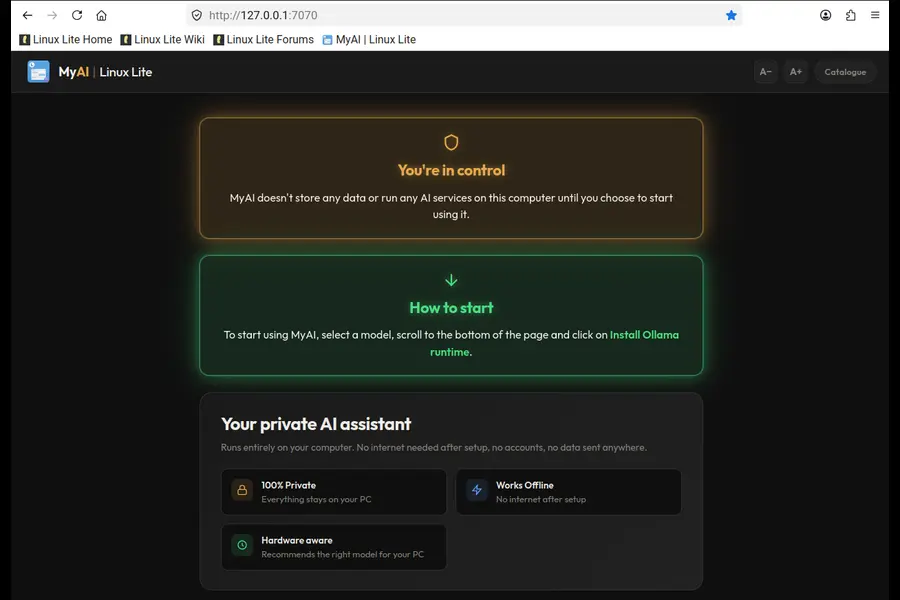
This one will get some attention. MyAI is a private, local AI assistant that runs completely on your own computer — no cloud account, no telemetry, nothing sent offsite. It suggests a model appropriate for your hardware, runs in a browser tab, and your conversation history stays on your machine.
The team was clearly thoughtful about this addition: it’s entirely optional, easily removed (sudo apt purge myai), and available in all Linux Lite supported languages. For users who want AI assistance without giving data to a third-party cloud service, this is a meaningful option.
Platform-Level Changes Worth Knowing About
Beyond the new apps, Series 8 brings several foundational changes:
- GTK4 everywhere — all Linux Lite GUI applications have been ported from GTK3/WebKit2 to GTK4. This is a significant undertaking and it means the UI layer is modern and consistent throughout.
- DEB822 format — APT sources have migrated from the older .list format to the newer .sources DEB822 format, which is cleaner and more maintainable.
- Python 3.14.4+ — up from 3.12 in Series 7.
- Firefox returns — and this time the Linux Lite team is hosting it themselves, eliminating the messy PPA situation that plagued previous series. Thunderbird 140.0 is also hosted directly.
- Btop replaces Htop — a nicer, more visual system monitor for the terminal.
- Fastfetch replaces Neofetch — Neofetch has been unmaintained for a while; Fastfetch is written in C, actively developed, and significantly faster.
- Starship replaces Powerline — a Rust-based cross-shell prompt that’s faster and more configurable.
- JPEG-XL and HEIC image support — both work out of the box, no extra packages required.
- ISO size reduced — down to 2.36 GB from 2.77 GB in Series 7, a 410 MB saving.
- Translation coverage — all Linux Lite applications are translated into 22 languages, the desktop into 23, and the OEM installer into 25.
- Dirty Frag Vulnerability patched.
- New Plymouth boot theme — an animated feather spinner, script-based, replacing the old text-based theme.
Upgrading from Linux Lite 7.x
If you’re already on Series 7, there’s a supported upgrade path. The process goes like this:
- Backup first — use Clonezilla to clone your disk, or run a full Timeshift backup. Don’t skip this.
- Run sudo apt-get update && sudo apt-get dist-upgrade and reboot if prompted.
- Install the upgrade tool: sudo apt-get install lite-series-upgrade
- Open Menu > Settings > Lite Series Upgrade and follow the prompts.
- The upgrade takes 30 minutes to 2 hours depending on your connection and hardware.
The upgrade tool handles a lot automatically — DEB822 source deployment, APT source backup, XFCE wallpaper restoration after upgrade, Plymouth theme update, GRUB and initramfs rebuild, and cleanup of old .list files.
A word of caution: if you encounter errors, don’t retry immediately. Zip the upgrade log and post it in the Series to Series Upgrade Support forum section. The team is active there.
Note: there is no upgrade path to or from RC releases. RC builds were for testing only.
System Requirements
Linux Lite 8.0 doesn’t demand much from your hardware:
- Processor: 1.5 GHz Dual Core or better
- RAM: 4 GB
- Storage: 40 GB HDD/SSD/NVMe
- Display: 1366×768 resolution via VGA, DVI, DP, or HDMI
- Boot media: DVD drive or USB port
- Secure Boot: Must be disabled in firmware (UEFI)
- CSM: Should be enabled
The recommended partition layout for UEFI installs is a 512 MB FAT32 /boot/efi partition with boot flag, and the remainder as EXT4 mounted at /. For most users, the “Erase Disk” option in Calamares is the simplest and cleanest approach if you’re dedicating a drive to Linux Lite.
Where to Download Linux Lite 8.0 Final
The ISO is available from SourceForge and a network of mirrors worldwide:
- https://sourceforge.net/projects/linux-lite/files/8.0/
- Torrent (fastest): Available on SourceForge — please seed if you can
- Mirror locations: USA (Clarkson), UK, Germany, Netherlands, Sweden, Singapore, Hong Kong, Greece, Ecuador, China, and more
File verification hashes:
- MD5: af78a8761bc7a1b389ff6eeb3125afa4
- SHA256: 7cfc63baf597156a0a5ecac87e860aff3967279694b19fa67fb410a34802857e
Always verify the ISO against these checksums before writing to a USB drive.
For writing the ISO: Balena Etcher (cross-platform) and Rufus (Windows) are the team’s recommended tools. You can also use dd on Linux if you’re comfortable with that.
Default Software Included in 8.0
| Application | Version |
|---|---|
| Firefox | 151.0 |
| Thunderbird | 140.0 |
| LibreOffice | 26.2.2 |
| VLC Media Player | 3.0.2.3 |
| GIMP | 3.2.2 |
| Linux Lite Kernel | 7.0 (Custom) |
| Base System (Ubuntu) | 26.04 LTS |
First Thing to Do After Installing
The Linux Lite team is explicit about this: the first thing you must do after a fresh install is run Menu > Favorites > Install Updates. Last-minute features and tweaks are often added after the ISO is published, so running updates immediately gets you fully current.
Final Thoughts
Linux Lite 8.0 Final Officially Released Based on Ubuntu LTS is not a maintenance release. It’s a genuine generational leap — a new installer, two custom performance kernels, a full GTK4 application suite, built-in gaming support, a local AI assistant, and one of the most polished lightweight desktop experiences available on Linux today.
For anyone running older hardware who wants a stable, long-term supported system that doesn’t sacrifice usability — this is a very strong option. For newcomers to Linux, the combination of a clean installer, friendly applications, and an active support community makes the learning curve as gentle as it gets.
The team behind Linux Lite has been building this for 14 years, and Series 8 shows what that kind of sustained, community-driven effort looks like when it all comes together.
Disclaimer
The information provided on this website is for general informational purposes only. While we strive to keep content accurate and up to date, we make no warranties — express or implied — about the completeness, accuracy, or reliability of any information published here.
All product names, logos, and trademarks mentioned belong to their respective owners. We are not affiliated with, endorsed by, or officially connected to any of the projects, companies, or organizations referenced unless explicitly stated.
Any actions you take based on the content of this site are strictly at your own risk. We are not responsible for any losses, damages, or issues arising from the use of information found here.
External links are provided for convenience only. We have no control over the content of third-party sites and accept no responsibility for them.
Related Linux Articles You May Like
Explore more Linux news, distro updates, storage innovations, and AI-focused operating systems.


