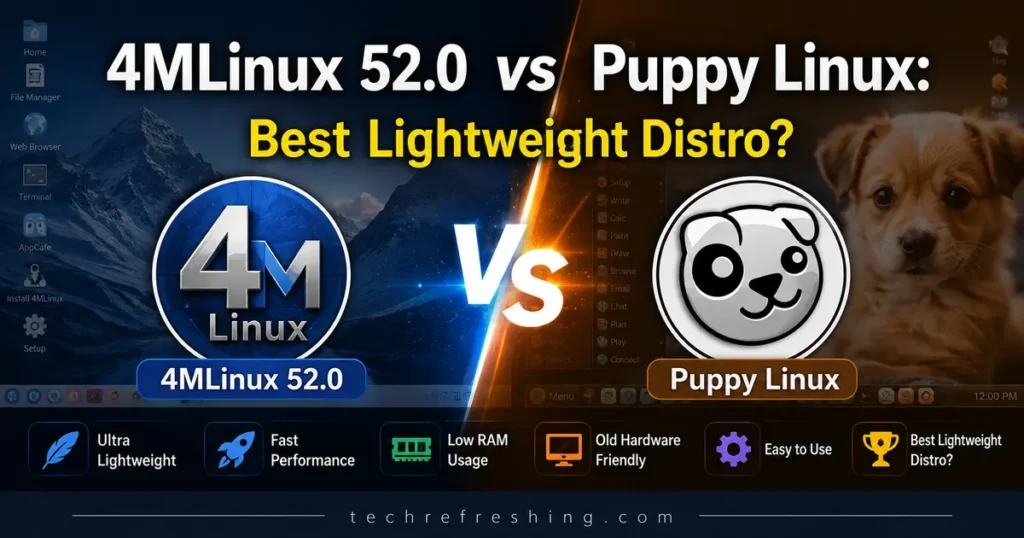
If your PC is old, slow, or just gathering dust in a closet, chances are someone has already told you to “try a lightweight Linux distro.” Two names come up again and again in that conversation: 4MLinux and Puppy Linux. Both are tiny, both are fast, and both have loyal followings that have stuck around for decades. But 4MLinux 52.0 vs Puppy Linux is not really an apples-to-apples fight — these two projects were built with different goals in mind, and picking the wrong one for your situation can leave you frustrated.
4MLinux just pushed out version 52.0 as a stable release at the end of July 2026, built on the freshly minted Linux 6.18 LTS kernel. Puppy Linux, meanwhile, isn’t really “one” distro anymore — it’s a whole family of community-built flavors (BookwormPup, TrixiePup, NoblePup, and others) that share the same DNA but look and feel quite different depending on which build you grab. In this guide I’ll walk through what each one actually does well, where each one falls short, and which one deserves a spot on your rescue USB drive.
What Is 4MLinux 52.0, Exactly?
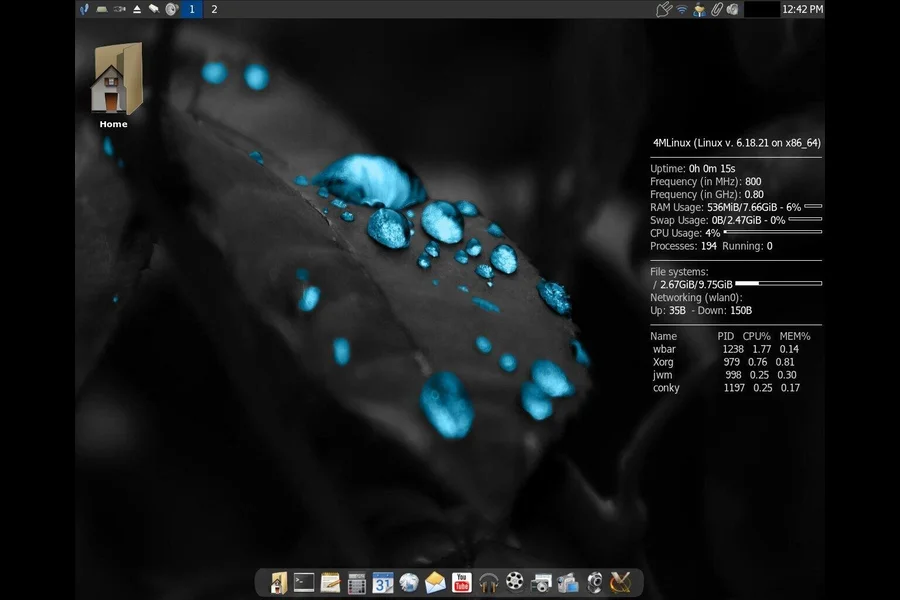
4MLinux is a Polish-developed, independent Linux distribution maintained almost single-handedly by Zbigniew Konojacki. It’s called “4M” because it was originally designed around four core missions: maintenance, multimedia, miniserver, and mystery (gaming). Over the years the “maintenance” side has become the project’s real calling card — it’s one of the best rescue and recovery discs you can carry around, full stop.
Version 52.0 went stable on July 31, 2026, about four months after 4MLinux 51.0. The headline change is the jump to the Linux 6.18 LTS kernel series, replacing the older 6.12 LTS branch. That matters more than it sounds like — kernel 6.18 was designated an LTS release in December 2025 and will get security patches through December 2027, so anyone running 52.0 is sitting on a genuinely supported foundation rather than a dead-end branch.
Here’s what else landed in this release:
- Mesa 26.0.3 graphics stack, with noticeably better handling of legacy graphics cards
- Simplified Wi-Fi configuration, which has historically been one of 4MLinux’s rougher edges
- Support for Ultra HDR images via libultrahdr and ImageMagick
- New apps and utilities: Rocks’n’Diamonds, the Elvis vi clone, PDF Tricks (a Ghostscript-based PDF image tool), plus ksh and audioconvert baked in by default
- Updated core packages: LibreOffice 26.2.5, Firefox 153.0, Thunderbird 153.0, GIMP 3.2.4, Audacious 4.6.1, VLC 3.0.23, and Python 3.14.3 / PHP 8.5.4 for anyone doing dev or server work
The distro comes in two editions — Full and Core. The Full ISO gives you the complete desktop experience with Firefox, LibreOffice, and the works. The Core edition is the truly extreme version: it’s built to run in as little as sixteen megabytes, which sounds almost unbelievable in 2026, but that’s the whole point. It’s meant for emergency recovery situations where you need something that boots in seconds on hardware that’s on its last legs.
One thing worth flagging: 4MLinux is 64-bit only. If you’ve got a genuinely ancient 32-bit machine, this isn’t your tool.
What Is Puppy Linux, and Why Is It a “Family” Instead of One Distro?
Puppy Linux started life back in 2003, created by Barry Kauler, and it’s built around a totally different philosophy than 4MLinux. Instead of one team pushing out numbered releases on a schedule, Puppy is a framework — called Woof-CE — that different community builders use to “bake” their own Puppy variant on top of whichever upstream base they like: Ubuntu, Debian, Void, you name it.
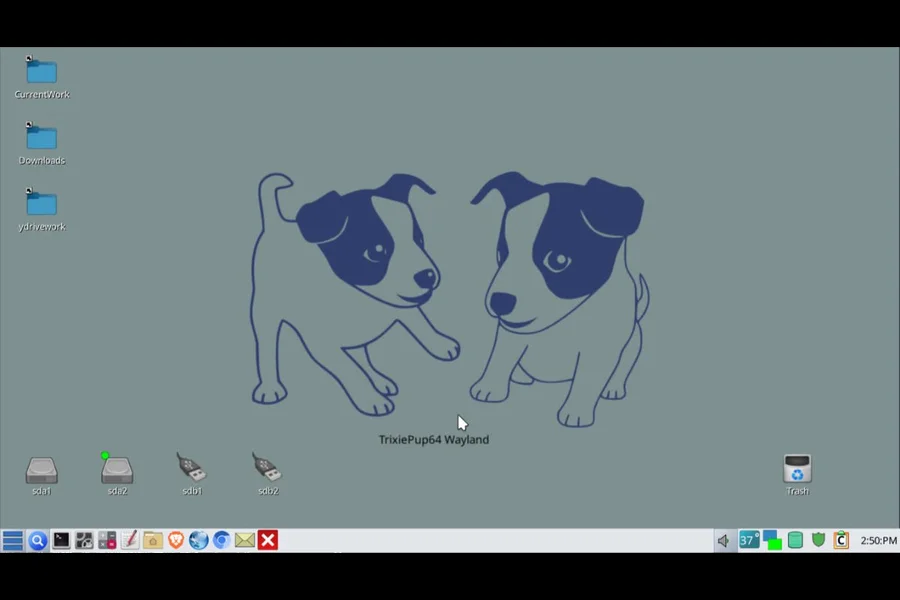
That’s why, in mid-2026, there’s no single “Puppy Linux 2026” version number to point to. Instead you’ll find a handful of actively maintained builds, including:
- BookwormPup64 10.0.10 — based on Debian Bookworm, currently one of the most stable and widely recommended 64-bit builds
- TrixiePup (2601-260212 and later builds) — based on Debian Trixie, notable for being one of the first Puppy builds to ship with Wayland support, and coming in at roughly 1.1GB, which Puppy fans consider “the smallest, most full-featured” option right now
- NoblePup32 — an Ubuntu Noble-based build aimed at 32-bit hardware
- Community-built variants from developers like PeaBee, distributed through GitHub and mirrored on SourceForge
This structure is both Puppy’s greatest strength and its biggest source of confusion for newcomers. You get an enormous amount of choice and flexibility, but “just download Puppy Linux” isn’t as simple advice as it sounds — you actually need to pick a flavor that matches your hardware and your comfort level with occasional rough edges.
What hasn’t changed across two decades of Puppy builds is the core experience: everything loads into RAM at boot, so once it’s up, the whole system feels instant. Puppy typically ships with 200+ applications pre-installed — file managers, a browser, a word processor, a spreadsheet, a PDF viewer, media players, screenshot and screen recording tools — and it runs comfortably from a USB stick with full persistence, meaning your settings and files survive a reboot even without installing anything to the hard drive.
Head-to-Head Comparison Table
| Feature | 4MLinux 52.0 | Puppy Linux (2026 builds) |
|---|---|---|
| Release model | Single team, scheduled stable releases | Community-built family, rolling flavors |
| Latest version | 52.0 STABLE (July 31, 2026) | BookwormPup64 10.0.10, TrixiePup 2601-260212, others |
| Kernel | Linux 6.18 LTS | Varies by build (typically upstream Debian/Ubuntu kernel) |
| Architecture support | 64-bit only | x86, x86-64, and ARM builds available |
| Minimum RAM | ~200MB (Full), 16MB (Core edition) | Roughly 256MB–512MB depending on flavor |
| ISO size | Full edition several hundred MB; Core edition extremely minimal | Around 1.1GB–1.5GB for most modern builds |
| Default desktop | JWM (Joe’s Window Manager) | JWM/IceWM + ROX, or Wayland-based UI on newer builds |
| Package manager | Add-on system (250+ downloadable modules) | Puppy Package Manager |
| Pre-installed apps | Firefox, LibreOffice, GIMP, Thunderbird, VLC, Audacious | 200+ apps out of the box, including office suite and media tools |
| Server tools | Built-in HTTP/FTP server, SSH, NFS, NTP, TFTP | Not a core focus; possible via add-ons |
| Best use case | System rescue, recovery, retro/legacy hardware, light server duties | Daily-driver lightweight desktop, USB-portable OS |
| Update cadence | Steady, multiple stable releases per year | Depends entirely on which flavor and maintainer you pick |
| Documentation/community | Small but dedicated, official forums at LinuxQuestions.org | Large, very active forum culture, decades of shared knowledge |
Performance and Hardware Requirements
This is where the two distros really start to pull apart. 4MLinux’s Full edition happily runs on 200MB of RAM, and that’s already impressive for a distro that includes a full office suite and modern browser. But the Core edition is in a category of its own — a live environment that fits inside sixteen megabytes. There’s genuinely nothing else in mainstream use today that goes that low while still being useful.
Puppy Linux, depending on the flavor, generally wants a bit more breathing room — somewhere in the 256MB to 512MB range for a comfortable experience, especially with newer Debian Trixie-based builds that lean into Wayland. That’s still tiny compared to a modern desktop OS, but it’s meaningfully heavier than 4MLinux’s rescue-mode footprint.
If you’re working with a machine from the Pentium or early Core 2 Duo era with barely any RAM, 4MLinux’s Core edition is going to boot when almost nothing else will. If you’re working with something from the past 10-15 years that just feels sluggish under Windows or a heavier Linux distro, either one will fly — but Puppy’s fuller app selection out of the box makes it feel less like a rescue tool and more like an actual desktop replacement.
Software and Package Management
4MLinux takes a curated approach. Rather than a sprawling repository, it ships a solid base set of applications and lets you bolt on more than 250 downloadable add-ons — things like extra games, dev tools, or specialized utilities. It’s simple, it avoids bloat, and it fits the “grab exactly what you need” philosophy of a rescue disc.
Puppy’s approach is broader by default. Most builds arrive with 200-plus applications already installed, covering office work, media, graphics, and utilities, and then the Puppy Package Manager lets you pull in more from whichever repository the specific flavor is built against (Debian, Ubuntu, or Void, depending on the build). For someone who wants to actually live in the OS day to day rather than just use it for an emergency, that’s a real advantage — less hunting around for add-ons, more things just working the moment you boot.
Stability, Support, and Long-Term Viability
4MLinux benefits from having a single, consistent maintainer and a predictable release cycle. The 52.0 series is now the current stable branch, the 51 series has moved to “OLD STABLE” with an end-of-life set for November 2026, and the 50 series is already unsupported. That kind of clear lifecycle messaging is genuinely useful — you always know exactly where you stand and when you need to upgrade.
Puppy Linux’s support story is more fragmented, which is the natural cost of a community-driven, multi-flavor model. BookwormPup64 has become something of an unofficial standard because of its stability, while TrixiePup builds are newer and occasionally get flagged by users on the forums and SourceForge reviews as having rough patches — installation quirks with certain USB tools, graphics driver mismatches in virtual machines, that sort of thing. None of this means Puppy is unreliable; it means you need to read a bit of community feedback before picking a specific build, rather than assuming every “Puppy Linux” download behaves identically.
Who Should Choose 4MLinux 52.0?
4MLinux Pros:
- Genuinely tiny footprint, especially the Core edition
- Runs on Linux 6.18 LTS, so it’s supported well into 2027
- Built-in server tools (HTTP/FTP, SSH, NFS, TFTP) make it useful for sysadmin work, not just rescue jobs
- One clear release, one clear upgrade path, easy to track EOL dates
- Great legacy GPU support after the 52.0 update
4MLinux Cons:
- 64-bit only, so it won’t help with truly ancient 32-bit hardware
- Smaller default app selection compared to Puppy’s out-of-the-box loadout
- Smaller community, so troubleshooting resources are thinner
- Feels more like a specialist tool than a full-time desktop OS for most people
4MLinux makes the most sense if you’re a sysadmin, an IT hobbist, or someone who just wants a bulletproof rescue USB sitting in a drawer for the day a machine won’t boot. It’s also a solid pick for reviving old hardware as a lightweight file server or NAS-style box, thanks to those built-in server protocols.
Who Should Choose Puppy Linux?
Puppy Linux Pros:
- Loaded with software right out of the box — no add-on hunting required
- Multiple flavors mean you can match the build to your exact hardware and base OS preference
- Long track record and an enormous, active community with decades of accumulated fixes and guides
- Genuinely good as a full-time lightweight desktop, not just a recovery tool
- Runs comfortably from USB with full persistence
Puppy Linux Cons:
- No single “current version” — choosing the right flavor takes a bit of research
- Some newer builds (like early Trixie-based Wayland versions) have had reported installation and compatibility hiccups
- Slightly higher RAM requirements than 4MLinux’s most extreme configuration
- Update reliability varies by which community maintainer built your specific flavor
Puppy Linux is the better pick if you want a lightweight distro you can actually live in day to day — browsing, writing documents, watching videos — on an older laptop or a machine you’ve repurposed as a portable “OS in your pocket” on a USB stick.
Final Verdict: 4MLinux 52.0 vs Puppy Linux
There isn’t one universal winner here, and honestly, that’s the honest answer. 4MLinux 52.0 vs Puppy Linux really comes down to what job you need done. If your priority is an emergency rescue tool, a lightweight server OS, or something that boots on hardware other distros have given up on, 4MLinux 52.0 is hard to beat — especially now that it’s riding on the Linux 6.18 LTS kernel with years of support ahead of it. If your priority is a lightweight everyday desktop with a huge app selection and a massive community backing it up, Puppy Linux — specifically a well-reviewed build like BookwormPup64 — is going to serve you better.
My honest recommendation: keep a 4MLinux Core ISO on a USB stick for emergencies, and if you want a distro to actually use day to day on older hardware, grab a stable Puppy flavor. They’re not really competitors so much as two different tools that happen to share the same “lightweight Linux” label — and having both in your toolkit covers more ground than picking just one.
Frequently Asked Questions
Is 4MLinux 52.0 good for daily use, or only for rescue purposes?
It can handle daily use thanks to Firefox, LibreOffice, and GIMP being included, but its minimal app selection and rescue-first design mean most users still treat it as a specialist recovery and maintenance tool rather than a primary desktop.
Which Puppy Linux version should I download in 2026?
BookwormPup64 10.0.10 is currently the most widely recommended stable build for most users, while TrixiePup is worth trying if you specifically want early Wayland support.
Can 4MLinux run on 32-bit computers?
No, 4MLinux 52.0 is 64-bit only, so genuinely old 32-bit hardware will need a different lightweight distro, such as a 32-bit Puppy build like NoblePup32.
How much RAM do I actually need for these distros?
4MLinux’s Core edition can run in as little as 16MB, its Full edition wants around 200MB, and most modern Puppy Linux builds are comfortable in the 256MB to 512MB range.
Is Puppy Linux still actively developed in 2026?
Yes, Puppy Linux is very much alive, with multiple community-built flavors like BookwormPup64 and TrixiePup receiving regular updates through the Woof-CE build system.
Which distro is smaller in download size?
4MLinux’s Core edition is dramatically smaller than any Puppy build, though for the more full-featured Full edition and typical Puppy ISOs (around 1.1GB to 1.5GB), the difference is much less extreme.
Disclaimer
This article is based on publicly available information from official project pages and release announcements as of August 2026. Software versions, features, and system requirements for both 4MLinux and Puppy Linux may change after publication — always check the official 4MLinux and Puppy Linux websites for the latest downloads and release notes before installing.
🚀 Continue Your Linux Journey
If you enjoyed this article, don’t stop here. Explore our carefully selected Linux guides, distro reviews, and beginner-friendly tutorials to deepen your knowledge.