
Why Linux Uses Swap Even with Plenty of RAM
If you’ve ever opened htop on a machine with 32GB or even 64GB of RAM and noticed a few hundred megabytes sitting in swap, you’ve probably asked yourself the same question every Linux user eventually asks: why is this happening when I have all this memory sitting free? It looks like a bug. It feels wasteful. And it’s the subject of more forum arguments than almost any other kernel behavior.
Here’s the short version: why Linux uses swap even with plenty of RAM comes down to how the kernel’s memory manager thinks about efficiency, not scarcity. Swap isn’t a last-resort panic button — it’s a proactive tool the kernel uses to keep your system responsive, your RAM full of useful data, and your applications fast. Once you understand the mechanism behind it, the behavior stops looking like a glitch and starts looking like good engineering.
This post breaks down exactly what’s going on under the hood, what the numbers actually mean, how modern kernels (as of the 6.18 LTS and 7.1 stable branches released in July 2026) handle this differently than a decade ago, and how to tune it if you decide the defaults aren’t right for your workload.
What Swap Actually Is (And What It Isn’t)

Swap is a reserved area of disk — either a dedicated partition or a swap file — that the kernel uses as an extension of RAM. When the kernel decides a page of memory hasn’t been touched in a while, it can write that page out to swap and reclaim the physical RAM for something more useful.
The common misconception is that swap only kicks in when RAM is nearly full. That’s true for emergency swapping, the kind that causes your desktop to freeze while everything grinds to a halt. But there’s a second, much more common type of swapping that has nothing to do with running low on memory. It’s proactive, it’s small, and it’s usually invisible unless you go looking for it.
Those two behaviors get lumped together in people’s minds, and that’s where the confusion starts.
I’ve seen this play out on a personal workstation with 32GB of RAM: free -h showed roughly 18GB free, yet swapon --show reported around 400MB in use. Nothing was slow. No app had been killed. The 400MB turned out to be memory pages from a browser tab that had been idle since the previous evening — the kernel had quietly moved them out overnight to make room for that day’s compiler cache. That’s the pattern this article is about.
The Real Reason: RAM Is Not Actually Free, It’s a Cache
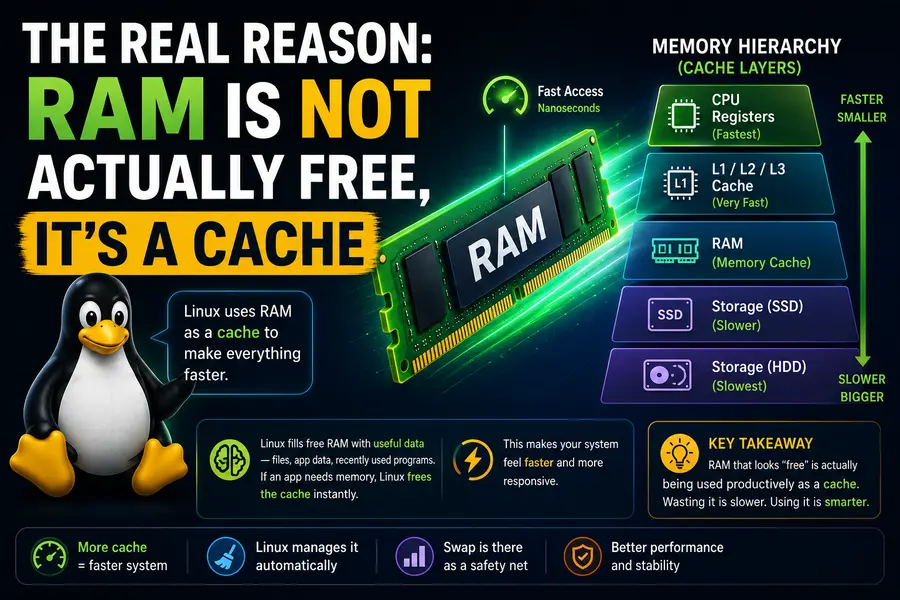
Linux treats unused RAM as wasted RAM. Anything sitting idle in memory is an opportunity cost. So the kernel’s memory manager is constantly trying to answer one question: what’s the most valuable thing I can keep in fast memory right now?
That “most valuable thing” is usually not your application’s rarely-touched memory pages — it’s disk cache. Every file you read, every library you load, every database index gets cached in RAM under the page cache. That cache is what makes a second git status, a repeated database query, or reopening a big project in your IDE feel instant instead of taking several seconds.
The problem is that application memory and page cache are competing for the same physical RAM. If an application allocated 4GB of memory eight hours ago and has touched only 200MB of it since, the kernel sees an opportunity: move the cold 3.8GB out to swap, and use that freed RAM to cache files you’re actively working with right now. This is the logic laid out in the official Linux kernel memory management documentation, which frames reclaim as an ongoing balancing act between anonymous memory (your app’s data) and the page cache — not a response to scarcity.
In other words, that little sliver of swap usage is inventory management, not distress. The kernel is moving stale boxes to the back room so the front shelf stays stocked with what you actually need.
Swappiness: The Dial Nobody Understands
The kernel’s aggressiveness here is controlled by a value called swappiness, which ranges from 0 to 200 on modern kernels (older kernels capped it at 100). You can check yours right now:
cat /proc/sys/vm/swappinessMost desktop distributions — Ubuntu, Fedora, Debian — ship with a default of 60. Some server-oriented images and cloud instances default lower, often around 10 to 30, because latency-sensitive workloads like databases don’t want any swapping if it can be avoided. The ArchWiki’s swap page is one of the clearer community-maintained explanations of what each value actually changes, and it’s worth a read if you want to go deeper than this article.
Here’s what the number actually controls, and this is the part people get wrong: swappiness is not a percentage of RAM usage that triggers swapping. It’s a relative preference between reclaiming page cache and swapping out anonymous memory. A higher number means the kernel favors swapping idle application memory to preserve cache. A lower number means it favors dropping cache pages first and only swaps application memory as a last resort.
| Swappiness Value | Kernel Behavior | Best Suited For |
|---|---|---|
| 0–10 | Almost never swaps unless truly necessary; drops cache aggressively instead | Databases (PostgreSQL, MySQL), latency-critical services |
| 30–60 | Balanced; swaps cold pages while preserving reasonable cache | General desktop and workstation use |
| 60 (default) | Standard Ubuntu/Debian/Fedora behavior | Everyday multitasking, laptops |
| 100 | Treats swap and RAM reclaim roughly equally | Systems with fast NVMe swap and heavy multitasking |
| 100–200 | Strongly favors swap over cache eviction (newer kernels only) | Systems with zram/zswap where “swap” is compressed RAM, not disk |
If you’re running a workstation with 64GB of RAM and you’re annoyed by a Chrome tab getting swapped out, dropping swappiness to 10 will noticeably change that behavior. If you’re running a database server, that same low value can be the difference between predictable query times and random latency spikes.
Swap Prevents the “Everything Is Fine Until It Isn’t” Problem
Memory usage on a real system doesn’t grow smoothly. It spikes. A background backup job kicks off, a browser opens forty tabs, a build system spins up parallel compiler processes, and suddenly you need several extra gigabytes of RAM for maybe ninety seconds.
Without swap, the kernel’s only options when RAM runs out are:
- Deny the memory allocation outright (programs crash or refuse to start)
- Invoke the OOM killer, which forcibly terminates a process — sometimes the wrong one
With swap available, the kernel has a pressure valve. It can push out memory that hasn’t been touched recently, absorb the spike, and let things settle without killing anything. This is precisely why AWS’s own knowledge base walks through adding swap to EC2 instances even though instances already ship with generous RAM — it’s cheap insurance against an OOM event killing a critical process during a traffic spike. Red Hat’s storage administration documentation makes a similar point: swap space exists to give the kernel breathing room, not just to extend total capacity.
Hibernation: The Other Reason Swap Exists
If you use suspend-to-disk (hibernation) on a laptop, swap isn’t optional — it’s the mechanism. Hibernation works by writing the entire contents of RAM to swap space before powering off, then reading it back on boot. If your swap partition or file is smaller than your RAM, hibernation simply won’t work correctly, which is why Ubuntu’s community SwapFaq still recommends swap space at least equal to RAM size if you plan to hibernate.
This has nothing to do with normal swapping behavior during runtime, but it’s a big reason distributions still create swap space by default even on machines with 32GB or 64GB of memory.
Modern Linux Handles This Smarter Than It Used To
If your mental model of swap comes from Linux in the 2010s, it’s worth updating. Several changes have made swap far less painful and far more precise:
Multi-Gen LRU (MGLRU). Merged into mainline a few years ago and now standard across the 6.x and 7.x kernel series, MGLRU replaced the older two-list active/inactive page reclaim scheme with a generational model that tracks page “age” far more accurately. It picks genuinely cold pages to evict instead of relying on coarse approximations, which means less thrashing and fewer cases where actively-used memory gets mistakenly swapped out.
zswap and zram. Instead of writing swapped pages straight to a spinning disk or even an SSD, many distributions now compress memory pages in RAM itself before ever touching storage. zram creates a compressed block device in memory; zswap sits as a compressed cache in front of your real swap device. Because compression ratios for typical memory pages run 2:1 to 4:1, this means “swapping” often costs a few microseconds of CPU time instead of a disk I/O round trip. Fedora, openSUSE, and most major distributions have shipped zram-backed swap by default for several release cycles now precisely because it removes the old “swap equals slowdown” stigma.
Faster storage changes the math entirely. Swapping to a mechanical hard drive in 2012 could mean multi-second stalls. Swapping to an NVMe SSD in 2026 often completes in under a millisecond — genuinely imperceptible for most cold-page evictions. If you’re still picturing swap as “the thing that makes your computer freeze,” you’re picturing hardware from over a decade ago.
Recent kernel releases keep refining reclaim. The July 2026 stable cycle pushed out the 6.18 LTS branch and the 7.1.x series with continued maintenance updates, and memory management remains one of the more active subsystems for tuning and bug fixes each cycle. Reclaim heuristics and multi-device swap handling aren’t settled, finished territory — they’re still being actively worked on, which is a good sign for anyone worried the current approach is stagnant or outdated.
Should You Disable Swap on a High-RAM System?
You technically can, and some people do, especially on dedicated single-purpose servers. But for most systems, it’s a bad trade:
Reasons to keep swap enabled:
- It gives the OOM killer room to breathe instead of triggering immediately under a temporary spike
- It enables hibernation on laptops
- It lets the kernel keep more useful data cached, improving overall responsiveness
- With zram, the performance cost is often close to zero
Reasons some people disable it:
- Predictable latency requirements where any swap I/O, even rare, is unacceptable (some real-time or high-frequency trading setups)
- Systems where the workload is well understood and memory usage is capped hard by other means (cgroup limits, container memory limits)
- A strong preference for “fail fast and loud” over “silently degrade”
If you do disable swap entirely, you should also lower vm.overcommit_memory scrutiny and be prepared for the OOM killer to act more abruptly, because you’ve removed its safety margin.
How to Check and Tune Swap on Your System
A few practical commands worth knowing:
# See current swap usage
swapon --show
free -h

# Check current swappiness
cat /proc/sys/vm/swappiness

# Temporarily change it (resets on reboot)
sudo sysctl vm.swappiness=20

# Make it permanent
echo "vm.swappiness=20" | sudo tee -a /etc/sysctl.conf
A reasonable approach: leave swappiness near default on a general-purpose desktop, lower it to somewhere around 10–20 on a database or latency-sensitive server, and consider adding zram if your distribution doesn’t already ship it — it’s a low-risk way to get swap’s benefits with almost none of the historical downside.
Frequently Asked Questions
Does having swap slow down my computer?
Not by default — modern kernels only swap out cold, rarely-used pages, and with zram-backed swap the performance cost is usually negligible.
Is it bad if swap usage shows a small amount even with free RAM available?
No, a small amount of swap usage (a few hundred MB) is normal and indicates the kernel is optimizing memory for cache, not a problem.
Should I disable swap if I have 32GB or 64GB of RAM?
Generally no — swap still helps with memory spikes, hibernation, and OOM prevention, and the cost is minimal with modern zram/zswap setups.
What swappiness value should I use for gaming or a workstation?
A lower value like 10–30 is often preferred to avoid swapping active applications, though the default of 60 is rarely noticeable on machines with 16GB or more.
Does more RAM mean I need less swap?
Not necessarily — more RAM reduces how often heavy swapping occurs, but a small swap space (or zram) is still recommended for stability and hibernation support.
The Bottom Line
Swap on a high-RAM system isn’t evidence that something is wrong. It’s evidence that Linux’s memory manager is doing exactly what it was designed to do: treat idle memory as wasted potential and keep your actively used data as fast to access as possible. Understanding why Linux uses swap even with plenty of RAM reframes the whole behavior — from a red flag into a quiet, well-engineered background process that’s been refined across decades of kernel development, right through the 6.18 LTS and 7.1 stable branches maintained in 2026.
If anything, the presence of a little swap usage on your system is a decent sign the kernel is paying attention.
Disclaimer
This article is for general informational and educational purposes only. Swap and memory management behavior can vary depending on your Linux distribution, kernel version, hardware, and workload, so results may differ from those described here. Always back up important data and test any system-level changes (such as adjusting swappiness or swap configuration) in a safe or non-production environment before applying them to critical systems.
About the Author