Android 16 Unveiled — the latest chapter in Google’s mobile OS evolution — is here, and it’s shaping up to be one of the most significant updates in the history of the Android operating system. Officially launched in June 2025, Android 16—codenamed “Baklava”—brings a variety of enhancements that focus on improving user experience, security, performance, and accessibility.
In this comprehensive post, we’ll explore the top 12 features of Android 16 that are set to redefine how you use your smartphone.
1. Live Updates: Real-Time Notifications
Android 16 introduces Live Updates, a powerful new system that brings real-time updates directly to your lock screen and notification panel. Whether you’re tracking a food delivery, waiting for a cab, or monitoring a live sports score, Live Updates will keep you informed without needing to open an app.
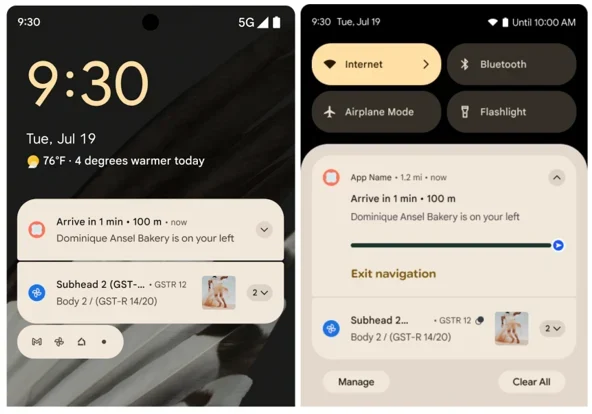
Live Updates are supported by Jetpack Compose for easy implementation by developers, allowing real-time information cards to be beautifully rendered. For end users, this means less app-switching and more focused interactions. Android now not only communicates updates faster but does so with an engaging visual layer that is both elegant and functional.
2. Material 3 Expressive: A Visual Makeover
The new Material 3 Expressive design language brings a more polished and immersive visual experience. It includes updated animations, more dynamic color schemes, and improved typography. The interface now feels more fluid, with better haptics and motion design.
Material 3 Expressive also improves support for languages with complex scripts, especially for users in India and Southeast Asia. This means a more inclusive and visually appealing interface across a wider range of devices.
Additionally, it brings enhanced support for Dark Mode and better dynamic theming, offering users a personalized experience tailored to their wallpaper or preferences. App developers can now tap into new design tokens to craft interfaces that feel native, yet uniquely branded.
3. Desktop Windowing & External Display Support
One of the standout features in Android 16 is the introduction of desktop-style windowing. Users can now resize app windows and run multiple apps simultaneously on larger screens and external displays.
Combined with support for keyboard shortcuts and taskbars, this feature transforms your Android device into a full-fledged productivity workstation—especially useful for tablets and foldable devices.
This opens up new avenues for professional use-cases. Imagine connecting your phone to a monitor and using it like a Chromebook—complete with floating app windows, resizable views, and intuitive multitasking. Developers can also utilize Jetpack WindowManager APIs to fine-tune app behavior across screen sizes.
4. Gemini AI Integration
Google has introduced Gemini AI as the new standard assistant, gradually replacing Google Assistant. Gemini brings context-aware interactions, smarter recommendations, and improved voice recognition.
It integrates deeply into Android 16, offering proactive suggestions, task automation, and conversational search that feels more natural and intuitive. Need to find that PDF you downloaded last week? Just ask Gemini.
Gemini is not just voice-based—it’s contextually aware, meaning it can respond based on what’s on your screen, recent activity, and even understand complex commands like “Share this image with Mom on WhatsApp.”
5. Advanced Security Features
Security gets a major upgrade in Android 16 with the addition of several new tools:
- Advanced Protection Mode: Shields your device from malicious apps and phishing attempts.
- USB Port Blocking: Prevents unauthorized data access via USB.
- Offline Device Lock: Keeps your device protected even without internet access.
- Factory Reset Protection Loop: Stops thieves from wiping your device.
- Scam Detection: On-device AI now alerts you to potential fraud during calls and messages.
- Notification Cooldown: Prevents spam apps from flooding your screen with alerts.
These layers of protection make Android 16 the most secure version yet.
For enterprise users, Android 16 expands on managed device security by offering stricter policy controls and compatibility with zero-trust environments.
6. Accessibility Enhancements
Android 16 focuses heavily on accessibility with features like:
- Outline Text: Adds a multi-color outline to text for better readability.
- LE Audio for Hearing Aids: Connect hearing aids via Bluetooth LE and use your phone as a microphone.
- Native Hearing Aid Controls: Adjust settings directly from your device.
Other improvements include magnification across all apps, better TalkBack support, and new gesture customizations for those with motor impairments. Google’s Accessibility Suite gets a comprehensive update to ensure that everyone—regardless of ability—can use Android comfortably.
7. Battery Health Monitoring
For the first time, Android includes a dedicated battery health dashboard. It shows your battery’s current capacity, charge cycles, and provides alerts when it’s time for a replacement.
The new settings panel includes estimated lifespan forecasts and usage tips for battery longevity. This feature empowers users to take better care of their devices and reduces e-waste by extending battery life.
Manufacturers can integrate deeper diagnostics, while developers of battery-intensive apps can use new APIs to monitor impact and optimize background activities.
8. Camera and Media Upgrades for Creators
Android 16 adds a host of tools for mobile photography enthusiasts and content creators:
- Night Mode Detection: Automatically adjusts settings for low-light conditions.
- Hybrid Auto-Exposure: Produces better balanced photos.
- Color Temperature Controls: For more accurate and creative shots.
- Ultra HDR and HEIC Support: Get better image quality with smaller file sizes.
- Motion Photo Improvements: Capture short clips seamlessly.
With the Camera2 and CameraX updates, third-party apps can now access more granular controls previously reserved for system apps. Creators will appreciate faster shutter response and better video frame rate stability.
9. Smarter Notification Grouping
To reduce clutter, Android 16 now auto-groups notifications by app and context. You’ll see your chats, reminders, and updates neatly categorized, making it easier to focus on what matters.
Notifications from apps like rideshares or food delivery services will show a continuous, real-time update without bombarding you with alerts.
The update also introduces new priority levels and user-defined grouping options, letting users define which notifications should appear during Focus Mode or Do Not Disturb periods.
10. Adaptive Apps and Predictive Back Navigation
With Android 16, apps are required to support adaptive layouts for devices with larger screens. This is a huge win for foldable phone and tablet users.
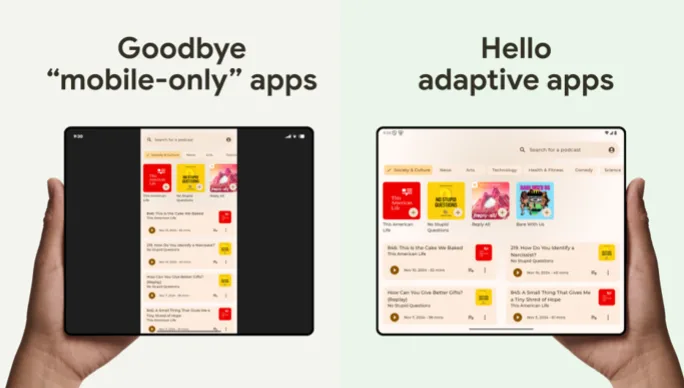
The predictive back gesture gives users a preview of the previous screen, adding more context to the back action. This works even with traditional navigation buttons.
Developers can now implement predictive navigation transitions to create smoother app flows, improving the coherence of app interactions across all device types.
11. Auracast & LE Audio
Android 16 introduces Auracast, allowing you to stream audio to multiple Bluetooth devices at once. Imagine a party where everyone hears the same music through their earbuds, or a classroom where the teacher’s voice streams to students’ hearing devices.
LE Audio support brings better sound quality with lower power consumption.
This opens up new applications in public spaces, like airports and cinemas, where audio can be broadcast to patrons without external noise interference.
12. Health Connect and Enhanced Photo Picker
Health Connect: Now supports syncing electronic medical records, including prescriptions and immunizations, using standard FHIR formats.
Photo Picker: Updated to allow access to cloud-stored images from Google Photos, improved UI, and a preview bar for quick selection.
Health Connect’s deeper integration with wellness apps means users can now view a consolidated health dashboard across devices. You can track fitness metrics, medication history, and even menstrual cycles in one secure location.
The revamped Photo Picker also reduces permission fatigue by allowing one-time access to specific images without giving apps full access to your gallery.
More Android 16 Goodies to Love
Beyond the top 12, Android 16 packs in several smaller but impactful features:
- Screen-Off Fingerprint Unlock: Pixel 9 series users can unlock their phone without waking the screen, thanks to ultrasonic sensors.
- Privacy Sandbox Updates: The SDK Runtime enhances data protection while keeping apps functional.
- 16 KB Page Size Transition: Apps targeting Android 15+ must support 16 KB page sizes by November 2025, boosting performance and battery life.
- UltraHDR and HEIC Encoding: Improved support for high-quality images aligns with ISO 21496-1 standards.
- Rich Haptics APIs: Developers can fine-tune haptic feedback for more immersive interactions.
For developers, Android 16 offers tools like Android Studio Narwhal, new SDK/NDK APIs, and the ProfilingManager for performance insights. The Privacy Dashboard now tracks app permissions over seven days, giving you a clearer view of app behavior.
Device Compatibility and Rollout
Android 16 is rolling out to all Pixel devices starting from Pixel 6 to Pixel 10, including Pixel Fold and Pixel Tablet. Other major manufacturers like Samsung, OnePlus, Xiaomi, Motorola, and Nothing will begin updates through late 2025.
OEMs will receive the latest GKI (Generic Kernel Image) which improves long-term update delivery and device longevity.
What Makes Android 16 Special
Android 16 isn’t just an update; it’s a vision of what smartphones can be. It balances cutting-edge tech with everyday practicality, offering something for everyone. Live Updates and Notification Cooldown keep your day running smoothly, while Advanced Protection Mode and the Photo Picker protect your privacy. Creators get pro tools like APV, and developers gain flexibility with features like the Linux Terminal. Accessibility upgrades ensure no one’s left behind, and Vulkan pushes gaming to new heights.
Google’s shift to a Q2 release shows its commitment to delivering updates faster, keeping Android fresh and competitive. Whether you’re a tech nerd or just someone who wants a better phone experience, Android 16 delivers.
Tips Before Upgrading
- Backup your data: Always create a full backup before updating.
- Update your apps: Some may require compatibility patches.
- Explore new settings: Check out Live Updates, battery health, and accessibility options.
- Use Developer Options: Enable desktop windowing and predictive back gestures to maximize functionality.
It’s also recommended to explore new security and privacy dashboards to review app permissions and recent activity logs.
Final Thoughts
Android 16 is not just an incremental upgrade—it’s a leap forward in terms of user experience, security, AI integration, and accessibility. Whether you’re a power user, a content creator, or someone who values privacy and ease of use, Android 16 has something transformative to offer.
From the sleek new Material 3 Expressive design to Gemini AI and beyond, Google is clearly setting a high standard for mobile OS innovation. This update redefines what it means to interact with a smartphone in 2025 and beyond.
As developers and OEMs adopt these features, the ecosystem will become more responsive, personalized, and intelligent. Android 16 is not just smarter—it’s more human.
Have you upgraded to Android 16 yet? Share your favorite feature in the comments!
Disclaimer
The information provided in this blog post is based on official sources and announcements from Google and the Android Developers Blog as of June 2025. Features, functionalities, and rollout timelines may vary depending on device manufacturer, region, and carrier. This post is for informational purposes only and does not represent any affiliation with or endorsement by Google LLC. Always refer to official documentation or your device manufacturer for the most accurate and up-to-date details.
FAQs About Android 16
What is Android 16 and when was it released?
Android 16 is the latest version of the Android operating system, officially released in June 2025. Codenamed “Baklava,” it introduces significant updates in AI, security, accessibility, design, and multitasking.
Which devices are compatible with Android 16?
Android 16 is initially rolling out to Google Pixel devices—from Pixel 6 to Pixel 10, including Pixel Fold and Pixel Tablet. Other brands like Samsung, OnePlus, Xiaomi, and Motorola are expected to release updates by late 2025.
What is Gemini AI in Android 16?
Gemini AI is Google’s next-generation digital assistant integrated into Android 16. It replaces Google Assistant in many tasks, offering smarter, context-aware responses, better automation, and advanced voice interactions.
How does Android 16 improve security?
Android 16 includes Advanced Protection Mode, USB port blocking, offline device lock, scam detection, and a new notification cooldown feature. It’s designed to offer multi-layered security for both personal and enterprise users.
What are Live Updates in Android 16?
Live Updates provide real-time, glanceable information on your lock screen or status bar—perfect for tracking deliveries, sports scores, or ride shares without constantly opening apps.
Also Read
macOS Tahoe 26 Unveiled: Liquid Glass & Game-Changing Features!