If you’ve spent any time researching home or small business storage this year, you’ve probably noticed the conversation has shifted. NAS, short for Network Attached Storage, is essentially a dedicated device connected to your network that lets you store, back up, and access files from any device in your home or office. But the conversation around it is no longer just “which NAS box should I buy.” It’s “which software should actually run my storage.” That distinction matters more in 2026 than it ever has, because the gap between a turnkey appliance and a build-your-own storage server has narrowed considerably. Picking the best NAS operating systems for your situation now depends less on brand loyalty and more on how you actually use your data — daily backups, a Plex library, Docker containers, or business-critical files you can’t afford to lose.
This guide breaks down the operating systems that actually matter this year: Synology DSM, TrueNAS SCALE, Unraid, QNAP QTS/QuTS hero, OpenMediaVault, Asustor ADM, and the newer UGREEN UGOS. I’ll walk through what each one does well, where it falls short, and who should actually be using it — based on how these platforms behave in real households and labs, not just spec sheets.
Why the NAS OS Matters More Than the Hardware
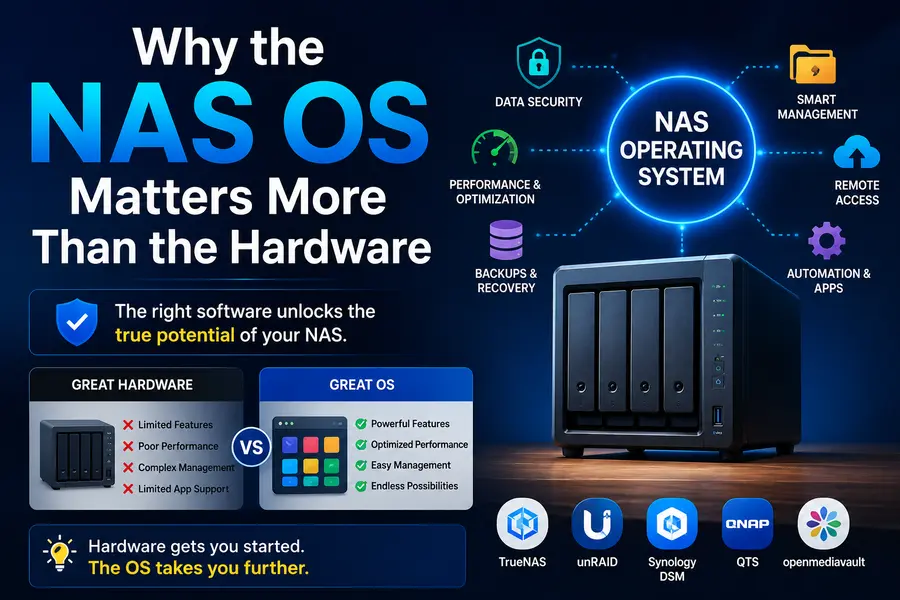
A lot of buyers still shop for a NAS the way they’d shop for a router — pick a box, plug it in, done. That approach works fine for basic file sharing, but it falls apart the moment you want something more: reliable snapshots, real data integrity checking, Docker apps, remote access that doesn’t feel clunky, or the flexibility to add mismatched drives without rebuilding your array.
The operating system is what decides all of that. Two NAS boxes with identical drives and nearly identical CPUs can behave completely differently depending on whether they’re running Btrfs, ZFS, or a plain EXT4 setup underneath. That’s why this comparison focuses on the software layer first, hardware second.
The Short Answer
There isn’t one single “best” NAS OS in 2026 — there’s a best fit depending on your priorities:
- Most polished, easiest for beginners: Synology DSM
- Strongest data protection, completely free: TrueNAS SCALE
- Best for mixed drive sizes and Docker/Plex apps: Unraid
- Most powerful container and virtualization story on branded hardware: QNAP QTS / QuTS hero
- Lightest footprint, works on almost anything: OpenMediaVault
- Best budget alternative with growing app support: UGREEN UGOS
- Middle ground between DIY and turnkey: Asustor ADM
Now let’s get into why.
Synology DSM — The Benchmark for Turnkey Simplicity
Synology has been the default recommendation for non-technical NAS buyers for a decade, and DSM 7.4 is arguably the most refined version yet. The desktop-style interface, complete with a taskbar, notification center, and app launcher, still feels more like using a computer than configuring a server.
What makes DSM stand out in 2026:
- Synology Photos now includes on-device AI facial recognition and organization that genuinely competes with Google Photos, without uploading your library to the cloud.
- Hyper Backup and Active Backup make protecting multiple devices from one dashboard painless.
- Surveillance Station remains one of the best free NVR solutions for anyone running IP cameras.
- Btrfs on Plus-series models gives you filesystem-level checksums and snapshot support, catching corruption that older EXT4-based models simply can’t detect.
Where it falls short:
- Starting with the 25-series, Synology tightened its hard drive compatibility policy so that only listed drives are supported on new installations. This has frustrated longtime users who liked buying drives on sale rather than paying Synology’s premium.
- DSM only runs on Synology hardware, so you’re locked into their pricing and their upgrade cycle.
- AMD-based Plus-series models still struggle with 4K HEVC transcoding for Plex — a gap that hasn’t meaningfully closed in years. You’ll want a 10GbE network or a model with Intel Quick Sync if transcoding matters to you.
DSM is still the right call if you want something that works the moment you plug it in, and you’re comfortable paying for that convenience. It’s less appealing if you want full control over your hardware or plan to grow your storage with second-hand drives.
TrueNAS SCALE — The Free, Enterprise-Grade Option
TrueNAS SCALE has quietly become the go-to recommendation among people who’ve actually tried multiple NAS platforms side by side. It’s built entirely on ZFS, and that single decision is what sets it apart from nearly everything else on this list.
Why ZFS matters:
ZFS gives you end-to-end checksumming, meaning every block of data is verified against a checksum every time it’s read. If a bit flips somewhere on the disk — something that happens more often than people realize on large drives — ZFS catches it and can repair it automatically from redundant data. No other consumer-friendly NAS filesystem offers this level of protection. Btrfs (used by Synology and some QNAP models) offers checksums too, but ZFS’s implementation is more mature and battle-tested at scale.
What else SCALE brings to the table:
- A Docker-based app catalog running through a lightweight Kubernetes distribution (K3s), so you can self-host Plex, Jellyfin, Nextcloud, and dozens of other services.
- Native KVM support for virtual machines, though it’s not meant to replace a dedicated hypervisor.
- SMB multichannel, Time Machine shares, and cloud sync tasks built in at no extra cost.
- Snapshot and replication tools that make disaster recovery genuinely simple once configured.
The trade-offs:
- It’s the least beginner-friendly platform here. The interface is well-organized but assumes you understand storage concepts like vdevs, pools, and datasets.
- ZFS is RAM-hungry. Plan on at least 8GB as an absolute minimum, and realistically 16–32GB for a comfortable experience with caching and apps running.
- All drives in a vdev need to be a similar size to avoid wasting capacity — you can’t casually toss in a random collection of leftover drives the way you can with Unraid.
If your data actually matters — original photography, business records, backups you can’t recreate — TrueNAS SCALE offers protection that’s hard to find anywhere else, and it costs nothing.
Unraid — Built for Flexibility and Home Labs
Unraid solves a very specific problem that ZFS-based systems don’t: what do you do with a pile of mismatched hard drives sitting in a drawer? Its array model lets you combine a 4TB, an 8TB, and a 14TB drive into a single usable pool, with one or two dedicated parity drives protecting the whole thing. You lose the per-block checksumming that ZFS offers, but you gain a storage system that grows the way real households actually accumulate drives — one at a time, whenever there’s a deal.
Strengths:
- The Community Applications plugin makes installing Docker containers close to a one-click experience, which is a big reason it’s popular for Plex and Jellyfin setups.
- Adding storage doesn’t require rebuilding your array, unlike traditional RAID.
- The interface strikes a good balance between accessible and powerful — less intimidating than TrueNAS, more capable than most turnkey options.
Weaknesses:
- It’s not free. Licensing starts at roughly $49 for smaller arrays, though there’s a 30-day trial to test it first.
- No per-block checksums on the data drives themselves means bit rot can go undetected in ways ZFS would catch.
- Parity rebuilds after a drive failure can take a long time on large arrays, during which your data has reduced protection.
Unraid is the platform I’d point most self-hosters toward if their top priority is running a media server and a handful of Docker apps without becoming a full-time storage administrator.
QNAP QTS and QuTS hero — The Power User’s Turnkey Choice
QNAP tends to get overshadowed by Synology in casual comparisons, but among people who’ve used both, QNAP’s software often wins on raw capability. QTS is the standard OS, while QuTS hero swaps in ZFS for users who want Synology-style ease with TrueNAS-style data integrity.
What sets QNAP apart:
- QuTS hero gives you ZFS-based snapshots and deduplication on turnkey hardware — something Synology simply doesn’t offer.
- Container Station and Virtualization Station are genuinely more flexible than Synology’s equivalent tools, appealing to users who want to run more than just file shares.
- Storage configuration options are broader, including support for more complex RAID and caching setups on higher-end models.
Downsides:
- The interface, while powerful, isn’t quite as intuitive as DSM for first-time users.
- QNAP’s security track record has had some rough patches over the years, so staying current on firmware updates isn’t optional — it’s necessary.
- Hardware pricing at the high end can rival or exceed Synology’s.
QNAP is worth serious consideration if you want more storage flexibility than Synology offers without fully committing to a DIY build.
OpenMediaVault — Light, Free, and Endlessly Flexible
OpenMediaVault (OMV) is the option for people who want something that runs on almost anything — including a Raspberry Pi or an old mini PC gathering dust. It’s Debian-based, free, and open source, and the 2026 interface refresh has made it noticeably more approachable than earlier versions, even if it still feels a bit more “engineered” than “polished.”
Good fit if:
- You’re repurposing older or low-power hardware.
- You want ZFS or Docker support but are fine installing them through the OMV-Extras plugin system rather than getting everything out of the box.
- You’d rather manage your system like a Linux admin than click through a wizard.
Not ideal if:
- You want a system that updates itself cleanly without occasional manual intervention — major version jumps (like OMV7 to OMV8) can require more attention than a Synology one-click update.
- You need first-party mobile apps or a polished, guided setup experience.
OMV is best described as a NAS OS that rewards people willing to read the manual. It’s not trying to be Synology, and it doesn’t need to be.
UGREEN UGOS and Asustor ADM — The Middle-Tier Challengers
Two names that have gained real traction in 2026 deserve a mention, since they’ve moved from “budget curiosity” to genuine alternatives.
UGREEN UGOS ships on UGREEN’s NASync hardware line, which has become known for offering strong hardware specs at prices well below Synology and QNAP. UGOS itself is still catching up in software polish and app depth, but UGREEN’s openness is a real selling point — most models allow you to wipe UGOS and install TrueNAS or Unraid instead if you outgrow the stock software. That flexibility is rare among hardware vendors who typically lock you into their own ecosystem.
Asustor ADM sits in a similar spot — more capable than UGOS, but still trailing DSM and QTS in overall polish. Asustor’s App Central has a reasonable library of first- and third-party apps, and their hardware, like the Lockerstor 4 Gen3, pairs well with self-hosters who want to build their own Docker stack rather than rely entirely on vendor tools.
Both are worth watching if your priority is value for money rather than the absolute smoothest software experience.
Comparison Table: Best NAS Operating Systems in 2026
| NAS OS | Cost | Filesystem | Data Integrity | Best For | Learning Curve |
|---|---|---|---|---|---|
| Synology DSM | Free (Synology hardware only) | Btrfs / EXT4 | Good (Btrfs checksums on Plus models) | Beginners, families, turnkey setups | Low |
| TrueNAS SCALE | Free, any hardware | ZFS | Best-in-class | Data integrity, self-hosters, businesses | High |
| Unraid | ~$49+ one-time license | XFS/Btrfs array, no per-block checksum | Moderate | Mixed drives, Plex/Docker home labs | Medium |
| QNAP QTS/QuTS hero | Free (QNAP hardware only) | EXT4 / ZFS (QuTS hero) | Good to excellent (QuTS hero) | Power users wanting turnkey + flexibility | Medium |
| OpenMediaVault | Free, any hardware | EXT4/XFS, ZFS via plugin | Depends on setup | Low-power hardware, budget builds | Medium-High |
| UGREEN UGOS | Free (UGREEN hardware) | EXT4 | Basic | Budget buyers, future OS-swap flexibility | Low |
| Asustor ADM | Free (Asustor hardware) | EXT4/Btrfs | Moderate | Self-hosters wanting a middle ground | Medium |
How to Actually Choose
Instead of chasing the “best” label, work backward from how you use storage:
- If your data is truly irreplaceable — original photos, financial records, business backups — prioritize ZFS. TrueNAS SCALE or QNAP’s QuTS hero are your strongest options, with TrueNAS being the free route.
- If you want a media server and a handful of self-hosted apps with minimal fuss, Unraid’s Docker ecosystem is hard to beat, especially if you’re starting with mismatched drives.
- If you’ve never set up a NAS before and want something that just works, Synology DSM remains the most forgiving entry point, provided you’re fine buying supported drives.
- If your budget is tight and your hardware is limited, OpenMediaVault or UGREEN’s NASync line give you a functional NAS without a big upfront cost.
- If you want the most storage and virtualization flexibility on branded hardware, QNAP is worth a serious look over Synology.
Final Thoughts
Choosing among the best NAS operating systems available in 2026 really comes down to how much control you want versus how much convenience you’re willing to trade for it. Synology and QNAP still lead the turnkey space, TrueNAS SCALE remains unmatched for data protection at zero cost, and Unraid continues to be the most approachable choice for anyone building a flexible home lab from spare parts. None of these platforms is objectively “wrong” — they’re built for different people solving different problems. Figure out what you actually need your storage to do, and the right operating system tends to reveal itself pretty quickly.
Disclaimer
This article is intended for general informational purposes only. Pricing, hardware compatibility policies, and software features mentioned are subject to change by their respective vendors. Always verify current specifications and compatibility lists on the official manufacturer websites before making a purchasing decision.