Blender 5.2 LTS landed on July 14, 2026, and it’s the kind of release that makes you stop scrolling through release notes and actually go open the software. This Blender 5.2 LTS review breaks down what’s genuinely new, what’s just polish, and — more importantly — whether you should upgrade your production pipeline to it right now or wait a cycle. I’ve gone through the official release notes line by line, tested the workflow changes that matter most for everyday users, and compared it against Blender 4.5 LTS and 5.1 so you’re not left guessing.
If you’re running Blender on Linux (or anywhere else, honestly), this release deserves your attention. It’s not a flashy, headline-grabbing update like Geometry Nodes was back in 2.9 — it’s a maturity release. But maturity releases are exactly what long-term projects need, and that’s precisely the point of an LTS branch.
Let’s get into it.
What Does “LTS” Actually Mean for Blender 5.2?
LTS stands for Long-Term Support. Blender 5.2 LTS will receive bug fixes and stability patches for two full years, through July 2028. That’s a meaningful commitment, and it’s the reason studios, schools, and freelancers who can’t afford to chase every point release tend to standardize on the LTS branch instead of the latest bleeding-edge version.
Compare that to a regular release like Blender 5.1, which only gets maintenance until the next version ships. If you’re building a pipeline you don’t want to touch again for a year or two — render farms, teaching labs, or a small studio’s toolchain — Blender 5.2 LTS is the version you build around.
This is also only the third LTS since Blender’s shift to the new 4.x/5.x numbering scheme, following 4.2 LTS and 4.5 LTS. Each LTS so far has represented a genuine leap rather than a coat of paint, and 5.2 continues that trend.
The Headline Feature: Node-Based Physics in Geometry Nodes
The biggest structural change in this release is the arrival of procedural, node-driven physics. Blender has had cloth and hair simulation for years through traditional modifiers, but 5.2 LTS rebuilds that entire concept inside Geometry Nodes using a new XPBD Solver node.
What this means practically:
- Cloth Dynamics can now be added to any mesh through a node-based modifier, with built-in controls for pinning, tearing, stretch, and bendiness — all exposed as editable node parameters instead of buried modifier settings.
- Hair Dynamics work the same way, requiring only a surface object for hair to attach to. The setup can even be automated through the updated Empty hair operator.
- Effectors — gravity, colliders, and fully custom forces — can be mixed and matched using a tagging system, so you can decide exactly which geometry each effector influences.
- Custom effector behavior can be built with Closures, which is a big deal for technical artists who want simulation logic that doesn’t exist yet as a built-in tool.
If you’ve ever fought with Blender’s older cloth modifier — fighting stiffness sliders that never quite acted right, or hacking together custom hair behavior with vertex groups and force fields — this is the fix. It’s not just “more sliders.” It’s a fundamentally different, composable approach to simulation that puts Blender’s physics closer to node-based tools you’d find in high-end VFX packages.
There’s a learning curve here. If you’re used to the one-click cloth modifier, the node version asks more of you upfront. But the payoff for anyone doing serious simulation work is substantial.
Sound-Reactive Geometry Nodes
A smaller but genuinely fun addition: the new Sample Sound Frequencies node lets you drive geometry directly from an imported audio file. Load a track into the node tree, sync playback in the Video Sequencer, and your geometry can now react to bass hits, vocal peaks, or any frequency band you isolate.
This sounds like a novelty until you consider how much motion graphics and music-visualization work happens in Blender already. Audio-reactive animation used to require third-party add-ons or manual keyframing against a waveform. Now it’s native.
Mesh Bevel Finally Comes to Geometry Nodes
For years, procedural bevels in Geometry Nodes required workarounds — extruding, offsetting, or relying on third-party node groups. Blender 5.2 LTS adds a proper Mesh Bevel node, giving you the same detailed edge and vertex control you’d get from the classic modifier, but fully procedural and driven by fields. It’s a quiet addition, but if you build hard-surface assets procedurally, this closes a gap that’s existed since Geometry Nodes launched.
Lists, Strings, and Attribute Handling Get Serious
Geometry Nodes also picks up a genuine new data type: Lists. Previously, working with arbitrary-length sequences of numbers or strings inside a node tree meant clever workarounds with attributes. Now you get dedicated nodes for creating, sorting, filtering, and querying lists directly.
Alongside that, string handling has been expanded significantly — trimming, reversing, case switching, splitting on delimiters — which matters more than it sounds like for anyone building naming conventions, procedural labeling systems, or data-driven asset pipelines.
Attribute tools also improved with a new Transfer Attributes node and better renaming tools, both aimed at people building complex multi-object procedural setups where keeping attribute data consistent used to be a headache.
Cycles: Texture Cache Changes the Memory Equation
If you render large scenes with dozens of high-resolution textures, this next feature alone might justify the upgrade. Cycles now includes a Texture Cache system that automatically generates optimized, lower-resolution .tx versions of your images and streams in only the tiles and resolutions actually needed for a given render.
According to Blender’s official benchmarks across test scenes like Attic, Bistro, and Junkshop, memory usage drops substantially when Texture Cache is enabled — in some scenes cutting memory footprint by several gigabytes. The tradeoff is a small hit to render speed and higher disk usage for the cached files, so this isn’t a universal win, but for texture-heavy archviz or product scenes running on VRAM-limited machines, it’s a genuine game changer.
Turning it on is simple: head to Performance → Texture Cache, enable Auto Generate, and Blender handles the rest, regenerating cache files automatically whenever a source image changes.
Thin Wall Shading for Paper, Leaves, and Glass
The Principled BSDF gets a new Thin Wall mode for rendering physically accurate thin materials — paper, leaves, window glass, fabric. Instead of modeling actual thickness (which tanks performance and often causes shading artifacts), Thin Wall treats the surface as an infinitely thin slab with mirrored layers, combining reflection and transmission for thin glass, or diffuse and translucent scattering for thin subsurface materials.
Anyone who’s tried to fake paper-thin objects with hacky subsurface settings will appreciate this. It’s a small toggle with an outsized visual impact.
EEVEE Gets Real Attention
EEVEE Next had a rocky transition when it first replaced legacy EEVEE, and 5.2 LTS is clearly the release where the Blender team paid down that technical debt. The improvements read like a “fix the annoying stuff” list, and that’s exactly what long-time EEVEE users have been asking for:
- Up to a 2x speed-up in scenes with heavy instancing
- Reduced banding through dithering
- The old 8-attribute limit per material is gone entirely
- New Anisotropic Filtering support
- A rewritten Screen Space Raytracing system with a new Backface option that reduces light leaking in screen-space global illumination
- Fixes to shadow artifacts, motion blur, depth of field bokeh, and volume shader compilation
None of these are individually flashy, but together they make EEVEE noticeably more reliable for production work — particularly for real-time previews and stylized rendering where EEVEE has always had an edge over Cycles on speed.
Compositor and Video Sequencer: A Serious VFX Push
The Compositor picks up six new socket types (Matrix, Rotation, String, Object, Font, and Integer Vector) plus 35 new nodes, many borrowed conceptually from Geometry Nodes. Gizmos in the compositor now support auto-keying, meaning you can animate compositing setups by simply moving a gizmo in the viewport instead of manually setting keyframes.
The Video Sequencer (VSE) picks up its own compositor integration — a new Compositor Effect strip that runs node trees directly on the timeline, GPU-accelerated modifiers for heavier effects, and text strip style presets (Subtitle, Main Title, Corner Title) that finally standardize how titles look across a project. HDR scopes and wide-gamut color space support round out what is clearly a push to make Blender’s video editor viable for more serious post-production work, not just quick edits.
Grease Pencil, Sculpt Mode, and Modeling Quality-of-Life
A few smaller but genuinely useful additions round out the release:
- Grease Pencil gets a new Delaunay-based fill algorithm with automatic gap detection and much faster fill performance, plus 19 new brushes from Blender Studio artists in the Online Essentials library.
- Sculpt Mode now lets you drop primitives (cubes, cones, cylinders, spheres) directly into a sculpt, and the new Scene Project brush wraps geometry onto nearby surfaces — useful for quickly blocking in environment details.
- Voxel Remeshing now interpolates vertex colors instead of snapping to the nearest point, which means repeated remeshing no longer destroys your paint work.
- LoopTools add-on functionality (To Circle, Space Edge Loops Evenly, Flatten) is now built into core Blender, rewritten in C++ for better performance.
Online Asset Libraries Without the Bloat
Blender 5.2 LTS expands its Essentials asset library with new materials, HDRIs, compositing setups, and Geometry Nodes assets — all hosted online rather than bundled into the installer. That keeps the base download lean while giving you access to a much larger library on demand. You can also host your own remote asset library or subscribe to a studio’s shared one, which is a smart move for teams that want a single source of truth for shop-standard assets.
System Requirements and Platform Notes
Blender 5.2 LTS follows the same general hardware baseline as recent releases: a 64-bit quad-core CPU, 8GB of RAM (16GB+ strongly recommended for anything beyond basic scenes), and a GPU with at least 4GB VRAM for Cycles GPU rendering — though the new Texture Cache system makes VRAM-constrained setups noticeably more workable than before.
For Linux users specifically, this release includes a fix for Wayland users on non-Latin keyboard layouts, ensuring shortcuts work correctly when a Latin fallback layout is available — a small but appreciated fix if you’ve been fighting keyboard shortcut issues under Wayland. macOS users get a new Liquid Glass application icon for macOS 26+, and Windows and Linux both benefit from the general performance work across Cycles, EEVEE, and the Compositor.
How to Install and Upgrade Blender 5.2 LTS on Linux
Linux users have several solid ways to get Blender 5.2 LTS running, and which one you pick depends on how much control you want over updates versus how little effort you want to spend. Here’s a rundown of each method.
Option 1: Official Tarball (Recommended for Full Control)
This is the method Blender’s own team recommends, since it gives you the exact build straight from blender.org without relying on a third-party package.
- Head to the official Blender Download page and grab the Linux tarball for 5.2 LTS.
- Extract it to a location of your choice, for example:
tar -xf blender-5.2.0-linux-x64.tar.xz -C ~/apps/- Run Blender directly from the extracted folder:
~/apps/blender-5.2.0-linux-x64/blender- Optionally, create a symlink or a
.desktoplauncher so it shows up in your application menu:
sudo ln -s ~/apps/blender-5.2.0-linux-x64/blender /usr/local/bin/blenderBecause this method installs to its own folder, upgrading later is as simple as downloading the new tarball into a separate directory — your old version stays untouched until you’re ready to remove it.
Option 2: Snap Package
If you’re on Ubuntu or another Snap-friendly distro, this is the lowest-effort route:
sudo snap install blender --classicTo upgrade an existing Snap install to 5.2 LTS once it’s published to the Snap Store:
sudo snap refresh blenderSnap builds usually take a little longer to catch up to a fresh release than the official tarball, so if you want 5.2 LTS on day one, the tarball or Flatpak method will get you there faster.
Option 3: Flatpak
Flatpak is a popular cross-distro option and keeps Blender sandboxed from the rest of your system:
flatpak install flathub org.blender.BlenderUpgrading is just:
flatpak update org.blender.BlenderOption 4: Distro Package Managers (Use with Caution)
Some distributions, like Arch (via the blender package in the official repos or the AUR) and Fedora, ship Blender through their own package managers. These are convenient, but they’re often a version or two behind the official release, so they’re not the best choice if you specifically want Blender 5.2 LTS right away. Check your distro’s package version before relying on this method:
# Arch Linux
sudo pacman -Syu blender

# Fedora
sudo dnf upgrade blender
Upgrading From an Older Version Without Losing Settings
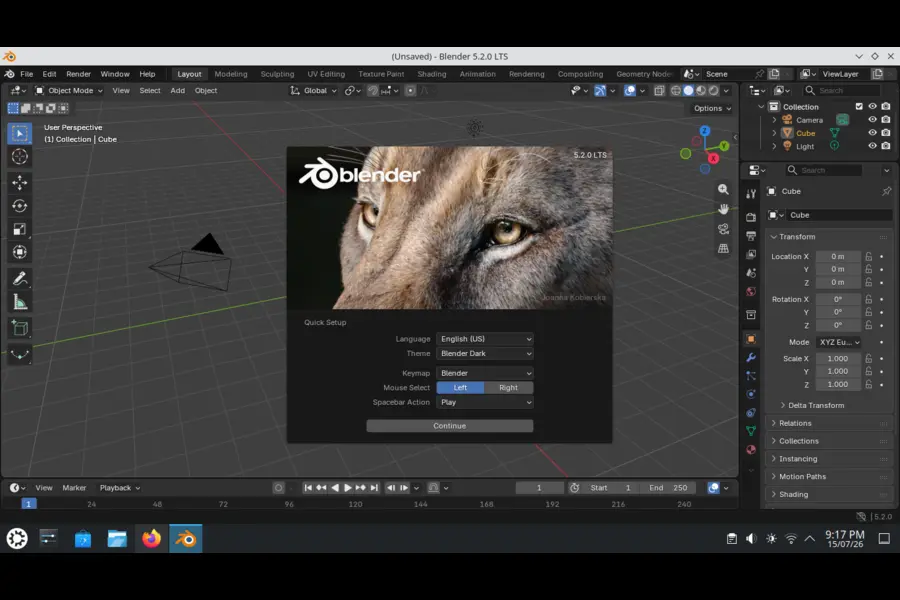
Blender stores your preferences, keymaps, and add-ons in a version-specific config folder, so a fresh 5.2 LTS install won’t automatically inherit settings from 4.5 LTS or 5.1. On first launch, Blender will prompt you to import settings from a previous version — accept that prompt and it will copy over your theme, keymap, and add-on preferences automatically.
If you’d rather do it manually, your settings live under:
~/.config/blender/5.2/You can copy the relevant folders (config, scripts/addons, scripts/presets) from your previous version’s directory (e.g. ~/.config/blender/4.5/) into the new 5.2 folder before launching Blender for the first time.
One more thing worth flagging: since some Geometry Nodes Python API calls changed in this release, any custom add-ons or scripts that set Geometry Nodes modifier inputs the old way will need updating before they’ll work correctly in 5.2 LTS.
Blender 5.2 LTS vs 5.1 vs 4.5 LTS: Quick Comparison
| Feature | Blender 4.5 LTS | Blender 5.1 | Blender 5.2 LTS |
|---|---|---|---|
| Support window | Ended with next LTS | Until next release | Fixes until July 2028 |
| Node-based cloth/hair physics | No | Experimental/partial | Full XPBD solver system |
| Cycles Texture Cache | No | No | Yes |
| Principled BSDF Thin Wall | No | No | Yes |
| EEVEE instance-heavy scene speed | Baseline | Improved | Up to 2x faster than baseline |
| Geometry Nodes Lists data type | No | No | Yes |
| Native LoopTools operators | Add-on only | Add-on only | Built-in |
| Compositor socket types | Standard set | Standard set | +6 new types, 35 new nodes |
| Best suited for | Legacy stable pipelines | Early access to new tools | New long-term production baseline |
If you’re still on 4.5 LTS, the jump to 5.2 LTS is significant enough to feel like a different application in places — especially around physics and EEVEE. If you’re already on 5.1, most of what’s here builds on features you may have seen in preview form, now stabilized and locked into an LTS branch.
Pros and Cons
Pros:
- Two years of guaranteed bug fixes, ideal for studios and long-running projects
- Node-based physics finally brings cloth and hair simulation into the procedural workflow
- Texture Cache meaningfully reduces memory pressure on texture-heavy scenes
- EEVEE reliability and performance fixes address real, long-standing complaints
- Native LoopTools and Mesh Bevel close long-existing modeling gaps
- Compositor and VSE upgrades make Blender more competitive for post-production work
Cons:
- Node-based physics has a steeper learning curve than the old cloth/hair modifiers
- Texture Cache adds disk space overhead and a small rendering performance cost
- Some Python API changes (Geometry Nodes modifier inputs moving to RNA properties) will break older scripts and add-ons
- Not a visually dramatic release — most improvements are under-the-hood, which may underwhelm casual users expecting big new toys
So, Should You Upgrade in 2026?
If you’re running a production pipeline on 4.5 LTS or earlier, yes — upgrade. The physics overhaul, EEVEE stability work, and Texture Cache system alone are worth the migration effort, and you’ll get two years of support to justify the transition cost.
If you’re already on 5.0 or 5.1 and mostly doing modeling, sculpting, or simple animation work, the upgrade is still worthwhile but less urgent — you’ll mainly notice the EEVEE speedups and the new modeling tools like Mesh Bevel and native LoopTools.
If you rely on custom add-ons or scripts that touch Geometry Nodes modifier inputs, budget time to test compatibility before rolling this out across a team, since the Python API change there is a breaking one.
Final Verdict
This Blender 5.2 LTS review comes down to a simple conclusion: this is the most substantial LTS release since the 4.x era began, not because of one headline feature, but because of how many long-standing pain points it quietly resolves. Node-based physics, a smarter memory system for Cycles, and a genuinely more dependable EEVEE add up to a version of Blender that feels less like beta software wearing a stable label and more like a tool you can build a two-year pipeline around. For most Linux users, studios, and hobbyists alike, Blender 5.2 LTS is worth the upgrade.
Disclaimer
This review is based on Blender’s official 5.2 LTS release notes and publicly available documentation as of July 2026. Performance figures such as memory savings and rendering speed improvements are scene-dependent and may vary based on your hardware, scene complexity, and settings. Always test any major software upgrade in a non-critical environment before deploying it across a production pipeline.
If you’re exploring Linux distributions, AI development environments, or lightweight operating systems, these expert guides will help you choose the right OS for your needs.
Fedora vs Ubuntu in 2026: Which One Wins for Daily Use?Compare Fedora and Ubuntu across performance, stability, software support, gaming, development, and everyday usability. Best OS for AI Development in 2026
Discover the best operating systems for AI, machine learning, CUDA, Python, Docker, and modern development workflows. Is Drauger OS 7.8 Good for Everyday Desktop Use?
Learn whether Drauger OS is suitable for daily computing, gaming, productivity, and Linux beginners.