If you’re trying to pick a desktop Linux distribution this year, you’ve probably narrowed it down to these two. Fedora vs Ubuntu is the comparison that just won’t die, and for good reason — they’re still the two distributions most people land on after outgrowing Linux Mint or getting curious about something more current. Fedora 44 and Ubuntu 26.04 LTS both landed within days of each other this spring, and both bring GNOME 50, a Wayland-only desktop, and a genuinely fresh kernel to the table. That overlap makes the decision harder, not easier.
I’ve run both as daily drivers — Fedora on a work laptop for the last two release cycles, Ubuntu LTS on a home desktop that mostly needs to just work. The differences aren’t dramatic anymore, but they’re real, and they matter depending on what you’re doing with the machine. This guide walks through installation, performance, package management, hardware support, gaming, development, and security, so you can figure out which one actually fits your workflow instead of just going with whichever one a YouTuber told you to install.
Fedora vs Ubuntu: Quick Comparison
| Category | Fedora 44 | Ubuntu 26.04 LTS |
|---|---|---|
| Developer | Fedora Project (sponsored by Red Hat) | Canonical |
| Latest Stable Release (July 2026) | Fedora Linux 44 (April 28, 2026) | 26.04 LTS “Resolute Raccoon” (April 23, 2026) |
| Base Distribution | Independent (upstream for RHEL) | Debian |
| Package Format | RPM | DEB |
| Package Manager | DNF5 | APT |
| Desktop Environment | GNOME 50 (default), KDE Plasma 6.6, Xfce, Budgie, and other spins | GNOME 50 (default), with official Kubuntu, Xubuntu, Lubuntu flavors |
| Release Cycle | Every 6 months | Interim every 6 months, LTS every 2 years |
| Support Period | ~13 months per release | 5 years (LTS), up to 10 with Ubuntu Pro |
| Kernel Freshness | Very current (6.19 at launch, rolling to 7.0) | Current at LTS release (kernel 7.0), then frozen |
| Wayland | Default, GNOME session is Wayland-only | Default, Wayland-only, X11 GNOME session removed |
| Flatpak | Supported, not preinstalled by default | Preinstalled and enabled out of the box |
| Snap | Not included by default | Preinstalled, core to Canonical’s strategy |
| Gaming | Strong, NTSYNC enabled by default | Strong, good Steam and Proton support |
| NVIDIA Support | Manual setup via RPM Fusion | Easier via “Additional Drivers” tool |
| Software Availability | Good, RPM Fusion needed for extras | Excellent, largest DEB/PPA ecosystem |
| Resource Usage | Moderate, GNOME defaults | Moderate, similar footprint |
| Beginner Friendliness | Good, slightly more manual setup | Very good, more out-of-the-box conveniences |
| Enterprise Usage | Feeds into RHEL, dev/test focus | Strong enterprise and cloud presence |
| Stability | Rock solid for a fast-moving distro | Very stable, especially on LTS |
| Best For | Developers, latest tech, RHEL-adjacent work | General users, servers, long-term stability |
Fedora Overview
Fedora exists to showcase where Linux is heading. It’s sponsored by Red Hat, and it functions as the proving ground for technologies that eventually land in Red Hat Enterprise Linux — Fedora 40 was the upstream basis for CentOS Stream 10, for example. That relationship shapes everything about how the project operates: new features get tested here first, then filtered down into RHEL once they’ve matured.
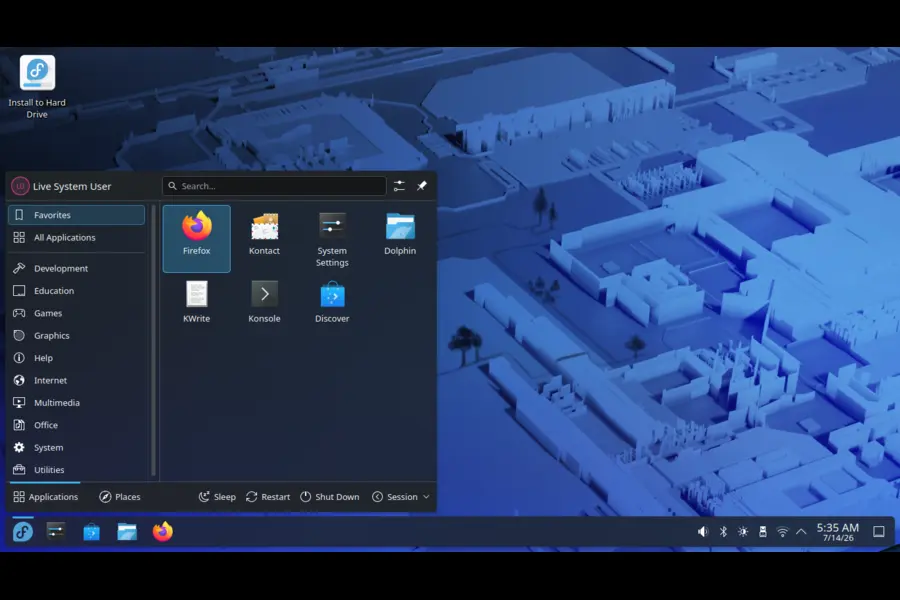
Fedora 44 ships with Linux kernel 6.19, bringing decent performance gains and expanded hardware support compared to previous versions. By the time you read this in July, most installs will have rolled forward through normal dnf updates to kernel 7.0, which pulls in a wider hardware support matrix for newer AMD and Intel laptops. That’s peak Fedora behavior — you install once and the kernel keeps moving without you doing anything special.
On the desktop side, Fedora 44 Workstation ships with GNOME 50 as the default, bringing parental controls, accessibility upgrades, and remote desktop improvements. If GNOME isn’t your thing, the KDE Plasma spin is genuinely first-class rather than an afterthought — it comes with Plasma 6.6, a new login manager, a Plasma Setup wizard, and QR code Wi-Fi sharing. There are also official spins for Xfce, Budgie, MATE, and more niche options like i3 and Sway.
Fedora’s target audience skews toward developers, sysadmins, and anyone who wants to work close to upstream without compiling everything themselves. If you use Red Hat technology at your job, Fedora is the most natural distro to run at home, since the concepts and tools translate directly.
Ubuntu Overview
Ubuntu is Canonical’s attempt to make Linux the default choice for regular people, cloud workloads, and everything in between, and honestly, it’s mostly succeeded. It’s built on Debian but adds its own installer, defaults, and a six-month interim release cadence layered under a two-year LTS cycle.
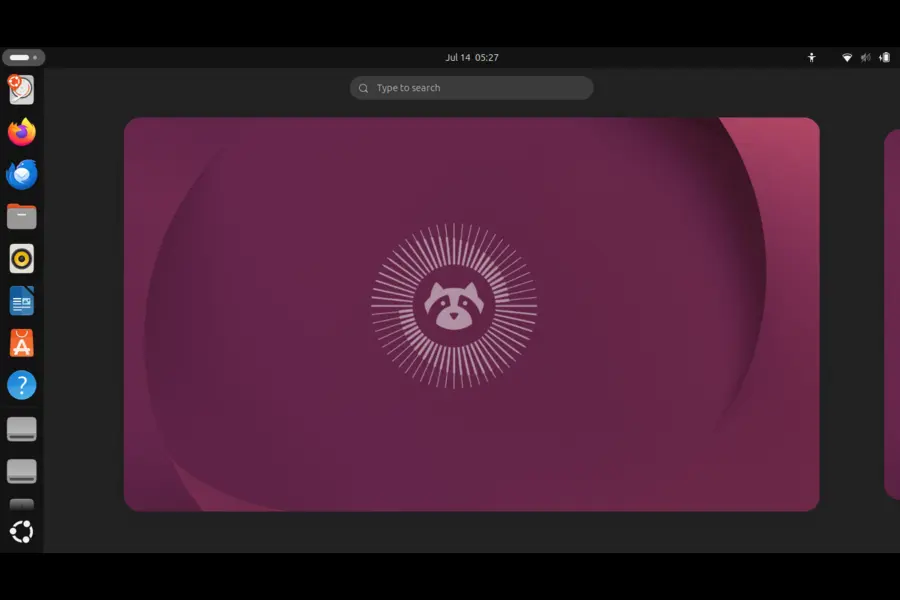
The interim releases (like 25.10 “Questing Quokka”) are for people who want newer software without waiting two years, but they’re only supported for nine months — treat them as a preview lane, not something to install on a machine you don’t want to babysit. The LTS releases are where Ubuntu earns its reputation. Ubuntu 26.04 LTS is designated as a long-term support release, meaning it will continue to receive security updates and critical bug fixes for five years, supported until April 2031. With an Ubuntu Pro subscription, ESM access extends that to ten years.
Resolute Raccoon is a big jump from 24.04. Linux kernel 7.0 replaces 6.8 from the previous LTS, GNOME 50 completes the full transition to Wayland with the X11 GNOME session removed, and core system utilities like sudo and coreutils have been rewritten in Rust as sudo-rs and uutils. Canonical is clearly leaning into memory-safety as a security story, not just a marketing line.
Snap is still the backbone of Ubuntu’s software strategy, preinstalled and used for core apps like Firefox. Canonical’s enterprise and cloud business — think AWS, Azure, and Google Cloud images — also feeds real engineering resources back into the desktop, which is part of why Ubuntu tends to feel so polished for a free product.
Installation Experience
Both installers have improved a lot over the years, but they still feel like they come from different design philosophies.
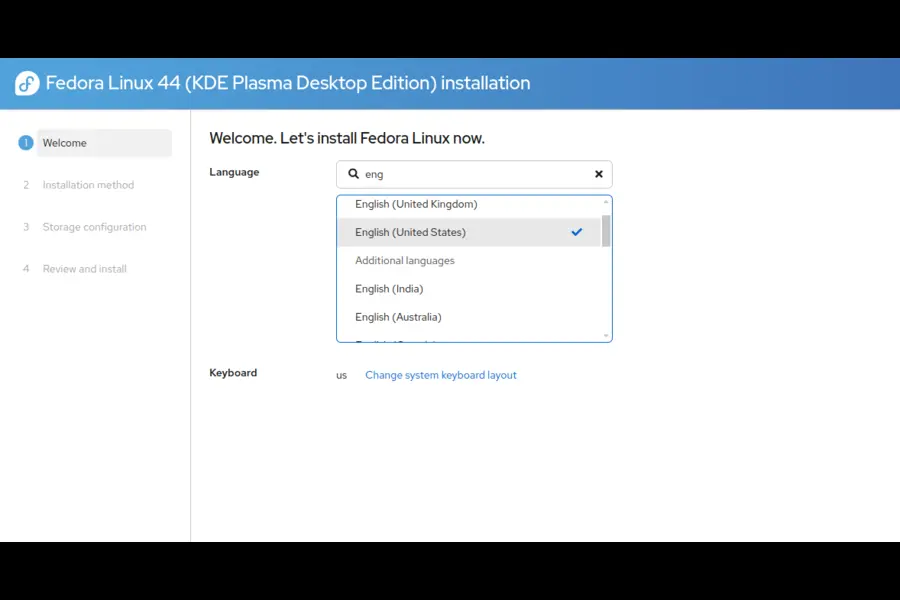
Fedora uses Anaconda, the same installer RHEL uses. It’s powerful but exposes more of its internals — partitioning, in particular, can feel like more than a beginner needs. Fedora 44’s installer no longer automatically creates network profiles for devices not involved in the initial configuration, which makes life easier when configuring additional hardware later. Secure Boot works out of the box on Fedora since it signs its bootloader and kernel packages, but you’ll need to enroll the RPM Fusion key manually the first time you install proprietary NVIDIA drivers or certain codecs.
Ubuntu’s installer has gone through a genuine redesign for 26.04. It now supports disk encryption built directly into the installer using your computer’s security chip on supported hardware, and replaces the old Minimal/Normal choice with new Default/Extended install options. Dual-booting alongside Windows is generally the smoother experience on Ubuntu — automatic partition resizing and Windows Boot Manager detection have been solid for years, and Secure Boot with NVIDIA drivers is handled more gracefully through the “Additional Drivers” tool post-install.
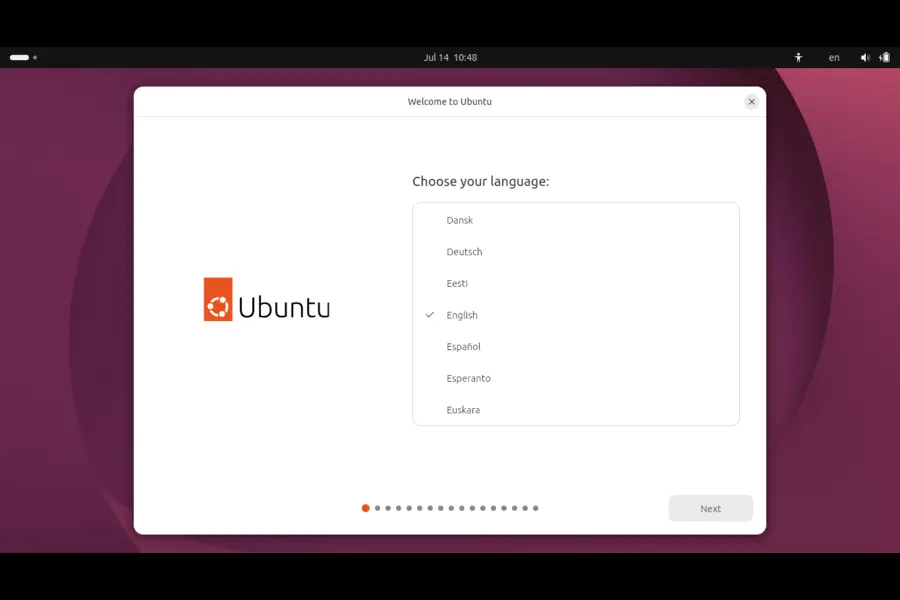
First boot on both is quick. Ubuntu’s welcome wizard nudges you toward Ubuntu Pro and Livepatch; Fedora’s is leaner and gets out of your way faster.
Desktop Experience
This is the category where the gap has narrowed the most. Both ship GNOME 50 by default, so the base experience — top bar, Activities overview, App Grid — looks nearly identical out of the box.
The difference is in the polish layered on top. Ubuntu themes GNOME with Yaru, and the Yaru theme gets some visual tweaks in this release that bring it closer to the standard GNOME theme, along with a new icon pack. Ubuntu also ships a heavier dock and a more opinionated app selection — new default applications include the Showtime video player, Resources system monitor, Papers PDF viewer, and Loupe image viewer.
Fedora ships GNOME closer to how the GNOME project intended it — fewer patches, a more “vanilla” feel. If you’ve used GNOME on any distro before, Fedora is usually the reference point reviewers compare against, because it changes the least.
Animations, workspace switching, and gesture support are functionally the same on both since they’re running the same GNOME 50 stack — grouped notifications, HDR support on compatible displays, lower CPU and memory use in core components, and smoother rendering on slower systems all apply equally to both distros. If you rely heavily on GNOME Shell extensions, both work, though Fedora’s faster release cadence occasionally means extensions lag a few weeks behind compatibility on brand-new GNOME versions.
If GNOME isn’t your style, Fedora’s KDE spin and Kubuntu are both genuinely good, running Plasma 6.6, so the desktop-environment argument matters more than the distro argument at this point.
Performance
Performance Comparison
| Metric | Fedora 44 | Ubuntu 26.04 LTS |
|---|---|---|
| Boot Speed | Fast, minimal background services | Fast, slightly more preloaded services |
| Idle RAM Usage (GNOME) | ~1.3–1.6 GB | ~1.4–1.8 GB |
| CPU Usage at Idle | Very low | Very low |
| Battery Life (modern laptop) | Excellent with kernel 6.19/7.0 power management | Excellent, similar power profiles |
| SSD/NVMe Performance | Native, no tuning needed | Native, no tuning needed |
| Multitasking Responsiveness | Smooth, snappy under GNOME 50 | Smooth, near-identical under GNOME 50 |
In day-to-day use, you won’t feel a meaningful difference between these two on the same hardware. Both are running the same desktop stack and comparable kernel generations. Where it diverges slightly is background services — Ubuntu tends to run a bit more out of the box (Snap daemon, additional indexing services), while a fresh Fedora install stays leaner. On older or lower-spec hardware, that difference becomes more noticeable, and Fedora usually feels a touch snappier fresh out of the box.
Battery life on both benefits enormously from the newer kernels this cycle. If you’re coming from an older LTS or Fedora release, expect a real, noticeable improvement in idle power draw on modern laptop silicon, particularly Intel’s newer chips.
Software Management
Package Management Comparison
| Feature | Fedora (DNF5) | Ubuntu (APT) |
|---|---|---|
| Native Package Format | RPM | DEB |
| Default Package Manager | DNF5 | APT |
| Built-in Upgrade Tool | Yes, integrated into DNF5 | do-release-upgrade |
| Flatpak | Available, Flathub not enabled by default | Preinstalled and pre-configured |
| Snap | Not available by default | Preinstalled, deeply integrated |
| Third-Party Repos | RPM Fusion | PPAs (Personal Package Archives) |
| GUI Software Center | GNOME Software (via PackageKit/libdnf5) | GNOME Software / App Center |
| Codec & Proprietary Software | Requires RPM Fusion setup | Available via “restricted” repos, easier out of box |
This is genuinely the biggest day-to-day difference between the two distros.
Fedora’s package manager is DNF, and Fedora 44 finishes a multi-release transition to DNF5. PackageKit — the abstraction that GNOME Software and KDE Discover sit on — is now rebuilt on top of libdnf5, meaning GNOME Software, KDE Discover, and any other PackageKit-based front end go through the same code path as running dnf install in the terminal. In practice, that means the Software Center finally feels as fast as the CLI. The system upgrade tool is now built directly into DNF5, so you no longer need a separate plugin to move between Fedora versions.
Fedora doesn’t ship codecs or certain proprietary drivers out of the box, for licensing reasons. You’ll want to enable RPM Fusion almost immediately after install if you plan to watch videos, play games, or use NVIDIA hardware. It’s a two-command process, but it’s a real extra step that Ubuntu users don’t face.
Ubuntu leans on APT for the base system and Snap for anything that needs sandboxing or frequent updates outside the base repos. Snap gets criticized a lot in Linux forums — mostly for slower cold-start times on some apps and Canonical’s decision to push Firefox and Chromium as Snaps by default — but it does solve real problems around dependency isolation. Flatpak is also preinstalled on Ubuntu now, so you genuinely have both options available immediately, unlike Fedora where you have to opt into Flathub yourself.
For third-party software, Ubuntu’s PPA ecosystem is enormous and mature, built on decades of community contribution through Launchpad. Fedora’s equivalent, Copr, is smaller but growing, and it plays a similar role for community-built packages that don’t fit into the main repos.
Hardware Support
Both distros run the Linux kernel, so the underlying driver support is identical at the kernel level — the differences come down to how current that kernel is and how proprietary drivers get handled.
Fedora ships closer to the bleeding edge. Wayland support improved through IBus 1.5.34, and various frameworks and programming languages were updated to modernize hardware and software compatibility. Wi-Fi and Bluetooth support for very recent chipsets tends to land in Fedora first, simply because its release cadence and rolling kernel updates get new hardware-enablement patches out faster.
Ubuntu 26.04 isn’t far behind, though, since it launched with kernel 7.0 fresh from upstream. Linux kernel 7.0 offers greater hardware compatibility, improved I/O performance, and optimized NPU performance for Intel Panther Lake processors, and includes support for Intel Core Ultra Series 3 chips with Xe3 integrated graphics. Because it’s an LTS, that kernel will get backported hardware-enablement stacks over its five-year life rather than jumping to entirely new kernel versions, which is the right trade-off for stability but means very new laptops released a year or two from now may need a HWE kernel update to work properly.
NVIDIA support deserves its own callout. Ubuntu makes this easy through the graphical “Additional Drivers” tool — pick your driver version, reboot, done. Fedora requires enabling RPM Fusion first, then installing the akmod-nvidia package, which is not hard but is one more thing a beginner has to learn. That said, Ubuntu 26.04’s shift to Wayland includes support for the latest NVIDIA production drivers, so once configured, the experience on both is genuinely good these days — NVIDIA on Wayland used to be a real pain point, and that’s mostly resolved now.
Fingerprint readers and newer laptop-specific hardware (like ambient light sensors or hybrid graphics switching) tend to work slightly better on Fedora due to its proximity to upstream kernel and fprintd development, but this varies a lot by laptop model. Older hardware runs fine on both, though very old machines (pre-2012) may find Ubuntu’s flavors like Xubuntu or Lubuntu, or Fedora’s Xfce spin, more comfortable than the default GNOME experience on either.
Gaming
Gaming Comparison
| Feature | Fedora 44 | Ubuntu 26.04 LTS |
|---|---|---|
| Steam | Available via RPM Fusion / Flatpak | Available via Snap / native .deb / Flatpak |
| Proton | Fully supported | Fully supported |
| NTSYNC (Wine/Proton performance) | Enabled by default | Available, not default-enabled the same way |
| Lutris | Available via Flatpak/Copr | Available via Flatpak/PPA |
| Heroic Games Launcher | Flatpak | Flatpak / Snap |
| Mesa Graphics Stack | Very current, fast updates | Mesa 26.0 at LTS launch, then frozen |
| GPU Driver Availability | RPM Fusion for NVIDIA | Additional Drivers tool, simpler |
Gaming on Linux has genuinely never been in a better place, and both distros benefit from the same upstream Proton, Wine, and Mesa improvements. The distro-specific differences are smaller than they used to be, but they still exist.
Fedora has quietly become a strong gaming pick because of how fast Mesa and kernel updates land. Fedora 44 brings automatic loading of the NTSYNC kernel module for Wine and gaming packages, which improves Windows application compatibility and can give big FPS boosts in some games with no manual tweaks required. Fedora 44 enables the NTSYNC kernel module by default and automatically pulls in wine-ntsync when Wine or Steam is installed — that’s a meaningful, tangible performance win handed to you without configuration.
Ubuntu counters with sheer convenience: Steam installs cleanly, NVIDIA drivers are a few clicks away, and the enormous user base means almost every game-specific fix or workaround you find online has been tested on Ubuntu first. Since Ubuntu 26.04 ships Mesa 26.0 and kernel 7.0, it’s not far behind Fedora on raw driver freshness at launch — the gap only reopens as the LTS ages and Fedora keeps rolling forward every six months.
If gaming performance and driver freshness matter more to you than long-term stability, Fedora has a slight edge right now. If you want the biggest community, most tutorials, and easiest setup, Ubuntu wins.
Programming and Development
Developer Experience Comparison
| Tool/Language | Fedora 44 | Ubuntu 26.04 LTS |
|---|---|---|
| Python | 3.14 (latest, fast-moving) | Current stable, frozen at LTS release |
| Go | Golang 1.26 at launch | Available via APT/Snap, similar version |
| Rust | Current stable, GCC 16 prerelease included | Rust used system-wide (sudo-rs, uutils) |
| Node.js | Available via DNF modules / NVM | Available via APT / Snap / NVM |
| Docker | Available, Podman is the default focus | Docker 29 in official repos |
| Podman | First-class, Red Hat’s preferred tool | Available, not the default focus |
| VS Code | Flatpak / Microsoft repo | Flatpak / Snap / Microsoft repo |
| JetBrains IDEs | Flatpak / Toolbox | Flatpak / Snap |
| Container Tooling | Podman, Toolbox, Distrobox | Docker, LXD, Multipass |
| Dev Containers | Supported via Podman/Docker | Supported via Docker |
This is where Fedora’s Red Hat lineage really shows. Fedora treats Podman as its first-class container tool rather than Docker, which matters if your workplace uses OpenShift or RHEL in production — the concepts transfer directly. Fedora 44 ships GCC 16 prerelease, since Fedora regularly ships prerelease compiler versions in its even-numbered releases to help catch bugs before the official GCC release. If you want to be developing against the newest language runtimes and compilers before they’re officially “stable” upstream, Fedora is built for that.
Python 3.14, GCC 16.1, and Nix package manager support are all fresh in Fedora 44, and Fedora’s Toolbox and Distrobox tools make it trivially easy to spin up isolated containerized dev environments without touching your base system — genuinely one of Fedora Workstation’s best underrated features.
Ubuntu, meanwhile, is still the default target for most tutorials, Dockerfiles, and CI pipelines you’ll find online, simply because of market share. Ubuntu 26.04’s server stack includes PostgreSQL 18, Docker 29, and PHP 8.5, and its LTS status means your development environment stays consistent for years without breaking changes — a real advantage if you’re maintaining a long-lived project rather than experimenting with the newest tools. Ubuntu also remains the most common base image across Docker Hub, AWS, and other cloud platforms, so if your production environment runs Ubuntu, developing on Ubuntu locally removes a layer of “works on my machine” risk.
If you’re doing WSL-style container development on Windows, both distros are available as WSL images, though Ubuntu is still the default and most polished option there.
Security
Security has gotten real attention in both distros this cycle, but they approach it differently.
Fedora defaults to SELinux, enforcing mandatory access controls out of the box in a way that’s genuinely stricter than most distros bother with. It takes some getting used to — SELinux denials can be confusing the first time you hit one — but it’s a meaningfully more locked-down default posture, and it’s the same technology RHEL uses in production.
Ubuntu uses AppArmor instead, which is generally considered easier to configure but slightly less granular than SELinux. Ubuntu 26.04 pushes security further with system-level changes: the sudo command and coreutils have been replaced by Rust-based alternatives, sudo-rs and uutils, TPM-backed disk encryption graduates from experimental to stable, and OpenSSH and OpenSSL use post-quantum algorithms by default. AppArmor will also prompt users for permission when using snap applications, adding a permission layer similar to mobile app models.
Both distros ship firewalls enabled by default (firewalld on Fedora, ufw underlying Ubuntu’s GUI firewall tool) and both sign their packages and support Secure Boot out of the box. Automatic updates are opt-in on Fedora’s desktop edition and available through Ubuntu’s Livepatch and unattended-upgrades service, with Canonical pushing Livepatch harder as part of its Ubuntu Pro offering.
Neither distro collects invasive telemetry by default. Ubuntu does ask, during installation, whether you want to share basic hardware information — it’s opt-in and clearly disclosed, not hidden.
Stability
This is where the philosophical split between the two is clearest.
Fedora prioritizes being current. Fedora, and Fedora 44 specifically, is frequently referred to as an “experimental” or leading-edge distribution because of its development model, designed to showcase the latest technologies — new GNOME versions, PipeWire, Wayland, Btrfs — soon after they’re released. That’s not the same as being unstable. Fedora goes through a real beta cycle and testing process, but it does mean you’re running newer code with less real-world mileage, which occasionally surfaces regressions. Fedora 44’s beta cycle exposed a few real growing pains — the KDE Plasma desktop’s new login manager froze cursors for a chunk of users upgrading from 43, and there was the usual mix of GRUB out-of-memory errors on older hardware and occasional Mesa hangs on AMD GPUs. These get patched fast, but they happen.
Ubuntu LTS takes the opposite approach: freeze the software stack at release and only backport security fixes and critical bug fixes for five years. That’s why banks, universities, and enterprises standardize on Ubuntu LTS — the software you install in year one behaves the same way in year four. The trade-off is that you’re running older package versions by design, which is a feature if you value predictability and a limitation if you want the newest tools.
If you want cutting-edge software and are comfortable troubleshooting the occasional rough edge, Fedora’s model suits you. If you want to set up a machine and not think about it for years, Ubuntu LTS is built exactly for that.
Release Model
Fedora releases roughly every six months, and each release is supported until approximately four weeks after the release two versions later, meaning a given Fedora release is supported for at least 13 months, possibly a bit longer. Upgrades between versions happen via dnf system-upgrade (now integrated directly into DNF5 as of Fedora 44), and they’re generally reliable if you’re only jumping one version at a time.
Ubuntu runs two tracks in parallel. Interim releases (25.04, 25.10, and so on) ship every six months and are supported for nine months — good for trying new features, risky for anything you depend on long-term. LTS releases ship every two years and get the five-year support window, extendable to ten with Ubuntu Pro. Upgrading from 25.10 to 26.04 became officially supported through the graphical Update Manager, though the process took nearly a month after the initial LTS release to open up, due to bugs affecting certain setups. If you’re on an older LTS like 24.04, you’ll need to wait for the 26.04.1 point release before Canonical opens the direct upgrade path, which is a deliberate move to avoid landing extra bugs on users during the first weeks of a new LTS’s life.
Community and Documentation
Ubuntu has the larger, more beginner-oriented community by a wide margin. Ask Ubuntu (part of Stack Exchange) has over a decade of answered questions covering nearly every error message you’ll encounter, and the official Ubuntu documentation is written with newcomers in mind. The Ubuntu subreddit and Ubuntu Discourse forums are active and generally welcoming to beginners asking basic questions.
Fedora’s community skews more technical. Fedora Discussion (the official forum) and the Fedora subreddit tend to assume more baseline Linux knowledge, though the official documentation itself has improved substantially and covers Workstation, Server, and the various spins in real depth. Fedora Magazine is also worth following directly — it’s where the project publishes release announcements, deep dives on new features, and practical how-tos.
Both projects maintain extensive official docs at their respective sites, and both have large GitHub/GitLab presences for reporting bugs or contributing. If you’re brand new to Linux generally, not just choosing between these two, our Best Linux Distros for Beginners guide is worth a look before committing to either.
Who Should Choose Fedora?
- You want the newest kernel, GNOME, and toolchains without waiting years
- You work with Red Hat, RHEL, or OpenShift professionally and want your local environment to match
- You prefer Podman and containers over Docker as your default workflow
- You’re comfortable enabling RPM Fusion and don’t mind a slightly more manual setup
- You want SELinux’s stricter security model by default
- You’re a developer who wants access to prerelease compilers and current language runtimes
Who Should Choose Ubuntu?
- You want the largest community, most tutorials, and easiest troubleshooting
- You need long-term stability for a machine you don’t want to reconfigure for years
- You’re setting up a server, cloud instance, or enterprise fleet
- You want proprietary drivers and codecs working with minimal extra steps
- You value Canonical’s Snap ecosystem and Ubuntu Pro’s extended support options
- You’re new to Linux and want the most polished, guided first experience
Fedora vs Ubuntu: Pros and Cons
Fedora Pros
- Closest to upstream GNOME, minimal patching
- Fastest access to new kernels, drivers, and language toolchains
- DNF5 unifies CLI and GUI package management speed
- SELinux enabled by default for stronger sandboxing
- Excellent Podman/Toolbox/Distrobox developer tooling
- Strong alignment with RHEL/enterprise Red Hat skills
Fedora Cons
- Codecs and NVIDIA drivers require manual RPM Fusion setup
- Shorter support window per release (~13 months)
- Smaller beginner-focused community than Ubuntu
- Faster-moving software occasionally introduces regressions
Ubuntu Pros
- Massive community, documentation, and tutorial coverage
- Five-year LTS support, extendable to ten with Ubuntu Pro
- Proprietary drivers and codecs easier to enable out of the box
- Dominant base image across cloud platforms and Docker Hub
- Polished installer with built-in disk encryption in 26.04
Ubuntu Cons
- Snap’s default use for core apps frustrates some users
- LTS software versions age and can feel dated by year three or four
- Slightly heavier default background services than a fresh Fedora install
- Interim releases have a short nine-month support window
Final Verdict
There isn’t a universal winner in the Fedora vs Ubuntu debate, and honestly, anyone who tells you there is hasn’t used both long enough. What you should take away is which trade-offs match how you actually use a computer.
Beginners will generally have an easier ramp with Ubuntu — the installer holds your hand more, proprietary drivers and codecs are simpler to get working, and the volume of tutorials online means almost any problem has already been solved by someone else. Developers, especially anyone working with containers, Red Hat technology, or who just wants the newest language tooling, will likely prefer Fedora’s faster-moving, closer-to-upstream approach. Gamers can go either way at this point — Fedora’s default NTSYNC support gives it a slight edge on raw Proton performance right now, but Ubuntu’s driver convenience and massive player base make troubleshooting easier.
Students and people on a budget benefit from either, but Ubuntu’s longer support window means less time spent reinstalling or upgrading between semesters. Professionals and creators who depend on stability for client work should lean Ubuntu LTS; those who want the newest creative tools and don’t mind occasional rough edges might prefer Fedora. Enterprise users deploying at scale will almost certainly end up on Ubuntu or RHEL/Fedora depending on which ecosystem their infrastructure already lives in — there’s rarely a neutral choice at that level.
Try both. They’re free, live USBs take fifteen minutes to make, and the only real cost is your time. Whichever one you pick, you’re getting a modern, well-supported, genuinely excellent Linux desktop in 2026 — the Fedora vs Ubuntu decision matters less than it used to, and that’s a good sign for where desktop Linux is headed.
Disclaimer
This article reflects publicly available information about Fedora Linux and Ubuntu as of July 2026. Software versions, features, and support timelines are subject to change; readers should verify current details on the official Fedora Project and Ubuntu/Canonical websites before making decisions based on this comparison.
Before You Leave…
If you’re comparing Linux distributions, these expert guides will help you choose the right distro for gaming, productivity, and security.