If you’ve been waiting to hear what’s new in Ultramarine 44, the short answer is: quite a lot, even if the release itself is framed as an incremental “polish” cycle. Built on top of Fedora Linux 44, Ultramarine 44 arrived on July 2, 2026, carrying a newer Plasma desktop, a long-overdue Wayland migration for the Budgie edition, a cleaner out-of-box setup flow, and the first real signs of a new release philosophy from developer Fyra Labs. It’s not a flashy, feature-explosion release. It’s the kind of update that fixes the annoying stuff, modernizes the parts that were falling behind, and sets up bigger changes for later in the year.
This guide walks through everything that changed, what’s inherited from Fedora 44 versus what’s genuinely Ultramarine’s own work, and whether upgrading makes sense for your setup.
What Is Ultramarine Linux?
Ultramarine Linux is a Fedora-based desktop distribution maintained by Fyra Labs, a small team that also runs the Terra software repository. Rather than reinventing Fedora’s package base, Ultramarine builds on top of it, adding curated defaults, extra repositories like Terra and RPM Fusion out of the box, a friendlier installer experience, and its own set of desktop editions.
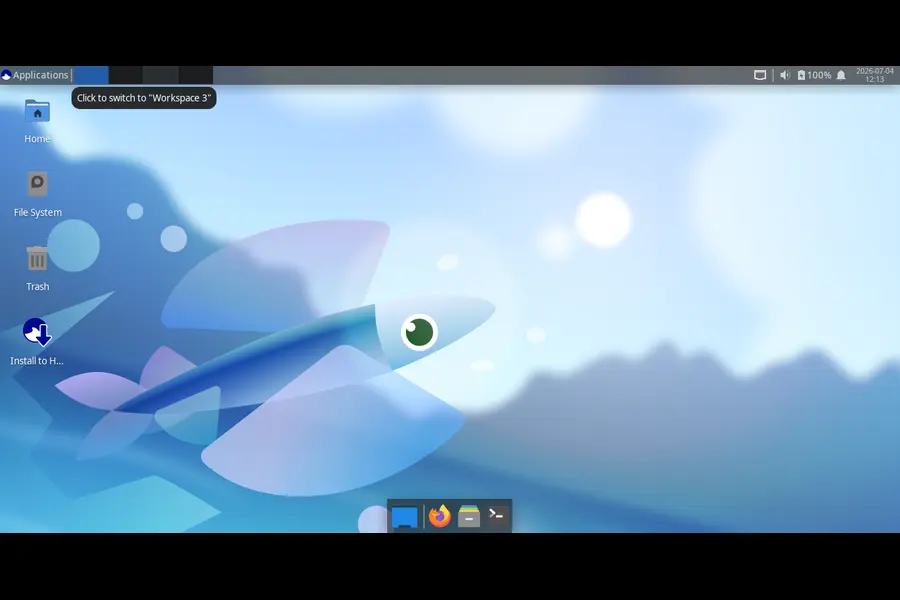
The project offers several editions: KDE Plasma (now the recommended flagship), GNOME, Xfce, and Budgie. Each one tracks the corresponding upstream desktop closely while layering in Ultramarine-specific tweaks — different defaults, extra utilities like the umcli command-line tool, and its own wallpapers and branding.
People choose Ultramarine over stock Fedora for a few practical reasons: it saves the post-install ritual of enabling RPM Fusion and third-party repositories, it ships a slightly more opinionated desktop configuration aimed at everyday usability, and it gives users a choice of four actively maintained desktop environments instead of committing to a single Fedora spin. For beginners, that means less manual setup. For power users, it means a Fedora base with some of the rough edges pre-sanded.
What’s New in Ultramarine 44
Before breaking things down feature by feature, it helps to see the release in context. Ultramarine 44 is built on Fedora Linux 44 and ships Linux kernel 7.0, giving it the same modern hardware and software foundation as any current Fedora release. On top of that base, Fyra Labs made three kinds of changes: desktop-edition upgrades (most notably Budgie’s move to Wayland and Plasma’s jump to version 6.7), out-of-box experience refinements in the Taidan installer, and quality-of-life additions to umcli, Ultramarine’s own tooling layer.
Just as significant is the change in how Ultramarine plans to ship features going forward. Instead of holding everything back for the next big numbered release, the team says it will roll out features throughout the year as they’re finished, while still syncing major releases with Fedora’s roughly six-month cadence. That’s a meaningful shift for a small distro team, since it reduces the pressure to cram half-finished work into a single release window.
New Features in Ultramarine 44
Budgie Moves to Wayland
This is arguably the headline change for anyone still on the Budgie edition. Budgie now runs on Wayland by default, using SDDM as its login manager along with a new Bluetooth application. Budgie was the second-to-last Ultramarine edition still stuck on X11, so this closes a long-standing gap with the rest of the lineup.
One catch: if you’re upgrading an existing Ultramarine 43 Budgie install, the switch to SDDM isn’t automatic. The developers found it wasn’t reliably stable to migrate automatically, so upgraders are pointed to a wiki guide with manual steps instead. Fresh installs get Wayland and SDDM from the start.
Why it matters: Wayland brings better security isolation between applications, smoother handling of mixed-DPI and multi-monitor setups, and generally lower input latency than X11. For Budgie users, it also means the edition is no longer the odd one out architecturally.
Plasma Gets a Version Bump and a New Theme Engine
Ultramarine’s Plasma edition — now the project’s recommended default — ships Plasma 6.7, along with a new theming system called the Union theme engine, plus a round of performance improvements and bug fixes. Fyra Labs notes they’ve had strong positive feedback since making Plasma the flagship edition, and this release continues investing in it.
Who benefits: anyone running Plasma day to day should notice snappier behavior and fewer of the small visual inconsistencies that theme engines are prone to introducing. If you rely on custom Plasma themes or widgets, it’s worth checking compatibility with Union before assuming everything will look identical after upgrading.
GNOME Edition Polish
GNOME edition picks up several small but genuinely useful fixes. The long-standing “Window is Ready” notification — the one GNOME shows instead of just focusing a newly opened window — has been fixed so windows now focus themselves automatically, matching behavior on the other editions. Minimize and maximize buttons are now enabled by default on every window, the calculator is now searchable from the Activities overview, and laptops show battery percentage directly in the top panel.
These aren’t headline features, but they’re the kind of friction points that new users notice immediately and longtime users have simply learned to work around. Removing them makes GNOME edition feel less like stock GNOME with a few tweaks and more like a coherent, considered experience.
One casualty of this cycle: Pop!_Shell has been dropped from GNOME edition. Fyra Labs says the extension is no longer actively maintained and usage numbers were low. It can still be installed manually via DNF, or replaced with a similar tiling extension, but it’s no longer bundled by default.
A Cleaner Taidan Setup Experience
Taidan, Ultramarine’s out-of-box setup tool, has been streamlined in this release. New options let you set your hostname, enable the CachyOS kernel, and turn on MTU probing directly during setup — all without dropping into a terminal afterward. The nightlight toggle has been removed from the flow, and traditional installs have shifted back to bundled RPMs rather than fetching everything fresh, which should make the whole process feel faster and more predictable.
Why it matters: first-boot setup is often where new Linux users form their lasting impression of a distribution. Fewer post-install chores and more configuration up front is a straightforward usability win, especially for people coming from Windows or macOS who aren’t used to touching config files.
umcli Adds Nix and Local Bootc Support
Ultramarine’s command-line management tool, umcli, gained two notable capabilities. Running um tweaks enable nix now sets up the Nix package manager for anyone who wants access to Nix’s isolated package ecosystem alongside DNF. Separately, advanced users can create a local bootc derivation through um env, laying groundwork for Ultramarine’s upcoming Atomic (image-based) edition. Fyra Labs is clear that this bootc tooling isn’t intended for most users yet — it’s aimed at people who already understand what they’re opting into.
Hardware and Platform Expansion
Ultramarine 44 also nudges the project’s reach into new hardware territory. There’s now a conversion script for turning a Fedora Asahi Remix install (Fedora’s Apple Silicon port) into Ultramarine, ahead of a planned installable Asahi image. Separately, Fyra Labs has partnered with the ASUS Linux team, and Ultramarine is now an officially recommended distribution for ASUS ROG hardware — part of a broader collaboration the two teams call the Open Gaming Collective. Ultramarine 44 is also rolling out to the Raspberry Pi Imager, and a WSL build is pending review for the Microsoft Store.
New Wallpapers
A smaller but visible touch: Ultramarine 44 refreshes its bundled extra wallpapers, including an Earthset photo taken by Artemis 2 astronaut Christina Koch, courtesy of NASA, alongside several new original pieces designed to match the tone of the previous wallpaper set.
Fedora 44 Improvements Included
Because Ultramarine tracks Fedora closely, a large share of what’s “new” in this release actually comes from upstream Fedora 44, released on April 28, 2026. It’s worth separating these out, since they apply to any Fedora 44-based system, not just Ultramarine.
Fedora 44 introduced Linux kernel 7.0, bringing expanded hardware support and general performance refinements over the previous release. On the packaging side, PackageKit switched to the new DNF5 backend built on libdnf5, and Anaconda’s networking behavior changed so it only creates network profiles for devices actually configured during installation, rather than generating default profiles for every wired device.
Gamers benefit from the NTSYNC kernel module being enabled automatically for packages like Wine and Steam, which can meaningfully improve compatibility and frame rates in Windows games without any manual configuration.
Toolchain updates are extensive: GCC 16, LLVM 22, Ruby 4.0, Go 1.26, and CMake 4.0 all land in Fedora 44, alongside Ansible 13 and PHP 8.5. MariaDB packages also move to a versioned layout, with the unversioned “distribution default” packages now pointing to the 11.8 series. For cloud and container users, Fedora Cloud images now use a Btrfs subvolume in place of a separate /boot partition, improving space efficiency.
Since Ultramarine builds directly on this base, Ultramarine 44 users get all of it — the kernel, the compiler toolchain, DNF5, and the gaming and hardware improvements — without needing to do anything special.
Desktop Environment Updates
KDE Plasma
Ultramarine’s Plasma edition, now the recommended default, ships Plasma 6.7 with the new Union theme engine and assorted performance work. This is a point release ahead of the Plasma 6.6 that ships in stock Fedora KDE, reflecting Ultramarine’s practice of pulling in newer package versions where it makes sense.
GNOME
Ultramarine’s GNOME edition sits on top of Fedora Workstation’s GNOME 50 base and layers in the fixes described above — automatic window focus, default minimize/maximize buttons, overview calculator search, and panel battery percentage on laptops. Fedora’s own GNOME 50 additionally brings improved accessibility tooling, refined color management, and better remote desktop support, all of which carry through to Ultramarine’s GNOME edition as well.
Xfce
Xfce edition moves to Xfce 4.20, matching the version now available in the Fedora 44 package repositories. It remains the lightest-weight of Ultramarine’s editions, aimed at users with older or resource-constrained hardware.
Budgie
Budgie 10.10 is the headline story here — not just a version bump, but the edition’s long-awaited transition to Wayland with SDDM as its login manager and a new Bluetooth app.
Other Editions
Ultramarine does not currently ship official Cinnamon editions; the project’s four maintained editions remain Plasma, GNOME, Xfce, and Budgie. Anything beyond these should be treated as unofficial or community-maintained rather than part of the core Ultramarine 44 release.
Performance Improvements
Performance gains in Ultramarine 44 come from a mix of upstream Fedora work and Ultramarine’s own tuning. The Linux 7.0 kernel base brings general scheduler and driver improvements that benefit boot time and responsiveness across the board, and the shift back to bundled RPMs during traditional installs should make fresh installs noticeably quicker to get running.
On Plasma, the version bump to 6.7 comes with its own round of internal performance work and bug fixes, which should translate into smoother animations and less occasional stutter during window management and virtual desktop switching. GNOME’s fixes are smaller in scope but still meaningful day to day — instant window focus instead of waiting for a notification click removes a small but real point of friction during multitasking.
For gaming specifically, the NTSYNC kernel module being enabled automatically for Wine and Steam-related packages is one of the more concrete performance wins in this cycle. It’s inherited from Fedora 44 rather than being Ultramarine-specific, but it applies equally to any Ultramarine 44 install, and it can produce a real frame-rate improvement in Windows games run through Proton or Wine without any manual setup.
Hardware Support
Thanks to the Linux 7.0 kernel base, Ultramarine 44 inherits Fedora’s improved support for recent AMD, Intel, and NVIDIA hardware, along with better out-of-the-box handling of Wi-Fi, Bluetooth, and USB peripherals on modern laptops. Fedora 44’s aarch64 live images also gained automatic device-tree selection, which helps Windows-on-ARM laptops boot Fedora-based live media correctly without manual intervention — a change that benefits any Ultramarine ARM-based effort as well.
Ultramarine’s own hardware push this cycle centers on two fronts: closer collaboration with the ASUS Linux team, which makes Ultramarine an officially recommended distribution for ASUS ROG gaming laptops and handhelds, and early groundwork for Apple Silicon support through a Fedora Asahi Remix conversion script. Neither of these replaces Fedora’s own hardware enablement work, but they extend Ultramarine’s reach into hardware categories that have historically been trickier for Linux distributions to support well.
Security and Stability Improvements
Security in Ultramarine 44 largely rides on Fedora 44’s upstream work. That includes the usual six-month cycle of updated packages and dependency patches across the entire base system, plus infrastructure-level changes like Anaconda’s more conservative network profile creation, which reduces the attack surface left over from unused network device configurations.
Ultramarine’s decision to move Budgie off X11 also carries a security dimension, even if it wasn’t framed primarily that way. Wayland’s compositor model isolates applications from each other’s input and display data far more effectively than X11 ever did, closing off a category of vulnerabilities — like keystroke sniffing between applications — that X11 was never designed to prevent.
On the stability side, the more cautious approach to migrating Budgie users to SDDM (via a manual wiki-guided process rather than an automatic switch) reflects a broader pattern in this release: Fyra Labs seems willing to trade a bit of upgrade convenience for a lower risk of breaking existing installs.
New Applications and Software Updates
Beyond desktop-specific changes, Ultramarine 44 inherits Fedora 44’s broad software refresh. Ruby jumps to version 4.0, a major update from Fedora 43’s Ruby 3.4, giving Ruby developers access to a significant set of new language features. Go moves to 1.26, and the GCC and LLVM toolchains update to versions 16 and 22 respectively, keeping Fedora and Ultramarine near the front of the pack for anyone compiling software from source.
Nix package manager availability, now easier to enable through umcli‘s um tweaks enable nix command, gives users an alternative path to install software in an isolated environment without touching the base RPM system — useful for testing packages or managing per-project dependencies without any risk to system stability. Flatpak support continues as it did in prior releases, remaining the recommended way to install sandboxed desktop applications regardless of which Ultramarine edition you’re running.
Ultramarine 44 vs Ultramarine 43
| Category | Ultramarine 43 | Ultramarine 44 |
|---|---|---|
| Fedora base | Fedora Linux 43 | Fedora Linux 44 |
| Kernel | Fedora 43 kernel series | Linux kernel 7.0 |
| Plasma edition | Earlier Plasma 6.x release | Plasma 6.7 with Union theme engine |
| Budgie edition | X11, LightDM-based | Wayland, SDDM, new Bluetooth app |
| GNOME edition | Delayed window focus notification | Instant window focus, default min/max buttons, calculator search |
| Installer (Taidan) | Nightlight toggle present, no hostname/CachyOS options | Hostname, CachyOS kernel, and MTU probing options; nightlight removed |
| Package installs | Streamed install packages | Back to bundled RPMs for traditional installs |
| umcli | No Nix or bootc tooling | Nix tweak and local bootc derivation support |
| Software | Pop!_Shell included in GNOME | Pop!_Shell dropped (unmaintained) |
| Hardware focus | Standard PC support | ASUS ROG official support, Asahi conversion script |
| Release model | Feature-locked to major releases | Rolling feature additions between major releases |
Should You Upgrade to Ultramarine 44?
For most existing Ultramarine users, upgrading makes sense. The improvements are largely additive and low-risk, apart from the Budgie SDDM transition, which requires a short manual step rather than happening automatically.
Developers get real value here — newer toolchains (GCC 16, LLVM 22, Ruby 4.0, Go 1.26) and easier access to Nix through umcli make this a solid release for anyone doing active software development.
Gamers benefit from Fedora 44’s automatic NTSYNC support for Wine and Steam, plus Ultramarine’s new ASUS ROG hardware relationship, making this a good time to upgrade if you game on Linux, especially on ASUS hardware.
Students and everyday users will likely appreciate the GNOME edition fixes most — the instant window focus and simplified setup experience remove small annoyances that otherwise pile up during daily use.
Content creators running Plasma should see tangible benefits from the 6.7 update and its performance work, though it’s worth checking that any custom themes are compatible with the new Union engine before switching.
If you’re currently on Budgie edition and rely heavily on your existing desktop configuration, it’s worth reading the wiki migration guide before upgrading, since the SDDM switch isn’t automatic. Everyone else can reasonably upgrade without much preparation beyond a standard backup.
Pros and Cons
Pros
- Budgie edition finally modernizes onto Wayland, closing a long-standing technical gap
- Plasma edition gets a real version bump plus a new theme engine and performance work
- GNOME edition fixes several long-standing usability annoyances
- Taidan setup flow is faster and offers more configuration up front
- Inherits Fedora 44’s kernel, toolchain, and NTSYNC gaming improvements
- New ASUS ROG partnership expands official hardware support
- Shift to a rolling feature-release model should reduce future release delays
Cons
- Budgie users upgrading from 43 must manually migrate to SDDM rather than being upgraded automatically
- Pop!_Shell is dropped from GNOME edition, requiring manual reinstallation for fans of tiling extensions
- Bootc/local Atomic tooling is explicitly experimental and not meant for most users yet
- No official Cinnamon edition, so users wanting that desktop must look elsewhere
- Some headline items, like the Asahi installable image, are still “coming soon” rather than shipped
Conclusion
So, what’s new in Ultramarine 44 in one sentence? A Fedora 44 foundation, a modernized Wayland-based Budgie edition, a refreshed Plasma flagship, meaningful GNOME polish, and a simplified setup process, all wrapped in a shift toward shipping features continuously rather than saving everything for the next big release. It’s not a release built around one blockbuster feature — it’s a release built around fixing what needed fixing and quietly setting up bigger changes, like Ultramarine Atomic, for later in the year.
If you’re already running Ultramarine 43, upgrading is a reasonable move for most people, with the Budgie SDDM migration being the one step that needs a little manual attention. If you’re coming from Fedora or another distribution entirely, Ultramarine 44 is a solid entry point: modern hardware support, four genuinely different desktop options, and a team that’s clearly paying attention to the small details that make a desktop feel finished.
Disclaimer
This article reflects information available as of early July 2026, based on official Ultramarine Linux and Fedora Project release announcements. Software details, package versions, and feature availability can change with subsequent point releases or updates — always check the official Ultramarine Linux and Fedora documentation before upgrading a production system.
📚 Related Linux Articles
If you’re exploring Ultramarine 44, you may also find these Linux distribution guides helpful.
Discover the latest features, security improvements, updated tools, and why ParrotOS 7.3 is an excellent Linux distribution for ethical hacking, privacy, and development.
See what’s new in Mageia 10, compare its improvements with previous releases, and find out whether upgrading is worthwhile for desktop users.
Explore the biggest changes between postmarketOS 26.06 and 25.12, including new features, supported devices, and performance improvements.