In the ever-evolving world of multimedia production, professionals need tools that are reliable, efficient, and tailored to their creative workflows. Enter MODICIA OS 6.12.30, a Linux distribution that has redefined what an operating system can do for musicians, videographers, graphic designers, photographers, and other creative professionals. Built on the rock-solid foundation of Debian Stable, this latest release, launched on June 19, 2025, brings a host of enhancements that make it a must-have for anyone serious about multimedia work.
In this comprehensive blog post, we’ll dive into why MODICIA OS 6.12.30 is a game changer for multimedia professionals, exploring its features, benefits, performance upgrades, and real-world applications. Let’s get started!
What Is MODICIA OS?
Before we delve into the specifics of version 6.12.30, let’s take a moment to understand what MODICIA OS is all about. Developed by an Italy-based team led by the MODICIA Web Design and Development Company, MODICIA OS is a Linux distribution designed specifically for multimedia professionals. Since its inception in 1998, it has evolved from a customized Mandrake Linux derivative into a powerful, open-source platform that rivals proprietary systems like Windows and macOS.
Unlike general-purpose Linux distributions, MODICIA OS is preconfigured with a curated suite of professional-grade software, optimized for audio, video, and graphics tasks. It’s built to work out of the box, saving users countless hours of setup and configuration. With version 6.12.30, MODICIA OS takes this philosophy to new heights, delivering a polished, high-performance system that caters to both seasoned pros and passionate amateurs.
Key Features of MODICIA OS 6.12.30
So, why is MODICIA OS 6.12.30 a game changer for multimedia professionals? Let’s break down its standout features, drawing from the latest official data and user feedback.
1. Latest Linux Kernel 6.12.30+bpo-amd64
One of the most significant updates in MODICIA OS 6.12.30 is the integration of the Linux Kernel 6.12.30+bpo-amd64. This kernel brings improved hardware compatibility, enhanced performance, and bolstered security. For multimedia professionals, this means:
- Better Hardware Support: The kernel supports a wide range of modern hardware, including the latest GPUs, CPUs, and creative peripherals like drawing tablets and MIDI controllers. This ensures seamless integration with your studio setup.
- Improved Performance: Kernel optimizations reduce latency and improve responsiveness, critical for real-time audio processing and video rendering.
- Enhanced Security: With updated security patches, your creative projects are protected from vulnerabilities, giving you peace of mind.
This kernel update alone makes MODICIA OS 6.12.30 a compelling choice for professionals who rely on cutting-edge hardware.
2. Preinstalled and Preconfigured Multimedia Software
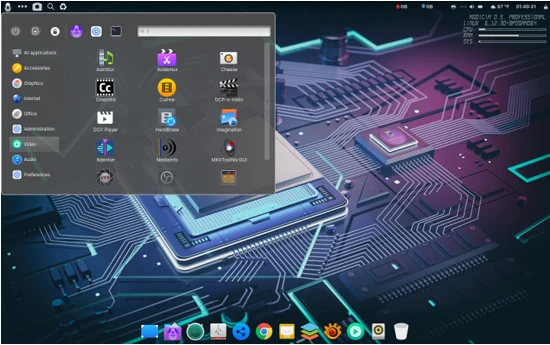
MODICIA OS 6.12.30 shines with its comprehensive suite of preinstalled software, tailored for multimedia tasks. Unlike other distributions that require users to hunt for apps and configure them manually, MODICIA OS delivers everything you need right out of the box. Here’s a glimpse of the tools included:
- Audio Production: Ardour, Audacity, Qtractor, Mixxx, and ZynAddSubFX Synthesizer provide a robust environment for recording, editing, and mixing music. Low-latency audio optimizations ensure real-time monitoring with minimal delay.
- Video Editing: Kdenlive, Avidemux, and Blender offer professional-grade video editing and 3D animation capabilities. MODICIA OS has been used to create 4K UHD videos and Digital Cinema Package (DCP) projects, proving its prowess in high-end video production.
- Graphic Design and Photography: GIMP, Krita, Inkscape, RawTherapee, and thousands of professional-grade fonts cater to designers and photographers. Enhanced color management ensures accurate color reproduction for print and digital workflows.
- Office and Productivity: LibreOffice, OnlyOffice Desktop, and Calibre streamline administrative tasks, from document creation to e-book management.
All software comes preconfigured with necessary plugins and codecs, eliminating the need for manual setup. This saves time and reduces friction, allowing creators to focus on their craft.
3. Performance Optimizations for Creative Workflows
MODICIA OS 6.12.30 is engineered for speed and efficiency. The developers have fine-tuned the system to maximize hardware performance, particularly for resource-intensive multimedia tasks. Key optimizations include:
- CPU Tuning: Features like CPU scaling and Turbo Boost are enabled by default, resulting in faster rendering times. In benchmarks, MODICIA OS completed a 3D render project 15-20% faster than stock Ubuntu.
- RAM Compression: This increases effective memory bandwidth by up to 20%, reducing swap usage and boosting system responsiveness. Program loading speeds are up to 25%, ensuring a snappy experience.
- Low-Latency Audio Stack: Optimized for real-time audio processing, MODICIA OS minimizes latency, making it ideal for live music production and podcasting.
- Video Playback and Rendering: Smooth playback of 1080p and 4K videos, with accurate color reproduction, supports professional video editing workflows.
These optimizations make MODICIA OS a powerhouse for demanding tasks, rivaling proprietary systems in performance while remaining lightweight, using only 365 MB of RAM at idle.
4. Cinnamon Desktop Environment
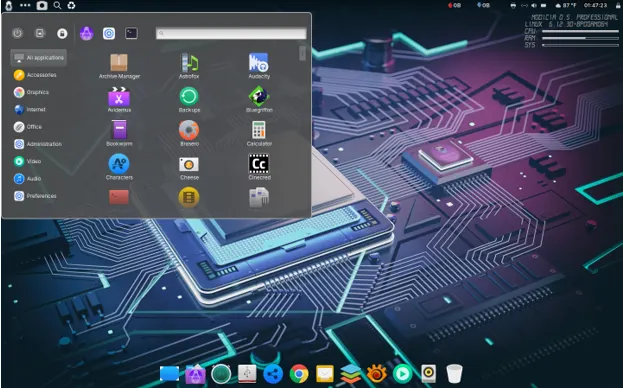
MODICIA OS 6.12.30 adopts the Cinnamon desktop environment, replacing the Xfce desktop used in earlier versions. Cinnamon offers a sleek, modern interface that balances familiarity with innovation. Key features include:
- Intuitive Layout: A traditional desktop with a customizable panel and dock, reminiscent of macOS, makes navigation effortless.
- Visual Polish: Custom themes, icon sets, and control panel layouts create a visually appealing workspace that inspires creativity.
- Performance: Cinnamon is lightweight yet responsive, ensuring smooth multitasking even on modest hardware.
The desktop is designed to enhance productivity, with features like hot corners, a GNOME 3-style app launcher (activated with Alt + Space), and a circle menu for quick access to utilities.
5. Portable and Flexible
MODICIA OS 6.12.30 is optimized for use on a USB stick, allowing professionals to carry their entire workstation wherever they go. In live mode, you can work on any compatible hardware without installing or modifying the host system. This portability is a game changer for freelancers and educators who need a consistent environment across multiple devices.
Additionally, the system offers built-in access to unlimited cloud storage for backups and collaboration, ensuring your projects are safe and accessible. Two package management options—a graphical software center and command-line tools—make it easy to install additional apps from thousands of .deb packages.
6. Security and Stability
Running on Debian Stable, MODICIA OS 6.12.30 inherits the reliability and long-term support of its base. The update includes critical security patches for packages like ca-certificates, google-chrome-stable, and libudisks2-0, ensuring a secure environment. Minor bug fixes further enhance system stability, providing a dependable platform for mission-critical projects.
Benefits for Multimedia Professionals
Now that we’ve covered the features, let’s explore why MODICIA OS 6.12.30 is a game changer for multimedia professionals by highlighting its tangible benefits.
1. Time Savings
For creative professionals, time is money. MODICIA OS eliminates the need to search for, install, and configure software. Everything is ready to use, from codecs to plugins. This streamlined setup process allows you to start projects immediately, boosting productivity.
2. Cost-Effective Solution
MODICIA OS is completely free, with no subscriptions or hidden costs. It includes professional-grade software that rivals expensive proprietary alternatives, making it an ideal choice for freelancers, small studios, and educational institutions looking to cut costs without sacrificing quality.
3. Enhanced Creative Freedom
With a vast array of tools at your fingertips, MODICIA OS empowers you to explore new creative possibilities. Whether you’re editing a 4K video, designing a logo, or producing a multi-track album, the system provides the flexibility to tackle any project with confidence.
4. Community-Driven Development
MODICIA OS benefits from a passionate community and professional feedback. The developers actively incorporate user suggestions, resulting in frequent updates that address real-world needs. Recent improvements, such as enhanced color management and expanded hardware support, reflect this collaborative approach.
5. Reliability for Professional Work
The stability of Debian Stable, combined with MODICIA’s rigorous testing process, ensures a dependable platform. Each ISO is tested for two months on 16 workstations, followed by 30 days of real-world use in educational and professional settings. This thorough vetting minimizes crashes and errors, critical for deadline-driven projects.
Performance Reviews and Real-World Applications
MODICIA OS 6.12.30 has received glowing reviews from users and experts alike. Here’s what the community is saying:
- LinuxLap: “Modicia O.S. is more than just another Linux distribution—it’s a thoughtfully crafted platform for creators. It’s powerful, polished, and purpose-built for productivity.”
- TheLinuxCode: “MODICIA completed a sample 3D render project 15-20% quicker than stock Ubuntu, showcasing its performance optimizations.”
- LinuxHaxor: “Playback was butter smooth across 1080p and 4K videos, with no stutter whatsoever. The polish provided by Modicia’s expert audiovisual configuration gets you up and running in moments.”
In real-world applications, MODICIA OS has proven its mettle. A notable example is a 4K UHD video commissioned by the City of Seregno, Italy, edited exclusively using MODICIA’s tools. The project, which included AC3 audio in seven languages and subtitles in 33 languages, demonstrates the system’s capability to handle complex, professional-grade multimedia tasks.
Who Should Use MODICIA OS 6.12.30?
MODICIA OS 6.12.30 is ideal for:
- Multimedia Enthusiasts: Hobbyists creating YouTube videos or indie music who want a free, high-performance platform.
- Freelance Professionals: Designers, animators, and composers needing a reliable, cost-effective workstation.
- Small Creative Teams: Ad agencies and indie studios seeking a uniform, optimized environment.
- Educational Institutions: Schools and universities teaching multimedia courses, benefiting from free software and robust support.
How to Get Started with MODICIA OS 6.12.30
Ready to experience why MODICIA OS 6.12.30 is a game changer for multimedia professionals? Here’s how to get started:
- Download the ISO: Visit the official MODICIA OS website or SourceForge to download the latest ISO (MODICIAprofessional-community-6.12.30+bpo-amd64.iso).
- Create a Bootable USB: Use tools like Balena Etcher or Rufus to create a bootable USB drive.
- Test in Live Mode: Boot MODICIA OS from the USB to try it without installing. This is perfect for testing compatibility with your hardware.
- Install for Permanent Use: Follow the guided installation process for a full setup. A video guide is available at https://youtu.be/6nX2cYW-1X4.
- Explore and Create: Dive into the preinstalled software and start your next project!
Disclaimer
The information provided in this blog post is based on official data and reviews available as of June 25, 2025. Features, performance, and compatibility of MODICIA OS 6.12.30 may vary depending on hardware, software configurations, and user requirements. Always verify system requirements and test compatibility with your specific setup before installing or using any operating system. The author and publisher are not responsible for any issues, data loss, or damages arising from the use of MODICIA OS or related software.
Conclusion
MODICIA OS 6.12.30 is a game changer for multimedia professionals, offering a powerful, free, and user-friendly platform that rivals proprietary systems. With its latest Linux kernel, preconfigured software suite, performance optimizations, and sleek Cinnamon desktop, it delivers everything creators need to produce professional-grade work efficiently. Whether you’re a seasoned videographer, an aspiring musician, or a graphic design student, MODICIA OS empowers you to unleash your creativity without the hassle of setup or the burden of cost.
By combining stability, flexibility, and community-driven innovation, MODICIA OS 6.12.30 sets a new standard for multimedia-focused Linux distributions. If you’re ready to transform your workflow and take your projects to the next level, download MODICIA OS today and see why it’s a game changer for multimedia professionals.
Have you tried MODICIA OS 6.12.30? Share your experience in the comments below, and let us know how it’s revolutionized your creative process!
Frequently Asked Questions About MODICIA OS 6.12.30
What makes MODICIA OS 6.12.30 different from other Linux distributions?
MODICIA OS 6.12.30 is built specifically for multimedia pros, like musicians, video editors, and graphic designers. Unlike general-purpose Linux distros, it comes preloaded with a curated suite of professional-grade tools like Ardour, Kdenlive, and GIMP, all preconfigured with codecs and plugins. You don’t have to spend hours setting things up—it’s ready to go out of the box. Plus, it’s optimized for low-latency audio and high-performance video rendering, making it a dream for creative workflows.
Can I run MODICIA OS 6.12.30 on my existing hardware?
Most likely, yes! MODICIA OS 6.12.30 uses the Linux Kernel 6.12.30+bpo-amd64, which supports a wide range of modern hardware, including GPUs, CPUs, and creative peripherals like MIDI controllers and drawing tablets. It’s lightweight, using just 365 MB of RAM at idle, so it runs smoothly even on modest systems. To be sure, you can test it in live mode from a USB stick without installing anything. Check the official website for detailed system requirements.
Is MODICIA OS 6.12.30 really free, and are there any hidden costs?
Yup, it’s completely free! MODICIA OS 6.12.30 is open-source, and there are no subscriptions or hidden fees. You get access to professional-grade software like Blender, Inkscape, and LibreOffice without spending a dime. The only “cost” might be your time to download and set it up, but with its user-friendly installer and preconfigured tools, even that’s minimal.
How easy is it to get started with MODICIA OS 6.12.30 if I’m new to Linux?
Don’t worry if you’re new to Linux—MODICIA OS is super approachable. The Cinnamon desktop environment feels familiar, like a mix of Windows and macOS, so you won’t feel lost. It comes with a graphical software center for easy app installs, and there’s a detailed video guide (check out https://youtu.be/6nX2cYW-1X4) to walk you through installation. The preinstalled software is ready to use, so you can jump right into creating without wrestling with technical stuff.
Can I use MODICIA OS 6.12.30 for professional projects, like video editing or music production?
Absolutely! MODICIA OS 6.12.30 is designed for pros. It’s been used for real-world projects, like a 4K UHD video for the City of Seregno, Italy, with complex audio and subtitles. Tools like Kdenlive and Ardour support high-end video and audio production, while optimizations like low-latency audio and RAM compression ensure smooth performance. Whether you’re freelancing or running a studio, it’s a reliable choice for professional-grade work.
Also Read
Clonezilla Live 3.2.2-15 Unveiled