If you’re a Linux enthusiast who craves a visually stunning, highly customizable, and user-friendly operating system, Feren OS 2025 is here to steal the spotlight. Released as a major rebase update in March 2025, Feren OS 2025.03, codenamed “Osmium,” brings a refined experience built on Ubuntu 22.04 LTS, blending the power of KDE Plasma 5.27 with thoughtful tweaks that make it a dream for customization lovers. Whether you’re a seasoned Linux user or a newcomer looking to dip your toes into open-source waters, Feren OS 2025 offers a pseudo-rolling release that’s stable, secure, and downright gorgeous.
In this deep dive, we’ll explore why Feren OS 2025 is a visual masterpiece, its standout features, customization options, and how it stacks up for both casual and power users. Let’s get started!
What is Feren OS 2025?
Feren OS is a free, open-source Linux distribution built on Ubuntu, designed to empower users to take control of their computing experience. With Feren OS 2025, the team has delivered a polished rebase update, shifting from Ubuntu 20.04 LTS to Ubuntu 22.04 LTS for enhanced security, newer software, and support until April 2027. Officially finalized on March 31, 2025, and rolled out to users on April 1, 2025, this release marks a significant milestone for the project, offering a refined system structure, improved performance, and a visually captivating KDE Plasma desktop environment.
Unlike many Linux distros that prioritize minimalism or raw performance, Feren OS 2025 strikes a balance between aesthetics and functionality. It’s a pseudo-rolling release, meaning you get continuous updates without the need for frequent full reinstalls, making it ideal for users who want a modern system without constant upheaval. With tools like DesktopSwop, Pipewire, and a redesigned OEM Config, Feren OS 2025 is both approachable for beginners and a playground for tinkerers.
Why Feren OS 2025 Stands Out: A Visual Feast
1. KDE Plasma 5.27: The Heart of Customization
At the core of Feren OS 2025 lies KDE Plasma 5.27, one of the most flexible and visually appealing desktop environments in the Linux world. This release marks the end of the Plasma 5 era, but it’s a fitting swan song with a host of refinements. Plasma 5.27 in Feren OS has been tweaked to perfection, offering:
- Adaptive Panel Transparency: Restoring the classic transparent panel behavior that fans love, giving your desktop a sleek, modern look.
- Extended Accent Color Options: Customize your interface with a wide range of accent colors to match your mood or aesthetic.
- Reduced Custom Patching: Feren OS minimizes heavy modifications to Plasma, ensuring faster updates and a more authentic KDE experience.
Plasma’s widget-based system lets you add clocks, weather apps, system monitors, or sticky notes to your desktop with ease. Want a macOS-inspired dock or a Windows-like taskbar? Feren OS 2025’s pre-configured “Human” and “Mac and Cheese” layouts make it simple to switch styles. The Latte Dock has been replaced with native Plasma panels, reducing bloat while maintaining flexibility.
2. Stunning Wallpapers and Themes
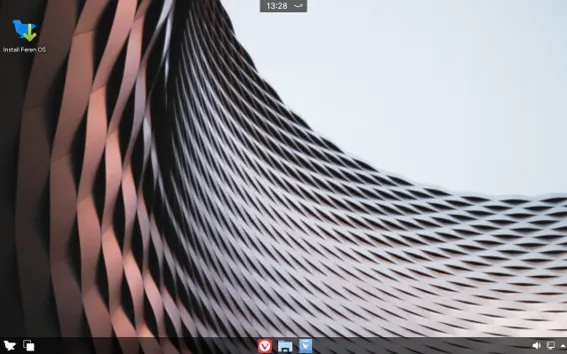
Feren OS 2025 is a love letter to visual enthusiasts. The release includes a curated set of wallpapers, blending nostalgic designs from Feren OS’s history with fresh, high-quality backgrounds from Unsplash. Whether you prefer minimalist gradients, vibrant landscapes, or retro-inspired art, there’s something to suit every taste.
The Feren OS team has also taken a new approach to theming. Instead of forcing custom styles on applications, Feren OS 2025 adopts an opt-in model where apps respect the user’s chosen theme. This means no more clashing styles or broken app visuals. The GTK stylesheet hasn’t been ported to GTK4, leaving it to developers to align with your theme, resulting in a cleaner, more cohesive look.
For icon lovers, the New-Inspire-icons project on GitHub offers a work-in-progress redesign of Feren OS’s icon set, forked from KDE’s Breeze icons. Expect crisp, modern visuals that elevate the desktop experience.
3. DesktopSwop: A Game-Changer for Layouts
One of Feren OS 2025’s standout features is DesktopSwop, a tool that lets you switch between desktop layouts effortlessly. Want to try a macOS-like setup with a top bar and dock? Or perhaps a traditional Windows-style taskbar? DesktopSwop makes it a breeze, offering pre-configured layouts that cater to different workflows and aesthetics. This tool is perfect for users who love experimenting with their desktop’s look and feel without diving into complex configuration files.
Performance and Stability: Built on Ubuntu 22.04 LTS
Feren OS 2025 is more than just a pretty face—it’s a robust operating system designed for stability and performance. By rebasing on Ubuntu 22.04 LTS, the team has ensured long-term support until 2027, with access to newer software and improved security. Key under-the-hood changes include:
- Removed Unnecessary Metapackages: Streamlining the system for better stability and faster updates.
- Pipewire as Default Sound Server: Replacing PulseAudio, Pipewire offers superior audio quality and enhanced screen recording capabilities.
- Improved Language Support: Better handling of language changes for home folders, making it easier for multilingual users.
- Redesigned OEM Config: A restricted Plasma session at first boot lets you connect to Wi-Fi, monitor battery, and adjust brightness before completing setup, mimicking Vanilla OS’s approach.
While Feren OS performs beautifully on most hardware, some older machines may face issues due to unsupported drivers. The team acknowledges this, recommending users check compatibility before installing.
Customization Galore: Tailor Feren OS 2025 to Your Needs
For Linux users, customization is king, and Feren OS 2025 delivers in spades. Here’s how you can make it your own:
1. Vivaldi Browser Integration
Feren OS 2025 includes Vivaldi as its default browser, known for its customization options and privacy focus. While it doesn’t open automatically on startup, Vivaldi’s integration requires agreeing to its Privacy Policy and EULA. The browser’s titlebar buttons have been lightly themed to match Feren OS’s aesthetic, ensuring a seamless visual experience.
2. Feren OS Transfer Tool
Migrating from Windows or another Linux distro? The Feren OS Transfer Tool, available on GitHub, simplifies data backup and transfer. Written in Python, this utility ensures reliable migration, making Feren OS 2025 a great choice for users switching operating systems.
3. Solstice: Site-Specific Browsers
For productivity enthusiasts, Feren OS 2025 introduces Solstice, a tool for creating site-specific browsers (SSBs). Turn your favorite web apps—like Notion, Slack, or Gmail—into standalone desktop applications for a clutter-free workflow.
4. New Feren Store (Work in Progress)
The upcoming Feren Store, still in development, promises a curated app ecosystem. Features like application playlists (export/import installed apps), snap support for official developer packages, and task queuing for installs/updates are in the works. While not yet fully functional, it’s a glimpse into Feren OS’s ambitious future.
Who is Feren OS 2025 For?
Feren OS 2025 caters to a wide audience, from Linux newbies to seasoned power users. Here’s a breakdown:
- Beginners: The intuitive KDE Plasma interface, pre-configured layouts, and OEM Config make it easy to get started. The pseudo-rolling release means you won’t need to reinstall frequently.
- Customization Enthusiasts: With DesktopSwop, extensive theming options, and Plasma’s widget system, tinkerers will feel right at home.
- Power Users: Tools like Solstice, the Transfer Tool, and Pipewire cater to those who demand advanced functionality.
- Privacy-Conscious Users: Vivaldi’s privacy focus and the ability to disable PPAs/custom repositories by default ensure a secure experience.
Known Issues and Workarounds
No operating system is perfect, and Feren OS 2025 has a few quirks. A known DNS resolver bug, tied to a systemd issue, may occasionally disrupt internet connectivity. A quick network reconnect usually resolves it. For advanced users needing custom repositories, software-properties-qt can be installed manually. The team actively tracks issues on GitHub, with repositories like Bug-Reporting-Center and Dependency-Issue-Reporting for community feedback.
How to Get Started with Feren OS 2025
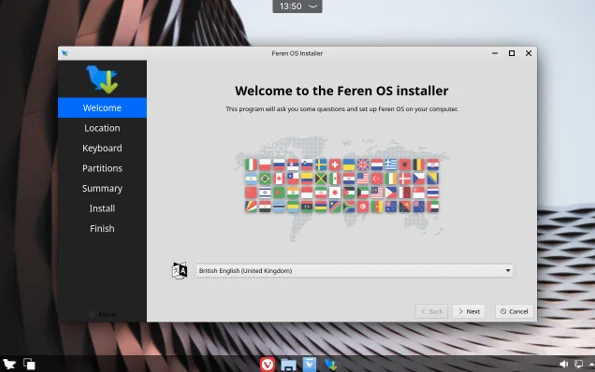
Ready to try Feren OS 2025? Here’s how to get started:
- Download the ISO: Head to ferenos.weebly.com to grab the latest ISO.
- Create a Bootable Drive: Use tools like Ventoy or Rufus to create a bootable USB. Feren OS 2025 is confirmed to work with Ventoy 1.0.72 in UEFI mode.
- Check System Requirements: Ensure your system meets the minimum requirements, including 64-bit architecture and sufficient RAM (1GB minimum, 2GB+ recommended for smooth performance).
- Install or Try Live Mode: Boot into the live environment to test Feren OS or proceed with installation.
- Update to 2025.03: If you’re on Feren OS 2023.04, use the Update Manager to upgrade to 2025.03 before May 31, 2025, when 2023.04 reaches end-of-life.
Community and Support
The Feren OS community is active on platforms like GitHub, Discord, Twitter, and Mastodon. With 117 repositories on GitHub, the team is transparent about development, encouraging users to report bugs or contribute code. The Feren User Guide and Bug-Reporting-Center repositories are great starting points for troubleshooting.
For news, follow The Feren OS Dev on Medium, where detailed release notes and yearly recaps provide insights into the project’s evolution. The team’s passion for Feren OS is infectious, making it a joy to engage with the community.
Feren OS 2025 vs. Other Linux Distros
How does Feren OS 2025 compare to popular distros like Ubuntu, Fedora, or Pop!_OS?
- Vs. Ubuntu: Feren OS offers a more customizable KDE Plasma experience compared to Ubuntu’s GNOME desktop, with a pseudo-rolling release for continuous updates.
- Vs. Fedora: Fedora’s cutting-edge approach suits developers, but Feren OS’s LTS base and visual polish make it more beginner-friendly.
- Vs. Pop!_OS: Pop!_OS excels for gamers and developers, but Feren OS’s DesktopSwop and theming options give it an edge for customization lovers.
The Future of Feren OS
Feren OS 2025 is a stepping stone to even bigger things. The team is already working on a Ubuntu 24.04-based release and the New Feren Store. With a history of overcoming delays, the Feren OS team’s dedication ensures a bright future for this distro.
Final Verdict: Is Feren OS 2025 Worth It?
If you’re looking for a Linux distro that combines breathtaking visuals, unparalleled customization, and rock-solid stability, Feren OS 2025 is a must-try. Its KDE Plasma 5.27 desktop, DesktopSwop tool, and thoughtful refinements make it a visual masterpiece for Linux customization lovers. Whether you’re revamping your desktop, migrating from Windows, or exploring Linux for the first time, Feren OS 2025 delivers an experience that’s both powerful and personal.
Download Feren OS 2025 today from ferenos.weebly.com and join a community that’s passionate about crafting the perfect desktop. With its blend of beauty, functionality, and freedom, Feren OS 2025 is poised to become your new favorite operating system.
Disclaimer
The information provided in this blog post about Feren OS 2025 is based on official sources, including the Feren OS website (ferenos.weebly.com) and related GitHub repositories, as of the latest available data. While every effort has been made to ensure accuracy, the features, specifications, and availability of Feren OS 2025 may change, as it is an open-source project subject to ongoing development.
The author is not affiliated with the Feren OS development team and does not guarantee the performance, compatibility, or suitability of Feren OS 2025 for any specific use case. Users are encouraged to verify compatibility with their hardware, back up data before installation, and consult official documentation for the most up-to-date information. The author is not responsible for any issues, damages, or data loss resulting from the use of Feren OS 2025. Always exercise caution when installing new software and refer to the official Feren OS community channels for support.
Frequently Asked Questions (FAQ) About Feren OS 2025
What makes Feren OS 2025 different from other Linux distributions?
Feren OS 2025 stands out because it’s like the Swiss Army knife of Linux distros—gorgeous, customizable, and beginner-friendly all at once! Built on Ubuntu 22.04 LTS, it uses the KDE Plasma 5.27 desktop, which lets you tweak everything from panel layouts to accent colors. The DesktopSwop tool is a game-changer, letting you switch between macOS or Windows-like setups in a snap. Plus, it’s a pseudo-rolling release, so you get continuous updates without needing to reinstall. It’s perfect if you love making your desktop yours while keeping things stable and user-friendly.
Is Feren OS 2025 good for beginners?
Absolutely! If you’re new to Linux, Feren OS 2025 is super welcoming. The setup process is streamlined with a redesigned OEM Config that helps you connect to Wi-Fi and tweak settings right away. The KDE Plasma interface is intuitive, and pre-configured layouts like “Human” or “Mac and Cheese” make it easy to get started without feeling overwhelmed. You don’t need to be a tech wizard to dive in, but there’s plenty of depth for when you’re ready to explore.
Can I run Feren OS 2025 on older hardware?
Feren OS 2025 is pretty lightweight, but it’s not perfect for every old machine. It’s built on Ubuntu 22.04 LTS and recommends at least 1GB of RAM (2GB+ for a smooth experience) and a 64-bit processor. Some older hardware might run into driver issues, as noted by the Feren OS team. Before installing, check your system specs and maybe try the live USB mode to test compatibility. If your machine’s a bit newer, you’ll likely have a silky-smooth experience!
How do I customize my desktop with Feren OS 2025?
Oh, where do I start? Feren OS 2025 is a customization lover’s dream! With KDE Plasma 5.27, you can add widgets, change themes, and tweak panel transparency to your heart’s content. The DesktopSwop tool lets you flip between different desktop layouts, like a macOS dock or a Windows taskbar, in seconds. You’ve also got a ton of wallpapers to choose from, plus the ability to customize accent colors and icons. If you love playing with aesthetics, you’ll be in heaven tinkering with this OS.
Where can I get support if I run into issues with Feren OS 2025?
The Feren OS community has your back! You can check out the official website (ferenos.weebly.com) for guides and downloads. For deeper help, hop onto their GitHub repositories, like the Bug-Reporting-Center, to report issues or browse solutions. The community is also active on Discord, Twitter, and Mastodon, where you can chat with other users and devs. The Feren User Guide on GitHub is another great resource for troubleshooting. Don’t be shy—reach out, and someone will help you sort things out!
Also Read
What Makes Parrot OS 6.4 the Ultimate Choice for Ethical Hackers?