If you’re a tech enthusiast with a passion for reviving older hardware or exploring alternative operating systems, MorphOS might just be the gem you’ve been searching for. This AmigaOS-inspired operating system is a lightweight, highly efficient, and flexible powerhouse designed for PowerPC (PPC) systems. Whether you’re running it on a vintage Mac G4, a Pegasos computer, or an Amiga with a PowerUP accelerator card, MorphOS delivers a modern yet nostalgic computing experience that’s hard to beat.
In this blog post, we’ll dive deep into why MorphOS is the ultimate lightweight operating system, exploring its features, performance, compatibility, and unique appeal in 2025. Let’s get started!
What is MorphOS?
MorphOS is a mixed proprietary and open-source operating system that began its journey in 1999. Built on the Quark microkernel, it’s designed primarily for PowerPC-based hardware, such as the Pegasos computer, Amiga systems with PowerUP accelerator cards, Freescale development boards (like Efika and mobileGT), and a range of Apple PowerPC systems, including the Mac mini G4, eMac, PowerBook G4, and Power Mac G4, with limited support for Power Mac G5. Its core is proprietary, but key components, like the Ambient desktop, are open-source, making it a unique blend of accessibility and exclusivity. MorphOS is often described as AmigaOS-like because it maintains compatibility with legacy Amiga software while offering a modern, customizable graphical user interface (GUI) optimized for PPC architecture.
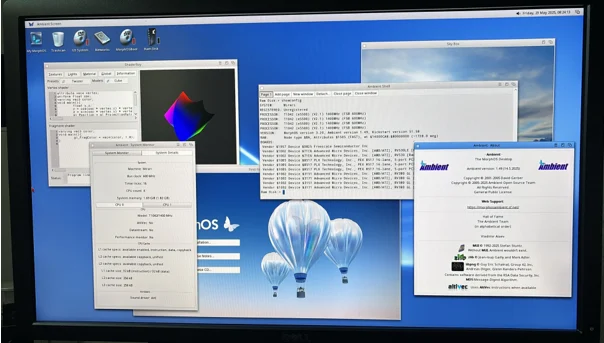
The latest version, MorphOS 3.19, released as of January 2025, showcases the development team’s commitment to keeping this OS relevant for retro computing enthusiasts and those seeking a lightweight alternative to mainstream operating systems like Windows, macOS, or Linux. But what makes MorphOS truly special? Let’s break it down.
Why MorphOS Stands Out as a Lightweight OS
1. Blazing Fast Performance on Minimal Hardware
One of the standout features of MorphOS is its ability to breathe new life into aging hardware. In an era where modern operating systems like Windows 11 demand hefty resources (think 8GB RAM minimum and powerful CPUs), MorphOS thrives on systems with as little as 512MB of RAM—though 1GB or more is recommended for optimal performance. The Quark microkernel is designed to be lean and efficient, allowing MorphOS to boot in under 20 seconds on decade-old hardware, a feat that puts many modern OSes to shame.
For example, a Mac mini G4 with a 1.5GHz processor and 64MB of video memory can run MorphOS smoothly, handling tasks like web browsing, multimedia playback, and even light gaming without breaking a sweat. The system’s lightweight nature means it doesn’t rely on virtual memory, keeping resource usage low and responsiveness high. This makes MorphOS ideal for users looking to repurpose older PPC-based machines without sacrificing performance.
2. Seamless AmigaOS Compatibility
MorphOS is a love letter to Amiga fans, offering binary compatibility with software written for Motorola 68k-based Amiga computers. Through its ABox emulation sandbox, MorphOS can run legacy Amiga applications natively, including those designed for PowerUP and WarpOS formats. This compatibility extends to the massive Aminet repository, which hosts over 75,000 packages, including games, music, sound tools, and artwork. Additionally, MorphOS-specific repositories like MorphOS Storage, MorphOS Files, and MorphOS Software provide a wealth of modern applications tailored for the platform.
Whether you’re running classic Amiga software like Personal Paint or modern MorphOS-native apps, the OS handles both with ease. The Just-in-Time (JIT) compiler enhances performance by emulating the 68k processor efficiently, ensuring that legacy apps run smoothly on PPC hardware. This blend of nostalgia and modern functionality is a key reason why MorphOS appeals to retro computing enthusiasts.
3. Modern, Customizable GUI with Ambient Desktop
The Ambient desktop, a core component of MorphOS, is a shining example of how to balance modern aesthetics with lightweight performance. Developed by David Gerber in 2001 and later released under the GPL in 2005, Ambient is a Magic User Interface (MUI)-based desktop environment that’s fast, asynchronous, and highly customizable. It draws inspiration from Amiga’s Workbench and Directory Opus Magellan but introduces modern touches like hardware-accelerated visual effects, true-color support, and scalable icons.
Ambient’s native icon format is PNG, but it also supports legacy Amiga icon formats through its DataType Icons system, where any image file with a .info extension can serve as an icon. This flexibility allows users to personalize their desktop with ease. The desktop supports multiple languages and offers real-time scaling of icons, round forms, and opacity effects via MUI, ensuring a visually appealing experience without taxing system resources. For users who prefer an alternative, Scalos is another MUI-based desktop option that maintains API compatibility with AmigaOS 3.1.
4. Optimized for PowerPC Architecture
MorphOS is laser-focused on PowerPC systems, with optimizations for the AltiVec instruction set, which boosts performance for tasks like multimedia processing. Supported hardware includes the Mac mini G4, eMac, PowerBook G4, Power Mac G4, and select Power Mac G5 models, as well as Pegasos I/II, Efika, Sam460, and AmigaOne X5000 mainboards. This focus on PPC ensures that MorphOS squeezes every ounce of performance from compatible hardware, unlike general-purpose OSes that must cater to a broad range of architectures.
For instance, MorphOS supports Radeon graphics cards (NVIDIA cards are not supported) with 64MB or more of video memory recommended for the best experience. Audio support is available for specific Power Mac models, and the OS has been tested with certain Apple keyboards (e.g., A1048 and M7803) for seamless input. These hardware-specific optimizations make MorphOS a tailored solution for PPC enthusiasts.
5. Robust Networking and Web Browsing
MorphOS 3.16 introduced the Wayfarer browser, a modern WebKit-based browser that replaced the aging Odyssey Web Browser (OWB). Wayfarer is designed from scratch with heavy modifications to leverage MorphOS’s capabilities, offering a more up-to-date browsing experience. While JavaScript performance on PPC is slower compared to modern x86 systems (due to the lack of a WebKit-compatible JS-JIT for PPC), Wayfarer handles most web tasks admirably for a lightweight OS. The WebFontInstaller tool further enhances web usability by allowing users to download and install fonts optimized for browsing.
MorphOS also includes a native TCP/IP stack called Netstack, introduced in MorphOS 2, and supports Atheros 5000 and Broadcom B43 chipsets for wireless connectivity, making it compatible with affordable Airport Extreme cards. This ensures that users can stay connected without needing modern hardware.
6. Rich Software Ecosystem
Despite its niche status, MorphOS boasts a surprisingly robust software ecosystem. The MorphOS Storage repository alone offers over 1,500 packages across categories like games (504 packages), development tools (212), audio (122), graphics (105), and emulation (95). Popular applications include the Kaya Audio Player for Ogg Vorbis and MP3 playback, and tools like Midi Logger for inspecting MIDI messages. The inclusion of MagicBeacon, a configurable notification system integrated into MorphOS 3.16, adds modern functionality, allowing users to set up notifications for system events or custom actions.
For productivity, MorphOS supports legacy Amiga software like AmiRC and ArtEffect, though it lacks a modern office suite comparable to Microsoft Office or OpenOffice. However, for users focused on creative tasks, retro gaming, or lightweight computing, the available software is more than sufficient.
7. Cost-Effective Licensing and Lifetime Support
MorphOS offers a free trial version that’s fully functional but slows down after 30 minutes, requiring a reboot. A full license costs €79 for most systems or €49 for EfikaPPC and Sam460 devices, making it an affordable option compared to mainstream OSes like Windows. The license is tied to a specific machine, but the MorphOS team provides lifetime support and free updates, a rarity in today’s subscription-driven software world. If your hardware fails, the team allows you to register a new machine for free, provided you verify the original machine’s failure. This user-friendly policy enhances MorphOS’s value proposition.
8. Security Through Obscurity
While MorphOS lacks modern security features (all programs share the same memory space, making it vulnerable to hacking), its niche status provides a degree of “security through obscurity.” With a small user base, it’s an unlikely target for malicious actors. For users who primarily use MorphOS for offline tasks, retro gaming, or light web browsing, this trade-off is often acceptable.
9. Community-Driven Development
The MorphOS community is passionate and dedicated, contributing to repositories like MorphOS Storage and the MorphOS Library. The Ambient desktop, for instance, is maintained by a community development team since its GPL release in 2005. User feedback drives updates, with the MorphOS team actively engaging with users through forums like MorphZone. This community spirit ensures that MorphOS remains relevant and responsive to user needs.
10. Versatility for Retro and Modern Use Cases
MorphOS is a versatile OS that caters to both nostalgic Amiga fans and users seeking a lightweight alternative for PPC hardware. Whether you’re running classic Amiga games, developing software, or using your Mac G4 as a media center, MorphOS adapts to your needs. Its ability to dual-boot with other OSes (like MacOS on a Mac mini) adds flexibility, making it a practical choice for multi-OS setups.
Installation and Hardware Compatibility of MorphOS
Installing MorphOS is straightforward, with detailed instructions provided on the official MorphOS website. For example, to boot MorphOS on a Mac mini or eMac, users can insert the MorphOS 3.19 ISO CD, hold the ‘C’ key after the startup chime, or use the Alt key to access the boot menu. The installer supports clean installations or updates, preserving user settings where possible. However, upgrading from versions older than MorphOS 2.0 is unsupported, so backing up data is recommended.
MorphOS supports a range of PPC hardware, but compatibility is specific. Only Radeon graphics cards are supported (NVIDIA cards require replacement), and audio support is limited to certain Power Mac models. The OS can utilize up to 2GB of RAM (1.72GB for ABox), with any additional memory ignored. For the best experience, a system with at least 64MB of video memory and a Radeon card is recommended.
Limitations to Consider
While MorphOS excels as a lightweight OS, it’s not without limitations. The lack of a modern office suite and limited JavaScript performance in the browser can be drawbacks for users needing productivity software or heavy web applications. Additionally, its focus on PPC hardware limits its audience, as most modern systems use x86 or ARM architectures. Finally, the absence of virtual memory and modern security features may deter users looking for a fully secure, general-purpose OS.
Why Choose MorphOS in 2025?
MorphOS is the ultimate lightweight operating system for those who value performance, nostalgia, and customization. Its ability to run on modest PPC hardware, seamless AmigaOS compatibility, and modern features like the Wayfarer browser make it a compelling choice for retro computing enthusiasts and anyone looking to revive an old Mac or Amiga. With a passionate community, lifetime support, and a rich software ecosystem, MorphOS proves that lightweight doesn’t mean limited.
If you’re ready to explore MorphOS, visit the official MorphOS website (www.morphos-team.net) to download the free trial or purchase a license. Whether you’re a seasoned Amiga fan or a curious tech tinkerer, MorphOS offers a unique computing experience that’s both nostalgic and forward-thinking. Give it a try, and discover why MorphOS is the ultimate lightweight operating system in 2025!
Disclaimer
The information provided in this blog post is for general informational purposes only and is based on the latest available data as of July 16, 2025. While we strive to ensure the accuracy and reliability of the content, we make no representations or warranties of any kind, express or implied, about the completeness, accuracy, reliability, suitability, or availability of the information, products, services, or related graphics contained in this post for any purpose. Any reliance you place on such information is strictly at your own risk.
The author and publisher are not affiliated with the MorphOS development team or any related entities. Any trademarks, service marks, or product names mentioned in this post are the property of their respective owners. Links to external websites, such as MorphOS Storage or Aminet, are provided for convenience and do not constitute an endorsement of their content.
Frequently Asked Questions About MorphOS
What is MorphOS, and who is it for?
MorphOS is a lightweight, AmigaOS-inspired operating system designed for PowerPC hardware, like old Mac G4s, Pegasos computers, or Amiga systems with PowerUP cards. It’s perfect for retro computing enthusiasts, Amiga fans, or anyone who wants to revive older PPC-based machines with a fast, modern-ish OS. If you love tinkering with vintage hardware or want a unique alternative to mainstream systems like Windows or Linux, MorphOS is totally worth checking out!
Can I run MorphOS on my modern PC or Mac?
Unfortunately, MorphOS is built specifically for PowerPC (PPC) architecture, so it won’t run on modern x86 or ARM-based PCs or Macs. It supports specific older hardware, like the Mac mini G4, PowerBook G4, Power Mac G4, and some Power Mac G5 models, as well as Pegasos and AmigaOne systems. If you’ve got one of these, you’re in luck! Check the official MorphOS website for a full list of supported hardware.
Is MorphOS free to use, or do I need to pay for it?
MorphOS offers a free trial version that’s fully functional but slows down after 30 minutes, requiring a reboot. If you want the full experience, a license costs €79 for most systems or €49 for EfikaPPC and Sam460 devices. The cool part? That license includes lifetime support and free updates, which is a pretty sweet deal compared to subscription-based software these days.
Can I run modern apps or browse the web on MorphOS?
Yes, but with some caveats. MorphOS has a modern WebKit-based browser called Wayfarer, which handles most websites decently, though JavaScript-heavy sites might feel sluggish due to the PPC architecture. You can also run tons of legacy Amiga apps thanks to its 68k emulation, and there are over 1,500 packages on repositories like MorphOS Storage for games, audio tools, and more. However, don’t expect modern apps like Microsoft Office—MorphOS is more about retro vibes and lightweight tasks.
How hard is it to install MorphOS on my old Mac or Amiga?
Installing MorphOS is pretty straightforward, especially if you follow the guides on the official website. For example, on a Mac mini G4, you just pop in the MorphOS ISO CD, hold the ‘C’ key at startup, and follow the installer. It’s user-friendly, but you’ll need to ensure your hardware (like Radeon graphics cards) is compatible. Back up your data first, as with any OS install, and you should be good to go! If you hit snags, the MorphOS community on forums like MorphZone is super helpful.
Also Read
Haiku OS in 2025: The BeOS Successor You Need to Try!