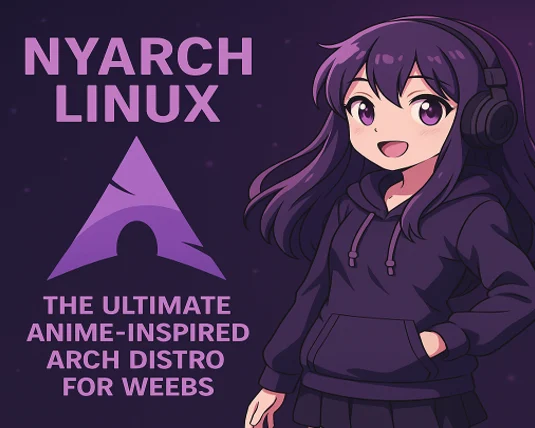
If you’re a Linux enthusiast with a passion for anime, manga, or Japanese pop culture, Nyarch Linux might just be the operating system you’ve been dreaming of. Built on the robust foundation of Arch Linux, Nyarch Linux infuses a playful, “kawaii” aesthetic with powerful customization options, making it a unique choice for weebs and tech tinkerers alike.
In this blog post, we’ll dive deep into what makes Nyarch Linux stand out, its features, installation process, target audience, and why it’s worth trying for anyone who loves both Linux and anime culture. Let’s explore this adorable, meme-worthy distro that’s capturing the hearts of weebs worldwide.
What is Nyarch Linux?
Nyarch Linux is an Arch-based, rolling-release GNU/Linux distribution designed specifically for “weebs”—a term affectionately used for non-Japanese fans of anime, manga, cosplay, and other aspects of Japanese pop culture. Developed with a small team and a lighthearted spirit, Nyarch Linux combines the flexibility and power of Arch Linux with a whimsical, anime-inspired aesthetic. It’s not meant to be taken too seriously, but don’t let its playful vibe fool you—it’s still a fully functional Linux distro capable of handling serious tasks.
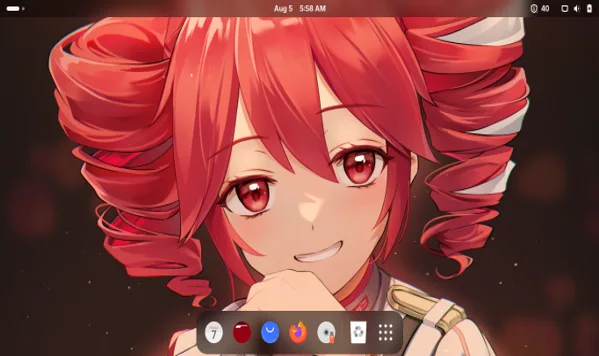
At its core, Nyarch Linux is built on Arch Linux and EzArcher, featuring the GNOME desktop environment with a host of customizations tailored for anime fans. From catgirl-themed wallpapers to manga readers and AI-powered assistants, Nyarch Linux delivers a unique experience that blends functionality with fun. Its rolling-release nature ensures that packages are always up-to-date, while its custom tools make it surprisingly user-friendly for an Arch-based distro.
Key Features of Nyarch Linux
Nyarch Linux comes packed with features that make it a delightful choice for anime fans and Linux enthusiasts. Here’s a breakdown of what you can expect:
- Anime-Inspired Aesthetic: Nyarch Linux embraces the “kawaii” culture with anime-style wallpapers, including characters like Arch-chan, the unofficial mascot of Arch Linux. Tools like Material UwU allow you to automatically theme your system based on your chosen wallpaper, similar to Android’s Material You.
- Nyarch Customize: This tool simplifies desktop customization, letting you switch layouts, enable animations, and tweak the taskbar, dock, or application menu with ease. Whether you want a Windows-like or Mac-like layout, Nyarch Customize makes it a breeze.
- Catgirl Downloader: A quirky feature that downloads random images of adorable catgirls (kemonomimi characters) to use as wallpapers, adding a playful touch to your desktop.
- Nyarch Assistant: An AI-powered digital companion that helps with computing tasks and even real-life activities. It supports multiple AI models, text-to-speech (TTS) voices, and Live2D or LivePNG avatars, letting you create your “dream waifu” assistant.
- Nyarch Wizard and Tour: These tools guide new users through the OS and its applications, making Nyarch more accessible than a typical Arch Linux installation. The Nyarch Wizard suggests useful programs, while the Nyarch Tour introduces you to the distro’s features.
- Pre-Installed Applications: Nyarch includes a curated selection of apps tailored for weebs, such as Komikku (a manga reader), Lollypop (a music player), Shortwave (a webradio player), and Fragments (a torrent downloader). All apps use GTK for a cohesive look that aligns with the GNOME desktop.
- NVIDIA Support: Nyarch offers a dedicated ISO with pre-configured NVIDIA proprietary drivers, supporting hybrid graphics and easy switching. This makes it a solid choice for users with NVIDIA GPUs.
- Nyarcher Script: For those who want Nyarch’s customizations without installing the full distro, the NyArcher script lets you apply Nyarch’s tweaks to other GNOME-based distros like Arch, Fedora, or Ubuntu.
- Flathub Integration: Flatpak is pre-installed, and Flathub is enabled by default, making it easy to install modern apps. Tools like Gearlever simplify AppImage installation, and nyay provides access to AUR packages.
- Rolling-Release Updates: As an Arch-based distro, Nyarch benefits from Arch’s rolling-release model, ensuring you always have the latest software versions. However, custom Nyarch features are updated on a release schedule.
Why Nyarch Linux Stands Out
Nyarch Linux isn’t just another Linux distro—it’s a love letter to anime culture wrapped in the power of Arch Linux. Here’s why it’s unique:
- Community-Driven and Open Source: Licensed under GPLv3, Nyarch Linux is fully open source, allowing users to check, edit, or contribute to its code. The small development team encourages community involvement via GitHub and Discord.
- Not for Daily Drivers (But Still Solid): The developers are upfront about Nyarch not being ideal as a daily driver due to its small team and potential bugs. However, its Arch Linux base ensures rock-solid performance, security, and customizability.
- Fun Without Compromise: While Nyarch leans into its meme-worthy, weeb-centric identity, it doesn’t sacrifice functionality. It’s a fully capable Linux distro that can handle everything from coding to multimedia consumption.
- Accessibility for New Users: Tools like Nyarch Wizard, Nyarch Tour, and Nyarch Updater make Nyarch more approachable than a standard Arch Linux installation, which is known for its steep learning curve.
Installing Nyarch Linux
Installing Nyarch Linux is easier than a vanilla Arch Linux installation, thanks to its user-friendly installer and pre-configured options. Here’s a step-by-step guide to get you started:
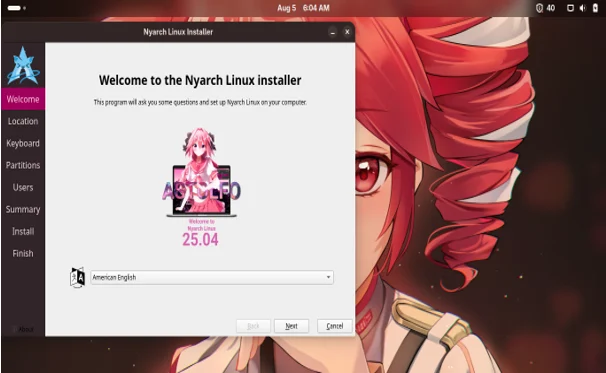
Step 1: Download the ISO
Visit the official Nyarch Linux website (nyarchlinux.moe) or SourceForge to download the latest ISO. Choose between the standard version or the NVIDIA variant if you have an NVIDIA GPU.
Step 2: Create a Bootable USB
Use a tool like Rufus (Windows), Etcher, or dd (Linux) to create a bootable USB drive with the Nyarch ISO.
Step 3: Boot and Install
- Boot your computer from the USB drive.
- Follow the Nyarch Wizard to select your language, keyboard layout, and disk partitioning preferences.
- Choose whether to install the standard or NVIDIA version.
- The installer will guide you through setting up the GNOME desktop, user accounts, and additional packages.
Step 4: Configure Japanese Input (Optional)
For anime fans who want to type in Japanese (e.g., for manga or visual novels), Nyarch supports fcitx-mozc. Here’s how to set it up:
sudo pacman -S fcitx-mozc fcitx-gtk2 fcitx-gtk3 fcitx-qt5
Create a .xprofile file in your home directory with:
export LANG=”ja_JP.UTF-8″
export XMODIFIERS=”@im=fcitx”
export XMODIFIER=”@im=fcitx”
export GTK_IM_MODULE=fcitx
export QT_IM_MODULE=fcitx
export DefaultIMModule=fcitx
Edit .bashrc to include:
export GTK_IM_MODULE=fcitx
export XMODIFIERS=@im=fcitx
export QT_IM_MODULE=fcitx
Step 5: Customize Your Desktop
Use Nyarch Customize to tweak your desktop layout, apply anime-themed wallpapers, and enable animations. Try Catgirl Downloader for a fun wallpaper refresh
Who is Nyarch Linux For?
Nyarch Linux is designed for a niche but passionate audience:
- Anime and Manga Fans: If you love Japanese pop culture, Nyarch’s aesthetic and tools like Komikku and Catgirl Downloader will feel like home.
- Linux Enthusiasts: Fans of Arch Linux who want a pre-configured, fun spin with GNOME will appreciate Nyarch’s balance of power and playfulness.
- Tinkerers and Hobbyists: Nyarch’s open-source nature and customization tools make it a great playground for those who love to experiment.
- Beginners with Linux Experience: While not as beginner-friendly as Ubuntu, Nyarch’s guided tools make it accessible for users with some Linux knowledge.
However, Nyarch isn’t recommended for:
- Business Environments: Its playful aesthetic and potential instability make it unsuitable for professional settings.
- Complete Linux Newbies: The Arch-based nature and occasional bugs may be challenging for those without Linux experience.
Pros and Cons of Nyarch Linux
Pros
- Unique Aesthetic: Perfect for anime and manga fans, with tools like Catgirl Downloader and Material UwU adding a fun vibe.
- Arch-Based Power: Inherits Arch Linux’s performance, security, and rolling-release updates.
- User-Friendly Tools: Nyarch Wizard, Tour, and Updater simplify the Arch experience.
- Customizability: Extensive desktop customization options via Nyarch Customize.
- Community Support: Active Discord and GitHub communities for support and contributions.
Cons
- Not a Daily Driver: The small dev team and potential bugs make it less stable than mainstream distros.
- Learning Curve: Still requires some Linux knowledge, especially for troubleshooting.
- App Crashes: Some users report crashes (e.g., the Packages app), especially in virtual machines.
- Niche Appeal: The weeb-centric focus may not suit everyone.
Nyarch Linux in Action: My Experience
I decided to give Nyarch Linux a spin on a VirtualBox VM to see what the fuss was about. The installation was surprisingly smooth for an Arch-based distro, thanks to the Nyarch Wizard. The GNOME desktop loaded with a vibrant Arch-chan wallpaper, instantly setting the tone. I played around with Nyarch Customize and loved how easy it was to switch to a Mac-like dock layout with a single click. The Catgirl Downloader had me chuckling as it fetched adorable kemonomimi wallpapers—definitely a mood-lifter!
However, I did encounter a few hiccups. The Packages app crashed when I tried to install additional software, forcing me to use the command line (sudo pacman -Syu libreoffice). This wasn’t a dealbreaker for me, as I’m comfortable with the terminal, but it might frustrate newer users. Running Nyarch on bare metal (not a VM) could resolve some of these issues, as noted in reviews.
The Nyarch Assistant was a standout feature. I set it up with a Live2D avatar and a TTS voice, and it felt like having a virtual anime companion guiding me through tasks. I also appreciated the pre-installed Komikku app, which made browsing manga a breeze. Overall, Nyarch Linux is a delightful blend of fun and functionality, though it’s best suited for hobbyists rather than mission-critical tasks.
Future of Nyarch Linux
Nyarch Linux is actively developed, with recent updates like the 25.04.2 Teto release (August 2025) bringing improvements to Nyarch Assistant, Nyarch Updater, and GNOME 48. The team is exploring exciting projects, such as:
- Hyprland Support: Adding a Hyprland-based spin with minimal dependencies for a lightweight, customizable experience.
- AI Image Generation: Tools to generate anime-style wallpapers using AI prompts.
- Modern Website Redesign: A more user-friendly website to showcase Nyarch’s features and guide downloads.
- Live2D Desktop Models: Displaying animated characters like Arch-chan on the desktop using gtk_layer_shell.
These projects align with Nyarch’s commitment to blending anime culture with cutting-edge Linux tech. The community-driven approach ensures that user feedback shapes the distro’s future.
How to Get Involved
Nyarch Linux thrives on community contributions. Here’s how you can join the fun:
- Contribute Code: Check out the GitHub repository (github.com/NyarchLinux) and review CONTRIBUTING.md for guidelines.
- Join the Community: Connect with other weebs and Linux fans on the Nyarch Discord server or Telegram group.
- Report Bugs: Help the small dev team by reporting issues on GitHub.
- Spread the Word: Share your Nyarch experience on social media with hashtags like #NyarchLinux or #Tetokasane.
Should You Try Nyarch Linux?
If you’re an anime fan who loves Linux, Nyarch Linux is a must-try. It’s not the most stable distro, and it’s not meant for enterprise use, but it’s a fun, customizable OS that brings a smile to your face. Whether you’re reading manga with Komikku, tweaking your desktop with Nyarch Customize, or chatting with your virtual waifu via Nyarch Assistant, Nyarch Linux delivers a unique experience that celebrates weeb culture without compromising on Linux’s power.
For those hesitant to commit, the NyArcher script lets you test Nyarch’s customizations on other distros. Either way, Nyarch Linux is a whimsical journey worth taking for anyone who wants to blend their love for anime with the flexibility of Arch Linux.
Where to Download Nyarch Linux
- Official Website: nyarchlinux.moe
- GitHub: github.com/NyarchLinux
- SourceForge: Check the Nyarch Linux website for links
- Socials: Follow @NyarchLinux on X, join the Telegram group (@NyarchLinuxGroup), or hop on the Discord server (discord.gg/xuw6BNXXE7).
Give Nyarch Linux a spin, and let your inner weeb shine! Have you tried Nyarch Linux? Share your thoughts in the comments below!
Disclaimer
The information provided in this blog post about Nyarch Linux is based on the latest available data from official sources, including the Nyarch Linux website, GitHub repository, and community discussions, as of August 5, 2025. While every effort has been made to ensure accuracy, the author and publisher are not responsible for any errors, omissions, or outdated information.
Nyarch Linux is a community-driven, open-source project, and its stability, performance, or suitability for specific use cases may vary. Users are encouraged to verify details, back up data, and proceed with caution when installing or using Nyarch Linux, especially as it is not recommended as a daily driver by its developers.
The author is not affiliated with Nyarch Linux or its development team, and opinions expressed are for informational purposes only. Always consult official documentation and community resources before making decisions about software installation or usage.
Also Read
Top 5 RHEL-Based Linux Distros for Servers in 2025