
BackBox Linux 10 arrived on November 19, 2026, and it is the first major release in over two years. If you have been curious about this lean, Ubuntu-based pentesting distro, the question comes up fast: could it replace the system you use every day?
So, can you use BackBox Linux 10 as your daily operating system? Technically, yes. Practically, it depends on what “daily” means to you. A student who browses, takes notes and runs labs will be fine. Someone who needs gaming, video editing and a stack of proprietary apps will be fighting the system.
This guide covers what is new in version 10, how it behaves as a general-purpose desktop, and how it compares with Kali, Parrot and Xubuntu. By the end you will know whether to install it, dual boot it, or keep it in a virtual machine.
Quick answer: Yes, BackBox Linux 10 can work as a daily driver, mainly for security students, hobbyists and testers who want one lightweight system. For everyone else, a dual-boot, live USB or VM setup is safer, because offensive tools and personal accounts shouldn’t share one machine.
What Is BackBox Linux?
BackBox is a free, open-source penetration testing and security assessment distribution. A non-profit community project builds it, and it has been around since 2010. It runs on Ubuntu and maintains its own repositories of ethical hacking tools.
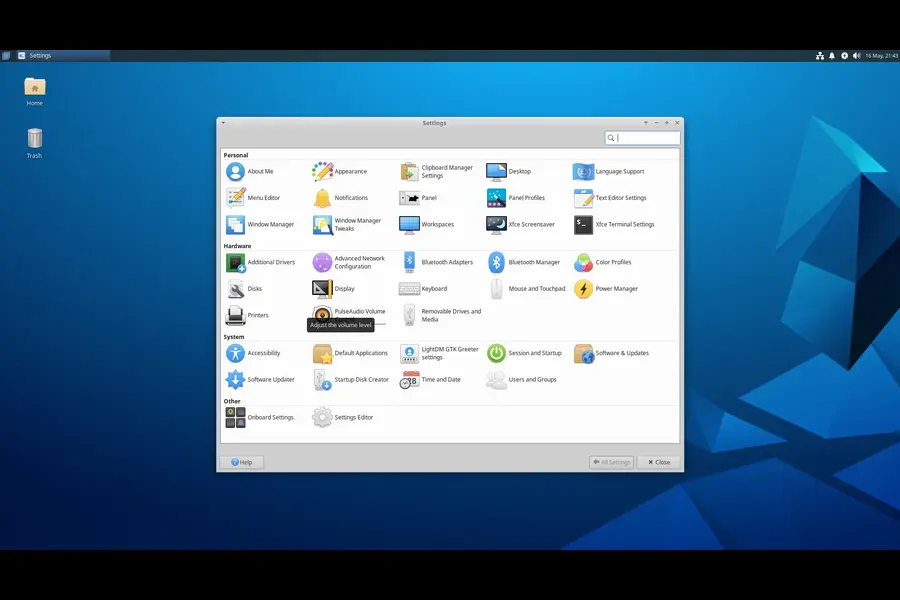
Its appeal is restraint. Many security distros ship a huge toolbox by default, while BackBox keeps a curated selection and a clean Xfce desktop. That focus is exactly why people wonder if it can handle everyday life too.
BackBox Linux 10 Release Information (November 2026)
The basics
- Release date: November 19, 2026
- Codename: Resolute Raccoon
- Base: built for compatibility with Ubuntu 26.04 LTS
- Kernel: Linux 7.0
- Desktop: Xfce 4.20
- Previous major release: BackBox 9 (October 30, 2024)
- Upgrading: BackBox 9 users should be able to move to version 10 using the default package manager
Updated tools
- Metasploit Framework 6.5
- Nmap 7.98
- Wireshark 4.6
- sqlmap 1.10
- hashcat 7.1
- OWASP ZAP 2.17
New tools
Most additions help with web testing, binary analysis and Windows environments:
- ffuf and gobuster for finding hidden pages and directories
- AFL++ for fuzzing, which means feeding a program malformed input until it breaks
- GDB, LLDB, ltrace and checksec for binary analysis
- smbclient with Kerberos and LDAP clients for Windows and Active Directory networks
- hashID, mdk4, Firejail, apksigner and aapt for hash identification, wireless testing, sandboxing and Android work
Anonymous mode gets a real fix
Anonymous mode now sends DNS queries through Tor and blocks IPv6 while it runs. A new “anonymous stop” command restores your original network settings afterward.
Both changes matter. A DNS lookup that escapes Tor reveals which hosts you are about to contact. IPv6 packets can slip around a tunnel that was built only for IPv4. Help Net Security’s coverage advises anyone who trusted the older behavior to check for stray DNS and IPv6 traffic before relying on it again.
Installer and requirements
- Normal and minimal installs
- Full disk encryption using LVM on LUKS
- ZFS support
- Hybrid ISO with UEFI and Secure Boot support
- Better VMware behavior: open-vm-tools in the live session and a desktop that resizes with the window
Official minimums: a 64-bit processor, 2 GB of RAM, 30 GB of disk space, an 800×600 display and an 8 GB or larger USB drive.
What’s coming
The team says it is working on BackBox AI, which would bring agentic cyber operations into the distribution. No date has been announced, so treat it as a plan, not a feature. The full announcement is on the official BackBox blog.
What Makes a Good Daily Operating System?
A daily driver has to pass five tests:
- It boots reliably on your hardware, including Wi-Fi, trackpad and sleep.
- It gets security and bug-fix updates on a sensible schedule.
- It runs the software you use, from browsers to office suites.
- It stays stable enough that an update doesn’t wreck your workday.
- It doesn’t expose you to extra risk during ordinary tasks like banking.
BackBox scores well on some of these and poorly on others.
Where BackBox 10 Works Well
It’s light
Xfce is among the leanest full desktops. On an older laptop it can feel snappier than GNOME or KDE-based systems. The 2 GB minimum also makes it a good rescue distro for aging hardware.
For real daily use, aim higher than the minimum. About 8 GB of RAM is comfortable if you will run a browser alongside virtual machines or heavy scanners.
The Ubuntu base helps
You inherit a huge package ecosystem and years of troubleshooting threads. If your Wi-Fi card misbehaves, someone has probably posted the fix. Version 10’s Linux 7.0 kernel should also improve support for newer chipsets, although results vary by device.
The security basics are covered
LUKS encryption at install time protects a laptop that carries client data. Firejail gives you an easy way to sandbox risky apps. Secure Boot support removes a common headache on modern machines.
The menus aren’t a maze
Tools are grouped by task, such as information gathering, vulnerability assessment and forensics. You find what you need quickly instead of scrolling through hundreds of entries.
Where It Struggles
It isn’t built for general desktop life
BackBox’s priorities are pentesting, so multimedia codecs, printer quirks, gaming and consumer apps get less attention than they would on Linux Mint or Ubuntu. You can add most of it yourself, but expect more manual setup.
The release rhythm is slower
Looking at past releases (8 in November 2022, 8.1 in November 2023, 9 in October 2024, 10 in November 2026), the pace is a major release every year or two. Rolling distros push new tool versions continuously. BackBox gives you fewer surprises but slower access to new features, and you depend on a small team to maintain its repositories.
The community is smaller
Kali and Parrot have more tutorials, videos and forum threads. When something breaks in BackBox, you will often lean on Ubuntu documentation and your own troubleshooting.
Attack tools and personal accounts don’t mix well
This is the biggest practical risk. Running exploit frameworks, fuzzers and wireless attack tools on the same system that holds your banking, email and password manager raises the stakes of every mistake. A misconfigured tool or a hostile lab payload can reach data you care about.
Three Realistic Ways to Use BackBox 10
1. A dedicated pentest laptop. Use an encrypted install on a machine reserved for security work, with no personal accounts. This suits BackBox best.
2. Dual boot or live USB. Keep a mainstream OS for daily life and boot BackBox when needed. The hybrid ISO with UEFI and Secure Boot support makes this easy.
3. A virtual machine. Run it in VMware or VirtualBox on your normal system. The improved VMware integration helps, and snapshots let you undo a bad experiment.
For most readers, option 2 or 3 is the smarter pick. Using BackBox as the only OS on your main computer works, but it is the weakest arrangement.
BackBox 10 vs Kali vs Parrot vs Xubuntu
Data below reflects public release information as of November 19, 2026.
| Feature | BackBox Linux 10 | Kali Linux 2026.3 | Parrot OS 7.4 | Xubuntu 26.04 LTS |
|---|---|---|---|---|
| Main purpose | Pentesting and security assessment | Pentesting and security auditing | Pentesting, privacy, daily use (Home edition) | General-purpose desktop |
| Base | Ubuntu 26.04 LTS compatible | Debian | Debian 13.6 “Trixie” | Ubuntu |
| Latest release | November 19, 2026 | October 2026 | October 3, 2026 | April 23, 2026 (LTS) |
| Kernel | 7.0 | 7.1.5 | 7.1 | Ubuntu LTS kernel track |
| Default desktop | Xfce 4.20 | Xfce (GNOME and KDE Plasma 6.7 available) | KDE Plasma | Xfce |
| Release model | Major release every 1 to 2 years | Rolling, with quarterly releases | Point releases on a Debian base | Fixed releases, LTS every two years |
| Separate everyday edition | No | No | Yes (Home) | Not applicable |
| Encryption at install | LVM on LUKS, ZFS | Available | Available | Available |
| Daily-driver fit | Moderate | Low | Moderate to good (Home) | High |
How to read this
- Choose BackBox for a lean, curated toolkit on an Ubuntu base.
- Choose Kali for the biggest tool selection and the most tutorials, with the understanding that it is built for security work, not general use.
- Choose Parrot if you want a security distro with a dedicated Home edition for everyday life.
- Choose Xubuntu when the machine is for living first and hacking second.
Pros and Cons of Daily Use
Pros
- Lightweight Xfce desktop that suits older hardware
- Ubuntu base with wide hardware support and plenty of documentation
- Installer offers LUKS encryption and ZFS
- Firejail included for sandboxing
- Anonymous mode now routes DNS through Tor and blocks IPv6
- Tidy, task-based tool menus
- Upgrade path from BackBox 9
Cons
- Tuned for security work, not entertainment or office polish
- Major releases arrive slowly
- Smaller community than Kali or Parrot
- No separate Home edition for daily use
- Some everyday extras need manual setup
- BackBox AI is still only planned
Who Should Use It Daily?
A good fit: security students, CTF players, junior pentesters, and anyone reviving an old laptop.
A poor fit: people who need a dependable work machine, gamers, video editors, and anyone who dislikes troubleshooting.
Setup Tips Before You Commit
- Try a live USB or VM first. Check Wi-Fi, graphics and sleep before touching your disk.
- Encrypt during installation. Adding encryption later is much harder.
- Use a regular account for everyday tasks. Keep privileged actions deliberate.
- Test anonymous mode yourself. Run a DNS and IPv6 leak check before trusting it.
- Sandbox risky apps with Firejail.
- Back up before upgrading from BackBox 9.
- Verify the ISO checksum. Download only from the official site.
Mistakes to Avoid
- Downloading ISOs from third-party mirrors
- Running every tool as root out of habit
- Treating anonymous mode as invisibility
- Testing systems you don’t own or lack written permission to test
- Skipping updates because “it’s only a lab”
The Verdict
Can you use BackBox Linux 10 as your daily operating system? Yes, if you are a learner or enthusiast who values a light, focused setup and accepts a bit of manual work. Version 10 adds sharper tools, a newer kernel, better encryption options and a more trustworthy anonymous mode.
For most people, though, the better plan is to keep a mainstream OS for daily life and run BackBox on a dedicated machine, USB stick or VM. You keep its strengths and leave its risks away from your personal data.
Download BackBox Linux 10
Get the official 64-bit ISO from the BackBox Linux download page. Always check the checksum after downloading.
For an independent overview of what changed, see Help Net Security’s release report. Kali’s latest changes are covered in Help Net Security’s Kali 2026.3 article.
Frequently Asked Questions
Is BackBox Linux 10 good for beginners?
It is approachable thanks to its Ubuntu base and tidy Xfce desktop, but the security tools themselves take time to learn. Start in a virtual machine.
What are the system requirements for BackBox Linux 10?
BackBox lists a 64-bit processor, 2 GB of RAM, 30 GB of disk space, an 800×600 display and an 8 GB or larger USB drive. About 8 GB of RAM is more comfortable for daily use.
Is BackBox Linux 10 based on Ubuntu?
Yes. It is built for compatibility with Ubuntu 26.04 LTS and ships with the Linux 7.0 kernel and Xfce 4.20.
Can I upgrade from BackBox 9 to BackBox 10?
Existing BackBox 9 users should be able to upgrade through the default package manager. Back up your data first.
Is BackBox better than Kali Linux?
Neither wins outright. BackBox is lighter and more curated, while Kali offers a larger toolset and a bigger community.
Does BackBox 10 support Secure Boot?
Yes. The hybrid ISO supports both UEFI and Secure Boot.
Does anonymous mode make me fully anonymous?
No tool guarantees that. Version 10 routes DNS through Tor and blocks IPv6 in this mode, but you should still test for leaks yourself.
Is BackBox Linux free?
Yes. It is a free, open-source project run by a non-profit community.
Disclaimer: This article is for educational and informational purposes only. Release details come from public reports published around November 19, 2026, and may change. Only use security tools on systems you own or have explicit written permission to test, and download software only from the official project website.
Explore More Linux Guides
Discover more Linux distributions, security technologies and upcoming releases with these related guides from TechRefreshing.
More Linux tutorials, distribution reviews and technology updates at TechRefreshing.