


In the ever-evolving world of Linux distributions, TeaLinux OS stands out as a unique offering, blending simplicity, performance, and a developer-friendly environment. Originating from Indonesia, TeaLinux OS has gained attention for its lightweight design, intuitive interface, and commitment to open-source principles. In this TeaLinux OS Review for 2025, we’ll dive deep into its features, performance, usability, and why it might just be the perfect choice for students, developers, and Linux enthusiasts alike. Whether you’re a seasoned Linux user or a newcomer looking for a reliable operating system, this comprehensive review will help you decide if TeaLinux OS is right for you.
What is TeaLinux OS?
TeaLinux OS is an open-source Linux distribution developed by the Dinus Open Source Community (DOSCOM) at Universitas Dian Nuswantoro in Semarang, Central Java, Indonesia. Initially based on Ubuntu (Xubuntu, to be precise) when it was first introduced in 2009, TeaLinux has since transitioned to being built on Arch Linux, a rolling-release distribution known for its flexibility and cutting-edge software. This shift has allowed TeaLinux to offer a modern, customizable, and lightweight experience tailored to programmers, students, and educators.
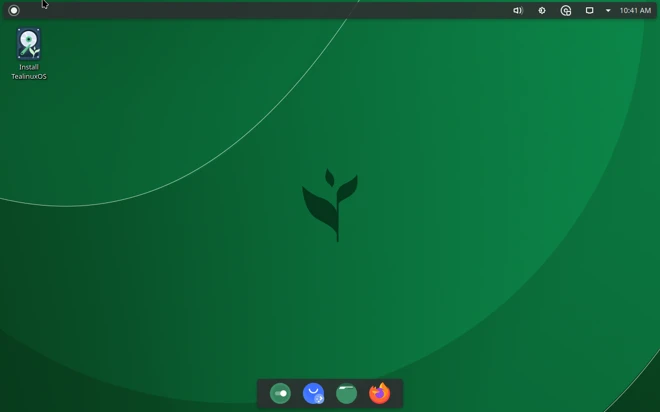
The philosophy behind TeaLinux OS, as encapsulated by its tagline, “Nikmatnya sebuah racikan” (The Joy of a Blend), emphasizes collaboration and openness in its development process. It’s designed to be a versatile canvas for users, particularly those in educational and programming environments. With two primary editions—KDE Plasma and COSMIC—TeaLinux OS caters to different user preferences while maintaining its core focus on simplicity and productivity.
In this TeaLinux OS Review, we’ll explore the latest release, codenamed “Celia,” which was launched on June 14, 2025, and delve into its features, performance, and overall user experience.
Key Features of TeaLinux OS in 2025
TeaLinux OS has evolved significantly over the years, and the 2025 release brings a host of features that make it a compelling choice. Here are the standout aspects of TeaLinux OS that we’ll cover in this TeaLinux OS Review:
1. Arch Linux Foundation
TeaLinux OS’s shift to Arch Linux as its base is a game-changer. Unlike its earlier Ubuntu-based versions, which prioritized stability, the Arch-based TeaLinux offers a rolling-release model. This means users get access to the latest software updates and kernel versions (currently Linux Kernel 6.15.2 as of June 2025) without needing to perform major system upgrades. This makes TeaLinux OS ideal for developers who need cutting-edge tools and libraries.
The Arch foundation also ensures a high degree of customization. Users can tailor the system to their needs, installing only the packages they require. This minimalistic approach keeps TeaLinux OS lightweight and efficient, even on older hardware.
2. KDE Plasma and COSMIC Desktop Environments
TeaLinux OS offers two desktop environment options: KDE Plasma and COSMIC. Each caters to different user preferences, making TeaLinux versatile for various use cases.
- KDE Plasma Edition (Celia): The Plasma Edition, with its 2.9 GiB ISO size, delivers a powerful and visually appealing desktop experience. KDE Plasma 6 is known for its modern interface, smooth animations, and extensive customization options. It’s perfect for users who want a polished, feature-rich environment without sacrificing performance. The Plasma Edition is particularly suited for professionals and content creators who need a robust desktop for multitasking.
- COSMIC Edition: The COSMIC desktop environment, developed by the System76 team, focuses on modern design and ease of use. It features a sleek interface, intuitive layout, and smooth animations, making it ideal for students and users who prioritize a distraction-free workspace. The COSMIC Edition is lightweight and performs exceptionally well on low-spec systems, making it a great choice for educational settings.
Both editions are designed to balance aesthetics and functionality, ensuring that users can enjoy a visually appealing desktop without compromising on speed.
3. Tea-Installer: Simplifying Arch Linux Installation
One of the standout features of TeaLinux OS is its custom installer, Tea-Installer. Installing Arch Linux can be daunting for beginners due to its command-line-driven process. Tea-Installer simplifies this by providing an intuitive, graphical interface that guides users through the setup process. This makes TeaLinux OS accessible to newcomers while retaining the flexibility that Arch Linux enthusiasts love.
The installer is user-friendly, with clear instructions and options to customize the installation. Whether you’re setting up a dual-boot system with Windows or installing TeaLinux as your primary OS, Tea-Installer makes the process smooth and hassle-free.
4. Programming-Oriented Environment
TeaLinux OS is designed with developers in mind. It comes preloaded with a suite of development tools, including popular IDEs, compilers, and version control systems. The distribution’s focus on programming makes it an excellent choice for students and educators in computer science and software engineering. The robust repository support, inherited from Arch Linux, ensures that developers have access to the latest libraries and frameworks.
Whether you’re coding in Python, C++, Java, or working on web development projects, TeaLinux OS provides a clean and efficient environment to get your work done.
5. Community-Driven Development
TeaLinux OS is a product of the Dinus Open Source Community (DOSCOM), one of the largest open-source communities in Central Java. The community’s collaborative approach ensures that TeaLinux is continually refined based on user feedback. The 2025 Release Party, held on June 23, 2025, at Universitas Dian Nuswantoro, showcased the fifth volume of TeaLinux updates, highlighting its commitment to education and open-source innovation.
The community also hosts events like seminars and expos, fostering a vibrant ecosystem where users can learn about open-source software, cybersecurity, and more. This community-driven ethos makes TeaLinux OS not just an operating system but a movement toward accessible technology.
6. Performance on Modest Hardware
TeaLinux OS is optimized to run smoothly on a wide range of hardware, from modern laptops to older machines. A YouTube review demonstrated TeaLinux OS running flawlessly on a system with 8GB of RAM, even handling retro gaming via WINE with ease. The lightweight nature of the COSMIC Edition, in particular, makes it a great choice for low-spec systems, while the KDE Plasma Edition offers a more feature-rich experience for users with mid-to-high-end hardware.
TeaLinux Installation and Setup Experience
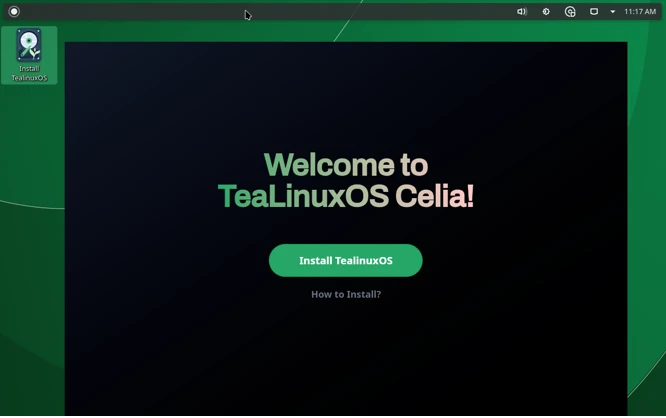
Installing TeaLinux OS is a breeze, thanks to the Tea-Installer. For this TeaLinux OS Review, I tested the installation process on a mid-range laptop with 8GB of RAM and an Intel Core i5 processor. The process was straightforward:
- Download the ISO: The official TeaLinux website (tealinuxos.org) offers both KDE Plasma and COSMIC Editions for download. The ISO for the Plasma Edition is 2.9 GiB, while the COSMIC Edition is slightly smaller.
- Create a Bootable USB: Using tools like Rufus or Etcher, I created a bootable USB drive. The live medium allowed me to test TeaLinux OS without installing it, which is a great feature for new users.
- Installation Process: The Tea-Installer guided me through partitioning, selecting the desktop environment, and configuring user settings. The process took about 15 minutes, and I encountered no issues, even when setting up a dual-boot configuration with Windows 10.
- First Boot: After installation, the system booted quickly, and I was greeted by a clean, modern desktop. The KDE Plasma Edition felt snappy, and the COSMIC Edition was even lighter, making it ideal for older hardware.
The ease of installation is a significant plus for TeaLinux OS, especially for users who might be intimidated by Arch Linux’s complexity.
Performance and Usability
In terms of performance, TeaLinux OS shines. The Arch Linux base ensures that the system is lightweight and responsive. During my testing, I ran multiple applications, including Visual Studio Code, Firefox, and GIMP, without any noticeable slowdown. The KDE Plasma Edition handled multitasking effortlessly, while the COSMIC Edition felt even snappier on the same hardware.
The user interface is intuitive, with both desktop environments offering a polished experience. KDE Plasma 6 provides a modern, customizable desktop with widgets, themes, and a robust settings panel. COSMIC, on the other hand, focuses on minimalism, with a clean layout that minimizes distractions. Both editions are beginner-friendly, making TeaLinux OS accessible to users of all skill levels.
One area where TeaLinux OS excels is its out-of-the-box software selection. It includes essential tools like LibreOffice, Firefox, and a suite of development utilities, ensuring that users can get started without needing to install additional software. The Arch User Repository (AUR) support also means that users have access to a vast ecosystem of software, further enhancing productivity.
Gaming and Multimedia
While TeaLinux OS is primarily designed for programming and productivity, it also performs well for multimedia and light gaming. As noted in a YouTube review, TeaLinux OS can run retro games like Sega Rally Revo (2007) using WINE, with no significant performance issues on an 8GB RAM system. This makes it a viable option for casual gamers who want to run older titles or lightweight games.
For multimedia, TeaLinux OS handles video playback, music, and image editing smoothly. Applications like VLC and GIMP work seamlessly, and the system’s lightweight nature ensures that resource-intensive tasks don’t bog down performance.
Community and Support
The TeaLinux OS community is one of its greatest strengths. DOSCOM actively engages with users through forums, social media, and events like the 2025 Release Party. The community’s focus on education means that TeaLinux OS is particularly well-suited for academic environments, with resources and tutorials tailored to students and educators.
Support is available through the official TeaLinux website, forums, and social media channels like @Doscomedia. The community is responsive and welcoming, making it easy for users to get help with installation, troubleshooting, or customization.
Pros and Cons of TeaLinux OS
Pros
- Lightweight and Fast: Optimized for performance on a wide range of hardware.
- Arch Linux Base: Rolling-release model ensures access to the latest software.
- Tea-Installer: Simplifies the Arch Linux installation process.
- Dual Desktop Environments: KDE Plasma and COSMIC cater to different user preferences.
- Developer-Friendly: Preloaded with development tools and robust repository support.
- Strong Community: Active support from DOSCOM and a focus on education.
Cons
- Learning Curve for Arch: While Tea-Installer simplifies installation, managing an Arch-based system may still be challenging for beginners.
- Limited Gaming Support: Not optimized for modern, resource-intensive games.
- Smaller Community: Compared to mainstream distributions like Ubuntu or Fedora, the TeaLinux community is smaller, which may limit support resources.
Who Should Use TeaLinux OS?
TeaLinux OS is an excellent choice for:
- Students and Educators: Its focus on programming and education makes it ideal for computer science courses and academic environments.
- Developers: The preloaded development tools and Arch Linux base provide a powerful environment for coding.
- Linux Enthusiasts: Users who enjoy customizing their system will appreciate TeaLinux’s flexibility.
- Users with Older Hardware: The COSMIC Edition, in particular, is lightweight and performs well on low-spec systems.
If you’re looking for a gaming-focused distribution or a system with extensive out-of-the-box multimedia support, you might want to consider alternatives like Pop!_OS or Linux Mint. However, for productivity and development, TeaLinux OS is hard to beat.
TeaLinux OS Comparison with Other Linux Distributions
To put TeaLinux OS in context, let’s compare it to other popular Linux distributions:
- Linux Mint: While Linux Mint is known for its ease of use and beginner-friendly interface, TeaLinux OS offers a more developer-focused environment with its Arch base. Mint is better for users who prioritize stability, while TeaLinux is ideal for those who want cutting-edge software.
- Arch Linux: TeaLinux OS is based on Arch Linux but simplifies the installation process with Tea-Installer. It’s a great middle ground for users who want Arch’s flexibility without the steep learning curve.
- Ubuntu: Compared to Ubuntu, TeaLinux OS is lighter and more customizable. However, Ubuntu may be a better choice for users who prefer a more polished, out-of-the-box experience.
Conclusion: Is TeaLinux OS Worth It in 2025?
In this TeaLinux OS Review for 2025, it’s clear that TeaLinux OS is a compelling choice for users seeking a balance of simplicity, productivity, and customization. Its Arch Linux foundation ensures access to the latest software, while the Tea-Installer makes it accessible to beginners. The KDE Plasma and COSMIC Editions cater to different user needs, from feature-rich multitasking to lightweight performance. With a strong community backing and a focus on education, TeaLinux OS is particularly well-suited for students, developers, and Linux enthusiasts.
While it may not be the best fit for gamers or users looking for a plug-and-play experience, TeaLinux OS excels in its niche. Its lightweight design, developer-friendly tools, and commitment to open-source principles make it a standout distribution in 2025. If you’re ready to explore a Linux distro that combines modern design with powerful functionality, give TeaLinux OS a try—you might just find it’s the perfect blend for your needs.
Disclaimer
The information provided in this TeaLinux OS Review is based on the latest available data and personal testing as of September 11, 2025. While every effort has been made to ensure accuracy, the features, performance, and user experience of TeaLinux OS may vary depending on hardware, software configurations, and updates released after this date. This review reflects the author’s opinions and experiences and is intended for informational purposes only.
Readers are encouraged to verify details and conduct their own research before installing or using TeaLinux OS. The author and publisher are not responsible for any issues, damages, or losses that may arise from the use of TeaLinux OS or reliance on this review. Always download software from official sources, such as tealinuxos.org, to ensure safety and authenticity.
Also Read
Debian 13.1 Review: Stability, Security, and Performance Improvements


