Most Linux distributions are remixes. They take a big upstream, change the wallpaper, tweak a few defaults and ship it. That’s fine, but it rarely moves the needle.
AerynOS 2026.11 is a reminder of what an independent distro can do when it owns every layer. The team rebuilt its package manager’s command structure, shipped a second installer for testing, added a fourth desktop and removed an install option that generated too many support requests.
By “teeth,” I don’t mean market share or polish. I mean the freedom to make real technical decisions without asking anyone’s permission. This release shows that freedom in action, even though the developers say plainly it isn’t ready for daily use.
Below, I’ll walk through what changed, compare the approach with other distros, and explain who should actually try it.
What Is AerynOS?
AerynOS is an independently developed, rolling-release Linux distribution for x86_64 desktops. It was previously called Serpent OS, and DistroWatch lists its origin as Ireland.
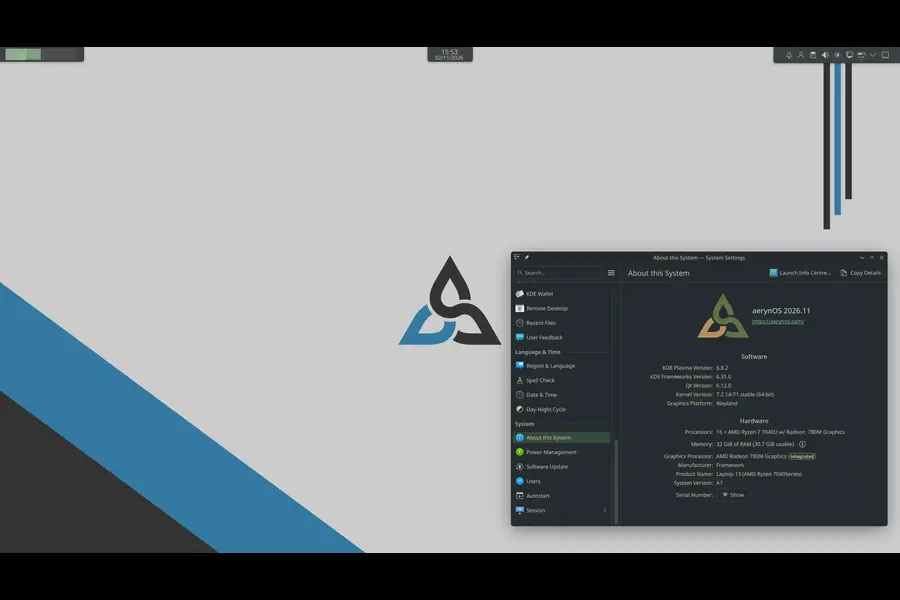
It isn’t built on Debian, Fedora or Arch. It has its own package manager (moss), its own build tool (boulder) and its own installer (lichen). Most of that tooling is written in Rust.
AerynOS 2026.11 at a Glance
The release landed on November 2, 2026, about three months after 2026.08. These details come from the official announcement:
- Kernel: Linux 7.2.14, with Linux 6.18.60 LTS in the repositories
- Live ISO desktop: GNOME 51.1
- ISO size: about 2.4 GB (DistroWatch lists 2,441 MB for the GNOME image)
- New installer:
lichen-installer, shipped alongside the existing one - New desktop: Budgie 10.10.4
- Firmware updates: fwupd added to the repository
- Package manager: a restructured
mosscommand line
Other notable packages include KDE Plasma 6.8.2, COSMIC 1.11.0 with COSMIC Viewer, Mesa 26.2.6, PipeWire 1.6.11, Firefox 159, Thunderbird 159, QEMU 11.1.3 and Wine 11.21.
Why This Release Shows Independence Still Matters
This is the heart of the argument. Three decisions in this release would be hard, or impossible, for a distro that inherits its foundations from someone else.
1. They can break their own tools on purpose
The moss command line was restructured around a declarative system-model. Commands for adding and removing repositories and packages changed, and existing users will need to relearn them.
The developers call it a deliberate breaking change, made now while the distro is still in development. A derivative distro can’t do that. Its package manager belongs to someone else, and users expect it to behave the way it always has.
2. They can make unpopular calls
The terminal-only and headless install options are gone. The team’s reason was blunt: people choosing those expert-only options were disproportionately asking for support.
Larger projects often keep every option for fear of complaints. A small team that owns its installer can simply say, “This wasn’t working,” and remove it.
3. They can work directly with upstream
AerynOS brought Budgie 10.10.4 in by collaborating with Joshua Strobl, who leads the Budgie project. The team says this helps them separate packaging problems from upstream bugs and send fixes to the right place.
That’s a different relationship from inheriting a finished package. It’s closer to being a partner than a downstream consumer.
What “teeth” does and doesn’t mean here
To be fair, this isn’t proof of maturity. The new installer still lacks disk encryption and dual-boot support, and the developers state the distro isn’t ready for daily use.
What the release proves is capability. A small independent team shipped a redesigned CLI, a new installer, a new desktop and firmware tooling in one cycle, and it was honest about the gaps. That’s the kind of bite a remix can’t offer.
The New lichen Installer
Installers rarely get attention, but this one matters. The old lichen was deliberately basic. The new lichen-installer is more capable and still a work in progress.
You can launch either from the live ISO:
sudo lichen        # the existing installer
lichen-tui         # the new, experimental installer
What it adds
- Wi-Fi and keyboard setup during installation, carried into the installed system
- Support for your own
system-model.kdlfile to define which packages get installed - Btrfs root support, including a separate
@homesubvolume - Automatic drive formatting, so you no longer prepare partitions beforehand
- A more refined terminal interface with better navigation and progress reporting
What it still can’t do
The team says the new installer doesn’t yet support disk encryption or dual booting. If you need either, wait.
The plan is for lichen-installer to become the default in the next ISO. Feedback goes to the project’s Zulip topic and the lichen-installer GitHub repository.
The new install-model format is the clever part. Locale and keyboard settings can be described in a KDL file, so an installation becomes reproducible rather than a series of clicks.
Moss Gets a New Mental Model
Moss works from a system-model, a description of what your system should contain. The new commands are named to reflect that instead of pretending moss is a traditional imperative package manager.
Core commands
sudo moss repo ...adds, removes, enables or disables repositories in your system-modelsudo moss package ...adds or removes packages in your system-model and syncs the resultsudo moss sync -urefreshes repository data, then syncs your install with the resolved system-model
If you declared your system-model yourself, package commands create a transient model that stays active until your next sync to the declared one. The developers say this resembles Nix in spirit but differs in the details.
Shortcuts
moss padis package addmoss prmis package removemoss pifis package infomoss radis repo addmoss rrmis repo remove
A new moss tree command prints the full command hierarchy with examples, which helps when you can’t remember where something lives.
Under the hood, the team moved from Clap’s builder pattern to its derive pattern in Rust. For users, that means better --help output, clearer errors and a path toward shell completions and a reworked moss search. A few features are still unimplemented, so expect rough edges.
Budgie and the Wayland Buffet
Budgie 10.10.4 is now an install-time option. That makes four desktops selectable in the installer: Budgie, COSMIC, GNOME and KDE Plasma.
If a full desktop isn’t your style, the repositories hold around a dozen Wayland compositors. The release notes name these:
- Hyprland 0.57
- Mango 0.18.4
- Miriway 26.10
- Noctalia 5.4.1
For a distro this young, that’s a generous menu for people who like to build their own desktop.
fwupd: A Small Package With a Big Message
Firmware updates through fwupd and the Linux Vendor Firmware Service (LVFS) are now possible. The team admits it had been cautious about adding anything that might suggest daily-driver readiness.
As the early-adopter community grows, though, they decided testing shouldn’t be harder than necessary. If your hardware is supported by LVFS, you no longer need another OS just for firmware updates.
How AerynOS Compares
The table below compares design philosophy rather than version numbers, since that’s where the real differences are.
| Feature | AerynOS 2026.11 | Arch Linux | Fedora Workstation | NixOS |
|---|---|---|---|---|
| Origin | Independent, built from scratch | Independent | Independent (Red Hat sponsored) | Independent |
| Release model | Rolling, with periodic ISO refreshes | Rolling | Fixed releases | Channels (stable and unstable) |
| Package manager | moss (system-model driven) | pacman | dnf | Nix |
| System definition | Declarative system-model (KDL) | Imperative | Imperative | Fully declarative |
| Installer | Two TUI installers (one experimental) | Manual or archinstall | Graphical (Anaconda) | Graphical or manual |
| Desktops at install | Budgie, COSMIC, GNOME, KDE Plasma | None by default | GNOME by default, spins available | Multiple |
| Daily-driver ready? | No, per the developers | Yes, for experienced users | Yes | Yes, with a learning curve |
| Disk encryption in installer | Not yet | Yes (manual setup) | Yes | Yes |
AerynOS sits between Arch’s rolling freshness and NixOS’s declarative thinking, using its own tools. It’s less mature than all three, and the developers don’t claim otherwise.
Who Should Try It
Good fit
- Linux enthusiasts who like testing new package-management ideas
- Rust and systems-programming fans who want to follow an interesting codebase
- Packagers and contributors looking for a small, welcoming project
- Anyone with a spare machine or a virtual machine
Poor fit
- Anyone who needs full-disk encryption today
- Dual-boot users who can’t dedicate a whole drive
- People who rely on their computer for work or school
- Anyone who wants a headless or terminal-only server image
Run it in a virtual machine or on a spare SSD first. That lets you learn the new moss commands without risking your main setup.
Pros and Cons
Pros
- A genuinely original design, not a derivative
- A declarative system-model that makes setups reproducible
- Four desktops plus around a dozen Wayland compositors
- A modern kernel and graphics stack, including Linux 7.2.14 and Mesa 26.2.6
- Active feedback channels on Zulip and GitHub
- Direct upstream collaboration, such as with the Budgie team
Cons
- Explicitly not ready for daily use
- No disk encryption or dual-boot support in the new installer
- The
mosschanges will confuse existing users - Headless and terminal-only install options were removed
- x86_64 only, according to DistroWatch
- The website and documentation are still being rebuilt
The People Behind the Release
The release post introduced two new staff members, Jaredy89 and K1ngfish3r. Both began as community contributors, moved up to Trusted Contributor and then Trusted Maintainer, and have now joined the team more formally.
That’s a healthy sign. People are earning their way in through contribution rather than being handed roles. The project also merged its websites into a single aerynos.com while a fuller rebrand continues in the background.
Getting Started Safely
- Download the live ISO from the official AerynOS website.
- Verify the published SHA256 checksum.
- Boot it in a virtual machine first.
- Try
lichen-tuiand note anything that behaves oddly. - Report issues on the lichen-installer GitHub repository.
- Run
moss treeto learn the new commands before changing anything.
Treat it as a learning exercise, not a migration.
Frequently Asked Questions
Is AerynOS 2026.11 ready for daily use?
No. The developers say the distribution is still in active development, and the new installer lacks disk encryption and dual-boot support.
What kernel does AerynOS 2026.11 use?
It ships Linux 7.2.14, with Linux 6.18.60 LTS also available in the repositories.
Which desktops can I choose during installation?
You can pick Budgie, COSMIC, GNOME or KDE Plasma. The live ISO itself boots into GNOME 51.1.
What is the new lichen-installer?
It’s an experimental installer that handles partitioning, Wi-Fi setup, Btrfs roots and custom system-model files. Launch it with lichen-tui.
Does AerynOS support firmware updates?
Yes, fwupd is now in the repository, so you can use LVFS on supported hardware.
Is AerynOS the same as Serpent OS?
Yes, AerynOS is the new name for Serpent OS. DistroWatch notes the styling is now lowercase “aerynOS.”
Did the moss commands change?
Yes, the CLI was restructured around the system-model, with new repo and package command groups and short aliases like moss pad and moss prm.
Final Thoughts
AerynOS 2026.11 isn’t trying to win on polish, and it doesn’t pretend to be something it isn’t. It wins on freedom.
The team broke its own CLI to improve it, dropped an option that wasn’t working, and partnered with upstream instead of just repackaging. Those are decisions only a project that owns its stack can make, and that’s what “teeth” really means.
Is it a replacement for your daily operating system? Not yet, and the developers say so themselves. But if you want evidence that independent distros can still innovate rather than just rebrand, this release is a strong piece of it.
Download the ISO, run it in a VM, and see whether the system-model approach clicks. For a distro this young, trying it and reporting what you find is the best way to help.
Disclaimer: This article is for informational purposes only and is based on publicly available release notes and news coverage as of November 3, 2026. AerynOS is under active development and, according to its developers, is not yet suitable for daily use, so back up your data and test in a virtual machine or on spare hardware before installing. Package versions and features may change in later releases, so check the official AerynOS website for current information.