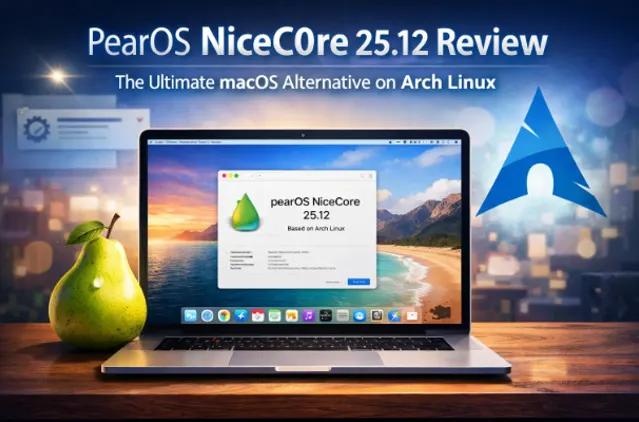
If you’ve ever dreamed of experiencing the elegance of macOS without shelling out thousands of dollars for Apple hardware, your wish just came true. Enter pearOS NiceC0re 25.12, the latest iteration of a Linux distribution that’s making waves in the open-source community. This isn’t just another macOS clone – it’s a full-fledged, performance-oriented operating system built on the rock-solid foundation of Arch Linux, featuring the powerful KDE Plasma desktop environment.
Released in December 2025, pearOS NiceC0re 25.12 represents a complete reimagining of what a macOS-inspired Linux distribution can be. Let’s dive deep into what makes this release a potential game-changer for users looking to escape the Apple ecosystem without sacrificing aesthetics or functionality.
The Phoenix Rises: A Brief History of pearOS
Before we explore pearOS NiceC0re 25.12, it’s worth understanding the fascinating journey this project has taken. The original Pear OS was created back in 2011 by French developer David Tavares, built on Ubuntu 11.10 and featuring the GNOME 3 desktop environment. At a time when Ubuntu was pushing its Unity interface, Pear OS stood out by offering a Mac OS X-inspired dock and interface.
The project went through several iterations and name changes, including a brief period as “Comice OS” before reverting to “Pear OS Linux.” In 2014, Tavares sold the distribution to an undisclosed company that wanted to develop it for proprietary products, effectively ending public development.
Fast forward to 2016, and Brazilian developer Rodrigo Marques breathed new life into the project, relaunching it as pearOS based on Ubuntu. But the most significant transformation came in 2019 when Romanian developer Alexandru Bălan took the reins, completely reimagining the distribution from the ground up.
Today, pearOS is developed by a small Romanian team, including Alexandru Bălan (21) and Ioana Lazăr (19), under their company Pear Software and Services Limited. Their vision has transformed pearOS from a simple Ubuntu derivative into a sophisticated, Arch-based powerhouse.
What Makes pearOS NiceC0re 25.12 Special?
Built on Arch Linux: Power Meets Flexibility
The most significant change in pearOS NiceC0re 25.12 is its foundation. Unlike previous versions based on Ubuntu, this release builds upon Arch Linux, one of the most respected and customizable Linux distributions available. This architectural shift brings several major advantages:
Rolling Release Model: With pearOS NiceC0re 25.12, you install once and receive updates forever. There’s no need to worry about major version upgrades or reinstallations. Your system continuously evolves with the latest software and security patches.
Cutting-Edge Software: Arch Linux’s repositories are known for providing the latest versions of software packages. This means you get access to new features and improvements much faster than distribution-based on fixed release cycles.
Performance Optimization: Arch’s minimalist philosophy means your system only includes what you actually need, resulting in better performance and reduced bloat.
Linux Kernel 6.17: Modern Hardware Support
pearOS NiceC0re 25.12 ships with Linux kernel 6.17 (Manjaro version), ensuring excellent hardware compatibility and performance. This recent kernel includes improved support for modern CPUs, graphics cards, and peripherals, making it an excellent choice for both new and older hardware.
KDE Plasma 6.5.3: The Heart of the Experience
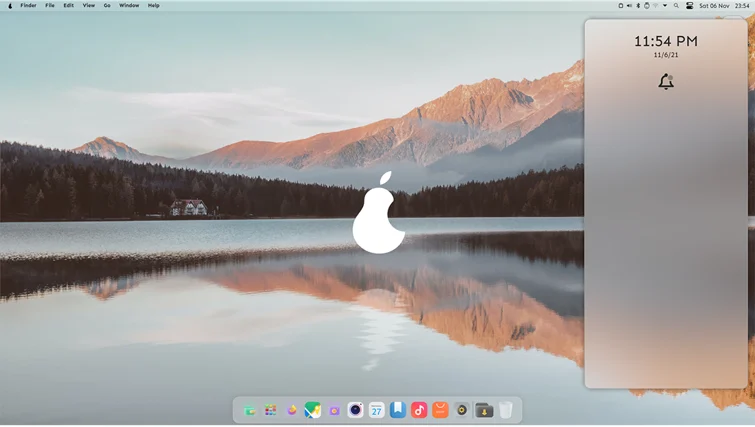
At the core of pearOS NiceC0re 25.12 lies KDE Plasma 6.5.3, one of the most feature-rich and customizable desktop environments available. But this isn’t vanilla KDE – the pearOS team has meticulously customized every aspect to create an experience that rivals Apple’s attention to detail.
Sweet Mars UI: The custom interface theme brings a modern, polished look that feels fresh while maintaining that familiar macOS aesthetic. The Liquid Gel design language mimics Apple’s Liquid Glass effects without being a carbon copy.
Custom Icon Theme: Based on the Bubble Dark icon set, pearOS features a completely custom icon pack that’s both beautiful and functional. Every icon has been carefully designed to maintain visual consistency across the system.
Smooth Animations: One of the hallmarks of macOS is its buttery-smooth animations. pearOS NiceC0re 25.12 delivers on this front with carefully tuned animations and effects that make the interface feel alive and responsive.
Application Launcher: The custom launcher perfectly emulates the macOS experience while remaining true to KDE’s flexibility and customization options.
Installation Experience: Polished and User-Friendly
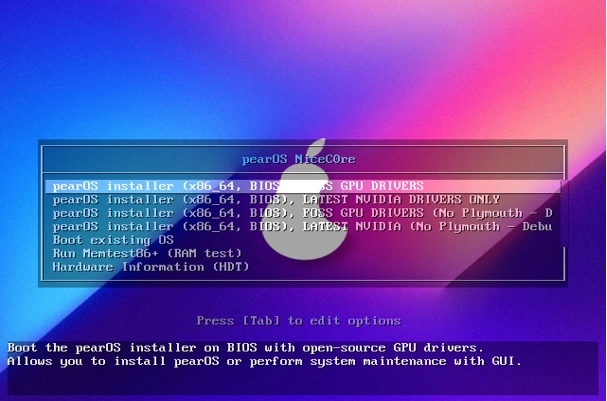
pearOS NiceC0re 25.12 introduces a completely new installer built with Electron and Node.js. While currently in beta, this installer represents a significant step forward in user experience. Here’s what you can expect:
Modern Installation Process
The installation wizard guides you through a straightforward setup process:
- Boot from USB: Create a bootable USB drive with the 3.3GB ISO image
- Select Language and Keymap: Choose your preferred keyboard layout (English U.S. is standard)
- Disk Selection: The installer helps you identify the correct disk with sudo fdisk -l support
- User Account Creation: Set up your username, password, and full name
- License Agreement: Accept the Arch Linux license agreement
- Automated Setup: The system commits changes and reboots automatically
Smart Installation Features
The developers have implemented several intelligent safeguards:
- USB Protection: The installer prevents accidental installation on the bootable USB drive itself
- Internet Requirement: Installation requires an active internet connection to ensure all packages are up-to-date
- Auto-Repair: The installer attempts to automatically fix broken packages or expired signatures
- VM Detection: VMware Tools and VirtualBox Guest Additions are automatically installed if you’re installing in a virtual machine
Post-Installation Welcome
After installation, you’re greeted with a Hello screen that helps you configure your new system. The post-installation application guides you through initial setup tasks and provides helpful tips for getting started.
System Requirements: Accessible Yet Powerful
One of pearOS NiceC0re 25.12’s strengths is its reasonable system requirements. You don’t need cutting-edge hardware to enjoy a smooth experience:
- RAM: 4GB minimum (8GB recommended for optimal performance)
- Storage: 25GB of free space minimum (SSD recommended but not required and 50 GB disk space)
- GPU: 256MB dedicated VRAM minimum (1GB VRAM recommended)
- Processor: 2 GHz dual-core processor (64-bit) minimum (3 GHz octa-core processor (64-bit) recommended)
These requirements make pearOS NiceC0re 25.12 accessible to users with older hardware who still want a modern, beautiful computing experience.
Important Compatibility Notes
- Virtual Machines: Running pearOS in a VM may result in reduced performance and potential bugs
- Wi-Fi Adapters: Not all Realtek Wi-Fi adapters work out-of-the-box; you may need to manually install drivers
- SSD Recommendation: While not required, an SSD significantly improves system responsiveness
Features That Set pearOS Apart
Privacy-Focused Design
In an era where data collection is the norm, pearOS stands out by completely avoiding trackers, anonymous feedback systems, and data collection mechanisms. Your computing experience is truly private.
Complete Software Suite
pearOS NiceC0re 25.12 comes pre-configured with everything you need for daily computing:
- Web Browsing: Modern browsers for seamless internet access
- Office Suite: LibreOffice is available in the software center for all your productivity needs
- Media Applications: Tools for viewing photos, playing music, and watching videos
- Social Media: Pre-configured applications for staying connected
- Software Center: Easy access to thousands of additional applications
No Terminal Required for Basic Tasks
While power users will appreciate terminal access, pearOS is designed so average users can accomplish everyday tasks through graphical interfaces. This makes it perfect for users transitioning from macOS or Windows.
Customization Freedom
Unlike macOS, pearOS gives you complete control over your system. Want to change the theme? Adjust animations? Modify the dock behavior? Everything is customizable through the KDE settings interface (though the developers are working on their own custom control center).
The Visual Experience: Attention to Detail
Boot Experience
From the moment you power on your machine, pearOS NiceC0re 25.12 makes an impression:
- Plymouth Theme: A custom boot splash screen with smooth animations
- Boot Sound: An audio cue that signals your system is starting
- Splash Screen: Updated visuals that maintain the premium aesthetic
Desktop Environment
The desktop layout has been meticulously crafted to provide a familiar yet fresh experience:
- Dock: An elegant bottom dock that mimics macOS’s design while offering KDE’s functionality
- Menu Bar: A top panel that feels right at home for macOS users
- Window Management: Smooth window animations, shadows, and effects
- System Tray: Thoughtfully designed system indicators and quick settings
Tahoe Design Language
The latest release adopts the Tahoe design system, bringing a cohesive visual language across all system components. This attention to design consistency is rare in the Linux world and shows the development team’s commitment to quality.
Performance: The Arch Advantage
Building on Arch Linux brings significant performance benefits:
Resource Efficiency
KDE Plasma 6 is already one of the most efficient desktop environments available, and pearOS’s customizations don’t add unnecessary overhead. The system remains responsive even on modest hardware.
Update Management
The rolling release model means your system stays current without the performance hit of major version upgrades. Updates are incremental and less likely to cause system instability.
Package Management
Arch’s powerful Pacman package manager provides lightning-fast package installation and updates. The Arch User Repository (AUR) gives you access to an enormous collection of community-maintained software.
Challenges and Considerations
Learning Curve
While pearOS NiceC0re 25.12 is user-friendly, the Arch Linux foundation means users may encounter situations requiring terminal knowledge, especially for troubleshooting or advanced customization.
Beta Status
The installer and some system components are still in beta. The developers are transparent about known issues, including:
- Light theme functionality is still being developed
- The custom control center is a work in progress
- Some minor visual glitches may occur
Driver Support
As with any Linux distribution, driver support can be hit-or-miss, particularly for:
- Certain Realtek Wi-Fi adapters
- Some proprietary hardware
- Very new devices that haven’t been added to the kernel
The Road Ahead: Future Development
The pearOS team has ambitious plans for future development:
Soda Desktop Environment
The developers are working on their own desktop environment called “Soda DE” (SDE). This will move pearOS beyond KDE Plasma to a truly custom experience built specifically for the distribution.
Enhanced Control Center
A custom settings application is in development to provide better customization options than KDE’s default settings.
PearBooks Hardware
The team is also developing PearBooks – Clevo-based laptops with stunning RGB keyboards controlled by the Cyrex RGB Control Center. This represents an ambitious expansion into hardware.
Theme Chooser
Future updates will include a comprehensive theme management system, making it even easier to customize your pearOS experience.
Who Should Use pearOS NiceC0re 25.12?
Ideal Users
- macOS Refugees: Users who love Apple’s design but can’t afford or don’t want to buy Apple hardware
- Linux Enthusiasts: Experienced Linux users looking for a polished, beautiful desktop experience
- Privacy-Conscious Users: Anyone who values a system that respects their privacy
- Developers: Those who need a powerful, customizable development environment with macOS-like aesthetics
- Budget-Conscious Users: People who want a premium computing experience without the premium price tag
Maybe Not For You If…
- You need guaranteed 100% stability for mission-critical work
- You’re completely new to Linux and unwilling to learn
- You require specific macOS-only software with no alternatives
- You prefer stable, long-term support releases over rolling releases
Installation Guide: Getting Started
Downloading pearOS NiceC0re 25.12
Visit the official website at https://pearos.xyz or https://nicec0re.pearos.xyz to download the latest ISO. The file is approximately 3.3GB, so ensure you have a stable internet connection.
Creating a Bootable USB
Use tools like:
- Rufus (Windows)
- Etcher (Cross-platform)
- dd command (Linux)
Installation Steps
- Boot from your USB drive
- Follow the installer prompts
- Select your installation disk carefully
- Set up your user account
- Let the system complete installation and reboot
- Remove the USB drive when prompted
- Complete the post-installation setup
Post-Installation Tips
- Update your system immediately: sudo pacman -Syu
- Install additional codecs if needed
- Configure your Wi-Fi if it didn’t work automatically
- Explore the Software Center for additional applications
- Join the pearOS community on GitHub for support
Community and Support
Getting Help
The pearOS community, while still growing, is active and helpful:
- GitHub: Report bugs and follow development at github.com/pearOS-archlinux
- Social Media: Follow on Instagram, Discord, and Twitter
- Email Support: Direct communication with the development team
Contributing
The project welcomes contributions:
- Bug reports and testing
- Translation work
- Theme and icon design
- Code contributions
- Documentation improvements
Comparison: pearOS vs. macOS
What pearOS Does Better
- Cost: Completely free vs. expensive Apple hardware
- Customization: Nearly infinite vs. limited options
- Privacy: No tracking vs. extensive data collection
- Hardware Flexibility: Runs on any compatible PC vs. Apple-only
- Open Source: Transparent development vs. closed ecosystem
What macOS Still Leads In
- Polish: Decades of refinement show
- App Ecosystem: More commercial software available
- Integration: Seamless with other Apple devices
- Support: Professional AppleCare support
- Stability: More mature and tested
Final Verdict: Is pearOS NiceC0re 25.12 Worth It?
pearOS NiceC0re 25.12 represents an impressive achievement in the Linux world. It successfully bridges the gap between the power and flexibility of Arch Linux and the polished aesthetics of macOS, creating something that feels both familiar and refreshingly different.
Strengths
✓ Beautiful, polished interface that rivals commercial operating systems
✓ Built on the solid foundation of Arch Linux
✓ Rolling release keeps you on the cutting edge
✓ Completely free and open source
✓ Privacy-respecting design
✓ Active development and regular updates
✓ Reasonable system requirements
✓ Strong customization options
Weaknesses
✗ Still in beta with some rough edges
✗ May require terminal knowledge for troubleshooting
✗ Limited documentation compared to major distributions
✗ Some hardware compatibility issues
✗ Smaller community than established distributions
Conclusion
pearOS NiceC0re 25.12 is more than just a macOS clone – it’s a statement that beautiful, user-friendly Linux distributions can compete with commercial offerings. While it may not be perfect for everyone, it represents an exciting option for users who want the best of both worlds: the elegance of macOS and the power of Linux.
The young Romanian development team has created something special here. With continued development and community support, pearOS could become a major player in the Linux desktop space. Whether you’re a macOS refugee, a Linux enthusiast looking for something beautiful, or simply curious about alternatives to mainstream operating systems, pearOS NiceC0re 25.12 deserves your attention.
The “macOS killer” label might be premature, but pearOS NiceC0re 25.12 is definitely a worthy challenger that proves you don’t need Apple hardware to enjoy a premium computing experience. Give it a try – you might just find your new favorite operating system.
Disclaimer
This article is for informational purposes only. pearOS is an independent open-source project not affiliated with Apple Inc. macOS and related terms are trademarks of Apple Inc. Information is based on publicly available sources as of December 2025 and may change with updates. Installing any operating system carries risks including potential data loss—always backup your data before installation.
The author assumes no responsibility for any issues arising from pearOS installation or use. Hardware compatibility may vary, and readers should verify compatibility before installing. This article contains personal opinions and should not be considered professional technical advice.
Also Read
Emmabuntüs DE6 vs DE5: Which Linux Distro for Your Old PC?