Picture this: a Linux distro that lets you cherry-pick the best apps, tools, and desktop environments from Arch, Ubuntu, Fedora, Debian, and even Android, all while keeping your system rock-solid and easy to manage. Sounds like a dream, right? Welcome to blendOS, the game-changing distribution that’s got the Linux community buzzing with excitement. Whether you’re a distro-hopper chasing the perfect setup, a developer juggling multiple environments, or just a curious techie, blendOS promises to blend it all into one seamless experience.
In this blendOS explained deep dive, we’ll unpack its innovative features, unique philosophy, and whether it truly lives up to its bold claim of being the one distro to rule them all. Buckle up—this is going to be a wild ride through the future of Linux!
What is blendOS?
At its core, blendOS is an Arch Linux-based, immutable, and declarative operating system designed to give users unparalleled flexibility. Created by Rudra Saraswat, the mastermind behind Ubuntu Unity, blendOS aims to solve a common problem for Linux users: the fragmentation of package ecosystems across distributions. Whether you’re an Arch purist, an Ubuntu enthusiast, or a Fedora fan, blendOS lets you use apps, package managers, and even desktop environments from multiple distributions—all on a single system.
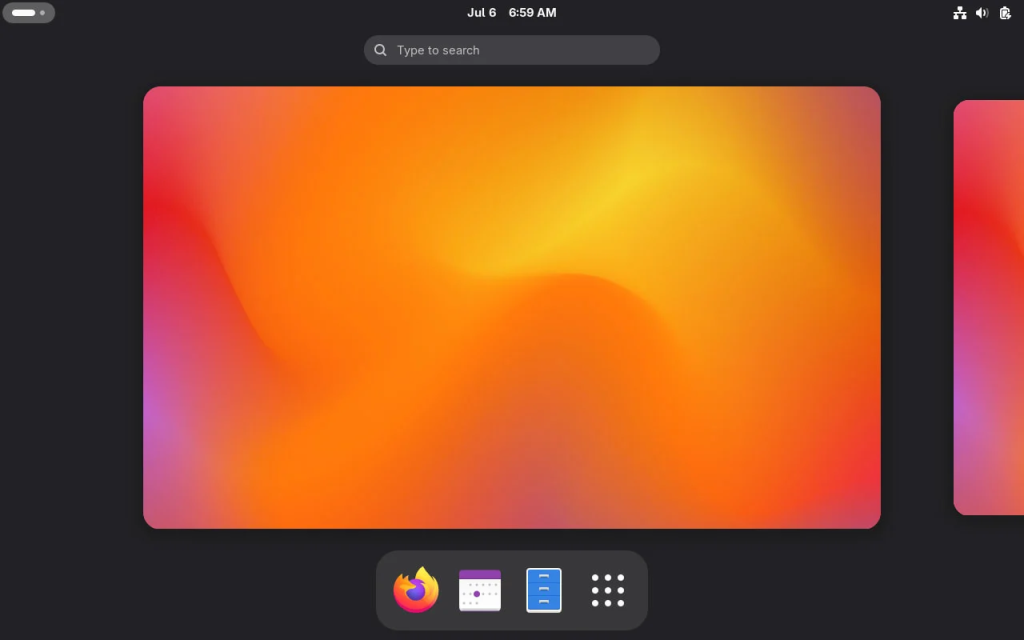
What sets blendOS apart is its ability to integrate applications from Arch Linux, Fedora, Ubuntu, Debian, and even Android, all while maintaining a stable, secure, and atomic base. It’s like having a Swiss Army knife for Linux distros, offering a blend of flexibility, immutability, and containerization that makes it stand out in a crowded field. But how does it achieve this? Let’s break it down.
The Core Philosophy of blendOS
Immutability: A Stable Foundation
One of the standout features of blendOS is its immutable nature. If you’re new to the term, immutability in Linux means the core operating system files (the root filesystem) are read-only and cannot be modified during normal operation. This design prevents accidental changes to critical system components, reducing the risk of breaking your system during updates or experiments.
With blendOS, updates are atomic, meaning they’re applied as a single, indivisible operation. Instead of incrementally updating individual packages (which can sometimes lead to dependency conflicts or a “half-broken” system), blendOS replaces the entire root filesystem with a new, clean version. This approach, inspired by distros like Fedora Silverblue and Vanilla OS, ensures that your system remains consistent and reliable, even if you’re tinkering with bleeding-edge software. If something goes wrong, you can easily roll back to a previous state, making troubleshooting a breeze.
Declarative Configuration: Define Your System
Another key pillar of blendOS is its declarative configuration, which allows users to define their system’s state using a configuration file called system.yaml. Want to install a specific kernel, desktop environment, or package? You can specify it in this file, and blendOS will handle the rest. This is a game-changer for power users who want granular control over their system without diving into complex manual configurations.
For example, you can define a custom track (a predefined system configuration) to use a specific desktop environment like KDE Plasma or a headless setup for servers. By running sudo akshara update, blendOS applies the changes defined in system.yaml, ensuring your system reflects your exact specifications. This declarative approach makes blendOS highly customizable while keeping things user-friendly.
Containerization: Run Anything, Anywhere
Perhaps the most exciting feature of blendOS is its use of containerization to support applications from multiple Linux distributions and even Android. Using a custom implementation of Podman (a container runtime similar to Docker but more lightweight and secure), blendOS allows you to run apps from Arch, Fedora, Ubuntu, Debian, CentOS, and more, all within isolated containers. This means you can install, say, a Debian package using apt or a Fedora package using dnf, without worrying about breaking your Arch-based system.
The magic happens through blendOS’s bpkg package manager, which acts as a universal wrapper for containerized package managers. For example, to install VLC from a Debian container, you’d simply run:
vlc.debian
This seamless integration means you don’t need to juggle multiple virtual machines or dual-boot setups to access software from different distros. Plus, blendOS supports Waydroid, allowing you to run Android apps natively on your desktop, complete with Google Play Store access in GNOME or KDE Plasma sessions.
Key Features of blendOS
Now that we’ve covered the philosophy behind blendOS, let’s dive into its standout features that make it a compelling choice for Linux users.
1. Support for Multiple Package Managers
blendOS doesn’t force you to stick with one package manager. It supports:
- pacman (Arch Linux’s default package manager)
- apt (Ubuntu/Debian)
- dnf (Fedora)
- bpkg (blendOS’s custom universal package manager)
- Flatpak (for sandboxed, distro-agnostic apps)
This means you have access to a massive pool of software from Arch’s main repositories, the Arch User Repository (AUR), Ubuntu’s repositories, Fedora’s Rawhide, and Flathub. If a package isn’t available in one ecosystem, you can likely find it in another, all without leaving blendOS.
2. Wide Range of Desktop Environments
Unlike many distros that lock you into a single desktop environment, blendOS offers flexibility with multiple options out of the box:
- GNOME (default, with Wayland support)
- KDE Plasma
- XFCE
- Cinnamon
- Deepin
- MATE
- LXQt
You can even create a custom track to use window managers like Sway or i3, or go headless for server setups. The Jade GUI installer makes it easy to choose your preferred desktop environment during installation, and you can switch tracks later using the system track command.
3. Android App Support with Waydroid
Running Android apps on Linux isn’t new, but blendOS makes it effortless with Waydroid, a container-based solution for running a full Android system. You can enable Android app support through the System app in GNOME or KDE Plasma sessions, giving you access to mobile apps alongside your Linux software. Whether it’s a productivity app or a game, blendOS bridges the gap between desktop and mobile ecosystems.
4. Atomic Updates with Minimal Download Sizes
blendOS uses an innovative update system powered by zsync, which keeps update sizes small (typically 10-100 MB). Updates are downloaded in the background, and the new root filesystem is applied on the next boot, preserving your custom packages and settings. This approach addresses a common pain point with rolling-release distros like Arch, where large updates can sometimes lead to instability.
5. User-Friendly Tools
blendOS comes with intuitive tools to simplify system management:
- System app: A GUI for updating the system, managing containers, and enabling Android app support.
- Akshara: A command-line tool for applying system.yaml changes and updating the system.
- User: A CLI utility for creating and managing containers.
- blendOS Settings: An Electron-based GUI for configuring containers and associations.
These tools make blendOS accessible to both beginners and advanced users, balancing ease of use with powerful customization options.
Who is blendOS For?
blendOS isn’t for everyone, but it’s a dream come true for certain types of users. Let’s explore who might benefit most from this distro.
1. Distro-Hoppers
If you’re someone who constantly switches between distros to try out different package ecosystems or desktop environments, blendOS is tailor-made for you. Its ability to run apps from multiple distros and switch desktop environments on the fly eliminates the need to reinstall or dual-boot. As one Reddit user put it, blendOS “cured my distro-hopping habit” by offering the best of all worlds in one package.
2. Developers
Developers often need to test applications across different Linux distributions. With blendOS, you can set up containers for Debian, Ubuntu, Fedora, and more, allowing you to test your software in multiple environments without leaving your primary system. The support for Arch’s AUR also means you can access cutting-edge development tools and libraries.
3. Power Users
If you love tinkering with your system, blendOS’s declarative configuration and containerized approach give you immense control. You can experiment with custom kernels, drivers, or desktop environments without risking system stability, thanks to immutability and atomic updates.
4. Advanced Linux Users
While blendOS is user-friendly, its full potential shines in the hands of experienced Linux users who understand package management and containerization. If you’re new to Linux, the sheer flexibility might feel overwhelming, and you may be better off starting with a more beginner-friendly distro like Ubuntu or Linux Mint.
Installing blendOS: What You Need to Know
Installing blendOS is straightforward, thanks to the Jade GUI installer, which is similar to those found in popular distros like Ubuntu. Here’s a quick overview of the process:
- Download the ISO: Visit the official blendOS website (blendos.co) and download the ISO for your preferred desktop environment (e.g., GNOME, KDE Plasma). Make sure to verify the checksum to ensure the file isn’t corrupted.
- Create a Bootable USB: Use tools like Rufus or Balena Etcher to create a bootable USB drive.
- Allocate Disk Space: Ensure you have at least 20GB of free disk space to avoid installation issues.
- Install: Boot from the USB, follow the Jade installer’s prompts, and choose your desktop environment. After installation, reboot and select the hard disk as the boot device.
- Post-Install Setup: Use the System app or sudo akshara update to configure your system, set up containers, or enable Android app support.
For detailed instructions, check the official installation guide on blendos.co.
The Pros and Cons of blendOS
Pros
- Unmatched Flexibility: Run apps from multiple Linux distros and Android, all on one system.
- Immutability: Prevents accidental system breakage and simplifies rollbacks.
- Declarative Configuration: Customize your system with a single system.yaml file.
- Wide Desktop Environment Support: Choose from GNOME, KDE Plasma, XFCE, and more.
- Atomic Updates: Small, reliable updates that keep your system stable.
- Community-Driven: Active development and a growing community on Discord and GitLab.
Cons
- Learning Curve: The containerized approach and declarative configuration may confuse beginners.
- Not for Everyone: Best suited for advanced users or distro-hoppers, not new Linux users.
- Limited Package Manager Support: While it supports pacman, apt, and dnf, other package managers like zypper (openSUSE) are missing.
- Mirror Availability: Some download mirrors for ISOs have been reported as unreliable.
blendOS v4: The Latest Release
The latest version, blendOS v4 (released in June 2024), takes the distro to new heights. Here are the highlights:
- Fully Declarative: Users can now install any kernel, package, or driver from Arch’s repositories or AUR using system.yaml.
- Linux Kernel 6.9.3: Powered by the latest kernel for improved hardware support.
- GNOME 46: The default desktop environment, with support for other DEs like KDE Plasma and Budgie.
- Android App Support: Enabled via Waydroid in GNOME and KDE Plasma sessions.
- Custom Containers: A new GUI and CLI tool for creating containers for distros like Debian, Ubuntu, and Fedora.
This release solidifies blendOS’s position as a forward-thinking distro that combines cutting-edge technology with user-friendly features.
How blendOS Compares to Other Distros
To understand blendOS’s place in the Linux ecosystem, let’s compare it to similar distros:
- Vanilla OS: Like blendOS, Vanilla OS is immutable and uses containerization, but it focuses on a simpler approach with fewer supported package managers. blendOS’s broader ecosystem support gives it an edge for power users.
- Fedora Silverblue: Another immutable distro, Silverblue uses Flatpaks and toolbox containers but is limited to Fedora’s ecosystem. blendOS’s multi-distro support makes it more versatile.
- Ubuntu: Ubuntu is beginner-friendly and stable but lacks the flexibility of blendOS’s containerized approach and Arch-based rolling updates.
- Arch Linux: While blendOS is based on Arch, it adds immutability, containerization, and GUI tools, making it more accessible than a traditional Arch install.
Real-World Use Cases
To give you a sense of blendOS’s potential, here are a few practical scenarios:
- Developer Workflow: A developer testing a web app can run it in a Debian container for stability, use Arch’s AUR for the latest tools, and prototype a mobile version in an Android container—all on the same system.
- Creative Professional: A graphic designer can use GIMP from an Ubuntu container, Kdenlive from a Fedora container, and a mobile editing app via Waydroid, all while enjoying the Deepin desktop’s sleek aesthetics.
- Server Admin: A sysadmin can set up a headless blendOS instance with custom containers for running services like Nextcloud or Plex, leveraging Arch’s rolling updates for the latest software.
Challenges and Future Potential
While blendOS is impressive, it’s not without challenges. The reliance on containers can introduce complexity, especially for users unfamiliar with Podman or Waydroid. The project’s documentation, while improving, could use more depth to guide new users. Additionally, the distro’s ambitious scope means it requires robust infrastructure for hosting ISOs, which the team has noted as a challenge.
Looking ahead, blendOS has immense potential. With active development and a growing community, it could become the go-to distro for users who want flexibility without sacrificing stability. Future releases may expand support for additional package managers (like zypper) or integrate new container technologies, further cementing its “one distro to rule them all” claim.
Why You Should Try blendOS
If you’re tired of distro-hopping, wrestling with package compatibility, or juggling multiple systems, blendOS offers a refreshing solution. Its immutable, declarative, and containerized approach makes it a powerful tool for advanced users, while its GUI tools and familiar desktop environments ensure it’s approachable for those willing to learn. Whether you’re a developer, a Linux enthusiast, or someone curious about the future of Linux distributions, blendOS is worth a spin.
You can try blendOS without installing it by using DistroSea, a web-based platform that lets you test it in your browser. For a full experience, download the ISO from blendos.co and follow the installation guide.
Conclusion
So, is blendOS the one distro to rule them all? It’s certainly a strong contender. By combining the flexibility of Arch Linux with the stability of immutability, the power of containerization, and support for Android apps, blendOS offers a unique proposition in the Linux world. While it may not be the best choice for complete beginners, it’s a dream come true for power users and distro-hoppers who want it all in one package.
Have you tried blendOS yet? Let us know your thoughts in the comments, and if you’re ready to dive in, head over to blendos.co to get started. With blendOS, the Linux world just got a whole lot more exciting.
Disclaimer
The information provided in this blog post about blendOS is based on official sources and the latest available data as of July 6, 2025. While every effort has been made to ensure accuracy, the features, functionality, and performance of blendOS may change with future updates or releases. The author is not affiliated with blendOS or its developers and does not guarantee the suitability of blendOS for any specific use case.
Users are encouraged to verify details on the official blendOS website (blendos.co) and exercise caution when installing or configuring any operating system. The author is not responsible for any issues, data loss, or damages that may arise from using blendOS or following the guidance in this post. Always back up your data before making changes to your system.
Also Read
Deepin 25.0.1 Patched ISO: Install Guide & New Features!