If you’ve been managing a growing photo library on Linux, Windows, or macOS without paying for a subscription-based tool, digiKam has probably been on your radar for a while. And for good reason — it’s one of the most capable open-source photo management applications available today. With the June 7, 2026 release, exploring digiKam 9.1.0 reveals a significant leap forward: smarter database handling, expanded media format support, cleaner search tools, and a pile of stability fixes that make everyday workflows feel noticeably smoother.
This post breaks down everything that’s new, what it actually means for your photography workflow, and why this release deserves your attention — whether you’re a hobbyist with 50,000 photos or a professional managing a full studio archive.
What Is digiKam (And Why Should You Care)?
Before jumping into the new features, a quick refresher for anyone who hasn’t used it before: digiKam is a free, open-source digital photo management application developed under the KDE project. It supports RAW processing, facial recognition, geolocation tagging, batch editing, metadata management, and much more — all without a monthly subscription or cloud lock-in.
Compared to Lightroom Classic, it’s more technically demanding but completely free. Compared to Apple Photos, it’s platform-agnostic and gives you complete control over your data. For photographers who value ownership and flexibility, digiKam has always been a compelling choice.
Version 9.1.0, released after three months of active development, builds on the 9.0.0 foundation with targeted improvements that address long-standing user complaints while also pushing the software forward.
The Big Picture: What 9.1.0 Focuses On
According to the official release notes, this version centers on four core areas:
- Database migration and stability
- Preview and media format support
- Advanced search improvements
- General usability refinements
Each of these areas had specific bugs and limitations that frustrated users in earlier versions. The team tackled them head-on this cycle, and the results show.
New Features and Major Changes
Google Pixel Motion Photo Support
This is one of the more exciting additions for anyone shooting with a Pixel phone. Google Pixel devices capture what are called “motion photos” — essentially a still image with a short video clip embedded inside the file. Previously, digiKam didn’t know what to do with these hybrid files, which could make your Pixel library feel messy or incomplete inside the app.
With 9.1.0, digiKam now natively supports Pixel motion photos. You can preview and manage these files seamlessly without needing to extract or convert them first. If you regularly back up your phone photos into digiKam, this alone is a meaningful quality-of-life improvement.
It also signals something broader: the team is paying attention to how people actually shoot photos in 2026, including the growing number of photographers who use smartphones alongside dedicated cameras.
Advanced Search Gets a “Clear All Groups” Button
This might sound like a minor UI tweak, but if you’ve ever used digiKam’s advanced search feature heavily, you know how cumbersome it could get. The SearchView interface lets you build complex multi-group filter queries — combining date ranges, ratings, tags, camera metadata, and more. The problem was that clearing those filters required deleting each group manually, one by one.
The new “Clear All Groups” button wipes the entire search configuration in a single click. For photographers who use search constantly to pull up specific sets of images, this saves real time every single session. It’s the kind of change that only makes sense once you’ve been frustrated by the old behavior — and the digiKam team clearly listened to community feedback here.
Time Zone Support in the Database Schema
Here’s a change that quietly solves a problem that has annoyed a lot of traveling photographers and anyone working with international clients: time zone support for registered item timestamps.
Previously, the database stored timestamps without time zone context, which created inconsistencies when importing photos taken across different regions or when collaborating with people in different parts of the world. The updated database schema now properly accounts for time zones, making timestamp data accurate and consistent regardless of where the photo was taken.
If you manage archives from international shoots — or if you’ve ever noticed your photos showing the wrong time after an import — this fix is relevant to you.
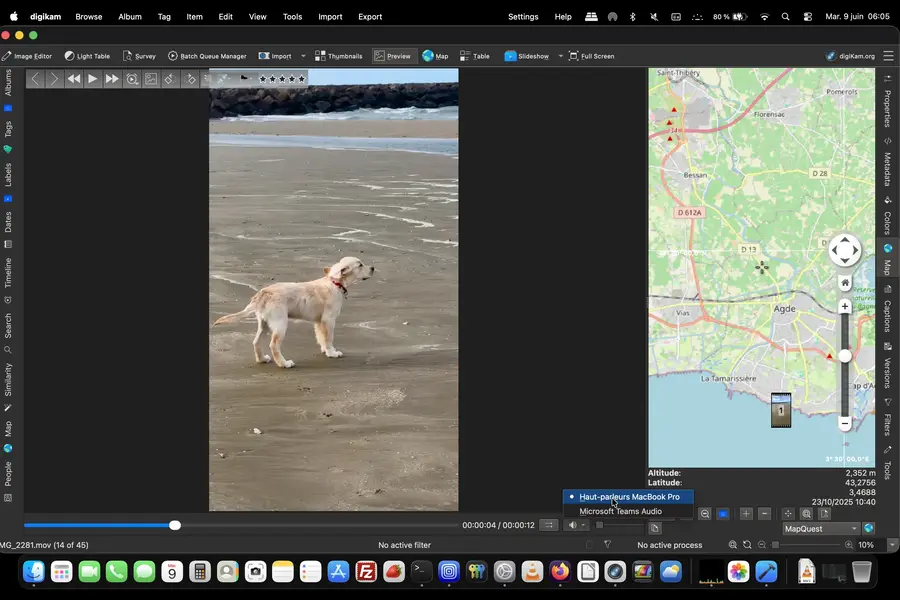
Audio Output Selection in the Video Player
Video handling in digiKam has always been functional but occasionally rough around the edges. One specific annoyance: the media player didn’t handle audio output device selection well, which meant connecting new audio hardware (say, Bluetooth headphones after you’d already launched the app) could result in no sound until a full restart.
Version 9.1.0 adds proper audio output selection in the video player, so you can switch between audio devices without killing and restarting the application. The companion bug fix for Bluetooth device detection on Linux rounds this out nicely.
Upgraded LibRaw Engine (20260523)
RAW format support is one of digiKam’s biggest draws for serious photographers. The application relies on the LibRaw library to decode RAW files from hundreds of different cameras, and version 9.1.0 ships with the May 23, 2026 build of LibRaw.
This update adds support for newer camera models released in the past several months and brings performance improvements to the RAW decoding pipeline. If you shoot with a camera body released in late 2025 or early 2026, this update may finally give you proper support.
Framework and Component Updates
Qt 6.11.0 and KDE Frameworks 6.26.0
The AppImage, Windows, and macOS bundles now ship with Qt 6.11.0 and KDE Frameworks 6.26.0 — the latest stable versions of the underlying toolkits. This keeps digiKam current with modern Qt features and security improvements, and ensures better compatibility with Windows 11 systems in particular.
For the Windows Qt6 installer, compatibility with Windows 11 has been specifically improved. If you’d been experiencing quirky behavior on a fresh Windows 11 install, this should help.
OpenCV 4.12 and 4.13
The computer vision library powering digiKam’s facial recognition and AI tools has been updated as well. Windows Qt6 bundles ship with OpenCV 4.12, while Linux AppImage and macOS bundles use OpenCV 4.13. More on why this matters in the face recognition section below.
FFmpeg 8.1.1
Video playback and processing relies on FFmpeg, and 9.1.0 bundles FFmpeg 8.1.1 for Qt6 builds. This brings improved codec support, better performance, and compatibility with newer video formats across the board.
Database and Migration: The Unsexy But Critical Fixes
MariaDB Migration Gets Much Better
If you run digiKam connected to a MariaDB backend — common for home server setups and NAS deployments — you likely hit some painful issues with version 9.0.0. Users reported photos appearing to disappear after upgrading from 8.8.0, missing database indexes causing extremely slow performance on large libraries, and schema update failures that broke things silently.
9.1.0 addresses all of this:
- The MariaDB migration process has been substantially improved
- A missing index on Images.status caused full table scans that made the tag count, calendar, and People panel queries glacially slow — this is now fixed
- ImageTagProperties.property was incorrectly typed as TEXT instead of VARCHAR, causing performance issues — corrected
- UpdateSchemaFromV16ToV17 was not implemented for MySQL/MariaDB — now it is
- An index on ImageTagProperties.property improves face tag query performance significantly
For anyone managing a large library on a NAS with MariaDB, these fixes alone make upgrading worthwhile. The performance difference in the People panel and calendar view can be dramatic on libraries with tens of thousands of tagged images.
Face Recognition and AI: Fixing the Frustrations
Face recognition in digiKam has had a complicated reputation. When it works, it’s genuinely impressive for a free tool. When it doesn’t, the failures can feel inexplicable. Version 9.1.0 tackles several of the most aggravating edge cases.
Face Detection on Small Images
Face detection previously failed entirely on low-resolution images (around 300×300 pixels). This is a real problem because thumbnail crops, scanned photos, and photos taken at low resolution for web use are common in most libraries. That limitation is now addressed.
Tag-Only Selections Now Work
A bug caused the face recognition engine to fail when processing tag-only selections — it would ignore tag constraints when albums were also selected in the interface. The result was that carefully filtered selections got ignored, and the engine would process the wrong images. Fixed.
Integer Overflow in the Face Pipeline
There was a Qt assertion failure triggered by an integer overflow in the face pipeline when processing very large batches. This caused crashes that were hard to reproduce and even harder to diagnose. The fix prevents the overflow from occurring in the first place.
OpenCL Detection on AMD GPUs
AMD Radeon RX 470 users (and likely similar cards) couldn’t get OpenCL detected by digiKam, which meant GPU-accelerated face recognition wasn’t available. This detection issue has been resolved, potentially unlocking significantly faster processing for affected users.
Geolocation Fixes: More Reliable Than Ever
Geolocation is one of digiKam’s most useful features for photographers who travel, and it saw meaningful attention in this release.
Reverse Geocoding Rate Limiting
Anyone using OpenStreetMap for reverse geocoding may have hit HTTP 429 “Too Many Requests” errors. This happened because digiKam was hammering the OpenStreetMap API without respecting rate limits. The fix introduces proper throttling so you don’t get blocked mid-session.
GPS Coordinates for Video Files
GPS metadata embedded in video files was not being written to the ImagePositions table in the database, which meant your videos weren’t showing up in map view even if they had GPS data. Fixed.
Geolocation Editor Crashes
Opening the Geolocation Editor was triggering crashes in certain configurations. This has been resolved, making the GPS editing workflow more reliable.
XMP Sidecar GPS Protection
A particularly nasty bug was overwriting GPS coordinates when writing tags to XMP sidecars. If you were careful about tagging your photos and using XMP sidecars to preserve metadata without modifying originals, your GPS data could silently disappear. That’s now patched.
Metadata and Rating Filter Fixes
The rating filter was broken. Flat-out broken. Multiple bug reports confirmed that filtering by star rating (0–5 stars) simply wasn’t working correctly — filter changes weren’t updating the view, and in some cases the filter had no effect at all. This affected multiple configurations and was introduced sometime after the libexiv2 update.
Version 9.1.0 fixes all reported rating filter issues across multiple tickets. This is one of those fixes that sounds small but affects basically every user who relies on star ratings to cull images.
Additionally:
- Finalizing tags was incorrectly removing EXIF Copyright and Artist fields — now fixed
- The Time Adjust tool now correctly uses Xmp.exif.DateTimeOriginal rather than the older XMP CreateDate fields
- ExifTool detection on first use has been improved
Survey Tool: Keyboard Shortcuts and Navigation Restored
The Survey tool introduced in 9.0.0 was a useful addition for culling workflows, but several critical interaction problems made it frustrating to use in practice:
- The left/right overlay navigation arrows weren’t responding to clicks
- Keyboard shortcuts were not working in the Survey module
- Flag shortcuts (quick-key flagging) were broken
- Grouped images were not being deleted properly
- Changing the rating filter in Survey didn’t immediately update the view
All of these have been fixed. If you gave Survey a try when 9.0.0 launched and gave up because it felt half-finished, it’s worth revisiting now.
Stability and Performance Improvements
Beyond the feature additions, 9.1.0 is notably more stable than its predecessor. Some highlights:
- A crash during album scanning on Linux kernel 6.17 has been fixed
- Thumbnail navigation that previously consumed 100% of the main thread for 10–15 seconds on each selection change has been addressed
- JXL thumbnail rendering quality in the general thumbnails view has been improved
- The slideshow no longer freezes on JPEG files with specific unusual EXIF markers
- The image editor’s Darktable RAW import has been repaired
- Album cache performance has been improved
The thread-blocking issue during thumbnail navigation is worth calling out specifically. On larger monitors with many thumbnails visible simultaneously, the previous behavior could make the entire application feel frozen during normal browsing. That’s not a minor inconvenience — it’s the kind of thing that makes you question whether the software is working at all.
Language and Internationalization
digiKam 9.1.0 ships with support for 61 languages in the application interface, and the online documentation is now available in 17 languages. macOS users who wanted to run the application in Simplified Chinese (zh_CN) were previously unable to switch languages — that’s been fixed.
What’s Coming Next
The team has outlined plans for the next maintenance release in late 2026, with focus areas including:
- OpenCV 5 migration, which will bring more advanced AI and computer vision capabilities
- New AI-powered tools for image enhancement, management, and workflow automation
- Further database performance improvements
- A shift toward Qt6-only bundles for Windows and Linux AppImage, as Qt5 has reached end of life
The macOS Intel build will remain on Qt5 for backward compatibility with older Apple operating systems.
Should You Upgrade?
If you’re already running digiKam, the answer is yes — especially if you:
- Use MariaDB as your backend
- Rely on star ratings for culling
- Work with Google Pixel motion photos
- Use geolocation features regularly
- Have been experiencing crashes or sluggishness in the Survey tool or thumbnail browser
The upgrade is available as a source tarball, Linux 64-bit AppImage, Windows 10+ installer, and macOS packages for both Silicon and Intel machines.
Final Thoughts
Exploring digiKam 9.1.0 makes one thing clear: this isn’t a glamorous, marketing-driven release full of flashy new features. It’s something arguably more valuable — a focused, disciplined update that fixes what was broken, improves what was slow, and expands support for how people actually shoot photos today.
The combination of Pixel motion photo support, the database overhaul for MariaDB users, rating filter fixes, geolocation reliability improvements, and the Survey tool repairs makes this a release that meaningfully improves day-to-day use. Whether you’re a long-time digiKam user who’s been frustrated by specific recurring issues, or someone evaluating it for the first time, version 9.1.0 is the most polished the software has felt in some time.
Best of all, it’s completely free. Download it at digikam.org and see for yourself.
Disclaimer
The information provided in this blog post is for general informational purposes only. All details about digiKam 9.1.0 are based on the official release notes published by the digiKam Team on June 7, 2026. While every effort has been made to ensure accuracy, software features, availability, and compatibility may change over time. We are not affiliated with, endorsed by, or officially connected to the digiKam project or the KDE community. Always refer to the official digiKam website for the most up-to-date information. Any third-party tools, libraries, or services mentioned (such as MariaDB, OpenCV, or LibRaw) are the property of their respective owners.
Related Linux Articles
Explore more Linux distribution releases, updates, and performance improvements: