If you’ve been waiting for a reason to hop back into the Garuda Linux world, this is it. This Garuda Linux Temeraire review breaks down everything that changed in the August 2026 release, codenamed 260819, and why it might be the most meaningful update the distro has shipped in years. It’s been more than a year since the last major Garuda release, and the team didn’t just polish the edges this time — they touched the kernel, the login manager, the window managers, and even the naming convention for future releases.
I’ve spent time digging through the official release notes, the changelog repository, and community feedback on the forums to put together a review that actually reflects what changed under the hood, not just a rehash of the announcement post. Let’s get into it.
What Is Garuda Linux, Quickly
For anyone new here, Garuda Linux is an Arch-based distribution built for people who want a rolling release without the setup headache that usually comes with vanilla Arch. It ships with performance tweaks baked in, a heavily customized desktop experience (especially on the KDE Plasma editions), and a strong focus on gaming and desktop usability. It’s rolling release, which means once you’re on Garuda, you’re always on the latest packages — no reinstalling every six months.
Temeraire is the name of the newest snapshot of that rolling base, and it marks a naming shift too. More on that below.
A New Naming Era: Goodbye Birds of Prey, Hello Dragons
For years, Garuda releases were named after eagles and birds of prey. That tradition ends with this release. Starting now, Garuda is naming its releases after dragons pulled from mythology, pop culture, movies, anime, gaming, and literature. Temeraire, the name chosen for this release, comes from the title character of Naomi Novik’s His Majesty’s Dragon novel series — a personal pick from one of the core Garuda developers.
It’s a small thing, but it says something about where the project’s head is at. This isn’t a distro coasting on inertia. The team is still making deliberate choices about identity and branding, which usually correlates with a project that’s actively cared for.
Kernel Switch: linux-garuda Replaces linux-zen
This is arguably the single biggest technical change in the release, and it’s the one that will actually affect your day-to-day performance.
For years, Garuda shipped linux-zen as its default kernel, mainly because it was more stable than the alternatives available at the time. That’s no longer the case. Temeraire switches the default kernel to linux-garuda, which is essentially the CachyOS kernel that many Garuda users were already manually installing anyway.
A few things make this switch worth paying attention to:
- It uses the EEVDF scheduler (Earliest Eligible Virtual Deadline First), the same scheduler that’s been merged upstream into recent Linux kernels for better responsiveness under mixed workloads.
- It’s built to always compile against Nvidia drivers via DKMS before updating, which should reduce the classic “kernel updated, Nvidia driver broke” problem that trips up a lot of dual-boot and gaming users.
- Garuda gives full credit to the CachyOS team for the underlying kernel work, which is a nice bit of transparency — they’re not pretending this is entirely in-house.
If you’ve used CachyOS and liked how snappy it felt, this is essentially Garuda adopting that same performance philosophy as its baseline instead of an optional extra.
KDE Plasma Editions: New Login Manager, Trimmed Fat
Both KDE Plasma editions — Dr460nized and Mokka — got a round of visual polish and updated theming files. But the more consequential change is under the login screen.
Garuda has dropped SDDM in favor of Plasma Login Manager across both Plasma editions and the live ISO environments. If you’re already running Garuda, this migration happened automatically in the background through recent updates, including the removal of the old SDDM themes that are no longer relevant.
The Plasma editions also quietly removed the “better blur” plugin. It sounds like a downgrade on paper, but the team pulled it because it was actively hurting performance in certain setups. That’s the kind of trade-off decision that prioritizes usability over eye candy, which I think is the right call for a distro that markets itself on being fast out of the box.
If you liked the exact look of the previous default theme and want to reproduce it manually, Garuda has published step-by-step wiki guides for both the Dr460nized and Mokka editions.
Hyprland Edition: A Full Rewrite in Lua
The Hyprland edition got the most dramatic overhaul in this release. The entire configuration has been rewritten in Lua, and the custom G-Hyprland settings tool (internally called “gum”) now ships Lua-based presets instead of the older config format. There’s also a new set of preset profiles so you can tune your setup without hand-editing config files from scratch.
Existing installs don’t need to do anything manually — garuda-update handles migrating your configuration automatically.
Beyond the language rewrite, here’s what else changed on Hyprland:
- Switched the screen lock tool to hyprlock
- Kitty is now the default terminal emulator
- Wallpaper backend moved from
swwwtoawww - A new Waybar theme
- Built-in emoji selector
- Brightness control keyboard shortcuts
- A low battery warning notification
- Better automatic keyboard layout detection
Individually these are small quality-of-life additions, but stacked together they make the Hyprland edition feel noticeably more finished than it did a year ago — less like a tiling window manager you have to configure yourself, and more like a desktop environment that happens to be a tiling window manager.
Sway Edition Finally Plays Nice With Nvidia
This is a genuinely big deal for anyone who has tried running Sway or any wlroots-based compositor on Nvidia hardware. Nvidia’s driver support for Wayland compositors outside of GNOME and KDE has historically been rough, and Sway users have had to jump through hoops to get things working properly.
Temeraire’s Sway edition now works with Nvidia hardware out of the box, including in the live environment and the installer itself. That’s not a small footnote — that means you can actually boot the live ISO on an Nvidia laptop or desktop and have Sway function correctly before you’ve even installed anything.
Alongside that, the SwayFX configuration picked up updates to transparency and shadow rendering, plus a new window animations feature. Garuda also dropped its custom output configuration and HiDPI scripts in favor of nwg-displays, a proper GUI tool for configuring multi-monitor and scaling setups. That’s a smart move — GUI-based display configuration is one of those things that shouldn’t require editing a text file in 2026.
Smarter Disk Partitioning Defaults
This is a quieter change, but it matters more than it looks like on paper, especially for anyone installing on newer SSDs or NVMe drives.
The installer now automatically selects the largest sector size supported by the disk when creating new partition layouts. Previously, installations would often default to a 512-byte sector size even when the disk supported the more optimal 4096-byte sector size, which is a performance-relevant mismatch on modern drives.
For anyone encrypting their disk, the installer now uses LUKS2 with Argon2 encryption, and it matches the same optimal sector size as the disk itself. Argon2 is a stronger, more modern key derivation function than the older PBKDF2 default, and it’s specifically designed to resist GPU-accelerated brute-force attacks — a meaningful security upgrade for anyone who relies on full-disk encryption.
Garuda Toolbox Is Now the Only Tool You Need
Garuda has been slowly building out “Garuda Toolbox” as a unified system administration tool, and with Temeraire, it has fully replaced every legacy Garuda tool. No more juggling separate utilities for different jobs — it’s now genuinely a one-stop shop.
What Toolbox now covers:
- System maintenance tasks
- System settings: locales, kernels, systemd services, user and group management
- Curated gaming tools
- Software discovery pulled from Arch Wiki software lists
- Boot configuration tools
- Networking configuration
- Diagnostic and troubleshooting tools
- Quick access to the most commonly edited config files
Community reaction on the Garuda forums has been notably positive about this consolidation — one longtime user pointed out that with everything unified into one tool, the old “Garuda ships too many redundant tools” criticism no longer really holds up. That tracks with what I’d expect: fragmented tooling is one of the more common complaints about heavily customized distros, and Garuda closing that gap is a meaningful maturity signal for the project.
FireDragon 13: A Faster, Rebuilt Browser
FireDragon, Garuda’s custom Firefox-based browser, got a version bump to 13 alongside this release, and it’s not a small update. It ships with an entirely new implementation that the team says makes it noticeably faster than previous versions. Features like the built-in workspaces and notes functionality are now developed in-house rather than relying on third-party forks or extensions, which should mean better long-term maintenance and fewer breakages when upstream Firefox changes something.
Leaner ISO Profiles, Especially for Gaming
Garuda’s gaming edition has historically shipped with a lot of pre-installed software, and not everyone wants all of it. With Temeraire, the iso-profiles received a proper cleanup: legacy and unnecessary packages were dropped, and — most notably — the entire kde-games meta-package bundle is gone from the gaming edition.
Instead, the gaming ISO now focuses on actual gaming tools and launchers people use on Linux, along with the performance-tweaks package included by default. This is a good trade-off. A gaming-focused install shouldn’t force a pile of unrelated KDE minigames onto your disk when you’re really there for Steam, Lutris, and performance tuning.
New Infrastructure: Arch Mirror on Cloudflare R2
On the infrastructure side, Garuda now hosts its own Arch Linux mirror on Cloudflare R2, distributed globally through Cloudflare’s network. You can point your pacman configuration directly at it:
Server = https://arch.garudalinux.org/$repo/os/$archFor users in regions where Arch mirror latency has historically been inconsistent, this is a genuinely useful addition — a globally distributed CDN-backed mirror should mean faster, more reliable package downloads regardless of where you’re located.
Alongside that, the Chaotic-AUR website — the service that builds and serves Garuda’s AUR packages — got a significant upgrade just before this release, adding estimated build start and finish times, expanded statistics, filtering options, and live package and pipeline logs. For anyone who regularly checks whether their favorite AUR package has built successfully, this is a solid transparency improvement.
For those curious about the underlying infrastructure, Cloudflare R2 is the object storage platform Garuda now uses to serve mirror traffic globally with low latency.
Garuda Linux Temeraire Editions and Download Links
Temeraire ships across the usual wide range of desktop environments and window managers Garuda is known for supporting. Available editions include:
- Dr460nized (KDE Plasma, flagship edition)
- Dr460nized Gaming
- Mokka (lightweight KDE Plasma)
- KDE-lite
- GNOME
- Cosmic (community edition)
- Hyprland
- Sway
- Cinnamon
- XFCE
- i3
That’s an unusually broad spread for a single distro release, and it’s part of what makes Garuda appealing to such a wide range of users — from people who want a fully decorated Plasma desktop to minimalists running i3 on older hardware.
Garuda Linux Temeraire: Comparison Table of Key Changes
| Area | Before Temeraire | Temeraire (2026) |
|---|---|---|
| Default kernel | linux-zen | linux-garuda (CachyOS-based, EEVDF scheduler) |
| Plasma login manager | SDDM | Plasma Login Manager |
| Hyprland config language | Custom config format | Fully rewritten in Lua |
| Hyprland terminal | Varied/user-set | Kitty (default) |
| Hyprland wallpaper backend | swww | awww |
| Sway + Nvidia | Manual workarounds required | Native out-of-box support |
| Sway display config | Custom scripts | nwg-displays (GUI tool) |
| Disk encryption | LUKS1/older defaults | LUKS2 with Argon2 |
| Partition sector size | Often defaulted to 512 | Auto-selects optimal size (e.g., 4096) |
| System tools | Multiple legacy tools | Unified in Garuda Toolbox |
| Browser | FireDragon (older build) | FireDragon 13, rebuilt architecture |
| Gaming edition packages | Included kde-games meta-package | Trimmed, gaming-focused tools only |
| Arch mirror | Third-party mirrors only | Official Cloudflare R2-hosted mirror |
Who Should Upgrade or Install Temeraire
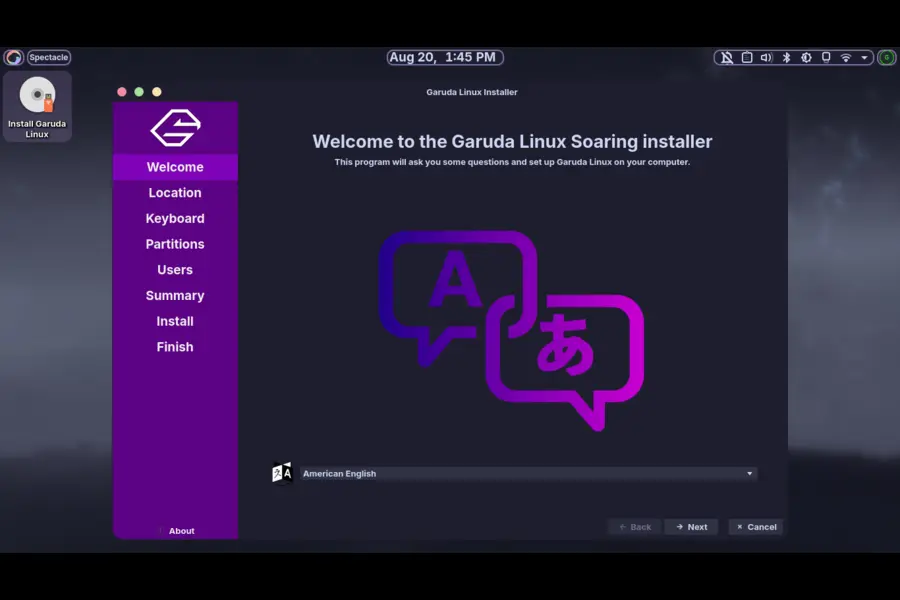
If you’re already running Garuda Linux, most of these changes have already been rolling out through normal rolling-release updates — the kernel switch, Hyprland’s Lua migration, and the login manager change should already be applied via garuda-update. There’s no dramatic “upgrade day” the way there would be with a point-release distro like Ubuntu or Fedora.
If you’re new to Garuda and deciding whether Temeraire is a good entry point, here’s my honest take:
- Gamers on Nvidia hardware get a real upgrade here. Between the linux-garuda kernel’s DKMS-first Nvidia handling and Sway’s new native Nvidia support, this release specifically closes gaps that used to push Nvidia users toward other distros.
- Hyprland users get the most transformed experience in this release. If you tried Hyprland edition a year ago and found the config intimidating, the new Lua-based presets are worth a second look.
- Security-conscious users benefit from the LUKS2 with Argon2 default, which is a meaningful upgrade if you’re setting up full-disk encryption on a new install.
- Minimalists running i3 or XFCE won’t see as many headline changes, but they still benefit from the leaner package lists and the unified Toolbox utility.
Pros and Cons of Garuda Linux Temeraire
Pros:
- Default kernel switch to linux-garuda brings real performance and Nvidia stability improvements
- Garuda Toolbox now fully replaces fragmented legacy tools — genuinely simpler system management
- Sway edition works with Nvidia GPUs out of the box for the first time
- Stronger disk encryption defaults with LUKS2 and Argon2
- Hyprland’s Lua rewrite makes customization more approachable
- Leaner, more focused gaming edition without unnecessary bundled software
- New Cloudflare-backed Arch mirror should improve download reliability globally
Cons:
- Removal of SDDM means anyone attached to specific SDDM theming will need to manually recreate looks under Plasma Login Manager
- The “better blur” plugin removal is a visual downgrade for users who liked the extra polish, even though it was a performance fix
- Naming convention change (birds to dragons) may confuse users searching for release history under old naming patterns
- As with any rolling release, testers reported some early hiccups with the pre-release ISO before final polish landed
Final Thoughts
This Garuda Linux Temeraire review comes away pretty impressed with how much of this release is about fixing real friction points rather than just chasing new features for the sake of a changelog. Switching the default kernel, fixing Nvidia support on Sway, tightening disk encryption defaults, and consolidating system tools into one place are the kinds of changes that make a distro genuinely easier to live with day to day — not just prettier in screenshots.
If you’ve been sitting on the fence about Garuda, or you tried it a year or two ago and bounced off because of Nvidia headaches or a cluttered toolset, Temeraire is a legitimate reason to give it another shot. And if you’re already a Garuda user, most of this has likely already landed on your machine through the rolling updates — so at this point, it’s really just a matter of catching up on what changed and enjoying the smoother ride.
Frequently Asked Questions
What is Garuda Linux Temeraire?
Garuda Linux Temeraire is the codename for the August 2026 release (build 260819) of Garuda Linux, an Arch-based rolling release distribution known for performance tuning and heavy desktop customization.
Why did Garuda Linux switch its release naming from birds to dragons?
The team decided to move away from eagle and bird-of-prey names toward dragon names drawn from mythology, pop culture, and literature, starting with Temeraire, named after the character from Naomi Novik’s novel series.
What is the default kernel in Garuda Linux Temeraire?
Temeraire replaces linux-zen with linux-garuda, a CachyOS-based kernel using the EEVDF scheduler that’s built to compile against Nvidia drivers via DKMS before updates.
Does Garuda Linux Temeraire support Nvidia GPUs on Sway?
Yes, the Sway edition now works with Nvidia hardware out of the box, including in the live ISO and installer, which previously required manual configuration.
Do I need to reinstall Garuda Linux to get Temeraire’s changes?
No, since Garuda is a rolling release, most Temeraire changes are automatically applied to existing installations through regular garuda-update runs.
What login manager does Garuda Linux Temeraire use?
The KDE Plasma editions now use Plasma Login Manager instead of SDDM, with existing users migrated automatically during updates.
Is Garuda Toolbox required to manage the system now?
Garuda Toolbox has fully replaced all legacy management tools, making it the primary recommended way to handle system maintenance, settings, and diagnostics on Garuda Linux.
Disclaimer: This article is based on the official Garuda Linux announcement and publicly available changelogs at the time of writing. Software details, package versions, and defaults can change with future updates since Garuda is a rolling-release distribution — always check the official release thread before making system changes.