If you’ve spent any time browsing Linux hardware forums, you’ve probably run into the name TUXEDO. This TUXEDO OS Review 2026 takes a close look at the German company’s in-house Linux distribution, what it actually offers, how it compares to Ubuntu and Kubuntu, and whether it deserves a spot on your next laptop or desktop — including the brand-new beta release that changes its entire foundation.
TUXEDO Computers has been building Linux hardware since 2004, and TUXEDO OS is its answer to a problem that’s plagued the Linux desktop for decades: fragmented driver support and inconsistent out-of-the-box experiences. Instead of asking customers to configure Ubuntu, Kubuntu, or openSUSE by hand, TUXEDO ships a distro tuned specifically for its own machines — and, as it turns out, for plenty of other PCs too.
What Exactly Is TUXEDO OS?
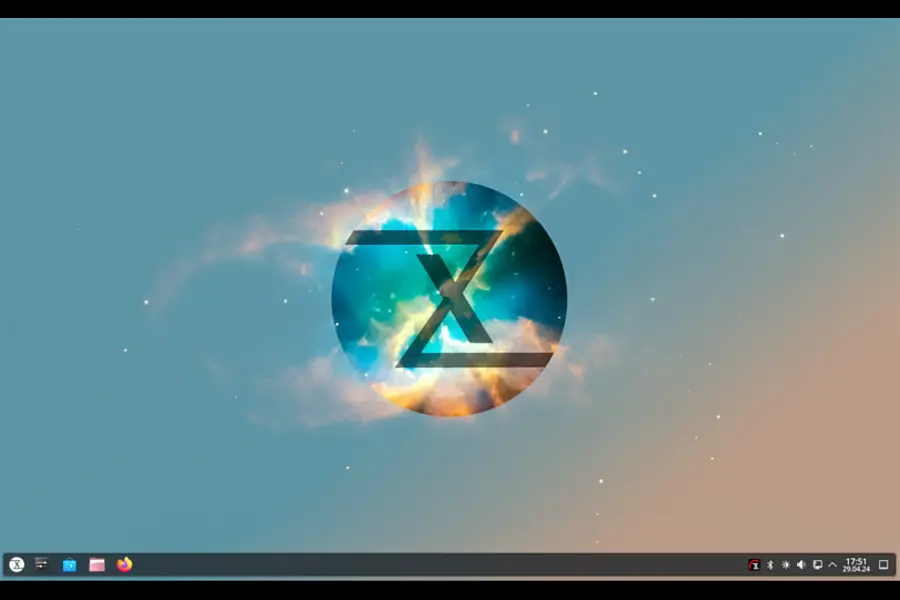
TUXEDO OS is a Linux distribution developed and maintained by TUXEDO Computers GmbH, a hardware manufacturer headquartered in Augsburg, Bavaria, Germany. The company began shipping devices with the Ubuntu-based TUXEDO OS at the end of September 2022, and it has been refined continuously since.
The distro is built on top of Ubuntu 24.04 LTS and uses KDE Plasma as its default and only desktop environment. That’s a deliberate choice. Rather than trying to be everything to everyone, TUXEDO picked one desktop, polished it heavily, and built the entire experience around it.
Two things set TUXEDO OS apart from a stock Ubuntu or Kubuntu install right away:
- No Snap packages. TUXEDO ships Firefox as a native .deb package instead of a Snap, and relies on Flatpak for sandboxed app distribution.
- Independent repositories. Instead of pulling everything straight from Canonical, TUXEDO OS uses its own package mirrors, hosted on servers located in Germany, which lets the team push driver updates and fixes without waiting on upstream Ubuntu release cycles.
On top of that, TUXEDO maintains its own modified Linux kernel, tuned specifically to work with the company’s notebooks and desktops — things like fan curves, keyboard backlighting, hybrid graphics switching, and Wi-Fi chipsets that often cause headaches on generic distros.
Big News: TUXEDO OS Is Moving to a Debian Base (Open Beta)
Here’s the part that makes 2026 a genuinely interesting year to be looking at TUXEDO OS: the company has just released an Open Beta of a new, Debian-based generation of TUXEDO OS. This is not a minor point release — it’s a foundational shift away from Ubuntu.
A few important facts about this beta, straight from TUXEDO’s own release notes and coverage of the rollout:
- It is explicitly not intended for production machines yet. This is a testing release for people who want to help shake out bugs, not a daily driver for your main laptop.
- The desktop stack is already current: KDE Plasma 6.7.2, KDE Frameworks 6.26, and Qt 6.10.2.
- Wayland is the default graphics platform, with X11 no longer the primary path.
- It runs on TUXEDO’s own kernel build, version 7.1.6.2.
- Btrfs is now the default filesystem, replacing ext4 — a change that opens the door to snapshots and easier system rollbacks down the line.
- Familiar TUXEDO branding, Plasma customizations, and core apps (Dolphin, Konsole, Firefox, Thunderbird, KDE Discover) all carry over.
For people who’d rather stay on an Ubuntu foundation, TUXEDO isn’t leaving them stranded. The existing Ubuntu 24.04-based release — now referred to as TUXEDO OS Legacy — will keep receiving regular support until mid-2027, with security-critical components maintained through 2029. TUXEDO also plans an upgrade path from Legacy toward Kubuntu 26.04 for users who specifically want to remain on an Ubuntu-family base rather than move to the new Debian-based line.
What this means practically: if you’re installing TUXEDO OS today for real work, you almost certainly want the stable Legacy/Ubuntu-based release, not the Debian beta. If you’re curious about where the project is headed, or you enjoy testing pre-release software, the beta ISO is available for download and gives you an early look at Btrfs, Wayland-first, and the newest Plasma release.
Why Did TUXEDO Even Build Its Own Distro?
It’s a fair question. There’s no shortage of Linux distributions already, and TUXEDO officially supports Ubuntu, Kubuntu, and openSUSE on its hardware too. The company’s own explanation is that its customer base spans two extremes: people picking up their very first Linux machine and expecting it to just work, and Linux veterans who’ve been running the OS for years and want deep customization without a fight.
TUXEDO OS exists to serve the first group without frustrating the second. Everything ships pre-configured — drivers, NVIDIA support, Wi-Fi, backlighting, power profiles — while KDE Plasma’s tiling, theming, and scripting options remain fully available underneath for people who want to dig in.
Software and Everyday Usability
TUXEDO OS comes with a fairly complete set of default apps and a curated app store with hundreds of reviewed, mostly free applications.
Web, email, and communication:
- Firefox (pre-installed, native .deb)
- Thunderbird (pre-installed)
- Chromium and Opera available via the store
- Signal, Telegram, and Slack for chat
Office and productivity:
- LibreOffice Writer, Calc, and Impress pre-installed, with strong .docx/.xlsx compatibility
- ONLYOFFICE available as an alternative suite
- BigBlueButton and Jitsi Meet for video calls
- VS Code, Atom, and Kate for anyone who codes
Creative work:
- Blender for 3D
- GIMP and Krita for image editing and digital painting
- Inkscape for vector graphics
- Kdenlive and DaVinci Resolve for video editing
- Audacity and Scribus round out audio and publishing
Gaming:
- Steam, Lutris, OBS, MangoHUD, and Feral Game Mode all come ready to install
- Steam Proton support means a large slice of the Windows game library runs with little to no manual tinkering
One detail worth calling out: TUXEDO leans into web apps for services that traditionally lack native Linux clients. WhatsApp, Microsoft Teams, Google Docs, Zoom, and even a feature-reduced Adobe Photoshop are all accessible as browser-based apps, which sidesteps a lot of the “but does it run my work software” anxiety that stops people from switching.
Privacy and Security: A Genuine Strength
This is where TUXEDO OS earns real credit rather than marketing points. The company operates on a fully open-source philosophy — the source code for every driver and software package TUXEDO modifies or builds is publicly available for review.
Practically, that translates to:
- No telemetry enabled by default. There’s no background data collection or automatic reporting baked into the OS.
- No bundled bloatware. No trial antivirus, no pinned games, no forced online account registration to start using the machine.
- German-hosted repositories. Updates and packages are pulled from TUXEDO’s own servers rather than routed through third parties.
Linux’s architecture also helps here independently of TUXEDO’s choices — the strict separation between user space and root, combined with a much smaller install base than Windows or macOS, makes it a far less attractive target for malware authors. TUXEDO does recommend ClamAV as an optional open-source antivirus if you want extra peace of mind, particularly if you share a network with Windows machines.
Hardware Compatibility: TUXEDO Devices vs. Third-Party PCs
TUXEDO OS is optimized first for TUXEDO’s own notebooks and desktops, where the driver integration — including the proprietary NVIDIA graphics driver — is tested and tuned in-house. That’s the scenario where the distro shines the most: fan control, hybrid graphics switching, and backlighting all work out of the box because TUXEDO controls both sides of the equation.
That said, the OS isn’t locked to TUXEDO hardware. It’s distributed as a free ISO that anyone can download and install on generic PCs, and the modified kernel’s broader driver set tends to help with newer hardware in general, not just TUXEDO’s own lineup. Reviewers testing it on non-TUXEDO machines have generally reported a smoother NVIDIA experience than they get from stock Ubuntu or Fedora, though results will vary depending on your specific GPU and chipset.
One firm requirement: Secure Boot must be disabled in your UEFI firmware to run TUXEDO OS, whether from a live USB or after installation.
TUXEDO OS vs. Ubuntu vs. Kubuntu: How They Actually Differ
| Feature | TUXEDO OS | Ubuntu | Kubuntu |
|---|---|---|---|
| Base | Ubuntu 24.04 LTS (Legacy) / Debian (new beta) | Ubuntu 24.04 LTS | Ubuntu 24.04 LTS |
| Default desktop | KDE Plasma | GNOME | KDE Plasma |
| Snap packages | Removed, uses Flatpak instead | Included by default | Included by default |
| Package sources | TUXEDO’s own repositories | Canonical repositories | Canonical repositories |
| Kernel | Custom TUXEDO-optimized build | Standard Ubuntu kernel | Standard Ubuntu kernel |
| Hardware tooling | TUXEDO Control Center included | Not included | Not included |
| Telemetry | None by default | Minimal, opt-in prompts | Minimal, opt-in prompts |
| Target hardware | TUXEDO devices, works on most PCs | General purpose | General purpose |
| Support | Linux-qualified TUXEDO support team | Community + Canonical (Ubuntu Pro) | Community-driven |
The practical difference for most people comes down to two things: TUXEDO OS avoids Snap entirely (which some users find slow to launch and heavy on disk usage), and it bundles hardware-specific tooling that neither vanilla Ubuntu nor Kubuntu offers.
Installation Experience
Installation uses Calamares, the same graphical installer found across many independent Linux distros. It’s a point-and-click process — set your language, partition your disk (or let it handle that automatically), create a user account, and you’re booted into a working desktop in well under half an hour on typical hardware. There’s nothing exotic here, which is exactly the point: TUXEDO wants first-time Linux users to get through setup without needing to consult a wiki.
You can also try TUXEDO OS without installing anything, by booting the ISO from a USB drive in live mode. The ISO includes a recovery tool called TUXEDO OS Chroot, accessible from the start menu, which lets you boot into a broken installation and repair it — genuinely useful if an update or driver change leaves your system unbootable.
Pros and Cons
Pros:
- Genuinely polished KDE Plasma experience with no unfinished or “bolted-on” feel
- Strong NVIDIA and general hardware driver integration, especially on TUXEDO devices
- No Snap, no telemetry, no bundled bloatware
- Free ISO available for non-TUXEDO hardware
- Linux-trained customer support team, not just community forums
- Active development cadence, with weekly public update notes
- Clear long-term support roadmap for the Ubuntu-based Legacy line (through 2029 for critical components)
Cons:
- The exciting new Debian-based version is currently beta-only and explicitly not production-ready
- Smaller community than Ubuntu or Fedora, so third-party troubleshooting guides are less abundant
- TUXEDO’s own support explicitly won’t cover general third-party software questions
- KDE Plasma’s depth of customization can overwhelm brand-new Linux users at first
- Best hardware results are still reserved for TUXEDO’s own machines; third-party PCs are a secondary priority
Who Should Actually Use TUXEDO OS?
If you own a TUXEDO laptop or desktop, this is close to a no-brainer — you’re getting a distro tuned specifically for the silicon under your keyboard, with support from people who built both. If you’re shopping for a new Linux machine and want fewer driver surprises than a generic install, TUXEDO OS on TUXEDO hardware is one of the smoothest combinations available right now.
If you’re on non-TUXEDO hardware and just want a clean, Snap-free KDE Plasma experience with sane defaults, it’s still worth trying via the free ISO — plenty of reviewers run it successfully on unrelated laptops and desktops. Just stick to the Legacy/Ubuntu-based release for anything you depend on daily, and treat the Debian-based beta as something to test in a virtual machine or spare partition for now.
Final Verdict
So, is TUXEDO OS worth using in 2026? For the intended audience — TUXEDO hardware owners and anyone who wants a no-drama KDE Plasma desktop without Snap packages or telemetry — the answer is yes. This TUXEDO OS Review 2026 found a distro that does a small number of things well: solid driver integration, a genuinely open-source and privacy-respecting default configuration, and support staff who actually know the OS inside out.
The move to a Debian base, currently sitting in open beta with Plasma 6.7.2, Btrfs by default, and Wayland-first design, shows the project isn’t standing still — but it also means the most exciting changes aren’t ready for daily use just yet. For now, the mature Ubuntu-based Legacy release remains the safe, dependable choice, while the beta is one to watch rather than one to rely on.
Frequently Asked Questions
Is TUXEDO OS free to use?
Yes, TUXEDO OS is completely free to download and install, whether or not you own TUXEDO hardware.
Can I install TUXEDO OS on a non-TUXEDO laptop?
Yes, the ISO is available for any PC, though driver tuning is most extensive on TUXEDO’s own devices.
Is TUXEDO OS based on Ubuntu or Debian?
The current stable release (TUXEDO OS Legacy) is based on Ubuntu 24.04 LTS; a new Debian-based generation is in open beta as of 2026.
Does TUXEDO OS support gaming?
Yes, it ships with Steam, Lutris, and Proton support, letting most Windows games run with minimal setup.
Is the new Debian-based TUXEDO OS ready for daily use?
No, TUXEDO explicitly states the Debian-based Open Beta is not intended for production machines yet.
Does TUXEDO OS collect user data?
No, TUXEDO OS ships with no telemetry enabled by default and follows a fully open-source philosophy.
How long will TUXEDO OS Legacy be supported?
Regular support continues until mid-2027, with security-critical components maintained through 2029.
Does TUXEDO OS use Snap packages?
No, TUXEDO OS removes Snap entirely and uses Flatpak alongside native .deb packages instead.
Disclaimer: This article is an independent review written for informational purposes. It is not sponsored by or affiliated with TUXEDO Computers GmbH. Version numbers, release timelines, and support dates change frequently in active software projects, so always check the official TUXEDO OS page before making a purchasing or installation decision.