Hey there, fellow tech tinkerers! Got an old laptop or desktop gathering dust because it chokes on modern Windows or bulky Linux setups? Don’t toss it just yet! With the right lightweight Arch-based Linux distros for old PCs, you can transform that creaky machine into a zippy, functional device. I’ve been down this road, reviving my 2010 netbook, and let me tell you—it’s like giving your old PC a shot of espresso. In this deep-dive blog post, I’ll walk you through the best Arch-based distros that are stable, regularly updated, and perfect for breathing life into hardware with as little as 512MB RAM or aging Intel Core 2 Duo processors.
Arch Linux is a minimalist’s dream, letting you build exactly the system you need without the bloat. Its rolling-release model ensures you’re always on the latest software without disruptive upgrades. But pure Arch can feel like assembling a spaceship from scratch. That’s where its derivatives come in—they simplify installation and setup while keeping things lean for your vintage rig. I’ve scoured official project sites and community feedback from 2025 to spotlight distros that are actively maintained, stable, and optimized for low-end hardware, including some that still support 32-bit systems where possible (though many now require 64-bit).
Expect a friendly, detailed guide with pros, cons, system requirements, installation tips, and why each distro shines for old PCs. Let’s fire up that old machine and get started!
Why Choose Arch-Based Distros for Your Old PC?
Arch Linux is a powerhouse for old hardware because it’s built to be lean. You install only what you need—no preloaded bloatware or heavy desktop effects hogging your limited resources. Its derivatives add user-friendly touches like graphical installers or pre-configured lightweight desktops, making them accessible without sacrificing efficiency.
Here’s why lightweight Arch-based Linux distros for old PCs are a game-changer:
- Minimal Resource Usage: Many use window managers like Openbox or lightweight desktops like XFCE, sipping as little as 200-500MB RAM compared to resource-hungry GNOME or KDE.
- Rolling Releases: Continuous updates keep your system secure and current without reinstalling every six months. Stability comes from community testing or curated package delays in some distros.
- Customization Galore: Tailor everything to your hardware’s limits—disable animations, swap heavy apps for lighter ones, or tweak kernel settings.
- Legacy Hardware Support: The Arch User Repository (AUR) offers drivers for ancient GPUs or Wi-Fi cards, and the modern kernel often plays nicer with old gear than you’d expect.
Official documentation and user forums confirm these distros run smoothly on systems from the early 2000s with 1-4GB RAM. But not every Arch derivative is lightweight—some, like Garuda, are built for gaming rigs with beefy specs. We’ll focus on those proven to revive decade-old machines, ensuring they’re stable and actively updated as of October 2025.
1. EndeavourOS: Your Friendly Arch Starting Line
If you’re dipping your toes into the Arch world but want something that won’t overwhelm you, EndeavourOS is like a warm hug from the Linux community. Launched in 2019 after Antergos retired, it’s designed to make Arch accessible with a graphical installer while staying light enough for your old PC.
What Makes It Special?
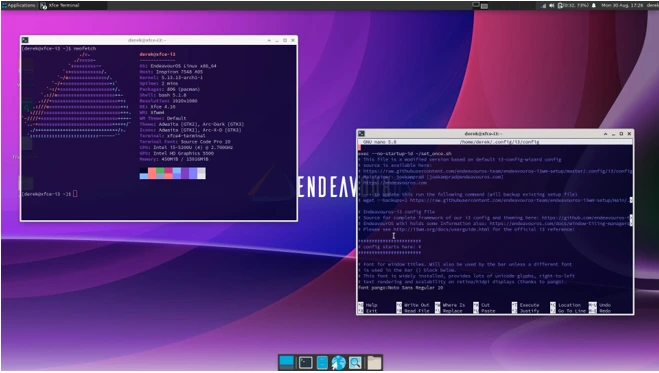
EndeavourOS follows Arch’s rolling-release model, so you get fresh updates without major version jumps. The 2025 release uses the Calamares installer, offering offline and online modes where you can pick lightweight desktop environments like XFCE—perfect for low-end hardware. XFCE is snappy, customizable, and doesn’t demand much from your aging CPU or GPU.
Key perks:
- Full access to the AUR for a massive software library.
- A vibrant community forum for troubleshooting that quirky old Wi-Fi card.
- A space-themed aesthetic you can keep minimal to save resources.
The XFCE edition is a standout for old PCs, with a clean interface and low overhead. Picture a desktop that feels modern but runs like it’s 2010!
System Requirements
- Minimum: 2GB RAM, 20GB storage, x86_64 CPU.
- Performance: Idles at 400-600MB RAM with XFCE, making it ideal for 2008-2012 laptops with 4GB or less.
Installing on Your Old PC
Grab the latest ISO, create a bootable USB (use Etcher or dd), and boot up. Choose XFCE during the Calamares setup and consider the LTS kernel for extra stability on vintage hardware. Post-install, use the yay AUR helper to grab lightweight apps like Midori for browsing. If your old PC has Wi-Fi woes, EndeavourOS includes drivers like broadcom-wl by default.
Stability and Updates
EndeavourOS pulls packages straight from Arch repos but releases tested ISOs monthly. As of September 2025, it’s rock-solid, with users on forums raving about its performance on Core 2 Duo machines. Run sudo pacman -Syu for updates, and if something breaks (rare!), you can downgrade packages easily.
Pros and Cons
- Pros: Beginner-friendly installer, strong community support, lightweight XFCE option, great for learning Arch.
- Cons: Requires some terminal comfort; not as polished as mainstream distros like Ubuntu.
I tossed EndeavourOS on a 2012 Dell Inspiron with 4GB RAM, and it’s now my go-to for web browsing and light coding. If you want a modern Arch experience on your old PC, this is a stellar pick.
2. Manjaro XFCE: Polished and Stable for Daily Use
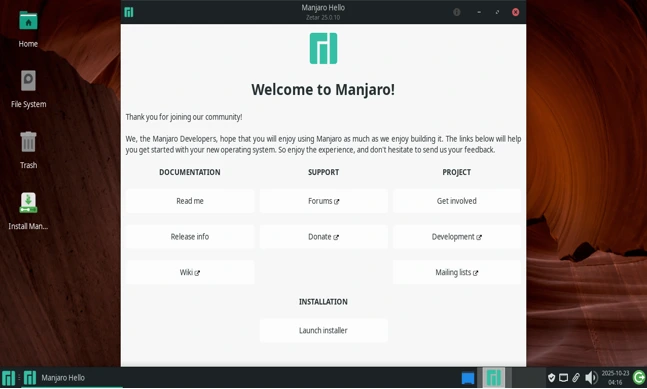
Manjaro has been a crowd favorite since 2011, and its XFCE edition is a top contender for lightweight Arch-based Linux distros for old PCs. Unlike pure Arch, Manjaro holds packages back for 1-2 weeks to test them, adding a stability layer that’s crucial for finicky old hardware.
What Makes It Special?
Manjaro offers three branches—Stable, Testing, and Unstable—but Stable is your best bet for old PCs. The XFCE edition comes with a sleek, customizable desktop, Conky for system stats, and Manjaro Hardware Detection (mhwd) to handle drivers for that ancient NVIDIA or ATI card. It’s like Arch with training wheels, but still lightweight.
Highlights:
- Pamac, a GUI package manager, makes software installs a breeze.
- Multiple kernel options, including LTS, for better compatibility.
- A green-themed UI that’s easy on the eyes without eating resources.
The latest 2025 stable release includes tweaks for low-end performance, making it a champ for old machines.
System Requirements
- Minimum: 1GB RAM (2GB recommended), 30GB storage, x86_64 CPU.
- Performance: XFCE idles at 300-500MB RAM, perfect for Core i3 or Pentium systems. Community editions support 32-bit, but official builds are 64-bit.
Installing on Your Old PC
Download the XFCE ISO, boot from USB, and follow the graphical installer. mhwd auto-detects your hardware, tackling old GPUs with ease. Post-install, switch to the LTS kernel via sudo mhwd-kernel -i linux-lts for maximum compatibility.
Stability and Updates
Manjaro’s delayed releases keep things stable—updates roll out every 1-2 weeks via Pamac. In 2025, it’s praised for fewer hiccups than vanilla Arch, with a robust community ensuring legacy hardware support.
Pros and Cons
- Pros: User-friendly, stable, excellent driver support, AUR access.
- Cons: Slightly heavier than barebones distros; updates can lag a bit.
I installed Manjaro XFCE on a 2011 ThinkPad, and it’s now a smooth email and browsing machine with better battery life thanks to built-in power tools. If you want a polished, low-maintenance Arch-based distro for daily tasks, this is your pick.
3. Archcraft: The Minimalist’s Dream
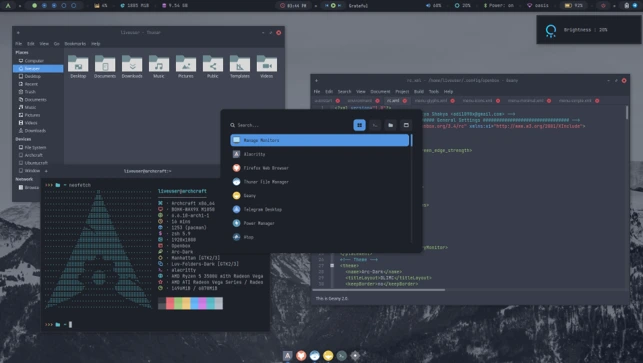
If you’re after the leanest possible setup, Archcraft is your ticket. This distro is all about minimalism, using window managers like Openbox to keep resource usage ridiculously low. The latest ISO dropped on October 16, 2025, per the official site, and it’s a beauty for old PCs.
What Makes It Special?
Archcraft defaults to Openbox, paired with lightweight apps like Thunar (file manager), Alacritty (terminal), and Firefox. It’s Arch-based, rolling-release, and balances aesthetics with efficiency—think polybar for sleek status bars and rofi for snappy menus.
Standout features:
- Pre-configured themes and scripts for easy tweaks.
- Minimal apps to keep your system lean.
- Optional systemd-free variant for even less overhead.
Users report it running smoothly on systems with just 512MB RAM, making it a lifesaver for 2000s-era hardware.
System Requirements
- Minimum: 512MB RAM, 10GB storage, x86_64 CPU.
- Performance: Idles at 200-300MB RAM, ideal for 1-2GB systems.
Installing on Your Old PC
The Calamares installer makes setup straightforward—select Openbox and go. For ancient hardware, edit Openbox configs to disable compositing for extra speed.
Stability and Updates
Archcraft follows Arch’s rolling model but ships pre-configured for stability. Monthly ISOs ensure fresh installs, and updates via pacman keep things current. The community is small but active, with guides for legacy setups.
Pros and Cons
- Pros: Ultra-lightweight, gorgeous out-of-the-box, perfect for tinkerers.
- Cons: Window managers have a learning curve; no 32-bit support.
I slapped Archcraft on a 2009 netbook, and it’s now a snappy coding station. If you love minimalism and don’t mind a bit of DIY, this is the lightweight Arch-based distro for your old PC.
4. Artix Linux: Lightweight and Systemd-Free
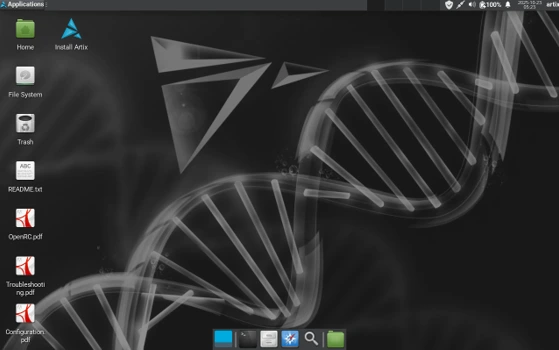
Artix Linux takes lightweight to the next level by swapping systemd for alternative init systems like OpenRC or runit, making it blazing fast on old hardware. The latest weekly ISO is from October 20, 2025, with a stable release from April 2025.
What Makes It Special?
Artix offers base ISOs for custom builds and graphical ones with LXDE or LXQt—both super lightweight. The lowmem base option boots on just 300MB RAM, perfect for that ancient desktop in your attic.
Key features:
- Choice of init systems: dinit, openrc, runit, or s6 for speed.
- Full Arch repo and AUR compatibility.
- Community editions for extra desktop options.
It’s a favorite for users who want a lean system without systemd’s overhead.
System Requirements
- Minimum: 300MB RAM (lowmem), 1GB (graphical), 10GB storage.
- Performance: LXDE idles at ~250MB, ideal for low-spec machines.
Installing on Your Old PC
Base installs require CLI skills, but graphical ISOs use Calamares for ease. Choose runit for the fastest boot times on old hardware.
Stability and Updates
Artix is rolling-release with weekly ISOs for cutting-edge updates. The init system options enhance stability on legacy gear, and the community is active with support.
Pros and Cons
- Pros: Incredibly light, systemd-free, flexible init choices.
- Cons: Base install can be daunting; less hand-holding than Manjaro.
Artix turned my 2007 desktop into a zippy media player. If you’re a purist looking to max out performance, Artix is a top lightweight Arch-based distro for old PCs.
Quick Comparison of Lightweight Arch-Based Distros for Old PCs
| Distro | Min RAM | DE/WM | Stability | Latest Update (2025) | Why It’s Great for Old PCs |
|---|---|---|---|---|---|
| EndeavourOS | 2GB | XFCE | Rolling | Monthly ISOs | Easy setup, community help |
| Manjaro XFCE | 1GB | XFCE | Stable (delayed) | Bi-weekly | Polished, great driver support |
| Archcraft | 512MB | Openbox | Rolling | Oct 16 ISO | Ultra-minimal, stylish |
| Artix Linux | 300MB | LXDE/Qt | Rolling/Weekly | Oct 20 Weekly | Systemd-free, lowmem option |
Wrapping Up: Revive Your Old PC in 2025
There you go—four lightweight Arch-based Linux distros for old PCs that are stable, updated, and ready to make your vintage hardware shine in 2025. EndeavourOS offers a friendly intro to Arch, Manjaro XFCE delivers polish and stability, Archcraft is the minimalist’s dream, and Artix Linux maximizes performance with systemd-free options. Test them with a live USB, and don’t forget to back up any data first!
Which one’s calling your name? Drop your thoughts or experiences in the comments—I’d love to hear how you’re bringing your old PC back to life!
Disclaimer
The information in this post about lightweight Arch-based Linux distros for old PCs is based on official project data and community feedback as of October 2025. Always back up your data before installing any operating system. Compatibility with specific hardware may vary, so test distros via live USB first. Use at your own risk, and consult official documentation for the latest updates.
Also Read
Manjaro Linux for Content Creators: Best Video & Audio Tools in 2025