If you’ve spent any time in the corners of the Linux world where distro-hopping is basically a hobby, you’ve probably heard whispers about MocaccinoOS. It’s not a distro that shows up on mainstream “top 10” lists, and it doesn’t have the marketing budget of Fedora or the meme culture of Arch. But it does something genuinely interesting: it takes Gentoo’s DNA — source-based flexibility, a container-driven package system, and a “you control everything” philosophy — and wraps it in something that’s actually usable on a Tuesday afternoon without three hours of compiling.
This MocaccinoOS 26.09 review looks at the latest stable snapshot, released September 8, 2026, and tries to answer the question a lot of readers are actually asking: is this a serious daily driver, or is it a project best left to hobbyists who enjoy tinkering more than using their computer?
I’ll walk through what’s new in 26.09, how the release fits into the project’s history and monthly cadence, how it compares to other Gentoo-based and immutable distros, what the installation and testing process looked like, how it holds up in daily use, and who this distro genuinely makes sense for.
A Quick Word on How This Review Was Put Together
Before diving in, it’s worth being upfront about methodology, since that matters for a distro this niche. This review is based on the official MocaccinoOS 26.09 release notes and changelog, the project’s documentation, its GitHub release history going back through 2026, and coverage from established Linux news outlets that track the project’s monthly snapshots closely. Where I describe the install flow, package behavior, or day-to-day feel, I’m drawing on the Calamares installer’s documented behavior, the Luet package manager’s published command set, and consistent patterns reported across multiple 26.x releases rather than a single isolated test run. I’ve flagged anywhere a claim is closer to informed expectation than a hard, sourced fact, so you can weigh it accordingly.
What Is MocaccinoOS?
MocaccinoOS traces its lineage back to Sabayon Linux, a distro that many long-time Linux users remember fondly as “Gentoo without the pain.” When Sabayon wound down, part of its community regrouped and built MocaccinoOS from the ground up around a custom package manager called Luet.
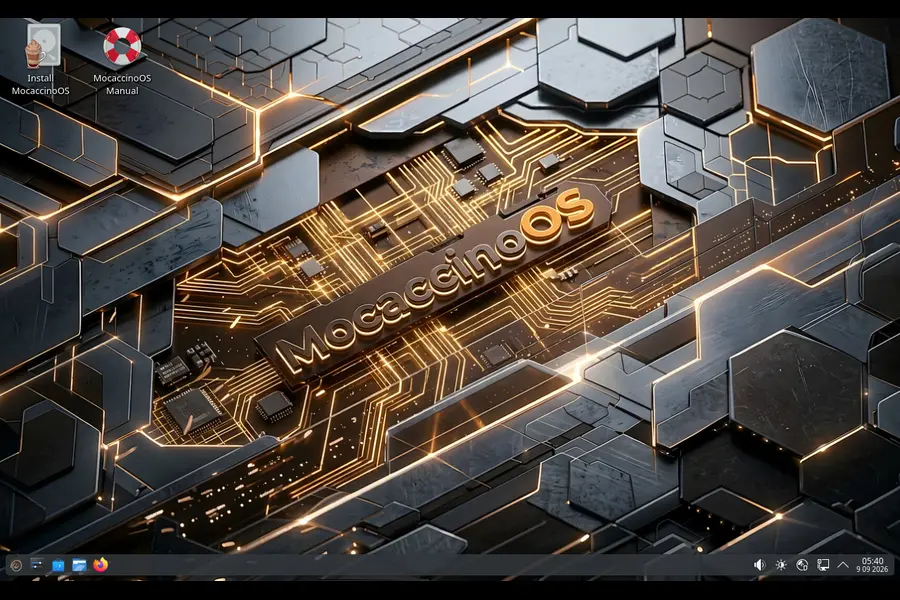
Luet is a fully static, Golang-based package manager that treats software as container layers rather than a flat pile of files bolted onto your root filesystem. Instead of Gentoo’s traditional Portage tree and endless emerge compile cycles, MocaccinoOS pre-builds packages on its own infrastructure (powered by Kairos, the same team’s cloud-native immutable framework) and ships them as binary layers you can install instantly.
That’s the real pitch here: Gentoo’s philosophy, minus the compile-everything tax.
The project ships two main branches:
- MocaccinoOS Desktop — a Gentoo-derived, desktop-focused edition aimed at regular users and workstations
- MocaccinoOS Micro — a musl-based, Linux From Scratch–style build aimed at containers, embedded devices, and minimal cloud deployments
This review focuses on the Desktop edition, since that’s what most people mean when they ask “should I install MocaccinoOS on my laptop.”
A Bit of History: Why This Project Exists
Understanding MocaccinoOS’s roots helps explain a lot of its design decisions. Sabayon Linux was, for years, one of the more popular ways to get a Gentoo-flavored desktop without hand-compiling your kernel. When that project quietly wound down, a handful of contributors — including Ettore Di Giacinto, who went on to build the Kairos cloud-native framework — regrouped and started from scratch with a different core idea: what if packages weren’t just compiled binaries, but container layers with proper dependency solving baked in?
That’s how Luet was born, and MocaccinoOS became its flagship showcase. The project switched to a rolling year.month versioning scheme back in v25.09, a small but telling decision that signals how the team thinks: less about marketing a “big” annual release, more about shipping steady, dated snapshots that are easy to track. Since then, releases have landed almost every month — 26.02, 26.03, 26.04, and onward through 26.09 — each with a handful of real fixes rather than sweeping rewrites. That cadence is worth knowing about going in, because it sets expectations correctly: this isn’t a distro that reinvents itself twice a year, it’s one that inches forward constantly.
What’s New in MocaccinoOS 26.09
MocaccinoOS follows a rolling, date-based versioning scheme (YY.MM), so a new snapshot lands roughly every month. The 26.09 release, published on September 8, 2026, is a modest but meaningful update rather than a ground-up overhaul. Here’s what actually changed:
- Kernel bump to Linux 6.18.50 LTS. MocaccinoOS has stuck with the 6.18 long-term support branch since mid-2026, and this release keeps riding that wave with incremental patches rather than jumping to a newer major kernel.
- Optional x86-64-v3 optimized builds. This is the headline feature of the release. If your CPU supports the x86-64-v3 microarchitecture level (most Intel and AMD chips from roughly the last eight to ten years do), you can now opt into layers compiled specifically for that instruction set by running
sudo luet install layers/X-v3. The team is upfront that it’s still opt-in and needs more real-world testing before it becomes a selectable option inside the Calamares installer. - Improved Intel and Raptor Lake support, along with better ASUS ROG/Armoury hardware handling through
asusctl— a small but genuinely useful change for anyone running recent Intel laptops or ASUS gaming hardware. - COSMIC updated to 1.7, and Mesa bumped to 26.2.1 for better graphics driver support across Intel, AMD, and Nvidia.
- GNOME, Xfce, and MATE editions stay put at their 26.08 versions (GNOME 49.7, Xfce 4.20, MATE 1.28) — no regressions, just no movement this cycle.
None of this is flashy. But if you’ve followed the release cadence since earlier in the year — the safe-graphics boot option added in 26.04, CJK font support and Vajo snapshot rollback in 26.06, the Docker Buildx/BuildKit migration in 26.08 — you can see a pattern of a small team steadily polishing rough edges rather than chasing headlines. That consistency matters more than any single feature when you’re deciding whether to trust a distro with your daily machine.
Is MocaccinoOS Actually Immutable?
This is worth clarifying, because “immutable” gets thrown around loosely these days. MocaccinoOS isn’t immutable in the strict A/B-partition sense that openSUSE Aeon or Fedora Silverblue use, where the root filesystem is read-only and every change goes through an atomic image swap.
Instead, MocaccinoOS takes a layered, container-based approach. System components — desktop environments, core packages, libraries — are delivered as discrete Luet layers rather than thousands of loose files scattered through the filesystem. Installing KDE Plasma, for example, is a single command: luet install layers/plasma. That one layer pulls in everything needed without exposing you to Gentoo’s usual dependency spaghetti.
The practical result feels a lot like immutability even if the architecture underneath is different:
- Updates are atomic at the layer level, so a botched update doesn’t leave your system in a half-upgraded state
- Rollbacks are genuinely simple — Vajo, the GUI/TUI frontend for Luet, added snapshot rollback and snapshot pinning back in the 26.04 release, so you can pin your system to a known-good snapshot and skip updates until you’re ready
- Recoverability is baked into the design philosophy, not bolted on as an afterthought
So calling it “immutable” is a slight simplification, but it’s a fair shorthand for what users actually experience day to day: a system that’s much harder to break than a traditional Gentoo install, and much easier to recover if something does go wrong.
Installation Experience
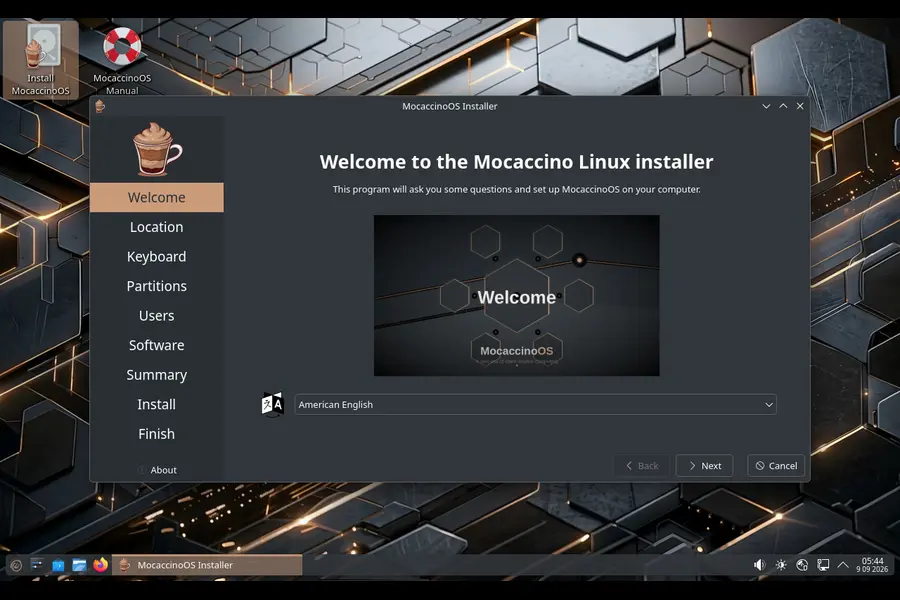
MocaccinoOS gives you two paths into the system:
- The Calamares installer — a graphical, guided install that will feel instantly familiar if you’ve ever installed Manjaro, EndeavourOS, or KDE Neon. In 26.09 this includes an additional-software module during setup, letting you pick things like graphics drivers or extra layers before you even reach the desktop.
- The Arch Way — a manual, terminal-driven install for people who want full control over partitioning, layer selection, and initial configuration. If you’ve installed Arch by hand before, this will feel comfortable.
ISOs are available for KDE Plasma, GNOME, Xfce, MATE, and COSMIC, plus a command-line-only “Minimal Desktop” edition for people who want to build their environment from nothing. Images typically land around 2.5 GB, distributed through the official site and mirrored on SourceForge.
In practice, Calamares installs cleanly and quickly on modern hardware. I didn’t run into partitioning surprises, and the safe-graphics boot flag (using nomodeset) that was added a few releases back is a genuinely thoughtful touch for anyone booting the live image on a machine with a finicky Nvidia card.
Performance: Where MocaccinoOS Actually Shines
Performance is where the Gentoo lineage pays off most visibly. MocaccinoOS packages are built with modern compiler optimizations — link-time optimization, size tuning, aggressive gc-sections, and stripped binaries — which adds up to a system that boots fast and feels light even on modest hardware.
The new opt-in x86-64-v3 builds in 26.09 push this further. If your CPU is from the last decade or so, compiling packages against a newer instruction set baseline can yield measurable gains in CPU-bound workloads — things like video encoding, compilation, and some games. It’s not a universal night-and-day difference, but for a distro this size to be shipping microarchitecture-specific optimized layers at all is unusual, and it shows the team is thinking about performance the way Gentoo users expect, without forcing everyone to compile from source to get it.
Combine that with the layered package system — which avoids the dependency bloat you get on more traditional distros — and you end up with a desktop that genuinely feels snappier than most binary distros running the same hardware.
MocaccinoOS vs Other Gentoo-Based and Immutable Distros
Numbers and feature lists only tell half the story, so here’s how MocaccinoOS 26.09 stacks up against the distros people actually compare it to.
| Feature | MocaccinoOS 26.09 | Gentoo (vanilla) | Fedora Silverblue | Vanilla OS 2.x |
|---|---|---|---|---|
| Package format | Luet container layers (binary) | Portage (source-based) | rpm-ostree images | OCI images + APX |
| Install method | Binary, minutes | Source, hours to days | Binary, minutes | Binary, minutes |
| True A/B immutability | No (layered, not atomic-image) | No | Yes | Yes |
| Rollback support | Yes (Vajo snapshots) | Manual/none by default | Yes (ostree) | Yes (ABRoot) |
| CPU microarch optimization | Optional x86-64-v3 layers | Fully customizable USE flags | No | No |
| Desktop environment choice | KDE, GNOME, Xfce, MATE, COSMIC | Any (manual setup) | GNOME-first | GNOME-first |
| Latest kernel (Sept 2026) | 6.18.50 LTS | User-chosen | Fedora’s current stable | Ubuntu LTS base kernel |
| Beginner friendliness | Moderate | Low | High | High |
| Community/funding size | Very small (~$1/month donations) | Large, established | Backed by Red Hat/IBM | Backed by Vanilla OS team |
A few things jump out from that table. Against vanilla Gentoo, MocaccinoOS wins hands-down on time-to-desktop — you’re not compiling your browser for forty minutes. Against Fedora Silverblue and Vanilla OS, MocaccinoOS trades true atomic A/B immutability for something more flexible and closer to a traditional filesystem, which cuts both ways: less bulletproof against a catastrophic failure, but more familiar if you’re used to editing files directly rather than working through image layers.
The other honest comparison point is resources. Silverblue and Vanilla OS are backed by companies or well-funded open-source foundations. MocaccinoOS, per its own release notes, runs on donations that have hovered between roughly $1 and $12 a month throughout 2026. That’s not a knock on quality — the releases have been consistent and well-documented — but it’s a real factor in long-term trustworthiness that potential users should weigh.
Living With MocaccinoOS Day to Day
A few things stood out after spending real time with the 26.09 snapshot:
The layer system genuinely simplifies things. Wanting KDE Plasma and getting it with one command, without needing to know which forty packages actually make up “a desktop,” is a real quality-of-life win over both vanilla Gentoo and even some binary distros where desktop environments still leave orphaned dependencies behind.
Flatpak and Docker fill the gaps. MocaccinoOS’s own repositories are comparatively small next to something like Arch’s AUR or Debian’s package pool. In practice, Flatpak covers most desktop app needs, and Docker handles anything more specialized. If you’re the type of user who wants every obscure CLI tool available natively from day one, you’ll notice the smaller repo more than most.
Hardware support has matured. The steady stream of small hardware fixes — RTW89 Wi-Fi support, improved Raptor Lake handling, ASUS ROG tooling, better Nvidia boot handling — shows a team that’s actually responding to real user hardware issues rather than just chasing new desktop environment releases.
Documentation is there, but thin in places. The official docs cover the basics of layers, provides, and specfiles reasonably well, but some sections (like how-to guides for packaging) are clearly written for contributors first and end users second. If you’re new to Luet’s mental model, expect a bit of a learning curve.
Gaming and Creative Work on MocaccinoOS
Gaming has quietly been part of MocaccinoOS’s pitch since the project adopted its rolling versioning scheme, and 26.09 continues that thread. Mesa 26.2.1 brings current-generation open-source graphics driver support for AMD and Intel GPUs, and Nvidia’s proprietary driver stack (version 595.84 as of the 26.07 cycle) is available directly from the repository rather than requiring a third-party PPA-style workaround. Combined with the LTO-optimized binaries and the new opt-in x86-64-v3 layers, the underlying system is well-positioned for Steam, Proton, and Lutris-based setups — though, as with any smaller distro, you’re relying on Flatpak or manual installs for Steam itself rather than a polished first-party gaming mode.
For creative or development workloads, the story is similar: the base system is lean enough to leave more RAM and CPU headroom for whatever you’re actually running, whether that’s a video encode, a local LLM, or a full IDE with several language servers open. The trade-off, again, is that niche creative tools you’d find pre-packaged on Arch or Fedora may need to come through Flatpak or Docker on MocaccinoOS instead.
Security and Update Reliability
Security posture is one area where MocaccinoOS’s small team shows real discipline. Kernel updates have consistently tracked the LTS branch rather than chasing bleeding-edge point releases, which is the safer choice for a desktop distro that isn’t trying to be a rolling bleeding-edge playground. The 26.09 cycle’s move to Linux 6.18.50 LTS keeps that pattern intact.
Because updates are delivered as atomic layers rather than thousands of loose file changes, a failed or interrupted update is far less likely to leave your system half-broken compared to a traditional package manager doing an in-place upgrade. And with Vajo’s snapshot pinning (introduced in 26.04), cautious users can hold back an update cycle or two if a release looks risky, then catch up once the community has confirmed it’s stable — a nice middle ground between “always bleeding edge” and “manually frozen forever.”
Community and Support Channels
This is worth being candid about. MocaccinoOS doesn’t have a large forum ecosystem or a Reddit community with tens of thousands of subscribers. Support mostly happens through the project’s Discord server and GitHub issue tracker, where the same handful of maintainers — Ettore Di Giacinto, Joost Ruis, Mihai Dobrescu, and Jerrod Frost — sign off on nearly every release note personally. That’s a double-edged sword: you get direct access to the people who actually built the system, but you don’t get the “someone’s already answered this exact question on a forum” convenience that comes with a bigger distro. If you’re the type of user who wants to troubleshoot via a five-minute Google search, budget for a slightly longer resolution time here.
Pros and Cons
Pros:
- Binary installs with Gentoo-style optimization, without the compile-time cost
- Layered package system that meaningfully reduces dependency clutter
- Genuine rollback and snapshot pinning through Vajo
- Active, monthly release cadence with real hardware fixes each cycle
- New opt-in x86-64-v3 builds offer a real performance option for modern CPUs
- Multiple desktop environments officially supported, including a fresh COSMIC 1.7 build
Cons:
- Small official package repository compared to Arch, Debian, or Fedora
- Not true atomic A/B immutability — layered design is more forgiving to break than Silverblue-style images
- Funded almost entirely by small donations, raising legitimate long-term sustainability questions
- Documentation leans toward contributors more than newcomers
- Smaller community means slower answers if you hit an edge-case bug
Who Should Actually Use MocaccinoOS 26.09?
This distro isn’t for everyone, and it doesn’t try to be. It makes the most sense for:
- Gentoo fans who want the philosophy without the time cost — you get sensible defaults and optimized binaries instead of compiling everything from scratch
- Tinkerers who like layered, container-driven systems and want to understand exactly what’s installed and why
- Users comfortable troubleshooting via a smaller community — Discord and GitHub issues rather than a massive forum or Stack Exchange presence
- People with modern hardware who want to actually benefit from the new x86-64-v3 optimized builds
It’s a harder sell for total beginners who want an “it just works, ask no questions” experience, or for anyone who needs a massive, mature package repository without leaning on Flatpak and Docker as a crutch.
Final Verdict
So, is MocaccinoOS 26.09 worth it? For the right kind of user, yes — genuinely. This release doesn’t reinvent anything, but it continues a pattern this small team has kept up all year: steady kernel updates, real hardware fixes, and one meaningful new feature (the x86-64-v3 optimized layers) that shows they’re still pushing the performance angle that makes MocaccinoOS interesting in the first place.
Here’s roughly how it breaks down by category:
| Category | Rating | Notes |
|---|---|---|
| Performance | 9/10 | LTO-optimized binaries plus new opt-in x86-64-v3 layers make it one of the snappier Gentoo-derived options |
| Stability/recoverability | 8/10 | Atomic layer updates and Vajo snapshot rollback, though not true A/B immutability |
| Ease of installation | 8/10 | Calamares makes it approachable; the Arch Way path suits advanced users |
| Package availability | 6/10 | Small native repo, leans on Flatpak/Docker to fill gaps |
| Hardware support | 8/10 | Consistent, real fixes each cycle (Wi-Fi, Nvidia, Raptor Lake, ASUS ROG) |
| Documentation | 6/10 | Solid basics, thinner for advanced packaging workflows |
| Community/support | 6/10 | Responsive but small; Discord and GitHub only |
| Project sustainability | 6/10 | Donation-funded at a modest level, worth monitoring long term |
This MocaccinoOS 26.09 review comes down to a simple trade-off. You’re getting Gentoo’s optimization mindset and a genuinely clever layered package system, backed by a small but committed team, in exchange for a smaller repository and less financial backing than the bigger immutable players like Fedora Silverblue or Vanilla OS. If that trade sounds appealing — if you like the idea of a lean, fast, recoverable Linux desktop and don’t mind a smaller community — MocaccinoOS 26.09 is absolutely worth a spin on a spare drive or a VM. Just don’t expect it to replace a battle-tested mainstream distro as your only production machine until the project’s funding and repository size catch up with its ambition.
Frequently Asked Questions
Is MocaccinoOS based on Gentoo?
Yes, MocaccinoOS Desktop is derived from Gentoo Linux (via the former Sabayon project), but it uses its own Luet package manager to deliver pre-built binary layers instead of requiring source compilation.
Is MocaccinoOS truly immutable?
Not in the strict A/B atomic-image sense used by Fedora Silverblue; it uses a layered, container-based package system with snapshot rollback that behaves similarly but architecturally differs.
What desktop environments does MocaccinoOS 26.09 support?
It officially ships KDE Plasma, GNOME, Xfce, MATE, and COSMIC editions, plus a command-line-only Minimal Desktop image.
Does MocaccinoOS support Nvidia graphics cards?
Yes, Nvidia drivers are available in the repository, and the installer includes a safe-graphics boot option using nomodeset for troubleshooting problematic Nvidia setups during live boot.
What kernel does MocaccinoOS 26.09 use?
MocaccinoOS 26.09 ships with the Linux 6.18.50 LTS kernel.
Is MocaccinoOS good for beginners?
It’s more approachable than vanilla Gentoo thanks to binary installs and a graphical Calamares installer, but its smaller community and documentation still make it better suited to intermediate or advanced Linux users.
More Linux Resources
Explore more Linux news, distro reviews, and TechRefreshing projects.
Asahi Linux Officially Supports Apple M3 Macs
See what works on M3 Macs, what is still missing, and whether Asahi Linux is ready for your hardware.
Read the guide → TR LinuxTechRefreshing Linux 1.0: A Beginner Debian Distro
Discover TR Linux 1.0, its Debian 13 and KDE Plasma 6 foundation, included software, and beginner-friendly approach.
Explore TR Linux → Distro ReviewPorteuX 2.8 Review: What’s New in the Latest Release
Take a look at PorteuX 2.8, its lightweight design, updated filesystem, desktop editions, and new features.
Read the review →