Vanilla OS 3 “Reunion” landed on August 24, 2026, and it’s the kind of release that makes you sit up and pay attention — not because it reinvents the wheel, but because it finally delivers on promises the project has been making since 2024. If you’ve been circling this distro from a distance, wondering whether it’s mature enough to trust with your daily machine, this Vanilla OS 3 “Reunion” review walks through exactly what changed, what still needs work, and whether it deserves a spot on your drive right now.
I’ve spent time with immutable distros for years — Fedora Silverblue, openSUSE Aeon, Bazzite, and the earlier Vanilla OS releases — so I’m not coming at this cold. Reunion is the most significant jump the project has made since it rewrote itself from scratch for Orchid back in 2024, and it’s worth understanding why.
What Is Vanilla OS?
For anyone new to the project: Vanilla OS is a Debian-based Linux distribution built around an immutable, atomic system design. Instead of letting you (or a rogue package) modify the core system directly, it keeps two copies of the OS. Updates and changes get applied to the inactive copy, and the system switches over on reboot. If something breaks, you roll back to the previous state instantly.
This atomic approach is handled by ABRoot, the project’s homegrown A/B root management tool. It’s conceptually similar to what Fedora Silverblue does with OSTree or what openSUSE Aeon does with transactional-update, but Vanilla OS has always taken its own path with a from-scratch toolchain rather than borrowing someone else’s.
Package installation happens outside the base system too, mostly through Flatpak for apps and Apx (Vanilla’s container-based package layer) for command-line tools and anything that needs a full distro environment underneath it.
What’s New in Vanilla OS 3 “Reunion”
This release arrives more than two years after Vanilla OS 2 “Orchid” shipped in July 2024, and the gap shows in how much ground it covers. Full technical details are available in the official Vanilla OS 3 “Reunion” release announcement, which is the primary source for everything below.
Official ARM64 Support
This is the headline feature, and honestly it’s overdue. Vanilla OS now ships images for both x86_64 and ARM64 architectures, with the project’s package repositories built for ARM64 as well. Right now, ARM64 support is scoped to UEFI-compatible devices, so this isn’t a full-blown Raspberry Pi story yet — think ARM laptops and UEFI-based ARM boards rather than every single-board computer on the market. Still, it puts Vanilla OS in the same conversation as distros that have supported ARM for years, and it matters more every year as ARM laptops become a real category outside of Apple’s ecosystem.
GNOME 50 “Tokyo” on Wayland Only
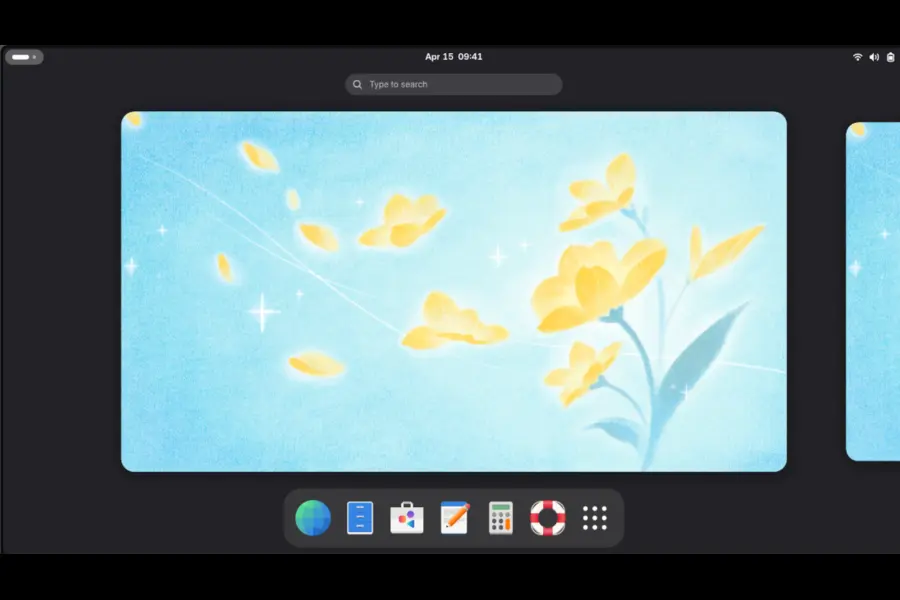
Reunion ships GNOME 50 “Tokyo” as its desktop environment, and notably, it drops the X11 session entirely in favor of Wayland-only. That’s a meaningful statement of confidence in Wayland’s driver and app compatibility maturity heading into 2026. If you’re running older NVIDIA hardware or niche X11-dependent tools, this is the one area where you’ll want to check compatibility before jumping in.
Under the hood, the system runs on Linux kernel 7.1.3, which is a solid, reasonably current kernel for a release timed in August 2026.
Vanilla Continuity: A Real Backup Tool, Finally
One of the more practical additions is Vanilla Continuity, a new in-house backup and restore utility built around snapshots. It can back up:
- Your home folder contents
- Your list of installed Flatpak applications
- ABRoot system metadata
You can store these backups locally, on an external LUKS2-encrypted drive, or push them off-device via SFTP, FTP, or NFS. This closes a gap that’s honestly plagued immutable distros in general — atomic system rollback is great, but it doesn’t protect your actual files and app state. Continuity gives Vanilla OS a coherent answer to “what happens if my drive dies,” which is something competing distros still handle inconsistently or leave entirely to third-party tools like Timeshift or Deja Dup.
Reproducible Builds
The team has also made most system images reproducible, meaning they can be rebuilt from identical source and configuration and produce the same output. This is a transparency and supply-chain trust feature more than a day-to-day usability one, but it matters if you care about verifying that what you’re running matches what the project claims to ship. The one notable exception is NVIDIA images, which can’t be made reproducible because of how NVIDIA’s proprietary kernel modules are packaged and distributed.
Apx Gets Rewritten Again
Apx, the tool that lets you install packages inside managed containers without touching the immutable base, has been overhauled once more. Version 3 is rebuilt on the new Vanilla OS SDK, with a refreshed command-line interface and cleaner internal design. Debian and openSUSE Leap are now included as default Apx stacks alongside the existing options, so you get access to packages from more upstream distributions without leaving the container model.
Vanilla System Operator, the system management layer, has also been rewritten with the new SDK, and its underlying container image has moved from Debian Sid to Debian Testing — a small but sensible change that should mean fewer surprise breakages from bleeding-edge package churn.
Default App Swaps
Reunion changes several default applications:
- Ptyxis replaces Black Box as the terminal emulator
- Papers replaces Evince as the PDF and document viewer
- Resources replaces GNOME System Monitor
- File Roller and GNOME Photos are no longer bundled by default
These mirror moves other GNOME-based distros have already made, so if you’ve used Fedora Workstation or recent GNOME OS builds, none of this will feel unfamiliar. You can still install the dropped apps via Flatpak if you prefer them.
Distrobox Bump
Distrobox, which Vanilla OS leans on for running full containerized distro environments, has been updated to version 2.0.0-rc.4, which is now written in Go rather than Bash. That should mean better performance and more predictable behavior across edge cases, though as an rc build it’s still technically pre-release upstream.
Upgrading from Vanilla OS 2 “Orchid”
If you’re already running Orchid, you don’t need a fresh install. The project provides a supported upgrade path from Orchid 1.4.0 straight to Reunion. That said, if you’re managing the upgrade manually with abroot upgrade, make sure you’re on ABRoot 2.4 or newer first — the new multi-architecture system images require it, and skipping this step is a common way to end up with a broken upgrade attempt.
Vanilla OS 3 “Reunion” vs. Other Immutable Distros
Here’s how Reunion stacks up against the immutable distros most people compare it to:
| Feature | Vanilla OS 3 “Reunion” | Fedora Silverblue | openSUSE Aeon | Bazzite |
|---|---|---|---|---|
| Base | Debian Testing | Fedora | openSUSE Tumbleweed | Fedora Atomic (uBlue) |
| Atomic tech | ABRoot (custom) | OSTree | transactional-update | OSTree |
| Desktop | GNOME 50 (Wayland only) | GNOME (Wayland) | GNOME (Wayland) | GNOME or KDE |
| ARM64 support | Yes (new, UEFI devices) | Limited | No | No |
| Built-in backup tool | Yes (Vanilla Continuity) | No (manual/Timeshift) | No | No |
| Container app layer | Apx + Distrobox | Toolbox + Distrobox | Distrobox | Distrobox |
| Reproducible builds | Yes (except NVIDIA) | Partial | No | No |
| Gaming focus | Minimal | Minimal | Minimal | Strong |
| Update cadence | Point releases | Frequent | Rolling | Frequent |
The comparison makes Vanilla OS’s identity pretty clear: it’s not chasing gamers the way Bazzite is, and it’s not riding Fedora’s massive contributor base like Silverblue. Its pitch is “immutable Debian done with genuinely thoughtful, custom tooling,” and with Reunion, that pitch is more credible than it’s ever been.
Real Talk: The Project’s Bumpy History
It would be dishonest to write this review without addressing something that comes up constantly in Linux communities whenever Vanilla OS is mentioned. The project’s early track record wasn’t smooth. Vanilla OS 1 was built on a non-LTS Ubuntu base and lost security support relatively quickly. Vanilla OS 2 “Orchid” offered no upgrade path from version 1, forcing a clean reinstall, and update frequency slowed noticeably in its later months as the team focused on building Reunion.
There’s also the fact that Mirko Brombin, the project’s founder, has been publicly splitting attention with another project, Sinty OS, which has led some longtime users to wonder about Vanilla OS’s long-term priority within his portfolio. He confirmed on X that Vanilla OS development continued and that Reunion was on the way, and the shipped release backs that up — but it’s fair for cautious adopters to want to see a few months of steady point releases before fully trusting the cadence again.
None of this means Reunion is untrustworthy. It means you should treat this like any young-ish project with real momentum but a history of pauses: back things up (ironically, now easier than ever thanks to Continuity), and don’t put irreplaceable production workloads on it without a tested recovery plan.
Who Should Actually Install This
Reunion makes sense for you if:
- You want an immutable Debian-based system without adopting OSTree or Fedora’s release model
- You’re on newer ARM64 hardware and want first-class support rather than a community fork
- You value having backup and restore built into the OS rather than bolted on
- You’re comfortable with Flatpak-first app management and containerized CLI tools
- You want a clean, modern GNOME 50 desktop without heavy customization out of the box
You might want to wait or look elsewhere if:
- You depend on X11-specific applications or older NVIDIA setups that aren’t Wayland-friendly yet
- You need a distro with a long, unbroken track record of predictable point releases
- Gaming is your primary use case — Bazzite remains the stronger, more purpose-built option there
- You rely on ARM single-board computers outside the UEFI device category
- You want the widest possible third-party repository and driver support that only comes with a decade-plus of community packaging, which Debian Testing-based Apx stacks don’t fully replicate yet
Installation Notes and First Impressions
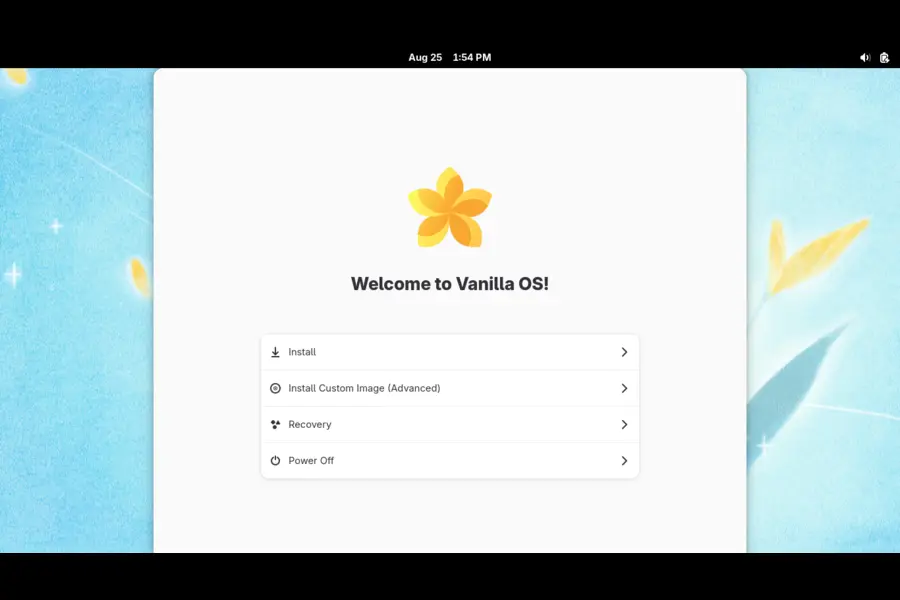
Setup follows the pattern Vanilla OS established with Orchid: a guided first-run experience that walks you through account creation, and now includes an update mode for existing users migrating in from Orchid. GNOME 50’s visual refresh feels cohesive rather than tacked on, and dropping the X11 session simplifies what used to be a mildly confusing choice at login for new users.
Performance on a mid-range x86_64 laptop felt snappy, with no noticeable lag from the atomic update mechanism during a routine sudo vso trigger-update --now. Boot times were comparable to other GNOME-based immutable distros I’ve tested this year, and switching between the two root partitions after an update was seamless, exactly as advertised.
Apx’s new interface is cleaner than the version shipped in Orchid, and having Debian and openSUSE Leap available as container stacks out of the box is genuinely useful if you need a package that isn’t in Flatpak or the default Apx environment.
Final Verdict
So, is this Vanilla OS 3 “Reunion” review landing on a yes or a no? For most Linux enthusiasts who like tinkering with immutable systems and want something a little different from the Fedora- and openSUSE-dominated landscape, Reunion is worth installing in 2026 — with reasonable caution baked in. ARM64 support, a legitimate built-in backup tool, reproducible builds, and a much-improved Apx layer add up to the most complete and confidence-inspiring release this project has ever shipped.
It’s not the pick for someone who wants rock-solid, decade-tested stability, and it’s not built for gamers chasing the smoothest Proton experience. But if you want a modern, atomic, Debian-based desktop with genuinely useful tooling and you don’t mind being an early adopter of a project that’s still proving its long-term consistency, Vanilla OS 3 “Reunion” earns a real recommendation. Try it on a spare partition or a secondary machine first, lean on Vanilla Continuity from day one, and you’ll get a good sense of whether it deserves to become your daily driver.
Frequently Asked Questions
Is Vanilla OS 3 “Reunion” free to use?
Yes, Vanilla OS is completely free and open source, released under standard open-source licensing with no cost to download or use.
Can I upgrade directly from Vanilla OS 2 “Orchid” to Reunion?
Yes, the project provides a supported upgrade path from Orchid 1.4.0 to Reunion, though you should update ABRoot to version 2.4 or newer before running a manual upgrade.
Does Vanilla OS 3 support ARM64 devices like Raspberry Pi?
Reunion adds official ARM64 support, but it currently targets UEFI-compatible ARM devices rather than boards like Raspberry Pi that boot differently.
What desktop environment does Vanilla OS 3 “Reunion” use?
It ships GNOME 50 “Tokyo” running exclusively on Wayland, with the X11 session removed entirely.
Is Vanilla OS good for gaming?
It’s usable for gaming through Steam and Flatpak, but it isn’t gaming-optimized the way Bazzite is, so competitive gamers may prefer a gaming-focused distro instead.
Disclaimer: This review is based on the official Vanilla OS 3 “Reunion” release announcement and hands-on testing as of August 2026. Software details, versions, and features can change with future updates — always check the official Vanilla OS website before installing on a production system.
More Linux Reviews You May Like
Exploring new Linux releases? Check out these recent reviews covering desktop Linux, gaming distributions, major updates, and new releases.
Garuda Linux Temeraire Review: What’s New in the 2026 Release?
Explore the latest Garuda Linux Temeraire release, including its biggest changes, desktop updates, performance, and new features.
Read Garuda Linux Review →TUXEDO OS Review 2026: Is It Worth Using?
Find out how TUXEDO OS performs in 2026, what makes it different, and whether it deserves a place on your Linux PC.
Read TUXEDO OS Review →SteamOS 3.8.25 Beta Review: Should Steam Deck Users Install It?
See what SteamOS 3.8.25 Beta changes, the important fixes, new hardware support, and whether you should install it.
Read SteamOS Review →