If you’ve spent any time browsing Linux forums, Reddit threads about weird operating systems, or old “so-bad-it’s-good” tech lists, you’ve probably stumbled across the name at least once and thought, “wait, is that a joke?” So let’s settle it right away: what is Hannah Montana Linux, exactly? It’s a real, honest-to-goodness Linux distribution — originally released in 2009 and themed entirely around Disney’s Hannah Montana TV show — that somehow refuses to stay dead. It vanished for well over a decade, became a running joke in Linux communities, and then, out of nowhere in July 2026, a developer brought it back from the grave with a modern Debian base and KDE Plasma 6. This guide walks through the whole story: where it came from, what it actually was, why it disappeared, and what the freshly revived 2026 version looks like today.
What Is Hannah Montana Linux?
Hannah Montana Linux (often shortened to HML) is a Linux distribution that took a standard Kubuntu setup and wrapped it in pink, purple, and Miley Cyrus-themed branding. Think custom boot splash screens, a Hannah Montana wallpaper collection, re-skinned icons, and a KDE desktop environment dressed up to look like fan merchandise rather than an operating system.
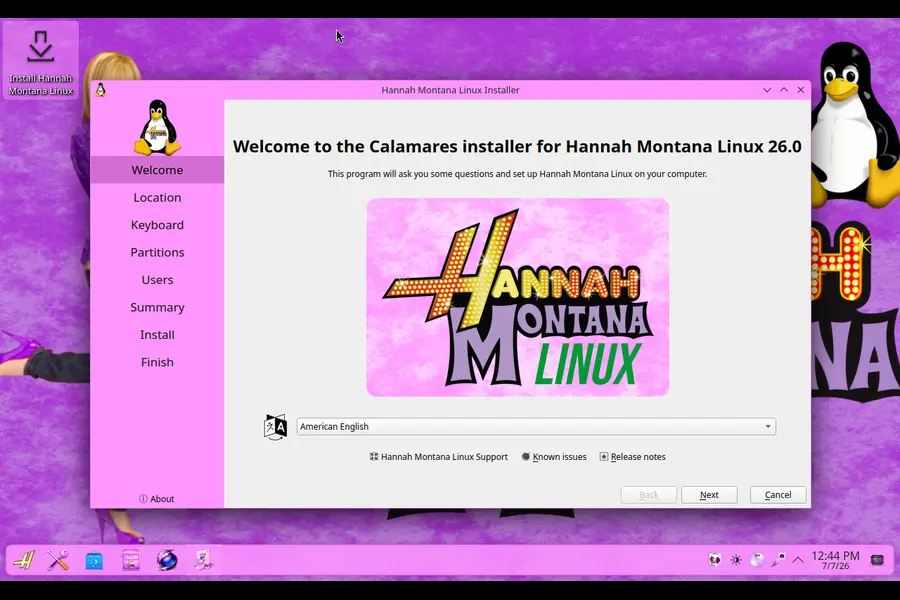
Under the hood, though, it was a genuine, functional OS. It used the Debian apt package manager, ran on the Linux kernel, and behaved like any other Ubuntu derivative once you got past the theming. That contrast — a fully working, technically competent Linux system hiding behind teenage pop-star branding — is exactly why it became a cult favorite. It wasn’t a hoax or a fake screenshot people passed around; you could genuinely download it, boot it, and use it.
The original tagline behind the project was that it aimed to “attract young users to Linux,” leaning on the massive popularity of the Disney Channel show at the time to make open-source software feel approachable to kids and teens who’d never touch a terminal otherwise.
The Origin Story: How HML Came to Exist
To understand Hannah Montana Linux, you have to remember what 2008 and 2009 looked like. Hannah Montana was one of the biggest shows on television, Miley Cyrus was a household name among tweens, and Linux distributions were going through a phase where hobbyist developers built themed spins of Ubuntu and Kubuntu for almost any niche interest imaginable — sports teams, cartoons, bands, you name it.
Against that backdrop, an independent developer built Hannah Montana Linux as a themed remix of Kubuntu, using KDE as the desktop environment because it offered the deepest visual customization at the time. The idea wasn’t necessarily to build a serious daily-driver OS for power users — it was closer to a novelty project, a bit of internet culture wrapped around a legitimate technical foundation.
It worked. The project picked up a surprising amount of attention, got written up by tech blogs and Linux news sites, and became one of those “did you know this actually exists” stories that circulated for years afterward.
Technical Specs of the Original Hannah Montana Linux
Here’s what the original release actually shipped with, based on its final version:
- Base distribution: Kubuntu 9.04 “Jaunty Jackalope”
- Desktop environment: KDE 4.2, heavily re-skinned
- Package manager: Debian’s
apt - Architecture: x86 (32-bit)
- Filesystem: ext3
- Distribution format: Live CD / installer combo, around 650MB
- Branding: Custom boot screen, KDM login theme, ksplash, icon set, color scheme, and wallpapers, all built around the Hannah Montana franchise
At the time, this was a perfectly reasonable Kubuntu build. You could boot from the live CD, poke around, and install it to a hard drive using ext3 with a standard, beginner-friendly installer flow. Early hands-on reviews from 2009 described the setup process as fast and painless, taking well under 15 minutes even on modest virtualized hardware.
Why Hannah Montana Linux Disappeared
Like a lot of themed hobby distros from that era, Hannah Montana Linux quietly stopped receiving updates after its “v2” release. There wasn’t some dramatic shutdown announcement — it simply aged out the way most one-person passion projects do once the original developer moved on. A few things compounded the disappearance:
- The Kubuntu 9.04 base went end-of-life, meaning the underlying system stopped receiving security patches years ago.
- KDE 4.2 became hopelessly outdated, both visually and in terms of compatibility with modern hardware and drivers.
- The original download host on Tucows eventually went offline, so even people who wanted to try it for nostalgia’s sake hit dead links.
- 32-bit-only support made it increasingly incompatible with newer PCs that expect 64-bit boot processes.
For years, the only realistic way to experience Hannah Montana Linux was to dig through the Internet Archive for a preserved ISO and run it inside a virtual machine, since installing genuinely ancient Linux kernels and drivers on real, modern hardware tends to go badly — kernel panics, missing drivers, and boot failures were common complaints from anyone who tried it on bare metal in recent years.
The 2026 Revival: Hannah Montana Linux Is Back
Here’s the part that makes this guide worth writing in the first place. In July 2026, an independent developer released Hannah Montana Linux v26.0, a completely rebuilt, modern remaster of the joke distro that actually runs well on today’s hardware, a revival that outlets like It’s FOSS also covered as the meme distro’s unexpected comeback. The project isn’t affiliated with the original 2009 developer, and it isn’t trying to be a byte-for-byte recreation — it’s a loving, updated tribute that swaps out the ancient guts while keeping the absurd pink branding intact.
What’s Under the Hood in 2026
The revived HML26 is built very differently from the original, using current, actively maintained technology:
- Base: Debian 13.5 (“Trixie”), built with Debian’s official live-build tooling
- Kernel: Linux 6.12
- Desktop environment (main edition): KDE Plasma 6, specifically version 6.3.6
- Display manager: SDDM
- Installer: Calamares, the same graphical installer used by many modern beginner-friendly distros
- Theming approach: A heavily re-skinned version of Plasma’s default Breeze theme, rebuilt with pink accents, custom wallpapers, and Hannah Montana-inspired visual touches
The developer has been upfront that most of what makes HML26 “Hannah Montana Linux” is a themed skin layered on top of a completely standard KDE Plasma desktop, rather than a totally custom-built environment. That’s actually a smart move — it means the distro benefits from all the stability, hardware support, and driver compatibility that comes with running current Debian and a modern Plasma release, instead of being frozen in 2009 like the original was.
Two Editions: Full Fat and Lite
One of the more thoughtful additions in the 2026 revival is that it doesn’t force everyone onto the same heavy desktop environment. There are two flavors:
- HML26 (Main Edition): Runs KDE Plasma 6 with SDDM, and the developer recommends around 8GB of RAM for a smooth experience — which lines up with what you’d expect from any modern full-featured Plasma desktop.
- HML26 Lite: Swaps Plasma and SDDM out for LXQt and LightDM, a much lighter combination that’s designed to run comfortably on machines with as little as 2GB of RAM. This makes it a genuinely viable option for older laptops or low-spec hardware, rather than just a joke that only runs in a beefy virtual machine.
That two-tier approach is a meaningful upgrade over the original project, which never offered a lightweight alternative and struggled to run acceptably on anything but adequately provisioned machines even by 2009 standards.
How You Can Get It
The project is distributed as a hybrid live ISO, meaning you can boot it directly from a USB drive to try it without installing anything, or run the Calamares installer to put it on a hard drive permanently. For anyone who prefers building from source rather than trusting a prebuilt download, the developer also documented the full build process using Debian’s live-build system — though that route requires running the build from an existing Debian-based machine.
Should You Actually Install Hannah Montana Linux?
This is the honest, practical question most readers actually care about, so let’s be straightforward about it.
Reasons You Might Want To Try It
- Genuine nostalgia. If you were a kid or teenager during the Hannah Montana era, or you were around the Linux community in 2009 when the original made the rounds, booting this up is a fun trip back in time.
- It’s a legitimately usable Debian/KDE system now. Unlike the original, which was arguably obsolete the day you tried to run it on real hardware, HML26 is built on a current, supported Debian base with a modern kernel and desktop. You’re not sacrificing security patches or driver support just to get the joke branding.
- A fun way to explore KDE theming. Because most of the customization is a Breeze re-skin, it’s an interesting example of how far you can push Plasma’s look-and-feel without touching the underlying desktop code.
- Low-spec hardware option exists. With the Lite edition, you’re not locked into needing a modern gaming rig just to run a meme distro — 2GB of RAM is a very approachable bar.
Reasons To Think Twice
- It’s not a production distro. Nobody involved in this project — including the developer themselves — is positioning HML26 as something you should run on a work laptop or a machine you depend on daily. It’s a novelty and hobby project first.
- Community and long-term support are unknown. As an independently maintained remaster from a single developer, there’s no guarantee of long-term updates, security patching cadence, or a large support community the way you’d get from Debian, Ubuntu, or Fedora directly.
- Niche appeal. If the branding and nostalgia don’t do anything for you, there’s honestly no functional advantage over just running vanilla Debian with KDE Plasma — you’d get the same underlying stability without the pink theme.
Hannah Montana Linux vs. Regular Debian/KDE Distros
It’s worth being clear-eyed about what actually differs between HML26 and, say, a standard Debian install with KDE Plasma on top. Functionally, very little. Both:
- Use the same Debian 13.5 package base and
apt - Run the same Linux 6.12 kernel
- Use the same Plasma 6.3.6 desktop environment and SDDM login manager
- Support the same Calamares installer workflow
The entire differentiator is the skin: wallpapers, color scheme, icon pack, and boot branding. If you strip that away, you’re looking at a completely standard, well-supported Linux desktop. That’s actually the charm of it — the 2026 version isn’t cutting corners on the “real OS” side of things to chase the joke, the way the original arguably had to given the tooling limitations of 2009.
A Quick Timeline Recap
- 2009: Original Hannah Montana Linux v2 releases, based on Kubuntu 9.04 and KDE 4.2.
- Early-to-mid 2010s: Development quietly stops; the distro fades from active use as its base system ages out of support.
- Mid-2010s onward: Original download host goes offline; the project becomes something people mostly reference as internet trivia rather than something people actually run.
- 2020s (pre-2026): Enthusiasts occasionally revisit it via Internet Archive-preserved ISOs, usually documenting kernel panics and driver failures when trying it on real hardware.
- July 2026: An independent developer releases Hannah Montana Linux v26.0, a full remaster on Debian 13.5 with KDE Plasma 6, including both a full-featured edition and a lightweight LXQt-based version.
Frequently Asked Questions
Is Hannah Montana Linux an official Disney product?
No. It has never had any official affiliation with Disney or anyone connected to the Hannah Montana franchise. It’s an independent, fan-made project that used the branding and theming without any corporate involvement, then and now.
Can I still download the original 2009 version?
The original hosting on Tucows is no longer functional, but preserved copies exist on the Internet Archive. Running that original build on modern hardware is difficult, since it relies on a kernel and drivers from 2009 — you’re generally better off using a virtual machine if you want the authentic old-school experience.
Is the 2026 version safe to use as a daily driver?
It’s technically capable, since it’s built on current Debian and Plasma, but it’s still a one-developer passion project rather than a distro with a large, established support structure. Most people treat it as a fun distro to try in a VM or on a spare machine rather than a primary system.
What desktop environment does Hannah Montana Linux use?
The main 2026 edition uses KDE Plasma 6 (version 6.3.6). The Lite edition swaps this out for LXQt to reduce hardware requirements.
How much RAM do I need to run it?
The full Plasma-based edition is recommended for systems with around 8GB of RAM, while the Lite LXQt edition is designed to run comfortably with as little as 2GB.
Final Thoughts
So, what is Hannah Montana Linux, at the end of the day? It’s proof that Linux culture has always had room for both serious engineering and completely unnecessary, joyfully absurd side projects — and sometimes those two things end up in the same package. What started as a 2009 novelty distro aimed at getting Disney Channel fans curious about open-source software became an internet legend that outlived its own hosting infrastructure, only to be resurrected in 2026 on a modern Debian and KDE Plasma foundation. Whether you’re here for genuine 2000s nostalgia, curious about how far KDE theming can go, or just want to see the meme for yourself, Hannah Montana Linux v26.0 is a real, downloadable, bootable distro — and honestly, it’s a lot more functional than anyone probably expected it to be in 2009 or now.
Disclaimer
Hannah Montana Linux is an independent, fan-made project with no official affiliation with Disney, Miley Cyrus, or the Hannah Montana franchise. It is not endorsed by, sponsored by, or connected to Disney in any way. Software names, version numbers, and technical details are current as of July 2026 and may change as the project develops — always check the official project source before downloading or installing.