When you’re searching for an Arch-based Linux distribution that doesn’t require building everything from scratch, the choice often comes down to two popular options. The EndeavourOS vs Manjaro debate has been ongoing in the Linux community, with both distributions offering unique approaches to making Arch Linux more accessible. This detailed comparison examines both distributions based on their January 2026 releases to help you make an informed decision.
Understanding the Foundation
Both distributions build upon Arch Linux, but they take remarkably different paths in how they deliver the Arch experience to users. Understanding these fundamental differences is essential before diving into specific comparisons.
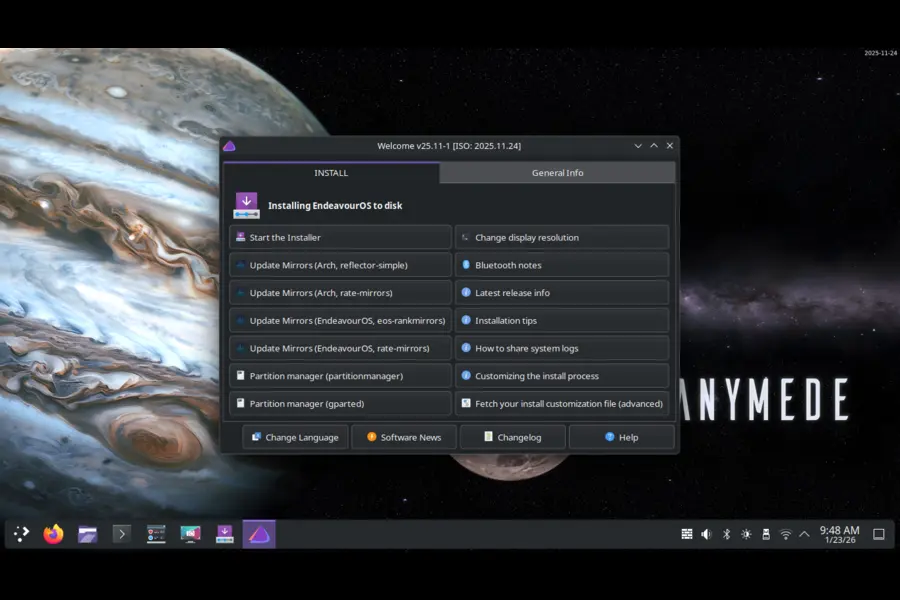
EndeavourOS positions itself as a terminal-centric distribution that stays exceptionally close to vanilla Arch Linux. The project emerged in 2019 as a successor to Antergos, focusing on providing an accessible installer while maintaining the Arch philosophy of simplicity and user control. The latest release, EndeavourOS Ganymede Neo (2026.01.12), ships with Linux kernel 6.18.4 LTS, demonstrating the distribution’s commitment to stability while keeping pace with upstream Arch.
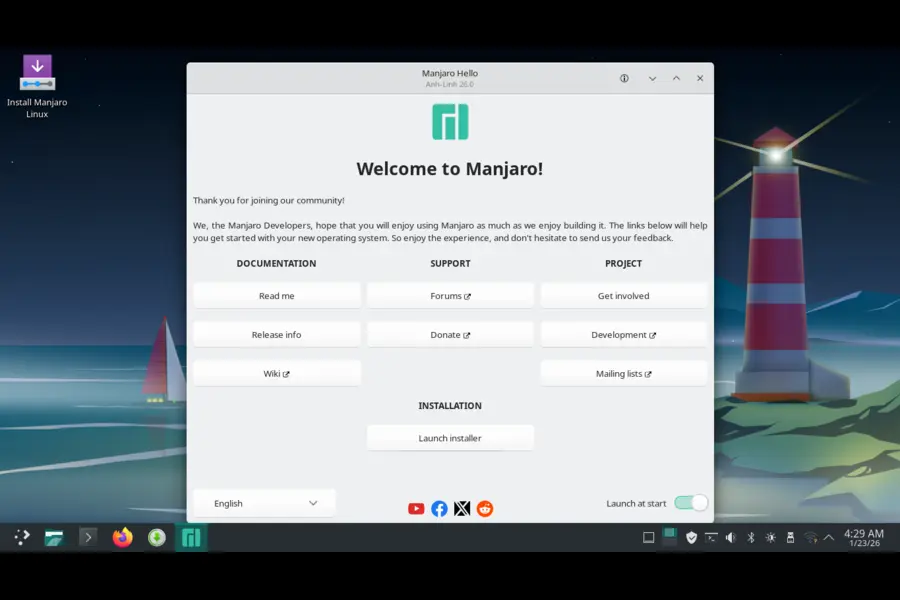
Manjaro takes a different approach by creating a more curated experience. Developed in Austria, France, and Germany, Manjaro adds its own layer of tools and holds packages back for testing before releasing them to users. The current version, Manjaro 26.0 “Anh-Linh,” released in January 2026, also features Linux kernel 6.18 LTS but includes substantial customizations and additional management utilities.
The philosophy behind each distribution shapes every aspect of the user experience. EndeavourOS aims to provide the bare minimum to get you started, leaving customization entirely in your hands. Manjaro opts for a more complete out-of-the-box experience with pre-configured tools and settings designed to work immediately.
Installation Process Comparison
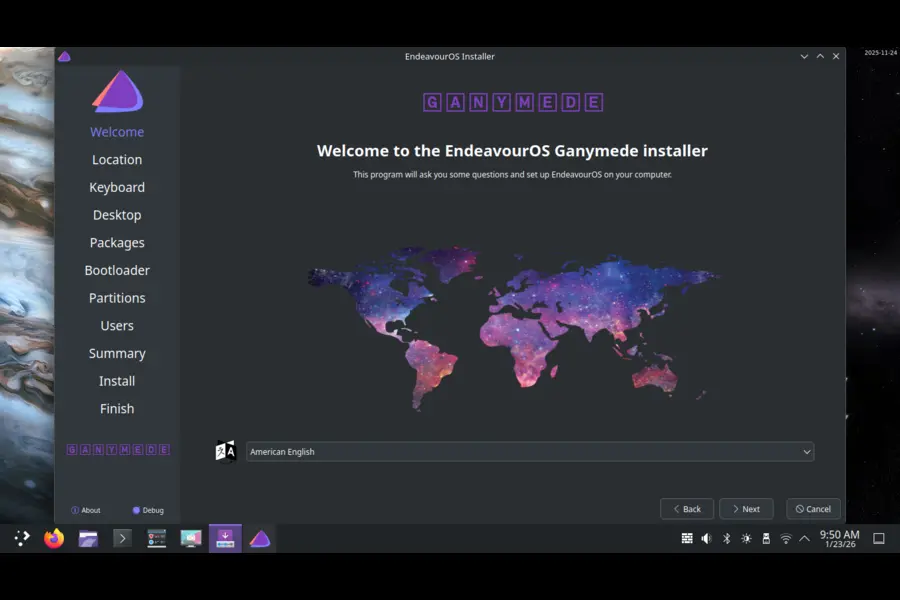
The installation experience sets the tone for how each distribution approaches user interaction. Both distributions utilize the Calamares installer, but they implement it differently.
EndeavourOS offers two installation methods through its Ganymede Neo release. The offline installer provides a quick setup with KDE Plasma as the default desktop environment, getting you up and running in approximately 15 minutes. The online installer opens up significantly more options, allowing you to select from multiple desktop environments including KDE Plasma, GNOME, Xfce, Cinnamon, MATE, Budgie, LXQt, and various window managers during installation.
The good news? They fixed those annoying startup delays from earlier versions. The Welcome app greets you after installation with some helpful post-install tasks, but it doesn’t hold your hand too much.
Manjaro’s installation through the Calamares installer focuses on automation and ease of use. The process detects hardware automatically, installs appropriate drivers including NVIDIA proprietary drivers where needed, and sets up a functional desktop environment without manual intervention. Manjaro 26.0 introduced important changes, with both KDE Plasma 6.5 and GNOME 49 editions defaulting to Wayland instead of X11, which may affect users relying on specific X11 workflows.
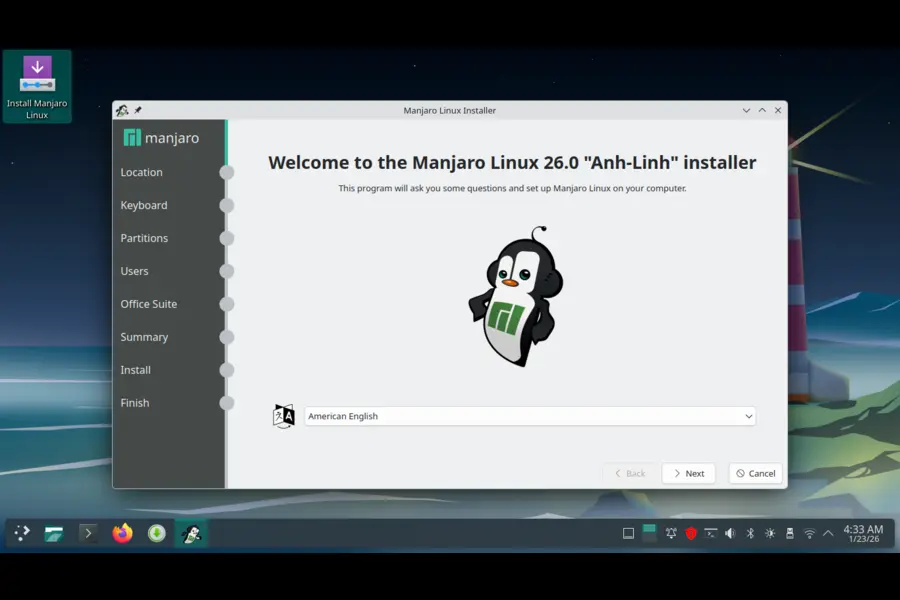
The Manjaro welcome screen provides access to system management tools, hardware configuration options, and a curated selection of applications ready to install. This guided approach reduces the learning curve for Linux newcomers while potentially limiting control for advanced users who prefer manual configuration.
Package Management Philosophy
This is where EndeavourOS vs Manjaro differences become most apparent. The package management approach fundamentally affects system behavior, update frequency, and troubleshooting procedures.
EndeavourOS uses Pacman directly from Arch repositories without creating any barriers between your system and upstream Arch. When Arch releases an update, EndeavourOS users receive it immediately. The distribution includes yay, an AUR (Arch User Repository) helper, making it straightforward to install community-maintained packages. This direct connection to Arch means EndeavourOS systems behave identically to vanilla Arch installations in terms of package availability and update timing.
The advantage of this approach is access to the absolute latest software as soon as it’s available in Arch repositories. Security updates arrive immediately, and bleeding-edge features become accessible without delay. The disadvantage is potential instability if upstream Arch packages contain bugs or compatibility issues. EndeavourOS users take on more responsibility for monitoring their system’s health after updates.
Manjaro implements a three-tier repository system that sets it apart. Packages flow from Arch to Manjaro’s unstable repository, then to testing, and finally to stable after passing verification. This cascading stability approach typically delays updates by two to four weeks compared to Arch. Security updates receive priority through “fast-tracking” to minimize exposure windows for critical vulnerabilities.
Manjaro ships with Pamac, a graphical package manager that handles traditional packages, Snap packages, Flatpaks, and AUR packages through a single interface. The Manjaro Settings Manager provides tools for kernel management, hardware driver configuration, and system settings that would require terminal commands in EndeavourOS.
The delayed update model means Manjaro users sacrifice cutting-edge software for increased stability. Bugs discovered in Arch packages get resolved before reaching Manjaro stable users. However, this approach can create dependency conflicts when using AUR packages, since AUR maintainers target current Arch packages rather than the older versions in Manjaro stable.
Desktop Options: Vanilla vs Polished
Both distributions support multiple desktop environments, but they deliver these options differently.
EndeavourOS Ganymede Neo ships with KDE Plasma 6.5.4 as the default offline installation option. The online installer provides access to GNOME, Xfce, Cinnamon, MATE, Budgie, LXQt, and LXDE, along with window managers like i3 and Sway. Each desktop environment arrives in a near-vanilla state with minimal theming and customization, allowing users to build their preferred setup from a clean foundation.
The absence of heavy customization means desktop environments perform closer to their upstream versions. Users familiar with GNOME or KDE Plasma from other distributions will find the experience consistent. The downside is the lack of visual polish compared to more curated distributions.
Manjaro 26.0 offers three official editions: Xfce, KDE Plasma, and GNOME. Each edition features significant customization with cohesive theming, pre-configured layouts, and Manjaro-specific touches. The KDE Plasma 6.5 edition includes rounded window corners, automatic light/dark theme switching based on time of day, and enhanced remote desktop capabilities. The GNOME 49 edition brings improved Calendar app layouts and refined user experience elements.
Community editions extend Manjaro’s desktop offerings to Cinnamon, MATE, i3, Budgie, and others, though these receive less frequent updates than official editions. The Manjaro approach provides a polished experience immediately after installation but leaves less room for users who want to configure everything themselves.
System Requirements and Performance
Resource requirements differ based on desktop environment choices, but both distributions maintain relatively modest hardware demands.
EndeavourOS requires a 64-bit dual-core processor, 2-4 GB of RAM depending on desktop environment selection, and approximately 15 GB of free disk space. Lightweight options like Xfce and LXQt function adequately with 2 GB RAM, while heavier environments like GNOME and KDE Plasma benefit from 4 GB or more. The minimal base installation philosophy means EndeavourOS systems start lean and only grow based on user-installed packages.
Real-world performance shows EndeavourOS delivers snappy responsiveness on modest hardware. A fresh Xfce installation consumes around 400-500 MB of RAM at idle, leaving substantial resources for applications. The distribution’s proximity to Arch means performance characteristics match vanilla Arch closely.
Manjaro recommends 1 GB RAM as a minimum, with 4 GB preferred for optimal performance. The distribution suggests a 1 GHz processor, 30 GB hard drive space, and HD graphics capability. These specifications account for Manjaro’s more complete default installation and pre-installed utilities.
Performance measurements vary by desktop edition. Manjaro Xfce uses approximately 390 MB of system memory after installation, while KDE Plasma consumes around 455 MB. The LXQt edition represents the lightest option at about 250 MB, with MATE using approximately 378 MB. Cinnamon and Budgie editions require more resources, ranging from 632 MB to 665 MB.
The additional tools and customizations in Manjaro create a small performance overhead compared to EndeavourOS’s minimalist approach, but the difference remains negligible on modern hardware. Both distributions run efficiently on systems built within the last decade.
Community and Support Resources
Community size, activity level, and support quality significantly impact the user experience, especially when troubleshooting problems.
EndeavourOS has cultivated a dedicated, helpful community focused on welcoming users transitioning from other distributions or taking their first steps with Arch-based systems. The EndeavourOS forum provides specialized support that acknowledges the distribution’s specific configuration and tools. The Discovery knowledge base offers articles and video tutorials covering common tasks and configurations.
The EndeavourOS community maintains a reputation for patience with newcomers while encouraging learning and self-sufficiency. Since EndeavourOS closely mirrors Arch, users can often apply solutions from the comprehensive Arch Wiki directly to their systems. This access to Arch’s extensive documentation represents a significant advantage.
Manjaro boasts a larger, more established community spanning over a decade of development. The Manjaro forums contain extensive threads covering virtually every configuration scenario and hardware combination. The community produces numerous tutorials, video guides, and documentation tailored specifically to Manjaro’s unique tools and repository structure.
The larger user base means more people encounter and document solutions to problems. However, the differences between Manjaro and Arch mean not all Arch Wiki solutions apply directly. Manjaro-specific issues, particularly those related to the delayed update model or custom tools, require Manjaro-focused troubleshooting.
Both communities demonstrate helpfulness and technical competence. The choice between them often comes down to whether you prefer a smaller, more focused community (EndeavourOS) or a larger, more diverse one (Manjaro).
Stability and Update Management
How each distribution handles stability versus bleeding-edge software represents a fundamental philosophical difference.
EndeavourOS prioritizes staying current with Arch. Updates arrive immediately as Arch publishes them, providing access to the latest features and security fixes without delay. This approach works well for users who regularly update their systems and monitor release notes for potential issues. The rolling release model means the system stays perpetually current without requiring reinstallation.
The immediate update model occasionally introduces instability when upstream Arch packages contain bugs. Experienced users appreciate the control this model provides, as they can choose update timing and troubleshoot issues using fresh community knowledge. The direct Arch connection means EndeavourOS benefits from Arch’s testing infrastructure and massive user base identifying problems quickly.
Manjaro‘s cascading stability model introduces a buffer between Arch updates and user systems. Packages undergo testing in unstable and testing repositories before reaching stable users. This delay prevents many bugs from ever reaching stable systems, creating a smoother experience for users who prioritize stability over cutting-edge features.
The testing period means security vulnerabilities persist slightly longer on Manjaro systems compared to Arch or EndeavourOS, though the fast-tracking mechanism mitigates this for critical issues. The delayed updates can create dependency mismatches when using AUR packages, since AUR maintainers develop against current Arch packages rather than Manjaro’s older stable versions.
Both distributions employ rolling release models, eliminating the need for major version upgrades. Regular updates keep systems current, though the definition of “current” differs between the distributions.
Hardware Support and Driver Management
Both distributions handle hardware detection and driver installation, but they differ in automation level and graphical tool availability.
EndeavourOS provides essential drivers during installation and relies on users to handle additional hardware configuration. The distribution includes basic networking, graphics, and sound support out of the box. Users needing proprietary drivers or specialized hardware support typically install these through Pacman or the AUR.
The Ganymede Neo release made significant changes to NVIDIA driver handling. Manjaro 26.0 now uses nvidia-open proprietary drivers by default, following upstream Arch changes. This switch supports Turing GPUs (GTX 16xx series) and newer models. Older NVIDIA hardware continues working through the Nouveau open-source driver loaded by the default boot option.
Manjaro emphasizes hardware compatibility through its MHWD (Manjaro Hardware Detection) tool. During installation, the system automatically detects graphics cards, wireless adapters, and other hardware, installing appropriate drivers without user intervention. This automatic configuration particularly benefits NVIDIA graphics card users and machines with hybrid graphics setups.
The Manjaro Settings Manager provides graphical tools for switching between driver versions, managing kernels, and configuring hardware. Users can install multiple kernel versions simultaneously and switch between them easily, useful for troubleshooting hardware compatibility issues. The ability to fall back to older kernels when new versions cause problems adds a safety net absent in minimalist distributions.
Both distributions ship with Mesa 25.3 graphics drivers in their latest releases, ensuring good performance with AMD and Intel graphics hardware. The primary difference lies in the ease of managing proprietary drivers and kernel versions through graphical interfaces versus terminal commands.
Software Availability and Package Ecosystem
Access to software packages and the tools for managing them define much of the day-to-day user experience.
EndeavourOS users have complete access to official Arch repositories and the AUR. The yay AUR helper comes pre-installed, making community package installation straightforward. Since EndeavourOS maintains no separate repositories, package availability exactly matches Arch Linux. This direct relationship means software availability stays at the absolute maximum for the Arch ecosystem.
The distribution includes minimal pre-installed software. Firefox provides web browsing, and essential system utilities come configured, but users build their software environment piece by piece. This minimalism appeals to users who want complete control over installed packages but requires more initial setup time.
Manjaro maintains its own repositories separate from Arch, containing tested stable packages. This separation means Manjaro users receive packages only after they pass through the testing pipeline. The Pamac package manager integrates with multiple package sources, providing access to Manjaro repositories, AUR, Snap packages, and Flatpaks through a unified graphical interface.
The Manjaro repositories include additional packages not found in Arch, such as custom kernels, Manjaro-specific tools, and pre-configured software bundles. These additions provide convenience but create dependencies that may complicate system maintenance or migration to pure Arch.
Both distributions allow installation of virtually any Linux software through official repositories, the AUR, or alternative package formats. The difference lies primarily in update timing and the tools used for package management rather than absolute software availability.
Use Case Recommendations
Different users have different priorities. Understanding which distribution aligns with your needs helps avoid frustration.
EndeavourOS suits intermediate to advanced users who understand Linux fundamentals and want maximum control over their system. The distribution works well for users who:
- Enjoy learning through hands-on system configuration
- Want the absolute latest software without delays
- Prefer terminal-based system management
- Plan to customize extensively from a minimal base
- Need compatibility with Arch-specific documentation and tools
- Value staying as close as possible to vanilla Arch
The learning curve is steeper than Manjaro, but EndeavourOS provides excellent preparation for managing pure Arch systems or understanding how Linux works at a deeper level.
Manjaro targets a broader audience, from Linux beginners to experienced users who prioritize stability and convenience over cutting-edge updates. The distribution excels for users who:
- Want a polished, complete system immediately after installation
- Prefer graphical tools for system management
- Need extensive hardware compatibility with automatic driver installation
- Value system stability over bleeding-edge software
- Want to avoid command-line package management when possible
- Appreciate curated software selections and tested updates
Manjaro’s additional tools and testing pipeline create a gentler introduction to Arch-based systems without sacrificing access to advanced features.
Latest Updates and Current Status
Both distributions released significant updates in January 2026, incorporating modern technologies and addressing user feedback.
EndeavourOS Ganymede Neo (2026.01.12) represents a refresh of the November 2025 Ganymede release. Key updates include:
- Linux kernel 6.18.4 LTS for long-term support stability
- Mesa 25.3.3 graphics drivers
- Firefox 146.0.1 web browser
- Calamares 26.01.1.5 installer with resolved startup delays
- X.Org Server 21.1.21
- NVIDIA driver 590.48.01 with open module support
- Removal of Nemo Preview from Cinnamon and Budgie installations following upstream changes
These updates maintain EndeavourOS’s commitment to providing current software while ensuring stability through LTS kernel selection.
Manjaro 26.0 “Anh-Linh” brought more substantial changes:
- Linux kernel 6.18 LTS with additional 6.12 LTS and 6.6 LTS options
- KDE Plasma 6.5 and GNOME 49 defaulting to Wayland
- Xfce 4.20 desktop environment
- NVIDIA driver 590.48 with discontinued support for Pascal and Maxwell GPUs
- Mesa 25.3 graphics drivers
- First stable COSMIC desktop environment (version 1.0.1)
- Firefox 146 web browser
- LibreOffice 25.8.4 office suite
- Multiple kernel support for improved hardware compatibility
The Wayland default for KDE and GNOME represents a significant shift, though Xfce maintains X11 support for users requiring legacy compatibility.
Comparison Table
| Feature | EndeavourOS | Manjaro |
|---|---|---|
| Current Version | Ganymede Neo (2026.01.12) | 26.0 “Anh-Linh” |
| Philosophy | Near-vanilla Arch | User-friendly Arch |
| Kernel | Linux 6.18.4 LTS | Linux 6.18 LTS (6.12, 6.6 available) |
| Updates | Immediate from Arch | 2-4 week testing delay |
| Repositories | Official Arch repos | Separate Manjaro repos |
| Package Manager | Pacman + yay (CLI) | Pacman + Pamac (GUI/CLI) |
| Default Desktop | KDE Plasma 6.5.4 | Xfce, KDE, or GNOME |
| RAM Needed | 2-4 GB | 1 GB minimum, 4 GB recommended |
| Disk Space | 15 GB | 30 GB recommended |
| Pre-installed Apps | Minimal | Moderate |
| Hardware Detection | Basic, manual setup | Automatic with MHWD |
| Driver Tools | Manual via CLI | GUI + automatic |
| Kernel Management | Limited selection | Multiple versions via GUI |
| GUI Management Tools | Welcome app only | Full Settings Manager |
| AUR Support | Native with yay | Via Pamac (occasional conflicts) |
| Community | Smaller, focused | Large, established |
| Best For | Intermediate to advanced | Beginners to advanced |
| Learning Curve | Moderate to steep | Gentle to moderate |
| Stability | Matches Arch | Enhanced by testing |
| Wayland | Available, user choice | Default on KDE/GNOME |
The Bottom Line
The EndeavourOS vs Manjaro debate doesn’t have a winner—just different approaches for different people.
EndeavourOS brings you as close to Arch as possible without the installation ordeal. You get bleeding-edge software, complete compatibility with Arch documentation, and maximum customization freedom. It respects your technical ability and rewards hands-on learning. If you want to deeply understand your system and stay absolutely current, EndeavourOS delivers.
Manjaro makes Arch accessible through automation, graphical tools, and tested releases. It reduces update-related breakage while keeping you reasonably current. Automatic hardware support minimizes setup frustration. If you want Arch power with less maintenance overhead, Manjaro provides that balance.
Your choice comes down to three things: your technical comfort level, time available for maintenance, and whether you prioritize currency or stability. Both distributions use rolling releases, so your system stays perpetually updated according to each project’s philosophy.
The Linux world benefits from having both options. Try them in virtual machines or live sessions before committing—there’s no substitute for firsthand experience.
Disclaimer
This comparison analyzes EndeavourOS Ganymede Neo (2026.01.12) and Manjaro 26.0 “Anh-Linh” as of January 2026. Both distributions receive regular updates that may alter features and behaviors described here. System requirements vary by desktop environment and use case. Always consult official documentation before installation. Individual experiences differ based on hardware, software needs, and technical expertise.
Frequently Asked Questions
Can I switch from Manjaro to EndeavourOS without reinstalling?
You’d technically need a fresh install. While theoretically possible to migrate by swapping repositories and removing Manjaro packages, this creates serious instability risks. The different repository structures make clean installation the smart move. Back up your data and configs, then install fresh.
Which is better for gaming?
Both handle gaming excellently with Steam, Lutris, and other platforms available through repos or AUR. Manjaro’s automatic NVIDIA driver installation might smooth initial setup. EndeavourOS offers newer drivers immediately, potentially benefiting the latest games. Real-world gaming performance? Nearly identical for most users.
Do AUR packages work properly on Manjaro?
They usually work, but Manjaro’s update delay causes occasional dependency conflicts. AUR maintainers target current Arch packages while Manjaro stable runs weeks behind. This mismatch sometimes breaks installations or needs manual fixes. EndeavourOS users face fewer AUR issues thanks to direct Arch connection.
How often should I update each distribution?
EndeavourOS benefits from weekly or at least monthly updates for security and stability. Delaying too long creates larger update sets that increase conflict risk. Manjaro’s testing buffer allows more flexible scheduling without major risk increases. Both distributions benefit from reading update announcements before applying major changes.
Can Linux beginners handle EndeavourOS?
Yes, but expect a learning curve. Success depends on willingness to learn terminal commands, read documentation, and troubleshoot occasionally. The community supports newcomers well. Beginners who enjoy understanding how things work will find EndeavourOS educational. Those wanting immediate productivity might prefer Manjaro’s automation initially, possibly moving to EndeavourOS after gaining confidence.
Also Read
Turning Linux into a Windows App Machine with Wine