


CachyOS has been on a roll this year, and the What’s New in CachyOS April 2026 Update is no exception. This is the distro’s third release of 2026, and while it might not have flashy headlines like a kernel rewrite or a full desktop overhaul, it packs in changes that genuinely matter for day-to-day use. From a brand-new default package manager to smarter hardware detection, DNS-over-HTTPS privacy support, and long-overdue fingerprint authentication for sudo — this update is the kind of thing you actually feel once you start using it.
Whether you’re an existing CachyOS user who just runs sudo pacman -Syu and moves on, or someone considering their first Arch-based install, here’s a detailed breakdown of everything that landed in this release.
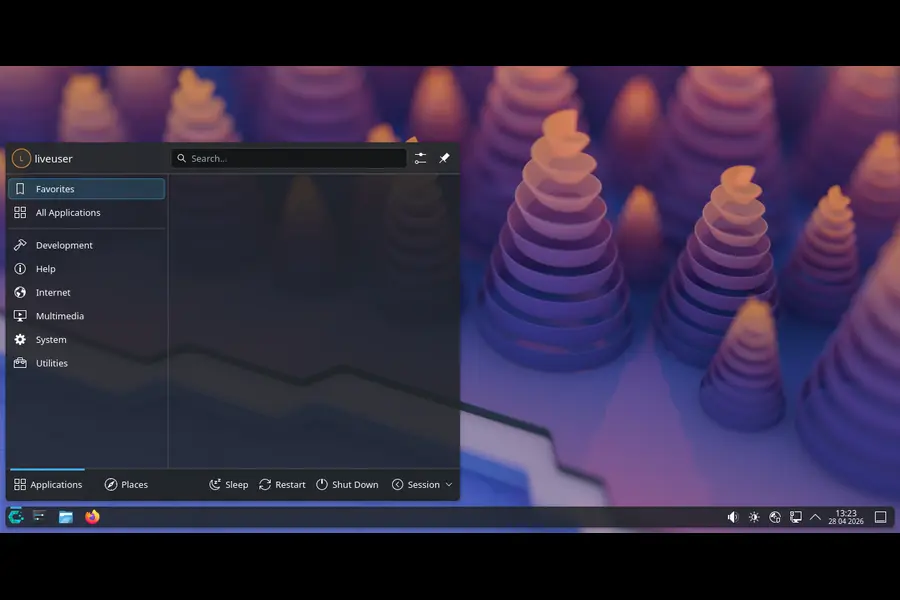
A New Package Manager Takes Center Stage: Say Hello to Shelly
The single biggest user-facing change in this update is the replacement of Octopi with Shelly as the default graphical package manager. If you’ve used Octopi before, you already know why this matters — it was notoriously unintuitive, earning comparisons to “learning dark sorcery” from actual CachyOS users.
Shelly, developed by Zoey Bauer, is a much more modern take on GUI package management for Arch-based systems. Here’s what makes it stand out:
- Unified source support — Shelly handles packages from the AUR, Flathub, FlatpakRef, AppImage formats, and local source files all in one place.
- Clean, approachable UI — no more hunting through confusing menus just to install a Flatpak.
- Single pane of glass — instead of juggling multiple tools for different package types, everything lives under one roof.
For casual users and newcomers especially, this is a meaningful quality-of-life leap. Power users who live in the terminal won’t care much either way, but for anyone who prefers a GUI for package management, Shelly is a genuine improvement over what came before.
Installer Improvements That Make a Real Difference
Beyond the package manager swap, the installer received several noteworthy updates.
Permanent Post-Installation Snapshot
After installation completes, CachyOS now automatically creates a clean system snapshot — and keeps it permanently. This is a smart, practical move. If you’ve ever tinkered your way into a broken system shortly after a fresh install (and who hasn’t?), having that reliable baseline restore point is a genuine safety net. It’s CachyOS essentially saying: go ahead and experiment, we’ve got your back.
GRUB os-prober Enabled by Default
For users running CachyOS alongside another operating system — Windows, another Linux distro, whatever — GRUB’s os-prober is now enabled by default. This means the bootloader will automatically detect other installed operating systems during setup, eliminating what used to be a manual step that tripped up a lot of dual-boot users.
MangoWM Gets an Official Installer Option
A new option in the installer lets you set up MangoWM with DMS shell right from the start. This is a nice addition for users who prefer a lean, tiling-style window manager setup without having to configure it manually post-install.
AMD GPU Plymouth Fix
Users with AMD graphics cards and a secondary monitor attached were seeing issues with the Plymouth boot splash — the amdgpu driver couldn’t reliably render the previous theme in that configuration. This release switches to a different Plymouth theme for AMD GPUs, resolving those visual glitches during boot.
Desktop Environment Housekeeping
The UKUI desktop has been dropped from the desktop selection entirely. The GNOME package selection has also been cleaned up and modernized. These aren’t massive changes, but they keep the installer lean and the options focused on environments that are actually maintained and used.
Privacy & Security: DNS-over-HTTPS and Fingerprint Sudo
This is where the April 2026 update earns some genuine credibility beyond just UI polish.
DNS-over-HTTPS Support in CachyOS-Welcome
The CachyOS-Welcome app now includes DNS-over-HTTPS (DoH) support via blocky, meaning your DNS queries are encrypted by default — a meaningful privacy upgrade, especially on networks you don’t fully trust. The implementation here is thoughtful too:
- DNS servers now display metadata including region, homepage, and whether they filter content.
- You can test individual server latency and auto-select the fastest option.
- Custom DNS server support is included, along with a DHCP automatic indicator and reset option.
It’s worth noting that systemd-resolved still lacks native DoH support, which is why the team opted for the blocky binary. It’s a practical workaround that gets the job done.
Fingerprint Sudo Authentication
This one’s been a long time coming. CachyOS now automatically configures supported fingerprint readers through chwd to work with sudo prompts. If your laptop has a supported fingerprint sensor, you can now authenticate administrative commands with your finger instead of typing a password every time.
It’s the kind of convenience that users coming from macOS or Windows expect as standard, and it’s great to see Linux catching up in a practical, plug-and-play way rather than requiring hours of manual PAM configuration.
VRAM Management Toggle for AMD and Intel GPUs
Gaming on Linux just got a small but meaningful boost. The CachyOS-Welcome app now includes a VRAM management toggle that uses dmemcg-booster (and installs plasma-foreground-booster on KDE setups) to optimize graphics memory allocation on AMD and Intel GPUs.
The goal here is to reduce stuttering and memory pressure in resource-heavy applications and games — particularly relevant for users with tighter VRAM budgets. It’s an opt-in feature that sits in the Welcome app, so you’re not forced into anything, but for gamers and content creators, it’s worth flipping on.
Hardware Detection Gets Smarter (chwd Updates)
CachyOS’s chwd hardware detection tool got a significant set of improvements this cycle.
Better Intel CPU Support
CPU family and model detection has been added to support intel-lpmd, a power management daemon that can put Intel CPUs into a low-power mode during light workloads. The result is better battery life on Intel laptops without any user configuration required.
Handheld Device Improvements
For the Steam Deck and ROG Ally crowd, handheld product name matching has been improved. The release specifically adds exact patterns for the Xbox ROG Ally and fixes false-positive detections that were misidentifying certain MSI laptops as the MSI Claw. Small fix, but annoying if you were affected.
Network Hardware Support
A new Wi-Fi profile for the Marvell AVASTAR 88W8897 has been added, covering the Surface Pro 4. Niche? Yes. But appreciated by the users who need it.
NVIDIA Profile Splitting
NVIDIA profiles have been split into separate configurations for laptops and desktop environments, and Virtual Machine profiles have also been split and updated. This makes the detection logic more accurate and reduces the chance of getting the wrong driver configuration applied.
NVMe I/O Scheduler: Switching to Kyber
Under cachyos-settings, the default NVMe I/O scheduler has been switched from none to kyber.
The none scheduler essentially passes all I/O requests directly to the hardware queue — fine for simple workloads, but not ideal under mixed read/write conditions. Kyber is a low-latency scheduler that handles mixed workloads more gracefully, particularly when read operations compete with background writes. In practice, you might notice snappier system responsiveness during things like compiling code while streaming, or running a game while a package update happens in the background.
NVIDIA Driver Fixes and Stability Improvements
Several longstanding NVIDIA-related annoyances have been addressed.
- The forced Xorg session has been removed from NVIDIA 470xx profiles, which was causing compatibility issues with plasma-login-manager. Legacy NVIDIA card users on Wayland setups should see better behavior.
- S01x power management has been dropped due to conflicts with the NVIDIA 595 driver. It was causing issues and has been removed.
- AggressiveVblank has been disabled due to VR-related problems with the NVIDIA driver. If you’ve been experiencing weird VR display behavior, this should help.
- The kms hook has been removed from mkinitcpio.conf on non-portable desktops to prevent NVIDIA driver conflicts at boot.
- The outdated WaylandEnable=false setting for GDM in Virtual Machine profiles has also been cleaned up.
CachyOS-Welcome App: Accessibility and UI Polish
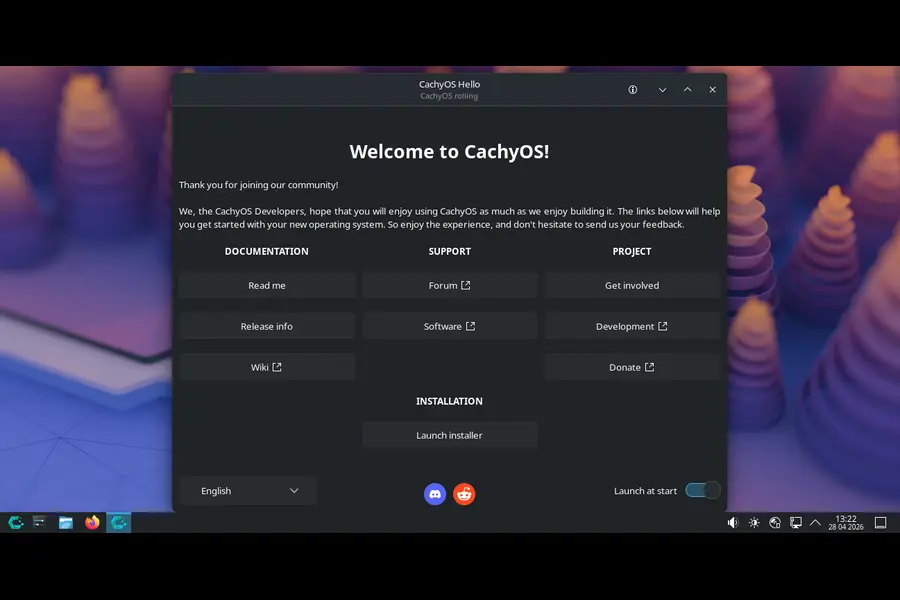
Beyond the DNS and VRAM features, the Welcome app received several smaller but worthwhile improvements:
- Full keyboard navigation support has been added for accessibility — you can now navigate the entire Welcome app without a mouse.
- PNG social icons have been replaced with crisp, HiDPI-aware SVGs that look sharp on high-resolution displays.
- wezterm has been added to the terminal helper options.
- Fixed connectivity checks that were incorrectly returning true when a ping actually failed.
- Prevented multiple instances of the Welcome app from launching simultaneously.
Under the Hood: Other Fixes Worth Knowing
A few more fixes round out the release:
- The installer now prints the chosen partition method to the debug log, which is helpful for troubleshooting installation issues.
- Old microcode packages are properly removed when reusing an existing boot partition during reinstalls — a subtle but important fix that could previously cause boot warnings.
What’s Powering This Release?
On the software stack side, this ISO ships with:
- Linux 6.18 LTS as the default kernel (with Linux 7.0 also available in the repos for those who want it)
- KDE Plasma 6.6.4 as the default desktop environment
- KDE Frameworks 6.25
- KDE Gear 26.04
- Mesa 26.0.5 for open-source graphics drivers
How to Get the Update
Existing users don’t need to reinstall anything. Just run:
sudo pacman -Syu
Or use Plasma Discover if you prefer a GUI approach. CachyOS is a rolling release, so all of these changes flow in through the normal update mechanism.
New users can download the updated ISO from the official CachyOS website, available in both Desktop and Handheld editions.
Final Thoughts
The What’s New in CachyOS April 2026 Update tells you a lot about where the distribution is headed. This isn’t a team chasing headlines — it’s a team focused on making their distro feel polished, secure, and genuinely comfortable to use. Shelly replacing Octopi fixes one of the most common complaints from new users. Fingerprint sudo and DNS-over-HTTPS are real privacy and usability wins. The hardware detection improvements show a commitment to supporting actual hardware that people use.
For a performance-optimized, Arch-based distribution, CachyOS keeps proving that you don’t have to sacrifice polish for speed. Whether you’re a gamer, developer, or just someone who wants a fast, well-maintained Linux system, this update is a solid reason to stay on — or jump to — CachyOS.
Disclaimer
The information provided in this article is for general informational purposes only. While we strive to keep the content accurate and up to date, we make no warranties or guarantees regarding the completeness or accuracy of the information. All product names, trademarks, and company names mentioned are the property of their respective owners. We are not affiliated with or endorsed by CachyOS or the Arch Linux project. Always refer to the official CachyOS website for the most current and authoritative information. Use any software or system changes at your own risk.


