If you’ve been keeping tabs on the open-source mobile world, here’s some exciting news: Ubuntu Touch OTA 2.0 Beta Is Out, and it’s packed with the kind of meaningful updates that privacy-focused, Linux-loving users have been waiting for. Released on June 15, 2026, by the UBports Foundation, this beta marks a significant milestone in the Ubuntu Touch 24.04 LTS (Noble Numbat) journey — building on top of a solid base with fresh features, better browser compatibility, new device support, and UI improvements that bring the platform genuinely closer to what modern smartphones expect.
Ubuntu Touch is the community-driven, open-source mobile operating system maintained by UBports, carrying the torch that Canonical left behind. It’s designed for people who value digital freedom and privacy over the convenience of the Android/iOS duopoly. And with this new OTA 2.0 beta, there’s a lot to talk about.
Let’s break down everything that’s new, what devices are supported, how to try it out, and what you need to know before updating.
What Is Ubuntu Touch OTA 2.0?
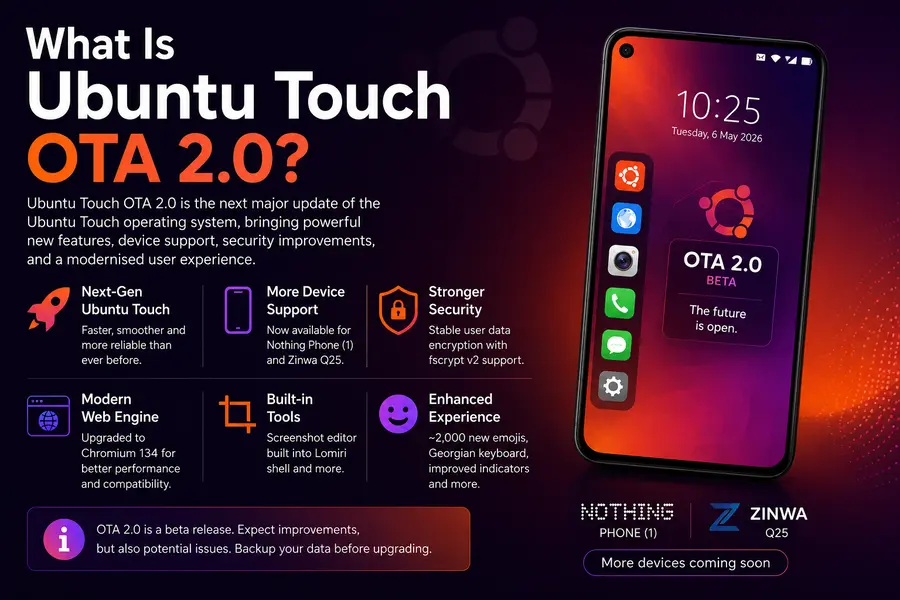
Ubuntu Touch follows a versioning scheme that combines the Ubuntu base version with a release-specific number. So “24.04-2.0” means it’s still built on top of Ubuntu 24.04 LTS (Noble Numbat), but it’s the second major feature update in that series.
This release is not a base system upgrade — it’s a feature update layered on the same 24.04 LTS foundation introduced with the 1.0 release back in September 2025. Think of it as Ubuntu Touch getting a significant feature refresh without a full OS rebuild. The stable version is expected to drop on July 13, 2026, giving testers roughly a month to identify and squash bugs.
What’s New in Ubuntu Touch OTA 2.0 Beta?
1. Morph Browser Gets a Massive Engine Upgrade
This is arguably the headline feature. The built-in Morph Browser — Ubuntu Touch’s default web browser — has been running on Chromium 87 for a very long time. That version is years old, and it showed: many modern websites broke, web apps refused to load correctly, and the overall browsing experience felt dated.
In OTA 2.0, Morph Browser leaps to Chromium 134, which is a massive jump in compatibility. Modern websites, Progressive Web Apps (PWAs), and content-heavy platforms should now behave much more reliably.
The UBports team acknowledged the limitations clearly: “This upgrade lays the foundation for future Chromium upgrades; we hope to be able to deliver more browser engine upgrades in the subsequent Ubuntu Touch OTA 24.04-2.x minor updates.”
There’s a temporary trade-off, though. Because older apps still depend on the previous Chromium 87 engine, the system currently ships two browser engines simultaneously. This increases storage requirements significantly, which is why not all currently supported devices can receive this update just yet.
2. Notch and Rounded Corner Support
If you own a modern smartphone with a display notch or rounded corners, you already know the pain — content bleeds under those areas and it looks messy. Ubuntu Touch has historically had no awareness of these hardware quirks.
That changes with OTA 2.0. The system can now be configured on a per-device basis to properly avoid notch cutouts and rounded corner areas, ensuring the UI renders cleanly within the actual visible display zone.
Currently, notch/corner awareness has been configured for:
- Fairphone 4
- Fairphone 5
- Volla Phone Quintus
- Volla Phone Plinius
- Xiaomi Redmi 9
The UBports team is encouraging device porters to add configurations for their own supported devices via the official documentation.
3. Lomiri Shell Gets a Screenshot Editor
The Lomiri shell (Ubuntu Touch’s graphical environment) now includes a built-in screenshot editor. Once you take a screenshot, you can immediately crop, rotate, and adjust the color — right from within the shell — and then save or share the result to another app.
If you prefer the old behavior (screenshot and done), you can disable the editor under System Settings → Gestures → Screenshot Editor.
It’s a small touch, but one that makes the mobile experience feel noticeably more polished.
4. Improved Mobile Data and MMS Connectivity
Two long-standing pain points get attention in OTA 2.0:
- Mobile data reliability has been improved across the board.
- You can now send and receive MMS messages even when mobile data is turned off. Previously, this wasn’t possible because MMS relied on the mobile data connection being active. This fix makes messaging feel significantly more seamless on dual-SIM and carrier-restricted setups.
5. Updated Network Indicator
The network indicator in the top panel has been improved to properly handle wired connections made through a dock (such as a USB-C dock or NexDock-style peripheral). This is part of the broader effort to make Ubuntu Touch a more capable convergence platform — one that works as a phone and a lightweight desktop when connected to a display.
6. User Data Encryption No Longer Experimental
For devices that support fscrypt v2, user data encryption is now a stable, production-ready feature — exiting its previous “experimental” status. This is a big win for security-conscious users who’ve been hesitant to rely on it.
If your device supports fscrypt v2, you can now enable full data encryption with confidence.
7. Over 2,000 New Emojis Added
The emoji keyboard gets a significant refresh with approximately 2,000 new emojis and emoji variants added. You can now also select emoji variants like skin tone options — a modern expectation that was previously missing.
8. Georgian Language Keyboard Support
The keyboard now includes support for the Georgian language, expanding Ubuntu Touch’s accessibility to users in Georgia and the wider Georgian-speaking community.
New Device Support
Two brand-new devices are joining the Ubuntu Touch ecosystem with OTA 2.0:
| Device | Status |
|---|---|
| Nothing Phone | New in OTA 2.0 |
| Zinwa Q25 | New in OTA 2.0 |
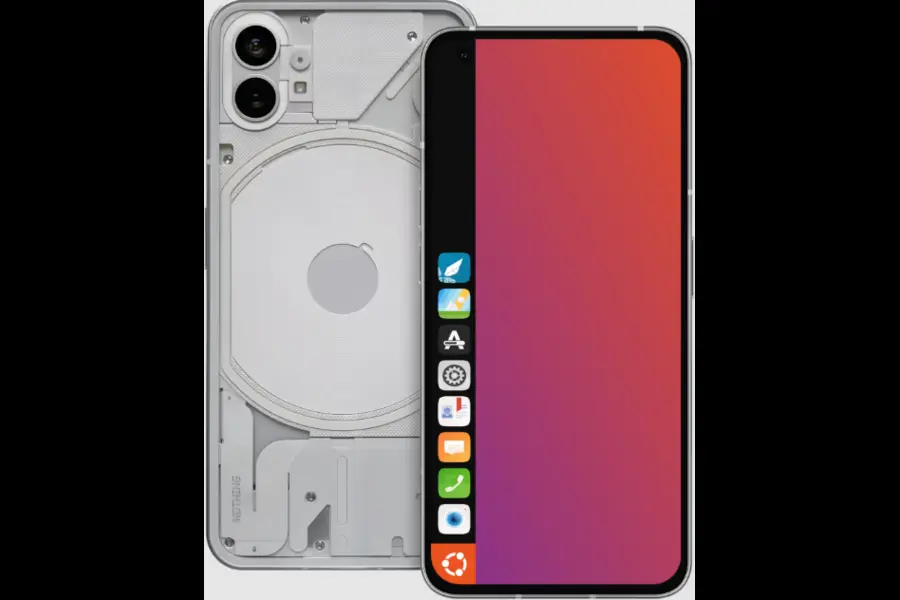
The Nothing Phone addition is particularly notable — it’s a popular device with a dedicated enthusiast community, and its inclusion could meaningfully expand Ubuntu Touch’s user base.
Full List of Supported Devices for OTA 2.0 Beta
Due to the dual browser engine storage constraint, the beta is currently available only on devices with enough system storage. Here’s the full list as of June 2026:
- F(x)tec Pro1X
- Fairphone 4
- Fairphone 5
- Lenovo Tab M10 HD 2nd Gen (WiFi / LTE)
- Nothing Phone (1) (new)
- Rabbit R1
- Sony Xperia X
- Volla Phone
- Volla Phone X
- Volla Phone 22
- Volla Phone X23
- Volla Phone Quintus
- Volla Phone Plinius
- Xiaomi Poco X3 / X3 NFC
- Zinwa Q25 (new)
The UBports team is actively working with device porters to expand this list before and after the July 13 stable release.
OTA 1.x vs OTA 2.0: What’s Changed?
Here’s a quick comparison of what’s improved between the previous OTA 1.x series and the incoming OTA 2.0:
| Feature | OTA 1.x | OTA 2.0 Beta |
|---|---|---|
| Browser Engine | Chromium 87 | Chromium 134 |
| Notch & Rounded Corner Support | Not available | Available (per-device config) |
| Screenshot Editor | Not available | Built into Lomiri shell |
| MMS Without Mobile Data | Not supported | Supported |
| User Data Encryption | Experimental | Stable (fscrypt v2 devices) |
| Nothing Phone (1) Support | No | Yes |
| Zinwa Q25 Support | No | Yes |
| Emoji Support | Limited | ~2,000 new emojis added |
| Georgian Keyboard | Not available | Available |
| Network Indicator | Basic | Improved dock/wired support |
Known Issues in the Beta
Because this is a beta release, there are some rough edges to be aware of before you dive in:
- Morph Browser black screen bug: The browser may show a black screen when it’s sent to the background and restored. Scrolling on the page usually makes the content reappear.
- No hardware video decoding yet: Video playback currently relies on software decoding, which consumes more power and may cause performance issues on some devices. Hardware decoding is expected in a future update.
- Limited device availability: The dual browser engine requirement means some supported devices can’t receive OTA 2.0 yet.
Always check the official UBports release notes before updating to any beta release.
Pros and Cons of Ubuntu Touch OTA 2.0 Beta
Pros
- Major browser engine upgrade from Chromium 87 to 134 dramatically improves web compatibility
- Notch and rounded corner support makes the OS feel modern
- Built-in screenshot editor adds a quality-of-life improvement
- MMS without mobile data is a practical win for daily users
- User data encryption is now production-ready for fscrypt v2 devices
- Expanding device support including the popular Nothing Phone
- 2,000+ new emojis make messaging feel current
Cons
- Dual browser engine ships temporarily, increasing system storage usage
- Not all currently supported devices are eligible for the beta
- Hardware video decoding is still absent, impacting battery life during video playback
- Notch/corner avoidance only configured for a handful of devices at launch
- Beta status means some bugs are still present and expected
How to Try Ubuntu Touch OTA 2.0 Beta
If your device is on the supported list and you want to test the beta, here’s how to enable it:
1. Open the Terminal app on your Ubuntu Touch device (or connect via ADB/SSH).
2. Switch to the Release Candidate channel under System Settings → Updates.
3. Run the following command:
gsettings set io.ubuntu-touch.system-settings.update offer-development-release true
4. Head back to System Settings → Updates and check for the OTA 2.0 beta update.
Beta software can be unstable. Always back up your data before installing pre-release firmware.
If you’re currently using the 24.04-1.x Daily channel, do not upgrade to the 2.x Daily image yet. Continue using the Release Candidate channel as instructed above until further guidance is provided.
For detailed installation guidance, visit the official UBports forum post.
What Does This Mean for the Ubuntu Touch Ecosystem?
Ubuntu Touch OTA 2.0 represents genuine progress. It’s not just about adding shiny new features — it’s about closing the gap between Ubuntu Touch and what users expect from a modern smartphone OS in 2026.
The Chromium 134 upgrade alone is transformative for daily usability. Browsing the web on Ubuntu Touch has historically been a frustrating experience for power users who rely on modern web apps or streaming services. That changes with this update.
The Nothing Phone addition is also strategically smart. Nothing has cultivated a tech-enthusiast audience that overlaps significantly with the Linux and open-source community. Bringing that device under the Ubuntu Touch umbrella could draw in new users and contributors.
And the encryption stabilization, while less visible, is a foundational win for the privacy-first users who choose Ubuntu Touch precisely because they care about data security.
The UBports team deserves credit for managing this update carefully — being transparent about storage constraints, documenting known issues, and giving testers clear instructions. That kind of community-first development approach is what keeps Ubuntu Touch alive and relevant.
Conclusion
There’s a lot to be excited about here. Ubuntu Touch OTA 2.0 Beta Is Out, and it represents the most meaningful feature leap in recent memory for this platform — from a browser that can actually handle 2026 websites to proper notch support, a built-in screenshot editor, expanded emoji support, and the addition of popular devices like the Nothing Phone . The final stable release on July 13, 2026 can’t come soon enough.
If you’re already running Ubuntu Touch, this is the update to watch. And if you’ve been curious about a privacy-respecting, Linux-powered mobile experience, now is a genuinely interesting time to give it a try.
Disclaimer:
This article is written for informational purposes only based on publicly available data from UBports and reputable tech sources as of June 2026. Device compatibility, features, and release timelines are subject to change. Always refer to the official UBports blog for the most up-to-date information before making any software changes to your device.