If you’ve been following the lightweight Linux scene, you already know Peppermint OS has carved out a well-earned reputation for doing more with less. On June 12, 2026, the team officially dropped something that a lot of the community had been waiting on for a while — PeppermintOS Devuan Excalibur, a Devuan-based build of Peppermint that brings the full Peppermint experience to users who want to run their systems completely free of systemd. It’s a significant release, and there’s a lot worth unpacking here.
Whether you’re a seasoned Linux user who’s been waiting for a polished systemd-free option, or someone reviving an older laptop and looking for something genuinely lightweight, this release deserves your attention.
What Is PeppermintOS, and Why Does It Matter?
Before diving into the Devuan Excalibur release specifically, it helps to understand what Peppermint OS is and why people keep coming back to it.
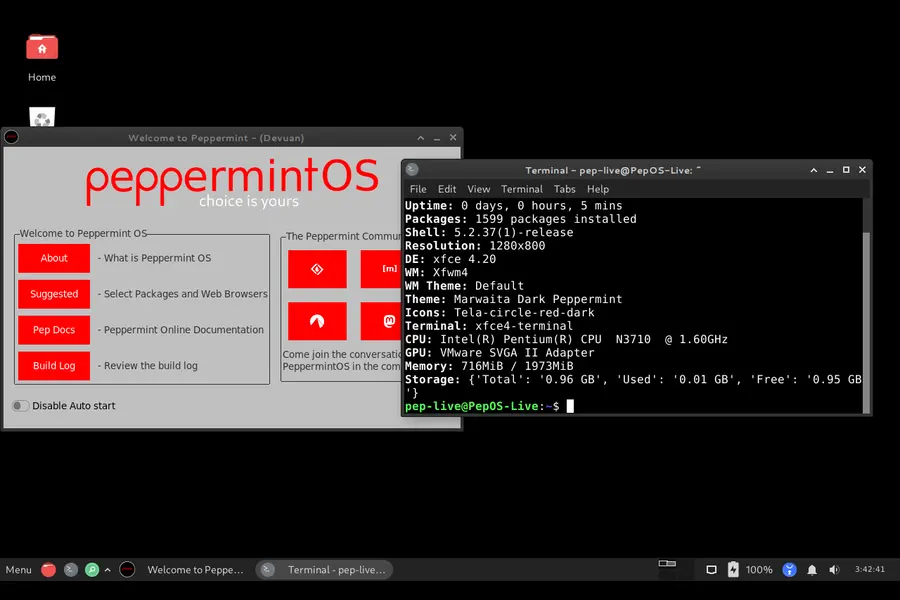
Peppermint describes itself as a community distro — built for all age groups and abilities — with a core philosophy rooted in minimalism. The guiding principle, carried over from founder Mark Greaves, is simple: “Everything you need and nothing you don’t.” That means no bundled firewall, no browser, no office suite, no media player out of the box. Just a clean, bare-bones desktop that lets you decide exactly what gets installed.
That approach sounds spartan, but in practice it’s liberating. You’re not fighting bloat. You’re not uninstalling apps you never asked for. You’re starting from a solid, stable foundation and building toward what you actually need.
Peppermint OS runs on a Debian base for its flagship release, and now officially on Devuan for users who prefer an init system of their own choosing. The team has also been building toward a Void Linux-based release (PepVoid), but more on that later.
What Is Devuan, and Why Does the No-Systemd Option Matter?
Devuan is a fork of Debian that was created specifically to give users a choice when it comes to their init system. Systemd became the default init system for most major Linux distributions starting around 2015, and while it’s become the standard, it’s also been a source of debate in the Linux community ever since.
Some users and developers take issue with how systemd behaves as more than just an init system — it has expanded to handle logging, network management, device management, and more. Critics argue this goes against Unix philosophy of having small, focused tools that do one thing well. Others simply value choice and transparency in how their system boots and manages processes.
Devuan’s whole point is that you shouldn’t be forced into systemd if you don’t want it. And PeppermintOS Devuan Excalibur builds directly on top of that philosophy.
What’s New in PeppermintOS Devuan Excalibur (June 2026)
The official release, posted on June 12, 2026 at peppermintos.com, is clear about what this build delivers. Here’s what you need to know.
A Full Peppermint Experience — Without systemd
The Devuan Excalibur build matches the standard Debian-based Peppermint OS experience almost entirely. The look, the feel, the custom tools, the theming, the icon sets — all of it is there. The key difference is the absence of systemd.
This wasn’t a quick port. The team spent considerable time rebuilding their ISO pipeline from scratch, moving away from the Debian livebuild tools to a fully custom set of spin tools that better fits their workflow and gives them more flexibility across different bases (Debian, Devuan, and Void). That transition took time, but it means future builds will be faster, leaner, and more consistent.
Three Init System Choices at Install Time
One of the most compelling features of this release is what happens during installation. When you boot the installer and click Install Peppermint from the Menu, you’ll be prompted to choose your preferred init system from three options:
- SysVinit — the traditional, time-tested init system that predates systemd and is well-understood by longtime Linux users
- OpenRC — a dependency-based init system used by Gentoo and Alpine Linux, known for its speed and simplicity
- runit — a minimal, fast supervision suite that boots quickly and has a simple, transparent design
This is a genuinely rare thing to see in a beginner-accessible distribution. Most distros that drop systemd pick one replacement and stick with it. Peppermint is giving you the choice at install time, which is a meaningful nod to user freedom.
Leaner Than the Debian Build
The team noted in their March 2026 roadmap update that the Devuan release would be slightly leaner than the Debian-based Peppermint. That’s deliberate. Some applications that strictly require systemd are excluded from the Devuan build. This keeps things clean — you’re not getting apps that can’t function properly on your chosen init system anyway.
Applications That Rely Strictly on systemd Are Excluded
This is worth being clear about upfront: any application that has a hard dependency on systemd will not be included in the Devuan Excalibur build. The team is transparent about this. For the majority of use cases — browsing, productivity, media, coding, and general desktop work — this won’t matter at all. But if you rely on something specific, it’s worth checking whether it has a systemd dependency before making the switch.
How to Install PeppermintOS Devuan Excalibur
Installation is straightforward. The team has integrated a Calamares-based installer (completed earlier in 2026 during the development cycle) that makes the process accessible even for users who are new to Linux.
Here’s the basic flow:
- Download the latest Devuan build from the official Peppermint downloads page
- Write the ISO to a USB drive using your preferred tool (Balena Etcher, Ventoy, dd, etc.)
- Boot from the USB
- Click Menu, type “install”, and click the Install Peppermint icon
- Follow the installer — you’ll be prompted to choose between SysVinit, OpenRC, or runit during setup
- Complete the installation and reboot
The Peppermint team also maintains a build log on SourceForge with more granular details for anyone who wants to dig into recent updates and changes.
The Philosophy Behind Peppermint’s Custom Tooling
Something that makes this release interesting beyond just the systemd question is the tooling that Peppermint brings to the table. These aren’t just cosmetic extras — they’re genuinely useful utilities built using Python, tkinter, and PyQt.
Peppermint’s Built-In Tools
- Peppermint Update Manager — a GUI update tool that pulls from Codeberg (their git host), meaning your existing installation gets continuous improvements without needing to reinstall or download a new ISO
- Software Center — includes access to Flatpak packages alongside native repository apps
- Kumo (SSB Manager) — a site-specific browser manager that lets you run web apps as if they were native desktop applications
- Backup & System Tools — utilities for keeping your system healthy and your data safe
- PepFetch — a graphical system info display (similar to neofetch, but with a GUI)
- Welcome Screen — a guided first-boot experience to help new users get oriented
These tools are built to survive across versions. Because Peppermint uses a DevOps-style CI/CD pipeline and hosts its tools on Codeberg, improvements flow to existing installations via the update manager — no full reinstall required.
Who Is PeppermintOS Devuan Excalibur For?
This isn’t a release with a narrow target audience. It appeals to a pretty wide range of users.
Old hardware enthusiasts will love it. The community has reported running Peppermint Devuan on machines from 2005–2006 with just 1GB of RAM, running Firefox ESR, LibreOffice, and even Eclipse IDE without notable lag. If you’ve got a machine that Windows dropped support for, this is the kind of distro that gives it years more life.
Privacy-conscious users and sysadmins who want a minimal, transparent init system will appreciate having a real choice at install time. Running SysVinit or runit means a dramatically smaller attack surface and a boot process that’s easy to audit.
Linux users frustrated with bloat will find Peppermint’s bare-bones approach refreshing. You install what you need. Nothing is pre-decided for you beyond the essentials.
Developers and power users who want a Debian-compatible package ecosystem without systemd now have a polished, well-maintained option that doesn’t require piecing together a custom setup from scratch.
Beginners switching from Windows will benefit from the Calamares installer and the suite of GUI tools that make common tasks approachable without needing to touch the terminal.
How It Compares to the Debian-Based Peppermint
It’s worth taking a moment to compare the two flagship flavors of Peppermint.
| Feature | PeppermintOS Debian (Trixie) | PeppermintOS Devuan Excalibur |
|---|---|---|
| Base | Debian Trixie | Devuan Excalibur |
| Init System | systemd | SysVinit, OpenRC, or runit |
| Application Compatibility | Full compatibility with Debian software | Most applications supported (excluding some systemd-dependent apps) |
| System Footprint | Lean and lightweight | Slightly leaner due to systemd removal |
| Package Repositories | Official Debian repositories | Devuan repositories (largely Debian-compatible) |
| Upgrade Path | Standard Debian-based upgrades | Standard upgrades (themes and customizations added separately) |
For most everyday users, either build will work well. The Devuan build is for people who specifically want init system freedom — and now there’s a genuinely polished way to get it under the Peppermint umbrella.
The Road to This Release: Why It Took So Long
The community was asking about this release for months, and the development team was transparent about why it took time. In their March 2026 update, lead developer Tommy (grafiksinc) explained that the delay came down to a deliberate shift away from Debian’s livebuild tools.
The team needed more flexibility than livebuild allowed — particularly as they were simultaneously working on PepVoid (a Void Linux-based variant). So they built their own ISO spin tools from scratch. That’s a significant engineering effort, but it means the infrastructure now supports multiple bases (Debian, Devuan, Void) with a consistent, maintainable pipeline.
The Calamares installer was completed, configurations were finalized, the GRUB theme was polished, community testers were brought in, bugs were identified and fixed — and on June 12, 2026, it was officially released.
What About PepVoid?
For completeness, it’s worth mentioning that Peppermint is also developing a Void Linux-based variant called PepVoid. Void Linux is an independent distribution (not based on Debian or any other distro) with its own package manager (XBPS) and its own init system (runit by default). Community members who’ve tested early PepVoid builds have reported excellent results, even on hardware that’s over a decade old.
PepVoid is still in active development and testing. For now, PeppermintOS Devuan Excalibur is the go-to release for users who want a systemd-free experience with a familiar Debian-compatible package ecosystem.
Community and Support
Peppermint is a genuinely community-driven project. The team actively collaborates with users on SourceForge forums, engages with feedback on the blog, and credits testers by name in release announcements. The Excalibur release, for example, explicitly thanks the Devuan team for their work, as well as the Peppermint testers who helped identify and squash key bugs before launch.
Support resources include:
- SourceForge Forums — the primary community support platform
- SourceForge Wiki — an evolving library of tutorials
- Codeberg — where Peppermint’s tools are hosted and maintained
- Official Blog — regular updates from the dev team
The ethos here is collaborative, not corporate. If you find a bug, report it. If you can help test, jump in. The team operates on DevOps principles — development and community are treated as one body.
Final Thoughts
PeppermintOS Devuan Excalibur is one of the more thoughtfully constructed lightweight Linux releases of 2026. It doesn’t just strip out systemd and call it a day — it gives users a genuine choice between three init systems, maintains full visual and functional parity with the Debian flagship, ships with a polished custom toolset, and runs on hardware that most modern distributions have already written off.
For anyone who’s been waiting for a beginner-friendly, well-maintained, systemd-free Linux distribution with a real community behind it, the wait is over. Whether you’re breathing new life into aging hardware, building a minimal workstation, or just philosophically opposed to having systemd manage half your system, this release is worth a serious look.
You can grab the ISO directly from the official Peppermint OS downloads page and check the build log on SourceForge for the latest details. The community is active, the project is moving fast, and the vision — everything you need and nothing you don’t — remains as clear as ever.
Disclaimer
This blog post is written for informational purposes only. While every effort has been made to ensure accuracy based on official PeppermintOS release notes and publicly available information as of June 2026, software projects evolve quickly — features, package availability, and system requirements may change over time. Always refer to the official PeppermintOS website at peppermintos.com and the SourceForge forums for the most current and accurate information before making any installation or migration decisions. The author has no affiliation with the PeppermintOS project or the Devuan team.