If you follow the Gentoo ecosystem even loosely, you’ve probably heard whispers about MocaccinoOS — the independently developed, Gentoo-based distribution that trades Portage’s famous patience for a binary-first, container-driven workflow. The latest release, MocaccinoOS 26.08, landed in early August 2026, and it’s a meatier update than the last couple of point releases. This piece walks through everything that changed, why it matters, and how it stacks up against the more mainstream options in the rolling-release space.
Whether you’re a longtime Sabayon refugee (MocaccinoOS’s spiritual predecessor) or someone hearing the name for the first time, this rundown of what’s new in MocaccinoOS 26.08 should give you a clear, honest picture before you download an ISO.
A Quick Refresher: What MocaccinoOS Actually Is
Before diving into the changelog, it’s worth grounding this in context. MocaccinoOS isn’t a Gentoo overlay or a Portage-based spin — it’s a distinct distribution that builds every package from the Gentoo tree on its own infrastructure, then ships them as pre-compiled binaries through Luet, a container-based, zero-dependency static package manager. That’s the core design decision that separates it from vanilla Gentoo: you get Gentoo’s software selection and build philosophy without sitting through hours of local compilation.
The team behind it — Ettore Di Giacinto, Joost Ruis, Mihai Dobrescu, and Jerrod Frost — has kept the project alive largely through community goodwill rather than corporate backing. It’s genuinely a small operation; donation totals mentioned in recent release notes have hovered between roughly $1 and $12 a month, which says a lot about how lean this project runs. That’s worth keeping in mind as context for both the pace of development and the occasional rough edge.
Since the 25.09 release, MocaccinoOS switched to a YY.MM rolling versioning scheme, similar in spirit to what Manjaro or Ubuntu do with dated snapshots, except MocaccinoOS is genuinely rolling underneath — the version number just marks when a particular snapshot was cut.
MocaccinoOS 26.08: The Headline Changes
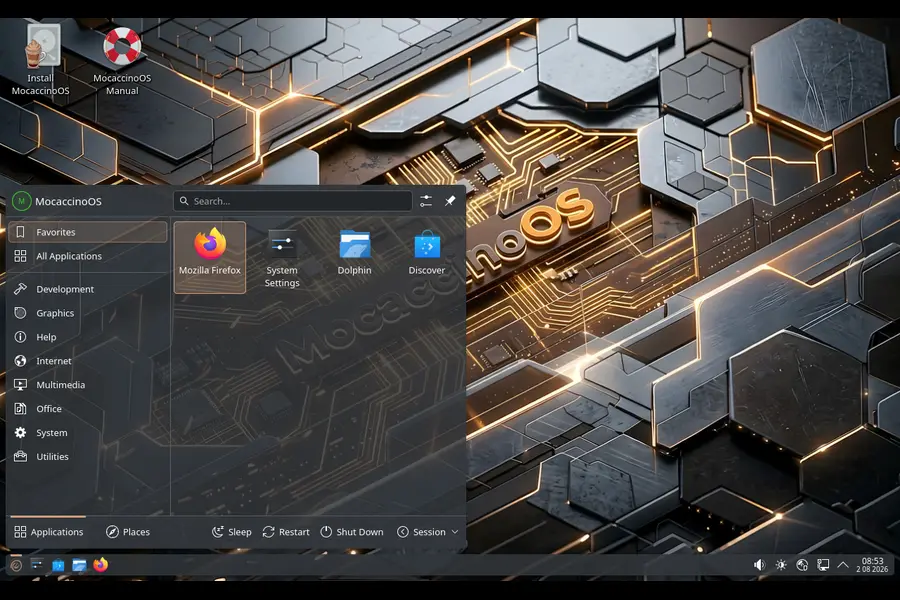
Here’s the core of what’s new in MocaccinoOS 26.08, based on the official announcement:
- Linux kernel 6.18.41 LTS — the base kernel moves to a newer long-term support build
- Mesa 26.1.5 — updated open-source graphics stack for AMD, Intel, and open Nvidia drivers
- Calamares 3.4.2 — the graphical installer used across most editions gets bumped to the latest stable release
- Vajo updates — the GUI/TUI frontend for the Luet package manager receives further refinement
- COSMIC 1.5 — the COSMIC desktop edition (System76’s Rust-based environment) is now current
- KDE Plasma 6.6.6 — the Plasma edition tracks the newest point release in the 6.6 series
- GNOME 49.7, Xfce 4.20, and MATE 1.28 — all three continue as standalone desktop editions
- Docker Buildx/BuildKit migration — package and layer builds now use the modern BuildKit image builder instead of the older Docker build pipeline
That last point is more significant than it sounds on the surface. It’s an infrastructure change rather than a user-facing feature, but it directly affects how fast new packages and security fixes reach the repositories, and how reliably the build cache behaves between releases. For a small team compiling the entire Gentoo tree themselves, better caching and build performance is a genuine quality-of-life win that trickles down to users as faster turnaround on updates.
Why the Kernel Bump Matters
Jumping to Linux 6.18.41 LTS keeps MocaccinoOS aligned with upstream long-term support rather than chasing the bleeding-edge mainline kernel every month. That’s a deliberate trade-off: you don’t get the very latest hardware enablement patches the day they land, but you get a kernel branch that’s had more eyes on it for stability, which matters more on a daily-driver desktop than shaving a few weeks off driver support.
Mesa 26.1.5 and What It Means for Gaming
Mesa updates rarely make headlines, but for a distro that markets itself as “gaming-ready,” they’re one of the most consequential changes in any release. Mesa 26.1.5 brings incremental fixes across RADV (the open Vulkan driver for AMD GPUs), Iris and Xe for Intel graphics, and continued work on NVK, the open Nvidia Vulkan driver. If you’re running Steam Play/Proton titles on an AMD card, this is the kind of update that quietly fixes shader compilation stutters and corrects rendering glitches introduced in earlier point releases.
Calamares 3.4.2: A Smoother Install Experience
Calamares is the installer shared by a huge swath of independent Linux distributions — EndeavourOS, Garuda, and now MocaccinoOS all lean on it rather than reinventing installer UX from scratch. The 3.4.2 update generally brings bug fixes to partitioning edge cases and improved handling of the “additional software” modules, which MocaccinoOS has been actively extending release over release, including a dedicated Graphics section added in the 26.07 cycle for driver selection during install.
The Desktop Editions Compared
One thing that sets MocaccinoOS apart from a lot of smaller independent distros is how many desktop environments it maintains in parallel. That’s ambitious for a four-person team, and it shows in how much attention each edition gets per release cycle.
| Edition | Version in 26.08 | Status | Best For |
|---|---|---|---|
| KDE Plasma | 6.6.6 | Actively maintained, flagship edition | Users wanting a full-featured, customizable desktop |
| COSMIC | 1.5 | Actively maintained, growing fast | Fans of Rust-based, GPU-accelerated desktops |
| GNOME | 49.7 | Standalone edition | Users who prefer GNOME’s opinionated workflow |
| Xfce | 4.20 | Standalone edition | Lightweight setups, older hardware |
| MATE | 1.28 | Standalone edition | Traditional desktop metaphor fans |
| Cinnamon | In development (started 26.05) | Not yet released | Future option for Linux Mint refugees |
KDE Plasma and COSMIC are clearly getting the most attention right now. Plasma has been the traditional flagship since the Sabayon days, while COSMIC’s inclusion signals the team betting on where desktop Linux is heading — System76’s environment has been picking up steam across the independent distro world, and MocaccinoOS was relatively early to ship it as a proper full edition rather than a community afterthought.
Xfce and MATE round things out for people who want something leaner. It’s worth noting these editions received practical quality-of-life additions in recent cycles too — Blueman, for instance, was added to the Xfce and MATE ISOs in 26.06 to make Bluetooth management less of a manual chore.
How MocaccinoOS 26.08 Compares to the Previous Few Releases
It helps to see this release in the context of what came before it, since MocaccinoOS ships monthly-ish and each cycle tends to be incremental rather than transformative.
26.05 introduced Mesa 26.0.5, Qt 6.10.3, Plasma 6.6.4, and COSMIC 1.0.11, and marked the start of Cinnamon development.
26.06 brought the kernel to 6.18.33 LTS, Mesa to 26.1.1, Plasma to 6.6.5, added a dedicated COSMIC ISO, dropped in Google’s CJK font family across all images for better out-of-the-box CJK language support, and gave Calamares an additional-software installation module.
26.07 pushed Mesa to 26.1.3, updated Nvidia proprietary drivers to 595.84 in the repository, moved COSMIC to 1.1.0, fixed a Calamares bug tied to enabling the community repository, and added new Plasma themes.
26.08 now consolidates all of that with a kernel bump, a much larger Mesa jump, COSMIC leaping from 1.1.0 to 1.5, Plasma moving to 6.6.6, and — critically — the Buildx/BuildKit infrastructure migration.
Laid out that way, the pattern is clear: MocaccinoOS ships small, steady improvements almost every month, with COSMIC and the packaging infrastructure getting the most sustained investment lately. If you’re the type of user who likes watching a distro mature release by release rather than jumping in cold, that consistency is reassuring.
Under the Hood: Luet, Vajo, and the Layered Package System
The technical heart of MocaccinoOS is worth understanding on its own, because it’s genuinely different from how most Linux distributions handle packages.
Luet is a package manager built around OCI container layers rather than the traditional dpkg/rpm model. Packages are essentially container images, which lets MocaccinoOS apply Docker-style layering to the base system and common packages — meaning updates can ship as incremental layer diffs instead of full package reinstalls. That’s the mechanism behind what the project calls its “layered approach for system and common packages, offering smoother upgrades.”
Vajo is the human-facing frontend to Luet — a GUI/TUI tool that abstracts away the container mechanics so day-to-day package management feels closer to what you’d expect from pacman or apt, minus the underlying complexity. Every recent release cycle has quietly improved Vajo, and 26.08 continues that trend, though the specific fixes weren’t itemized in detail beyond “further refinements” this time around.
This architecture is also why the Buildx/BuildKit migration matters so much for this particular distro more than it would for, say, a traditional rpm-based one. Since packages are literally OCI layers, moving to a more modern, better-caching container builder has a direct multiplier effect on how fast the whole Gentoo package tree can be rebuilt and pushed out.
MocaccinoOS Micro: The Other Half of the Project
It’s easy to overlook, but the team also maintains MocaccinoOS Micro, a much smaller Linux From Scratch-style build using musl libc instead of glibc, aimed squarely at cloud and embedded use cases rather than desktops. It shares almost nothing with the desktop editions except lineage — no Calamares, no desktop environments, just a minimal core package set designed to boot fast and stay small. If you’re evaluating MocaccinoOS purely as a desktop OS, Micro isn’t really relevant to you, but it’s a good signal that the project has ambitions beyond just being “Gentoo but with an installer.”
MocaccinoOS vs. Gentoo: What You’re Actually Trading
The most natural comparison is straight against upstream Gentoo, since that’s where all the packages originate.
Compilation time. Gentoo compiles everything locally by design, which is powerful for tuning (USE flags, CFLAGS, hardware-specific optimization) but can mean hours or days of build time for a full desktop stack. MocaccinoOS pre-builds everything on its own infrastructure and ships binaries, so installation and updates are Arch-speed rather than Gentoo-speed.
Customization depth. This is where you lose something moving to MocaccinoOS. Gentoo’s USE flag system lets you strip out or enable features at a granular per-package level. MocaccinoOS’s binary model doesn’t give you that same knob-turning — you get what the team built, which is a sensible default configuration but not a bespoke one.
Installer experience. Gentoo’s install is still largely manual, even with the newer Gentoo installer improvements of recent years. MocaccinoOS uses Calamares, the same graphical installer found on plenty of beginner-friendly distros, so the barrier to entry is dramatically lower.
Update cadence and testing. Gentoo’s testing (~arch) and stable branches give you fine control over risk tolerance. MocaccinoOS is rolling by nature with monthly snapshots, so you’re trusting a small team’s build pipeline rather than choosing your own stability threshold.
If you want the actual Gentoo experience — the hands-on tuning, the education that comes with compiling your own kernel and libc choices — MocaccinoOS won’t give you that. If you want Gentoo’s package selection and philosophy without the time investment, it’s a genuinely useful middle ground.
MocaccinoOS vs. Arch Linux and openSUSE Tumbleweed
Since MocaccinoOS competes in the same “rolling release, binary packages” space as Arch and Tumbleweed, a direct comparison is more useful than it might first appear.
Arch has the advantage of scale: the AUR, an enormous wiki, and years of community troubleshooting content. MocaccinoOS’s community is a fraction of that size, so when something breaks, you’re more likely relying on GitHub issues and direct project channels than a decade of forum threads. That’s the honest trade-off of using a smaller distro — better in some technical respects, thinner in community support.
openSUSE Tumbleweed uses openQA to automatically test package combinations before they hit the rolling repository, giving it a reputation for being one of the most stable rolling releases available. MocaccinoOS doesn’t have an equivalent automated testing pipeline at that scale; releases are shaped more by a small team’s manual QA and community bug reports. That doesn’t make it unstable, but it does mean the safety net is thinner.
Where MocaccinoOS pulls ahead of both is package provenance — everything traces back to Gentoo’s tree, which means access to software that’s well-maintained in the Gentoo ecosystem but sometimes slower to land in the AUR or openSUSE’s repos, plus the container-layered update model that neither Arch nor Tumbleweed uses natively.
Who Should Actually Use MocaccinoOS 26.08
Being blunt about fit matters more than hype here.
Good fit if you:
- Like the idea of Gentoo’s package tree but don’t want to compile everything locally
- Want a rolling release with a graphical installer instead of a manual bootstrap process
- Are comfortable troubleshooting with a smaller community and fewer third-party guides
- Want to try COSMIC or Plasma on a genuinely up-to-date base without waiting for a point release from a bigger distro
- Have some patience for occasional rough edges, given the project’s limited funding and staffing
Probably not a good fit if you:
- Need enterprise-grade support or long-term stability guarantees
- Want the deep, granular customization that made you like Gentoo in the first place
- Depend heavily on AUR-style community package availability
- Aren’t comfortable being an early adopter of a less battle-tested update pipeline
Pros and Cons of MocaccinoOS 26.08
Pros:
- Genuinely fast update delivery thanks to pre-built binaries and container-layered packages
- Multiple well-maintained desktop editions, with real investment visible in COSMIC and Plasma
- Calamares installer makes onboarding dramatically easier than vanilla Gentoo
- Infrastructure improvements (Buildx/BuildKit) show the team is investing in long-term maintainability, not just shipping surface-level updates
- Mesa and kernel stay reasonably current without going full bleeding-edge
Cons:
- Small community and limited funding mean slower response to edge-case bugs
- Loses Gentoo’s signature USE-flag-level customization
- Fewer third-party guides and troubleshooting resources than Arch or openSUSE
- No automated large-scale testing pipeline comparable to openSUSE’s openQA
- Cinnamon and some newer editions are still works in progress, so not every desktop preference is covered yet
Installing or Upgrading to 26.08
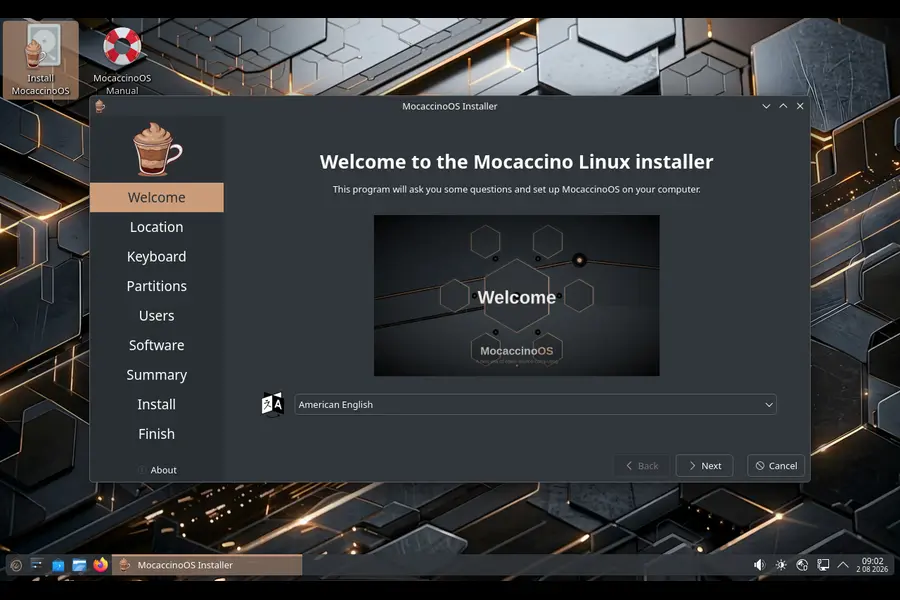
If you’re already running an earlier YY.MM build, MocaccinoOS’s rolling nature means you don’t need to reinstall — a standard system update through Vajo should pull you up to the 26.08 package set, including the new kernel and Mesa stack. For fresh installs, the ISOs are built per desktop edition (Plasma, COSMIC, GNOME, Xfce, MATE), so grab the one matching your preferred environment rather than a generic “MocaccinoOS” image. Worth noting: the DesktopMinimal image, if you come across it, is meant for testing purposes only and doesn’t include the Calamares installer.
Given the project runs on a shoestring budget, it’s also worth mentioning that donating even a small amount genuinely moves the needle for a team working with this little financial support — something to consider if 26.08 ends up being a distro you stick with.
Final Thoughts
So, what’s new in MocaccinoOS 26.08, in one sentence? A newer LTS kernel, a meaningful Mesa jump, COSMIC and Plasma both landing on current releases, and a behind-the-scenes build system overhaul that should make future updates land faster and more reliably. None of it is flashy, but taken together it’s a solid, workmanlike release from a project that keeps proving it can iterate steadily despite running on fumes financially.
MocaccinoOS isn’t trying to be Arch or Tumbleweed with a different name slapped on it — it’s carving out its own niche as Gentoo’s packages without Gentoo’s compile times, wrapped in a container-based update model that’s genuinely unusual in the Linux world. If that combination sounds appealing and you’re willing to accept a smaller support community in exchange, 26.08 is a reasonable point to give it a real try.
Disclaimer
This article is based on publicly available release information from the MocaccinoOS project and independent Linux news coverage. Version numbers and features may change; always check the official MocaccinoOS site for the latest details.
Master the Fundamentals of Linux
If you’re learning how Linux works behind the scenes, these hand-picked guides explain the operating system from boot-up to memory management and filesystem optimization.
What Happens During the Linux Boot Process?
Follow every stage from BIOS/UEFI and GRUB to the Linux kernel, initramfs, systemd, and finally the desktop environment.
Why Linux Rarely Needs Defragmentation
Learn why EXT4, XFS and Btrfs automatically reduce fragmentation and maintain excellent disk performance.
Why Linux Uses Swap Even with Plenty of RAM
Discover how Linux intelligently manages memory by moving inactive pages to swap while maximizing file cache efficiency.