If you’ve ever migrated from Windows to Linux, you’ve probably wondered where the disk defragmenter went. There isn’t one on most distros, and that’s not an oversight. Understanding why Linux rarely needs defragmentation comes down to how its filesystems are engineered from the ground up, decades before SSDs even existed, to avoid the fragmentation problem in the first place rather than clean it up afterward.
This isn’t a small technical footnote. It’s one of the more underrated differences between Windows and Linux, and it explains why longtime Linux users look a little confused when someone asks “how do I defrag my Ubuntu box?” Let’s go through the actual mechanics, the filesystems involved, and where fragmentation can still sneak in even on Linux.
What Fragmentation Actually Is
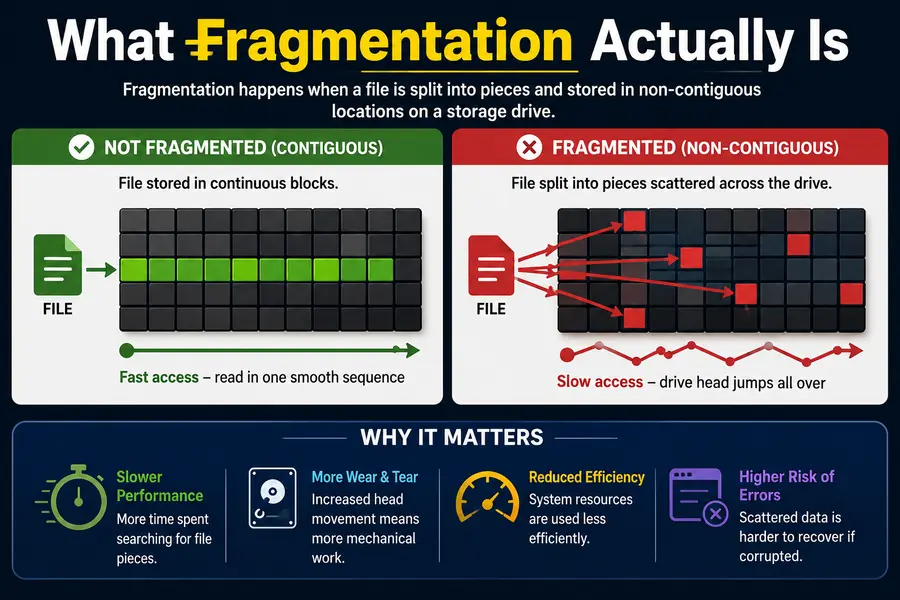
Fragmentation happens when a file’s data gets split into non-contiguous blocks on a storage device. Instead of living in one clean, sequential chunk, pieces of the file end up scattered across the disk. On a spinning hard drive, that means the read/write head has to jump around physically to reassemble the file, which slows things down noticeably.
Windows filesystems, particularly older FAT and NTFS implementations, allocate space in a fairly greedy, first-fit manner. Over time, as files are created, deleted, and resized, free space becomes a patchwork of small gaps. New files get crammed into whatever gaps are available, and fragmentation builds up. That’s why Windows shipped a built-in Disk Defragmenter tool going all the way back to the 1990s, and why it still runs scheduled optimization passes today.
Linux filesystems approach the allocation problem completely differently, and that difference is the real answer to why Linux rarely needs defragmentation.
The Core Reason: Smarter Allocation From the Start
Most Linux filesystems, ext4 being the default on the majority of distributions, use allocation strategies designed to prevent fragmentation before it happens rather than fix it afterward.
Extent-Based Allocation
Ext4, XFS, and Btrfs all use extents instead of the older block-mapping scheme ext2 and ext3 relied on. An extent is a single record that describes a contiguous range of blocks, so instead of tracking a file block by block, the filesystem can say “this file occupies these 50,000 contiguous blocks” in one entry. This makes it far more likely that a file will be written to a single unbroken run of disk space, and it makes any fragmentation that does occur easier to describe and manage.
Delayed Allocation
This is one of the more clever pieces of the puzzle. Ext4 and XFS both use delayed allocation (sometimes called “allocate-on-flush”). Instead of deciding exactly where to place data the moment it’s written, the filesystem holds the data in memory for a short window and waits until it’s ready to flush to disk. By then, it usually knows the full size of the file, so it can pick a single contiguous region that fits, rather than allocating piecemeal and hoping for the best.
This is a genuinely different philosophy from older allocation strategies, and it’s a big part of why fragmentation rates on ext4 systems stay low even under heavy, long-term use.
Multi-Block and Locality-Aware Allocation
Linux filesystems also try to keep related data physically close together. Ext4’s allocator, for instance, tries to place a file’s blocks near its inode and near other files in the same directory. XFS goes further with allocation groups, splitting the disk into regions that can be allocated to independently and in parallel, which spreads out I/O load while still favoring contiguous placement within each group.
Free Space Management
Fragmentation isn’t just about individual files, it’s also about how free space breaks down over time. Ext4 tracks free space using buddy bitmaps and works to keep large contiguous free regions available instead of letting free space degrade into tiny unusable slivers. Btrfs, being a copy-on-write filesystem, handles this differently again, using space cache and free-space trees to track available extents efficiently.
Ext4, Btrfs, and XFS: How Each One Handles It
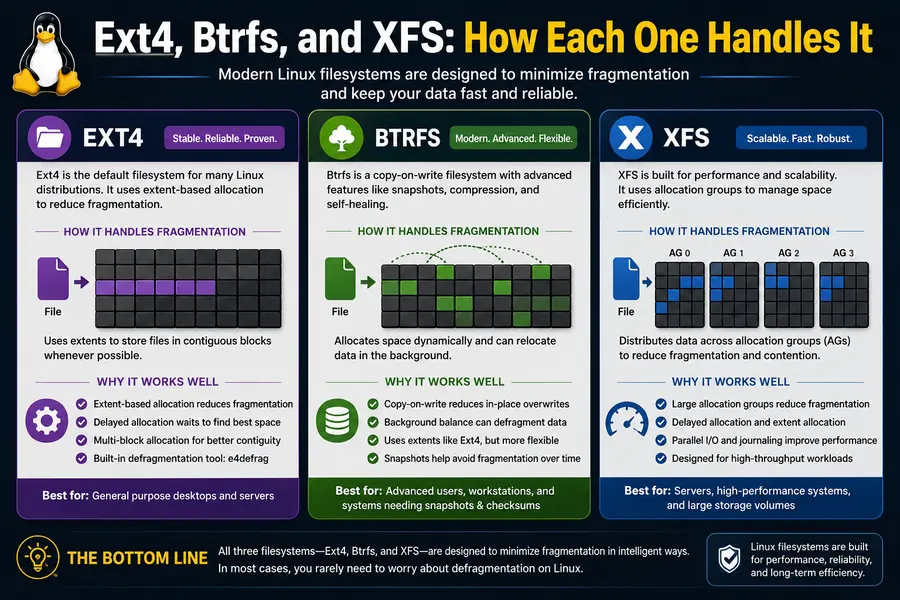
It helps to look at this filesystem by filesystem, because “Linux” isn’t one single filesystem, it’s an ecosystem, and each option has its own tricks.
Ext4 is still the default for Debian, Ubuntu (for most partitions), Fedora Workstation in many configurations, and countless embedded systems. It leans on extents, delayed allocation, and multi-block allocation to avoid fragmentation, and it includes e4defrag, a built-in defragmentation tool, for the rare cases where it’s actually needed, usually on nearly full drives or after unusual workloads like heavy database churn.
XFS, the default on Red Hat Enterprise Linux and Fedora Server, was originally built by Silicon Graphics for high-throughput workloads on large storage arrays. Its allocation-group design and strong extent handling make it especially resistant to fragmentation on large files and parallel writes, which is why it’s a common choice for video editing rigs and big data servers. XFS ships xfs_fsr (file system reorganizer) for maintenance on the rare system where fragmentation creeps up.
Btrfs, used by default on openSUSE and increasingly popular on Fedora Workstation, is copy-on-write, which actually makes it more fragmentation-prone in specific scenarios, particularly with large files that get modified in place, like VM disk images or database files. Btrfs compensates with autodefrag mounts options and manual btrfs filesystem defragment commands for those edge cases. It’s worth knowing this if you run VMs on Btrfs, since it’s one of the few common Linux setups where manual defrag maintenance genuinely matters.
Comparison Table: Linux Filesystems vs. Windows NTFS
| Feature | ext4 | XFS | Btrfs | NTFS (Windows) |
|---|---|---|---|---|
| Allocation method | Extent-based, delayed allocation | Extent-based, allocation groups | Copy-on-write, extent-based | Cluster-based, first-fit |
| Built-in defrag tool | e4defrag (rarely needed) | xfs_fsr (rarely needed) | btrfs filesystem defragment (occasionally needed for CoW workloads) | Disk Defragmenter (scheduled by default) |
| Typical fragmentation under normal use | Very low | Very low, even at scale | Low to moderate, higher for VM/DB files | Moderate to high over time |
| Best suited for | General desktop and server use | Large files, high-throughput servers | Snapshots, checksums, flexible storage | General Windows desktop/server use |
| SSD-specific handling | TRIM support, no scheduled defrag needed | TRIM support | TRIM support, autodefrag interacts with CoW | TRIM plus periodic “optimization” pass |
SSDs Change the Conversation Entirely
Here’s the part that applies regardless of which filesystem you’re running: most machines today, Linux or Windows, use solid-state drives, and SSDs don’t have a mechanical read/write head that needs to travel across a physical platter. Fragmentation on an SSD has a much smaller performance impact because access times are close to uniform no matter where the data physically sits on the flash chips.
In fact, running a traditional defrag pass on an SSD is actively counterproductive. It causes a bunch of unnecessary write operations, and flash memory has a finite number of write cycles before cells start to wear out. That’s why Linux distributions handle SSD maintenance with fstrim instead, a command that tells the SSD’s controller which blocks are no longer in use so it can manage its own internal garbage collection more efficiently. Most distros run fstrim on a weekly timer via systemd rather than anything resembling a defrag schedule.
Windows actually made the same shift. Modern versions of Windows detect SSDs and run TRIM-based “optimization” instead of classic defragmentation, but the tool is still labeled “Optimize Drives” and still runs on a schedule by default, which keeps the defrag habit alive in people’s minds even though the underlying operation has changed.
Real-World Numbers: How Little Fragmentation Actually Builds Up
This isn’t just theoretical. System administrators running long-lived ext4 file servers, some active for a decade or more without a full reformat, routinely report fragmentation levels under 1 to 3 percent even on drives that stay above 80 percent capacity, which is usually the threshold where fragmentation starts becoming a real risk on any filesystem. Compare that to older FAT32 or early NTFS volumes under similarly heavy use, where fragmentation could climb into the double digits within months without regular defrag maintenance.
The one place this breaks down is when a Linux filesystem is pushed close to full, generally past 90 to 95 percent capacity. At that point, even ext4 and XFS run out of large contiguous free regions to allocate into, and fragmentation rates start climbing regardless of how smart the allocator is. This is really a “keep your disk from filling up” issue more than a “your filesystem is bad” issue, and it applies to basically every filesystem ever built, Linux included.
When Linux Actually Does Need Some Defrag Maintenance
It would be misleading to say fragmentation never happens on Linux. A few specific situations are worth knowing about:
- Databases with heavy random writes. MySQL and PostgreSQL data files that see constant in-place updates can fragment over time, particularly on Btrfs, where copy-on-write semantics mean every modified block gets written to a new location.
- Virtual machine disk images. A large qcow2 or raw disk image that’s constantly being written to internally is one of the more realistic cases where
e4defragorxfs_fsrearns its keep. - Torrent downloads and other pre-allocated sparse files. Files that get written out of order, as pieces arrive, can fragment more than sequentially written files, even with delayed allocation working in the background.
- Drives running above 90 to 95 percent capacity. As mentioned above, this is the single biggest fragmentation risk factor on any filesystem, Linux included.
If you fall into one of these categories, running e4defrag on ext4 or xfs_fsr on XFS occasionally is reasonable maintenance, not a sign that something is broken. For everyone else running typical desktop or server workloads, it’s simply unnecessary.
Why This Matters for Everyday Users
Beyond the technical details, there’s a practical upside here: one less thing to think about. Windows users have spent years being trained to check disk health, run optimization tools, and keep an eye on fragmentation percentages. Linux users generally don’t have that item on their maintenance checklist at all, because the filesystem design handles it quietly in the background.
That’s a meaningful part of why so many long-running Linux servers, the kind that power a huge share of the web’s infrastructure, can stay up for months or years between reboots without any noticeable degradation from fragmented storage. The Linux Foundation’s kernel documentation goes into the technical weeds on ext4’s block and extent allocation if you want to see exactly how the allocator makes these placement decisions.
It’s also worth noting that Linux kernel development hasn’t slowed down on the storage front. The kernel’s July 2026 stable cycle brought a fresh round of fixes across storage subsystems, including a data-corruption fix for XFS, a reminder that filesystem engineering on Linux is still actively maintained and refined rather than left on autopilot.
Frequently Asked Questions
Does Linux need a defrag tool like Windows?
No. Ext4, XFS, and Btrfs are designed with allocation strategies that prevent most fragmentation from building up, so a scheduled defrag tool isn’t part of standard Linux maintenance.
Can I still defragment a Linux filesystem if I want to?
Yes. Ext4 has e4defrag and XFS has xfs_fsr, both usable for specific cases like near-full drives or heavily rewritten large files.
Is Btrfs more prone to fragmentation than ext4?
Somewhat, yes, particularly for files that receive frequent in-place writes like VM images or database files, because Btrfs’s copy-on-write design creates new extents on every write.
Do SSDs need defragmentation on Linux?
No. SSDs don’t benefit from defragmentation and can wear out faster from the extra writes; Linux instead uses fstrim to maintain SSD performance.
At what disk usage does fragmentation become a real risk on Linux?
Generally once a drive passes about 90 to 95 percent capacity, since the filesystem runs out of large contiguous free space to allocate new files into.
Why doesn’t Ubuntu or Fedora ship a defrag utility by default?
Because ext4 and XFS, the default filesystems on those distributions, keep fragmentation low enough on their own that a scheduled defrag tool isn’t necessary for typical use.
The Bottom Line
At the end of the day, why Linux rarely needs defragmentation comes down to smart engineering choices made decades ago and refined ever since: extent-based allocation, delayed allocation, locality-aware placement, and free-space management that keeps large contiguous regions available. Add SSDs into the mix, where fragmentation barely matters at all, and you get an operating system where “defrag” simply isn’t part of the regular vocabulary.
That doesn’t mean fragmentation is impossible on Linux. Databases, VM images, and nearly-full drives can still hit it, and tools like e4defrag and xfs_fsr exist for exactly those situations. But for the overwhelming majority of desktop users, developers, and server administrators, it’s one maintenance task that Linux quietly handles so you don’t have to think about it.
Disclaimer
This article is for general informational purposes only. Filesystem behavior can vary by distribution, kernel version, hardware, and configuration, so always test maintenance commands like e4defrag, xfs_fsr, or btrfs filesystem defragment in a safe environment before running them on production systems, and back up important data beforehand.
Continue Learning Linux
If you’re interested in how Linux manages storage and system performance, these guides explain memory management, desktop adoption, and Ubuntu update issues in greater detail.