If you follow the Arch Linux scene even loosely, you already know Garuda Linux doesn’t do “quiet updates.” On September 20, 2026, lead developer dr460nf1r3 posted straight to the official Garuda Linux Forum to announce “Garuda Nix” — and while the team’s own wording calls it a release rather than a formal beta program, the substance of what shipped is, in every practical sense, how Garuda Linux opens NixOS public testing to its community: no versioned stable release, just daily CI-built ISOs anyone can download and put through their paces. For a distro that built its reputation on BTRFS snapshots, the Zen kernel, and an unapologetically maximalist desktop experience, betting on NixOS’s declarative model is a genuinely interesting pivot, and it’s worth unpacking exactly what changed, what “testing” actually means here, and whether you should install it on your own machine.
This isn’t Garuda’s first brush with Nix. A “Nix Subsystem” has quietly existed for a while, letting people dual-boot a NixOS install alongside Garuda on the same partition via a BTRFS subvolume. What’s new is that this side project has now graduated into something much bigger: a full installer-backed NixOS distribution wearing Garuda’s own dotfiles, complete with its own package repository mirror and a CLI tool built specifically for testers who want to poke at NixOS without wrecking their setup. Let’s get into the details.
What Exactly Is Garuda Nix?
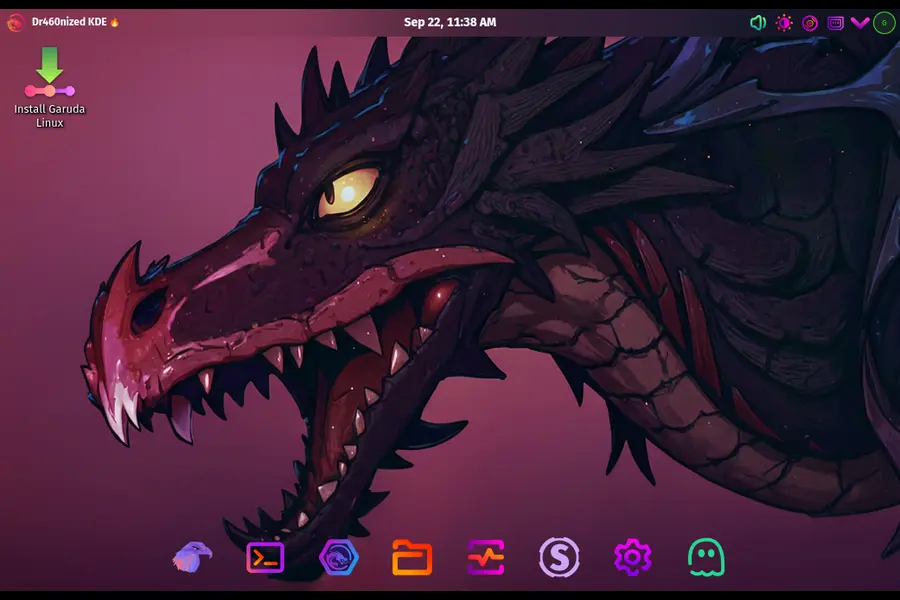
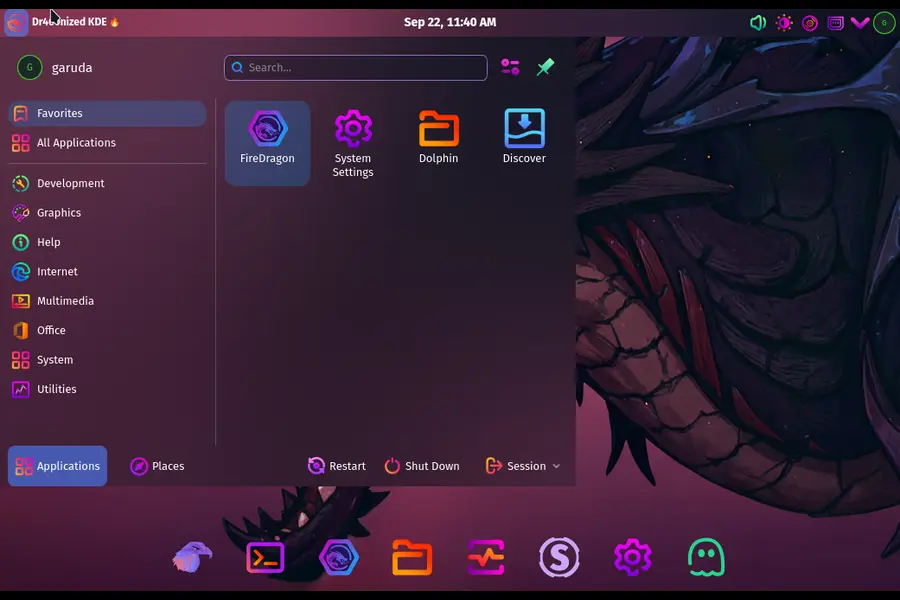
Garuda Nix is, in the simplest terms, NixOS dressed in Garuda’s clothes. It takes the exact same configuration files, panel layouts, and visual tweaks that ship on Garuda’s Arch-based ISOs and reimplements them as NixOS modules. The result is a system that looks and feels like Garuda — down to the desktop theming — but runs on Nix’s package manager and declarative configuration model underneath instead of pacman and the AUR.
According to the official release notes, two Garuda editions are available at launch:
- Dr460nized — Garuda’s flagship neon-and-chaos KDE Plasma edition
- Mokka — the newer, pastel Catppuccin-themed KDE Plasma edition that’s become genuinely popular since it launched
Here’s the twist that trips people up at first: because NixOS installs are always net installs (the system pulls packages during setup rather than shipping them pre-baked on the ISO), either installer can actually put down either edition. Download the Mokka ISO, and you can still choose Dr460nized during setup, and vice versa. The ISO you grab just determines your starting point, not your final destination.
Why “Public Testing” Is the Right Way to Describe This
One clarification up front, because accuracy matters more than a catchy headline: Garuda’s own announcement is titled simply “Garuda Nix released,” not “public beta” or “testing program.” Nobody on the team formally labeled this a testing phase. That said, the mechanics of the release make “public testing” a fair and useful description for anyone deciding whether to install it. Daily ISO builds are generated by CI and published on Garuda’s build server rather than a handful of stable, versioned releases. That’s a testing cadence, not a “download once and forget it” release cadence. If you’re the kind of person who wants a rock-solid daily driver on day one, this probably isn’t it yet. If you’re the kind of person who enjoys being an early set of eyes on something new — filing bug reports, poking at edge cases, telling the devs what breaks — this is exactly the invitation it looks like.
The developer’s own words in the announcement capture the spirit well: NixOS “might not be for everyone, but if it is, there is no going back.” That’s a fair warning wrapped in genuine enthusiasm, and it sets expectations correctly. This is a project built by someone who clearly uses Nix daily (Garuda’s own infrastructure reportedly runs on the same impermanence setup Garuda Nix offers testers), not a marketing exercise bolted onto an existing distro for headlines.
Two Ways to Install: Calamares vs. the CLI Tool
Garuda Nix ships with two separate installation paths, and picking the right one matters more than it might seem.
The Calamares Graphical Installer
If you’ve installed any Garuda edition before, this will feel familiar. It’s the same graphical installer Garuda uses for its Arch-based ISOs, adapted to write a NixOS configuration instead of an Arch one. The options here are intentionally kept simple — partitioning, locale, user account, desktop edition choice — because, as the developers put it, extending every NixOS-specific option into Calamares’s UI would have been more pain than it’s worth. This is the path for people who want a familiar, guided setup and are comfortable editing their /etc/nixos configuration by hand afterward.
The install-garuda-nix CLI Tool
This is where things get genuinely interesting, and it’s arguably the more important of the two paths for anyone doing serious testing. The CLI offers extra configuration options that didn’t make sense to bolt onto a graphical wizard, and its headline feature is a streamlined setup for Impermanence.
Impermanence, in NixOS terms, is a module that wipes non-persisted data on every reboot. Instead of your root filesystem slowly accumulating cruft, cache files, and half-finished experiments over months of use, the system resets to a known-clean state each time it boots. Two implementations are available depending on your filesystem choice:
- BTRFS rollback — the root subvolume gets rolled back to a clean snapshot on boot
- tmpfs root — on ext4 systems,
/itself lives in RAM and simply disappears at shutdown
Both approaches trace back to a concept popularized in Graham Christensen’s well-known “Erase your darlings” writeup on immutable infrastructure, and it’s a technique DevOps engineers have used in production servers for years. Bringing it to a desktop distro aimed at testers and enthusiasts is a fairly bold, if logical, move.
The Impermanence Trade-Off You Need to Understand
Before you get excited and enable this on your daily machine, there’s a genuine catch the Garuda team is upfront about: you have to explicitly opt in to persisting anything outside the defaults.
Out of the box, Garuda Nix keeps the essentials — things like your saved Wi-Fi passwords and your user’s .config directory — safe across reboots. Everything else follows an “erase by default” philosophy unless you declare it should survive. That means:
- Downloads folders, unless declared, vanish on reboot
- Application data stored outside
.config(some games, some browsers’ cache/profile data, certain Steam library metadata) needs to be explicitly listed - Anything you install or configure outside the Nix config files themselves won’t persist unless you tell the system to keep it
This is a feature, not a bug, for the intended use case — a genuinely disposable, always-clean testing environment where you can break things without consequence and reboot into a pristine state. But it is absolutely not the default behavior most desktop Linux users expect, and installing it without reading the Nix wiki’s impermanence documentation first is a good way to lose data you assumed was safe. If you’re testing this, treat every reboot as a hard reset until you’ve explicitly configured otherwise.
What’s Under the Hood: Chaotic Nyx and Garuda’s Module Presets
A big part of what makes Garuda Nix feel like Garuda, rather than vanilla NixOS with a new wallpaper, comes down to two things baked in from the start.
Chaotic Nyx is included out of the box. If you’ve used Garuda’s Arch editions, you already know Chaotic-AUR — the pre-built binary package repository that saves you from compiling half the AUR from source. Chaotic Nyx is its Nix-flavored counterpart, giving Garuda Nix testers access to a similar breadth of pre-built packages without the usual Nix build-from-source wait times for less mainstream software.
On top of that, the release ships a sane flake configuration dropped straight into /etc/nixos, plus a set of garuda-* module settings that mirror the opinionated presets Garuda applies on its Arch-based systems — sensible defaults for things like fonts, shell tooling, and desktop behavior that Garuda users have come to expect without configuring from scratch.
Garuda Nix vs. Vanilla NixOS vs. Garuda’s Arch Editions
A table makes the practical differences much easier to digest than paragraphs of comparison, so here’s how the three options actually stack up for someone deciding where to spend their testing time.
| Aspect | Garuda Nix | Vanilla NixOS | Garuda (Arch-based editions) |
|---|---|---|---|
| Package manager | Nix | Nix | Pacman + Chaotic-AUR/AUR |
| Configuration model | Declarative (Nix modules), Garuda presets included | Declarative (Nix modules), blank slate | Imperative, GUI + CLI tools |
| Pre-built binary cache | Chaotic Nyx included by default | Official NixOS cache only (unless self-configured) | Chaotic-AUR included by default |
| Desktop theming out of the box | Garuda Dr460nized or Mokka look, ported | None — you build it yourself | Garuda Dr460nized or Mokka look, native |
| Impermanence setup | One CLI flag away, BTRFS or tmpfs | Manual, requires third-party modules and config | Not applicable (mutable by design) |
| Rollback mechanism | Nix generations + optional BTRFS snapshots | Nix generations | BTRFS snapshots via Timeshift/Snapper |
| Installer | Calamares (guided) or install-garuda-nix CLI (advanced) | Manual partitioning + hand-written config, or NixOS’s own graphical installer | Calamares |
| Release cadence | Daily CI-built testing ISOs | Stable + unstable channels | Regular tagged releases (e.g. “Temeraire”) |
| Best for | Testers who want Garuda’s UX on Nix’s model | Users who want a from-scratch, minimal Nix setup | Daily-driver Arch users, gamers |
| Learning curve | Moderate — Garuda smooths the Nix on-ramp | Steep — you’re on your own | Low to moderate — familiar package tooling |
The honest takeaway here: Garuda Nix isn’t trying to replace vanilla NixOS for Nix purists who enjoy building their configuration from a blank configuration.nix. It’s aimed at Garuda’s existing audience — people who already like the distro’s look, presets, and gaming-friendly defaults — and want a low-friction path into declarative, reproducible configuration without abandoning everything familiar at once.
A quick note on sourcing: everything below is drawn directly from the official announcement thread on the Garuda Linux Forum, the linked documentation it references, and Garuda’s own build infrastructure — not from personal installation logs. If you install a daily build, expect the day-to-day specifics to shift as the project moves fast; check the forum thread for the latest before you rely on any one detail here.
Getting Started: A Practical Walkthrough
Here’s the realistic path based on what the Garuda team itself recommends to newcomers, in the order they suggest tackling it.
- Grab the right ISO. Daily builds for both editions are published on Garuda’s build server. Remember, the edition on the ISO isn’t locked in — you can switch during installation.
- Decide between Calamares and the CLI early. If you just want to see what NixOS-flavored Garuda looks like, Calamares gets you there fastest. If you specifically want to test impermanence, go straight for
install-garuda-nix. - Read the impermanence documentation before you enable it. The NixOS wiki’s impermanence page and Graham Christensen’s original writeup are both referenced directly by the Garuda team for good reason — skipping this step is how people lose files they didn’t realize weren’t persisted.
- Bookmark the reference material. Garuda maintains its own module options reference specifically for Garuda Nix, and the standard NixOS options and package search tools remain the fastest way to answer “how do I install X” or “how do I enable service Y” once you’re editing your flake.
- Start small. Don’t reconfigure your entire workflow on day one. Get comfortable rebuilding your system from the flake, understand what breaks on reboot under impermanence, and expand from there.
For anyone brand new to Nix’s declarative philosophy, working through a beginner-friendly guide like the community-maintained “NixOS & Flakes” book before diving into Garuda’s module presets will save a lot of head-scratching. Nix’s syntax and mental model are genuinely different from anything pacman-based, and that learning curve doesn’t disappear just because the desktop theme looks familiar.
Pros and Cons: Should You Actually Install It?
Reasons to try Garuda Nix right now:
- You already like Garuda’s Dr460nized or Mokka aesthetic and want that experience with reproducible, version-controlled configuration
- You’re curious about NixOS but intimidated by starting from a completely blank configuration
- You want a genuinely disposable testing environment for experimenting with software, distro-hopping-style, without commitment
- You’re interested in impermanence and want a guided on-ramp instead of hand-rolling BTRFS snapshot scripts yourself
- You enjoy being part of early testing and reporting bugs before a project matures
Reasons to hold off for now:
- Daily CI builds mean you should expect rough edges, not a polished stable release
- The default erase-on-reboot behavior can catch you off guard if you don’t read the persistence documentation first
- The Calamares installer intentionally limits options — if you want fine-grained control, you’ll need the CLI and comfort editing Nix configs directly
- If you’ve never touched Nix before, the underlying language and module system still has a real learning curve that Garuda’s presets soften but don’t eliminate
- It’s genuinely new — as of this announcement, the community testing base is still small, so documentation gaps and edge cases are more likely than with Garuda’s long-established Arch editions
How This Fits Into Garuda’s Bigger Picture
It’s worth zooming out for a second. Garuda has never been a distro that sits still — recent releases like “Broadwing” introduced the Mokka edition and consolidated multiple utility apps into a single Rani tool, and the more recent “Temeraire” build moved the default kernel away from linux-zen toward a CachyOS-derived linux-garuda kernel, alongside a unified Garuda Toolbox for system administration. Opening NixOS up to public testing fits that same pattern: take something powerful but historically niche or intimidating, and wrap it in Garuda’s opinionated, tester-friendly presentation.
The announcement thread is still small at this stage — this is a fresh release, not a years-old project with a sprawling comment history — but the early replies are telling. A forum moderator who helped test the ISO builds chimed in with a lighthearted Dr460nized-versus-Mokka preference debate, while dr460nf1r3 followed up recommending Catppuccin’s userstyle ecosystem for anyone wanting to theme their setup further. Small as it is, that mix of aesthetic banter and genuine technical follow-up is a reasonable early signal for a testing-phase project — worth watching as more testers install it and report back over the coming weeks.
Frequently Asked Questions
Is Garuda Nix a replacement for Garuda’s Arch-based editions?
No — it’s a separate, parallel project built for people who want NixOS’s declarative model with Garuda’s look and presets, not a replacement for the pacman-based Dr460nized, Mokka, or other Garuda editions.
Can I install Dr460nized from the Mokka ISO or vice versa?
Yes. Since NixOS installs are net installs, both the Mokka and Dr460nized ISOs can install either edition; the ISO you download just determines the starting installer environment.
Will my files disappear every time I reboot?
Only if you enable impermanence and haven’t explicitly configured persistence for that data — Wi-Fi credentials and your user’s .config folder persist by default, but most other directories need to be declared.
Does Garuda Nix include a package repository like Chaotic-AUR?
Yes, it ships with Chaotic Nyx, the Nix-based counterpart to Chaotic-AUR, giving you access to pre-built binary packages out of the box.
Where do I download the daily test builds?
Daily CI-built ISOs for both editions are published on Garuda’s official build server and linked directly from the announcement thread on the Garuda Linux Forum.
Final Thoughts
However you slice it, the moment Garuda Linux opens NixOS public testing to its community is a genuinely notable milestone for a distro that’s spent years perfecting the Arch-based, pacman-driven experience. It’s not a finished product, and the team isn’t pretending otherwise — daily CI builds, an installer with intentionally limited GUI options, and an erase-by-default philosophy all signal a project that’s still finding its footing. But for anyone who’s been NixOS-curious without wanting to start from a blank configuration file, or who’s simply been waiting for a lower-friction way into declarative Linux, this is a legitimately exciting on-ramp. Grab a daily ISO, read the impermanence docs before you touch anything important, and go see what the fuss is about — just don’t say nobody warned you there’s no going back once it clicks.
Disclaimer: This post is based on Garuda Linux’s official forum announcement and publicly available documentation as of September 2026. Garuda Nix is an actively evolving, testing-phase project — features, defaults, and installation steps may change without notice. Always check the official Garuda Linux Forum for the latest updates before installing, and back up any important data before trying daily test builds.