This Archman Linux review looks at an independent, Turkey-based Arch Linux derivative that ships a preconfigured Xfce desktop instead of asking you to assemble one yourself. It’s a rolling-release distribution built on Pacman and the standard Arch repositories, with its own installer defaults, theming, and a few Archman-specific tools layered on top. If you like the idea of Arch’s package ecosystem but don’t want to build a system from a bare terminal, Archman is one of several distros designed to close that gap.
Quick answer: Archman is a small, community-run project that’s been releasing Xfce-focused ISOs since 2017. Its newest stable build, Archman Xfce Edition 2026-03 (“Freedom”), is still the current official release as of September 2026 — no newer stable ISO has followed it. It’s a reasonable pick if you want an easier on-ramp into the Arch ecosystem, but it’s a much smaller project than Manjaro or EndeavourOS, with a correspondingly smaller support footprint.
What Is Archman Linux?
Archman takes its name from a mashup of “Arch” and “Pacman.” According to its official About page, it’s developed by a community rooted in Turkey with what the project describes as global ambitions, built on Arch Linux but explicitly independent of it — Archman states plainly that it is not affiliated with or endorsed by the Arch Linux project.
Where vanilla Arch hands you a minimal base and expects you to build the rest, Archman does the opposite: a ready-to-boot Xfce desktop with a curated app set, a graphical installer, and Archman’s own visual identity layered onto the Arch package pool. It’s a rolling release, so packages update continuously through Pacman rather than through periodic version bumps. Xfce is the flagship edition; Archman’s documentation also lists KDE Plasma and MATE as alternate editions, though — as covered below — Xfce is clearly the one getting consistent releases.
The project’s long-standing lead maintainer is publicly known by the handle “tulliana” (credited elsewhere as Demiray Muhterem). Development is tracked on GitLab, and Archman runs its own forum plus Telegram, X, Facebook, and Instagram channels.
Archman Linux in 2026: What’s New?
The newest official stable ISO is Archman Xfce Edition 2026-03, codenamed “Freedom,” dated mid-March 2026 in Archman’s release announcement. As of September 2026, it remains the current stable download — Archman’s release archive shows nothing newer between March and September.
That distinction matters because Archman is a rolling release: the 2026-03 ISO is a snapshot of packages as they stood in March, and anyone who installs it and runs routine pacman -Syu updates will end up considerably more current than the ISO itself implies. Don’t confuse “latest ISO” with “latest packages.”
According to DistroWatch’s package tracking for that build, it shipped with Linux kernel 6.19.8, Firefox 148.0.2, LibreOffice 25.8.5, GIMP 3.0.8, Python 3.14.3, GCC 15.2.1, and systemd 259.5 — again, versions on the March ISO specifically, not what a rolling install looks like today.
A few things worth noting from Archman’s own 2026-03 release notes:
- The ISO switched to Zstandard (.zstd) compression. Archman states this produces faster live-session boots and shorter installs, specifically claiming typical install times under 2 minutes on SSDs and under 5 minutes on hard drives. That’s Archman’s own figure, not an independently benchmarked result.
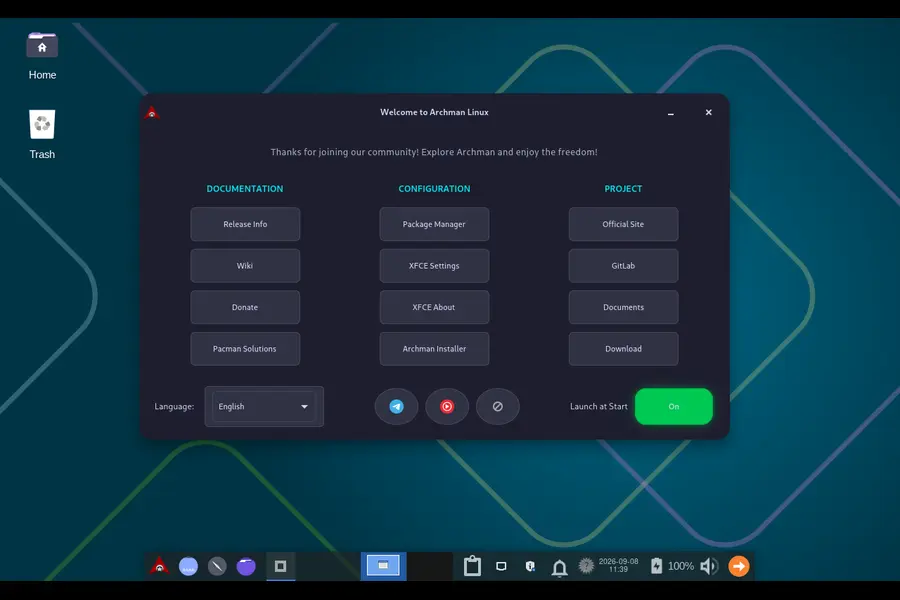
- The release introduced an “Archman Welcome” first-boot app linking to Xfce settings, the Calamares installer, the Pamac package manager, Archman’s site, forums, and docs, with a language picker for international users.
- The release notes also mention Turkish cultural references worked into some bundled example files and system sounds, which the project frames as representing its origins within an otherwise internationally-oriented distro.
- The notes reference NVIDIA’s 590-series driver dropping support for older Pascal-generation cards as packages shift toward NVIDIA’s open kernel modules — an upstream change rather than something Archman-specific, but relevant if you’re on older NVIDIA hardware.
Desktop Experience and Package Management
The flagship experience is Xfce, themed with Archman’s own icon set, wallpaper, and panel layout. Historically, Archman’s Xfce builds have favored a bottom panel with auto-hide behavior to maximize screen space — a design choice a 2019 TechNewsWorld/LinuxInsider review by Jack Germain specifically called out. Recent editions bundle a fairly standard open-source app set (Firefox, LibreOffice, GIMP, Xfce’s own utilities), plus the new Welcome app as of 2026-03.
Beyond Xfce, Archman’s documentation lists KDE Plasma and MATE as alternate editions, but independent tracking paints a mixed picture: DistroWatch currently tracks only Xfce and i3 as active desktop categories for Archman, and a recent SourceForge user comment on the project’s download page specifically noted the absence of a recent KDE build. If a non-Xfce edition matters to you, check Archman’s download page directly rather than assuming it’s as current as Xfce.
For packages, Archman uses Pacman against the standard Arch repositories (plus multilib), supplemented by its own smaller add-on repo, which Archman’s materials describe as intentionally kept lean rather than expansive. Pamac provides a graphical front end and optional AUR access. The AUR itself isn’t an Archman product — it’s Arch’s community repository, inherited the same way any Arch-based distro inherits it, complete with the usual caveat that AUR packages are user-submitted and not vetted the way official repo packages are.
Installing Archman Linux
Archman uses Calamares, the same graphical installer used by EndeavourOS and several other independent distros. The flow is standard: boot the live ISO, launch the installer, pick language and keyboard layout, configure partitioning (guided or manual), create a user account, and reboot. Archman’s release documentation recommends writing the ISO to USB with tools like Suse ImageWriter, Etcher, or Rufus in “dd” mode, or via the dd command directly. Archman publishes checksums alongside its ISOs, and verifying them before installing is good practice for any distro.
We haven’t independently tested this installer ourselves, so we can’t verify install-time specifics like partitioning screens or driver detection on particular hardware. For dual-boot, disk encryption, or Secure Boot questions, check Archman’s current documentation and forum directly, since those details can shift between releases.
Archman Linux System Requirements
Archman does not currently publish a defined minimum hardware specification on its official site. Third-party install guides list their own suggested figures, but these aren’t official Archman numbers, so we won’t repeat them as fact. What can be said with confidence: Xfce is broadly a lighter desktop environment than GNOME or KDE Plasma, which is one reason Archman leads with it. If exact minimums matter for your hardware, test the live ISO before committing.
Archman Linux vs Arch Linux
| Aspect | Archman Linux | Arch Linux |
|---|---|---|
| Installation | Calamares graphical installer | Manual setup, or the archinstall script |
| Desktop | Xfce preconfigured (KDE Plasma, MATE as alt editions) | None included — you choose everything |
| Package management | Pacman, Arch repos + Archman’s small add-on repo | Pacman, official Arch repos only |
| Release model | Rolling | Rolling |
| Customization | Pre-themed and configured | Blank slate, full control from boot |
| Default software | Firefox, LibreOffice, GIMP, Xfce utilities included | Minimal base, nothing extra |
| Learning curve | Lower entry point | Steep; assumes CLI comfort |
| AUR access | Via Pamac, same as any Arch-based system | Via a separately installed AUR helper |
| Maintenance | Archman’s layer plus standard Arch upkeep | Pure Arch upkeep, no distro layer |
Archman isn’t “better” than Arch in any absolute sense — it’s a different starting point. Arch gives complete control and nothing you didn’t ask for; Archman trades some of that minimalism for a working desktop out of the gate on the same package base.
Archman Linux vs Manjaro
| Aspect | Archman Linux | Manjaro |
|---|---|---|
| Base | Arch Linux | Arch Linux |
| Release model | Rolling, tracks Arch’s repos directly | Rolling, but staged through Manjaro’s own testing branches first |
| Desktop editions | Xfce actively maintained; KDE Plasma/MATE update less consistently | Plasma, Xfce, and GNOME officially maintained on separate cycles |
| Package management | Pacman + Pamac, direct Arch repos plus a small Archman repo | Pacman + Pamac, Manjaro’s own delayed repos plus AUR support |
| Team/backing | Small community team, GitLab-hosted | Backed by Manjaro GmbH & Co. KG |
| Documentation | Relies substantially on ArchWiki | Own wiki plus ArchWiki reliance |
| Community size | Smaller, niche | Larger, more third-party coverage |
The difference comes down to scale and philosophy. Manjaro deliberately holds packages back briefly to test for breakage, with a much larger team behind it. Archman stays closer to Arch’s own repos in something closer to real time, maintained by a much smaller team.
What Makes Archman Different?
- A tightly scoped Xfce focus — rather than spreading effort across many editions, Archman’s most consistently updated release is Xfce specifically.
- A deliberately small custom repo — most software choices are left to standard Arch and the AUR rather than a large distro-specific stack.
- The Archman Welcome app — a genuinely distro-specific addition introduced in 2026-03 that centralizes settings, installer, package manager, and support links.
- Turkish-origin identity with an international target audience — recent releases lean into region-specific artwork and sound choices while marketing globally.
- Zstandard-compressed ISOs — a concrete, verifiable technical choice, though the specific speed figures in Archman’s notes are the project’s own claims, not independently measured.
Pros and Cons
Pros
- Full access to the Arch package ecosystem and AUR without a from-scratch install
- Rolling release with continuous updates rather than periodic jumps
- Calamares installer is more approachable than Arch’s manual setup
- Xfce edition receives regular, fairly consistent stable releases
- Small, deliberately minimal add-on repo avoids distro-specific bloat
Cons
- Much smaller project and community than Manjaro, EndeavourOS, or Arch itself
- KDE Plasma and MATE editions appear to update less consistently than Xfce
- Limited official documentation compared with Manjaro’s wiki or the ArchWiki
- No current, published minimum hardware specification from Archman itself
- Still requires rolling-release maintenance know-how — Archman softens setup, not upkeep
Who Should (and Shouldn’t) Use Archman Linux?
Archman suits people who want Arch’s package ecosystem and rolling-release model without a manual install, particularly Xfce users, since that’s where Archman puts most of its release effort. It also works as a lightweight second system for experienced Linux users curious about an Arch-based setup with less setup overhead.
It’s a poor fit if you want a fixed-release distro with predictable, tested update cycles (the Ubuntu/Mint model) — packaging doesn’t change that underlying rolling-release reality. The same goes if KDE Plasma or another non-Xfce desktop is your priority, or if you want the largest possible support ecosystem and documentation base, where Manjaro or EndeavourOS currently offer more.
Is Archman Linux Good for Beginners?
Archman makes getting onto an Arch-based system considerably easier than installing Arch manually — the Calamares installer, preconfigured desktop, and Welcome app all lower the initial barrier. But “beginner-friendly compared with Arch” isn’t the same as “beginner-proof.” You’re still on a rolling-release system built on Arch’s package base, where updates can occasionally need manual intervention, and troubleshooting benefits from terminal comfort and the ArchWiki. First-time Linux users will generally find a gentler start with a fixed-release, mainstream-supported distro; if you specifically want to learn the Arch ecosystem without a full manual install, Archman is a reasonable stepping stone.
Is Archman Linux Worth Using in 2026?
Archman remains active — its 2026-03 stable release, ongoing DistroWatch tracking, and forum activity all point to a maintained project, not an abandoned one. It’s also small: DistroWatch’s page-hit data puts it well outside the top tier of Arch-based distros by traffic, and its documentation and third-party coverage are noticeably thinner than Manjaro’s or EndeavourOS’s.
That combination makes Archman worth trying if you want its specific mix of a curated Xfce desktop, a lean add-on repo, and closer-to-upstream Arch tracking than Manjaro’s staged model provides — and if you’re comfortable troubleshooting with community resources over extensive official docs. It’s a harder call if you want the broadest safety net, official support beyond Xfce, or a large user base behind every edge case. For most people moving from Ubuntu or Mint who want an easier way into Arch, Archman is worth a look — one solid option among several rather than an obvious default.
Frequently Asked Questions
What is Archman Linux?
An independent, Turkey-based Linux distribution derived from Arch Linux, shipping a preconfigured desktop — primarily Xfce — with the Calamares installer on top of the standard Arch ecosystem.
Is Archman Linux based on Arch Linux?
Yes, using Arch’s repositories and Pacman, but developed independently and not affiliated with or endorsed by the Arch Linux project.
Is Archman Linux rolling release?
Yes. Its periodic ISOs, like the 2026-03 build, are installation snapshots, not fixed OS versions — packages update continuously via Pacman.
Is Archman Linux good for beginners?
More approachable than installing Arch manually, but it still involves rolling-release maintenance and benefits from basic Linux familiarity.
What desktop does Archman Linux use?
Xfce is the primary, most actively maintained edition. KDE Plasma and MATE exist as alternate editions but appear to update less frequently.
Is Archman Linux still active in 2026?
Yes — its 2026-03 stable release remains current as of September 2026, and the project maintains active forum and social presence.
Where can I download Archman Linux?
Through Archman’s official download page at archman.org, with mirrors also on SourceForge.
More Linux Reviews & Guides
PorteuX 2.8 Review
Explore PorteuX 2.8, its new aufs-ng filesystem, Xfce improvements, desktop editions, and portable Linux features.
Read the PorteuX 2.8 review → TR LinuxTechRefreshing Linux 1.0
Discover TR Linux 1.0, a beginner-friendly Debian 13 distribution built with KDE Plasma 6 for everyday desktop users.
Explore TR Linux 1.0 → Linux ReviewGaruda Linux Temeraire Review
See what’s new in Garuda Linux Temeraire and how its performance, desktop experience, and features compare.
Read the Garuda Linux review →