Hey there, tech enthusiasts! If you’re ready to break free from the Windows or macOS routine and dive into Linux, you’ve likely come across Zorin OS vs Elementary OS in your search for a beginner-friendly distro. Both are designed to make your transition to Linux as smooth as butter, but which one truly delivers the polished, hassle-free experience you’re after?
In this detailed blog post, we’ll compare Zorin OS 17.3 (with insights from the 18 Beta) and Elementary OS 8.0.2 Circe, using the latest official data as of October 2025. We’ll cover their interfaces, performance, customization, and more to help you decide which offers the smoother ride. Whether you’re a Linux newbie or a seasoned user looking for a refined desktop, let’s break it down in a friendly, conversational way—like we’re geeking out over a coffee. Ready? Let’s go!
What Does a “Smooth” Linux Experience Mean?
A “smooth” OS experience means intuitive navigation, snappy performance (even on older hardware), minimal bugs, easy access to apps, and that “it just works” vibe. Both Zorin OS and Elementary OS aim for this by building on Ubuntu’s stable foundation, ensuring wide hardware compatibility and regular updates. They cater to users switching from Windows or macOS with familiar interfaces but differ in approach: Zorin emphasizes flexibility and Windows-like ease, while Elementary focuses on macOS-inspired elegance and privacy.
Recent discussions on Reddit and X highlight what users value in smoothness. A 2025 Reddit thread praises Zorin OS for reviving old PCs, while X posts applaud Elementary OS for its distraction-free design. Let’s dive into each distro to see how they stack up.
Overview of Zorin OS: The Windows-Friendly Powerhouse
Zorin OS, crafted by the Ireland-based Zorin team since 2009, is designed to make Linux feel like home for Windows users. As of October 2025, the stable version is Zorin OS 17.3 (released March 2025), with the Zorin OS 18 Beta (September 2025) offering a sneak peek at what’s next. Built on Ubuntu 24.04 LTS, it guarantees long-term support with security updates until at least June 2027.
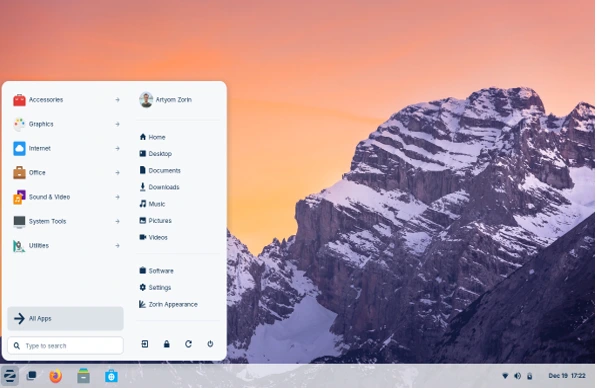
Zorin OS is all about speed and accessibility. Its official site highlights performance that doesn’t degrade over time, unlike Windows, and it can breathe new life into PCs up to 15 years old with just 2GB RAM (4GB recommended for optimal smoothness). The Zorin Appearance app lets you tweak the desktop to mimic Windows 11, macOS, or classic Linux layouts. Features like Zorin Connect sync your Android phone for seamless file sharing and remote control, while built-in Wine and Bottles (updated to Wine 9.0) support running Windows apps natively—perfect for gamers or professionals needing .exe files.
The 18 Beta introduces advanced window tiling, a refreshed rounded design, OneDrive integration, and new theme colors, promising even snappier multitasking. User testimonials on the Zorin blog and forums emphasize its “no learning curve” approach. Forbes calls it “clean and polished,” and ZDNET says it’s “exactly what a desktop OS should be.” Real-world examples, like the City of Vicenza, Italy, extending PC life by 30-40% using Zorin, showcase its smooth performance on aging hardware.
Overview of Elementary OS: The Elegant macOS Alternative
Elementary OS positions itself as a “thoughtful, capable, and ethical” alternative to macOS and Windows. Launched in 2011, it’s also based on Ubuntu 24.04 LTS, with the latest release being Elementary OS 8.0.2 Circe (October 2025), building on version 8’s November 2024 debut. It focuses on privacy, productivity, and a sleek, macOS-like aesthetic.
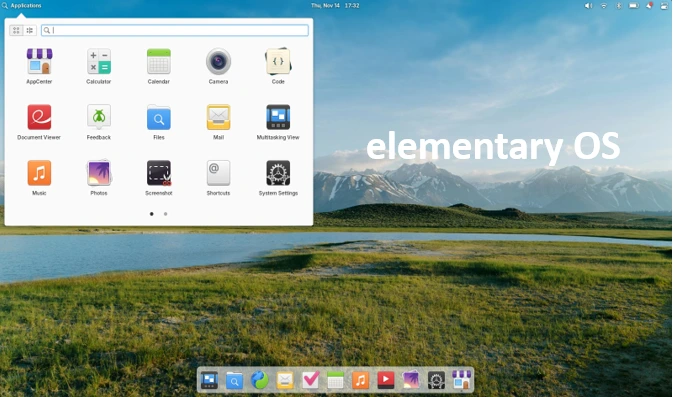
According to elementary.io, key features include a revamped Dock for multitasking, Picture-in-Picture mode, and Do Not Disturb for focused work. The Secure Session, powered by Wayland, ensures apps request permissions explicitly, prioritizing privacy. The AppCenter curates free and paid apps, all vetted for security, and housekeeping tools auto-clear temp files for consistent performance. System requirements are modest: a 3.3GB download, 64-bit processor, 4GB RAM, and 15GB storage.
Elementary OS is praised for its “beautiful, user-friendly desktop” (ZDNET) and “solid Linux distro” status (LinuxInsider). Updates in 8.0.2, like improved Files app navigation and new Portals (Screenshot, Wallpaper), enhance fluidity. Its pay-what-you-can model funds development without ads, and features like screen time limits and microphone indicators cater to inclusivity. Users on X love its “get out of the way” philosophy, making it feel premium and distraction-free.
User Interface and Design: Flexibility vs Refinement
When comparing Zorin OS vs Elementary OS for UI smoothness, it’s adaptability versus curated elegance.
Zorin OS uses a GNOME-based desktop (with XFCE in Lite editions) that’s highly customizable. The Zorin Appearance tool lets you switch layouts—Windows-style taskbar, macOS-like dock, or Linux vibes—in seconds. The 18 Beta adds a floating panel and reactive workspace indicators for modern navigation. Vibrant themes and accessibility options (magnifiers, screen readers) make it intuitive. Users on forums say they “enjoy every click” due to its polished, no-fuss design.
Elementary OS’s Pantheon desktop is a love letter to macOS: a clean Dock, multitasking view, and keyboard-driven workflows. The 8.0.2 update refines this with opaque Dock styles and better notifications. It’s less customizable—no quick layout swaps—but feels premium with features like Tattle-Tale indicators for privacy. ZDNET’s Jack Wallen calls it a “beautiful desktop,” perfect for users who want elegance without tinkering.
Verdict: Zorin OS wins for Windows users needing flexibility; Elementary OS shines for macOS-like polish. If relearning interfaces bugs you, Zorin’s adaptability feels smoother.
Performance and System Requirements: Speed on a Budget
Smoothness hinges on performance, and both distros are lightweight but differ slightly.
Zorin OS is optimized for speed: apps launch fast, and it stays snappy over time. X users report 87% faster CPU and 75% faster memory ops than Windows on a Ryzen 7 with 32GB RAM. The 17.3 update improves kernel and driver support for NVIDIA/AMD GPUs, ideal for gaming or old hardware. The Lite edition targets even older PCs, extending their life.
Elementary OS boots quickly and uses resources efficiently, with a battery-friendly Web browser and auto-housekeeping to free storage. Linuxiac calls it “fast and low-maintenance,” though some users note it’s less snappy on very old hardware compared to Zorin’s Lite edition.
System Requirements:
- Zorin OS: 2GB RAM min (4GB rec), supports 15-year-old PCs, Ubuntu driver compatibility.
- Elementary OS: 4GB RAM rec, similar hardware support, Wayland for modern features.
YouTube comparisons (e.g., “Zorin OS vs Elementary OS 2025”) give Zorin the edge for raw speed, especially for gaming via Steam/Lutris, while Elementary excels in laptop battery life.
Customization and Flexibility: Tailor-Made vs Streamlined
Customization impacts smoothness by aligning the OS with your workflow.
Zorin OS is a customization champ: tweak themes, layouts, and extensions easily. The Pro edition ($39) adds premium apps and layouts. Windows App Support runs .exe files smoothly, and dual-boot keeps your old setup intact.
Elementary OS is more curated—gorgeous out of the box but less flexible. Custom shortcuts and extensions are possible, but it prioritizes a streamlined experience over deep tweaks.
Verdict: Zorin OS for personalization lovers; Elementary OS for those who want a polished, no-fuss setup.
Software Availability and Compatibility: Apps for All
Both leverage Ubuntu’s vast repo, plus Flatpak/Snap/AppImage support.
Zorin OS shines with Windows app compatibility via Wine/Bottles, running Office or games seamlessly. Its software store is intuitive, with updated pre-installed apps in 17.3.
Elementary OS’s AppCenter curates secure, privacy-focused apps with a pay-what-you-can model. It syncs online accounts effortlessly.
Verdict: Zorin for broad compatibility; Elementary for curated, secure apps. Both feel smooth here.
Community and Support: Help When You Need It
Zorin’s active forum and blog, plus a large user base (millions of downloads), mean ample resources. Community feedback, like switching to Brave in 17.3, shapes updates.
Elementary’s GitHub and blog foster open development, with early access for sponsors. Its smaller community is dedicated but less extensive.
Verdict: Zorin edges out for broader support; both are responsive.
Security and Privacy: Safe and Sound
Zorin OS offers robust Linux kernel security, quick patches, and no malware slowdowns.
Elementary OS’s Secure Session, Wayland, and strict app permissions make it a privacy standout, with no data collection.
Verdict: Both secure, but Elementary’s privacy focus gives it a slight edge.
Zorin OS vs Elementary OS: Which Is Smoother?
In the Zorin OS vs Elementary OS face-off, your choice depends on your priorities. Zorin OS takes the crown for overall smoothness, especially for Windows users, with its speed, customization, and old-hardware compatibility. The 18 Beta promises even more polish. Elementary OS excels for macOS fans craving a privacy-first, elegant experience.
Disclaimer
This comparison of Zorin OS vs Elementary OS is based on the latest official data and user feedback available as of October 2025. Experiences may vary depending on hardware, software configurations, and individual preferences. Always verify system requirements and test both operating systems to determine the best fit for your needs.
Faq about Zorin OS vs Elementary OS
Which is better for beginners: Zorin OS or Elementary OS?
If you’re new to Linux, both Zorin OS and Elementary OS are super beginner-friendly, but they cater to slightly different vibes. Zorin OS feels like a warm hug for Windows users—it’s got customizable layouts that mimic Windows 11, so you won’t feel lost. Plus, it runs smoothly on older PCs, and the software store is a breeze to navigate. Elementary OS, on the other hand, is like slipping into a sleek macOS-inspired setup. It’s gorgeous and intuitive but less flexible, so it’s great if you want a polished experience without much tinkering. For absolute ease, Zorin OS edges out slightly due to its familiar interface options.
Can I run Windows apps on Zorin OS or Elementary OS?
Yup, both can handle Windows apps, but Zorin OS takes the lead here. Zorin has built-in tools like Wine and Bottles (updated to Wine 9.0 in 2025) that make running .exe files—like Microsoft Office or games—pretty seamless. It’s a lifesaver for gamers or professionals. Elementary OS supports Wine too, but it’s not as emphasized, and you might need to do a bit more setup. If Windows app compatibility is key for a smooth workflow, go with Zorin OS.
How do Zorin OS and Elementary OS perform on older hardware?
Both distros are champs at reviving old laptops, but Zorin OS is the star for ancient hardware. It can run on PCs up to 15 years old with just 2GB of RAM (though 4GB is better for smoothness). Its Lite edition is especially snappy on low-spec machines. Elementary OS needs a bit more juice—4GB RAM is recommended—and while it’s lightweight, it’s not as optimized for super-old systems. If you’re breathing life into a dusty laptop, Zorin OS will likely feel smoother.
Is Elementary OS’s privacy focus worth choosing it over Zorin OS?
Elementary OS is a privacy rockstar, especially with its Secure Session and Wayland-based permissions in version 8.0.2 (October 2025). Apps have to ask for access to your data, which feels reassuring if you’re privacy-conscious. Zorin OS is secure too, with Linux’s robust kernel and quick updates, but it doesn’t emphasize privacy features as much. If you want a macOS-like experience with top-notch privacy for a distraction-free workflow, Elementary OS might be your smoother pick.
How easy is it to customize Zorin OS vs Elementary OS?
Zorin OS is like a playground for customization—you can tweak layouts, themes, and extensions with the Zorin Appearance app to match Windows, macOS, or Linux styles. It’s perfect if you love tailoring your desktop. Elementary OS, however, is more like a curated art gallery—stunning out of the box but with fewer customization options. You can add shortcuts or extensions, but it’s designed to stay sleek and simple. For a smooth, personalized experience, Zorin OS wins; for effortless elegance, Elementary OS shines.
Also Read
Ubuntu 25.10 “Questing Quokka” Review: A Bold Leap into Linux’s Future!