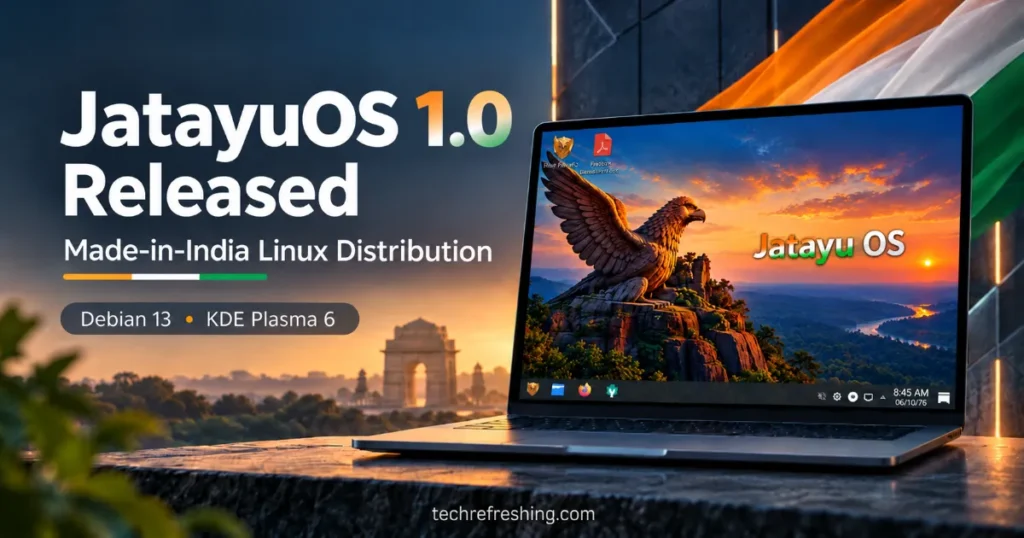
JatayuOS 1.0 Released: A new Linux distribution from India has officially arrived, bringing Debian 13 (Trixie), KDE Plasma 6, and a collection of custom-built applications to the desktop. Named JatayuOS 1.0 (Udaan), the operating system focuses on everyday computing, with particular attention to Indian users while remaining freely available worldwide.
The first official ISO became publicly available on October 11, 2026, through SourceForge. Developed and maintained by Anup Yadav, JatayuOS combines a familiar desktop interface with productivity software, India-inspired branding, and its own collection of utilities called Jatayu Tools.
Mozilla Firefox ESR, LibreOffice, the Dolphin file manager, and graphical software management are included. The distribution also supports offline installation, making it possible to set up a computer without an active internet connection once the installation USB is ready.
The release comes as a 2.37 GB ISO for 64-bit Intel and AMD computers, with a minimum requirement of 4 GB RAM.
India has a growing community of Linux enthusiasts, developers, and open-source contributors. JatayuOS adds another independently developed project to that landscape, taking established Linux technologies and shaping them into a desktop experience with its own identity.
Editorial Disclosure: JatayuOS is developed and maintained by Anup Yadav, founder and editor of TechRefreshing.com. This article is based on the project’s published release information and documentation.
What Is JatayuOS?
JatayuOS is a free and open-source Linux distribution designed for personal computing, education, productivity, and creative work.
Its first release is named Udaan, a Hindi word meaning flight. The operating system carries the tagline “Udaan Aapki. Shakti Bharat Ki.”, alongside its English identity, “India’s Own Digital Experience.”
The name Jatayu is inspired by the legendary bird from the Indian epic Ramayana, remembered for courage and sacrifice.
That Indian identity is visible throughout the project, from its wallpapers and branding to applications that provide convenient access to selected Indian online services.
However, JatayuOS is not limited to India. It is a general-purpose Linux desktop that anyone with compatible hardware can download and use.
The project does not attempt to replace Linux’s existing foundations. Instead, it builds on Debian and KDE Plasma, two well-established open-source technologies, while introducing its own applications and desktop configuration.
JatayuOS 1.0 Udaan: Specifications
Here are the main details of the first release.
| Specification | Details |
|---|---|
| Distribution | JatayuOS 1.0 (Udaan) |
| Public ISO release | October 11, 2026 |
| Developed in | India |
| Maintainer | Anup Yadav |
| Base distribution | Debian 13 (Trixie) |
| Desktop environment | KDE Plasma 6 |
| Linux kernel | Debian 6.12 LTS series |
| Architecture | AMD64 / x86-64 |
| Installer | Calamares |
| Default browser | Mozilla Firefox ESR |
| Office suite | LibreOffice |
| File manager | Dolphin |
| Package management | APT and Flatpak |
| Graphical software manager | Discover |
| Minimum RAM | 4 GB |
| Recommended RAM | 8 GB or more |
| Minimum storage | 25 GB |
| Recommended storage | 40 GB or more |
| ISO size | 2.37 GB (2.21 GiB) |
| Installation | Offline installation supported |
| Price | Free |
The first release supports 64-bit Intel and AMD systems. Users can explore JatayuOS from a live USB drive before installing it.
Debian 13 Trixie Provides the Foundation
JatayuOS is built directly on Debian 13 (Trixie), the stable Debian release introduced in August 2025.
Debian has been part of the Linux ecosystem for more than three decades. Its long-established package repositories, structured release process, and community development model have made it a popular foundation for other distributions.
For JatayuOS, using Debian means that many essential system components are already maintained by an experienced upstream community.
The distribution uses Debian’s Linux 6.12 LTS kernel series and APT package management system.
Users can access thousands of applications, including programming environments, educational tools, graphics editors, multimedia software, and productivity programs.
For example, someone who needs GIMP can install it through Debian’s repositories using:
sudo apt update
sudo apt install gimp
Terminal commands are optional for routine software installation, however. Discover provides a graphical interface for browsing and managing supported applications.
This combination makes JatayuOS recognizable to experienced Debian users while providing convenient graphical tools for newcomers.
KDE Plasma 6: A Familiar Desktop With Indian Branding
The desktop is where JatayuOS begins to look different from a standard Debian installation.
It uses KDE Plasma 6, offering an application launcher, taskbar-style panel, system tray, desktop shortcuts, and graphical settings.
The arrangement should feel familiar to anyone who has used a traditional Windows desktop.
Applications can be launched from the menu, frequently used programs can be pinned to the panel, and files can be organized through Dolphin.
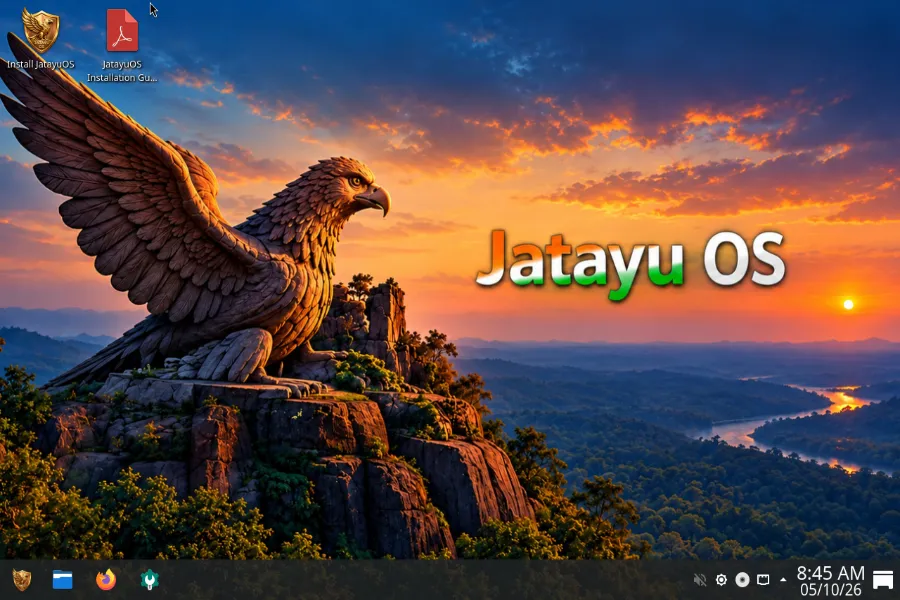
JatayuOS introduces its own wallpapers, launcher branding, and startup graphics. India-inspired colours feature prominently in its visual identity.
The customization extends beyond the wallpaper, with a branded boot presentation and dedicated welcome application.
At the same time, KDE Plasma’s flexibility remains intact. Users can change themes, reposition panels, configure shortcuts, and personalize window behaviour.
That balance is useful: the desktop has a recognizable appearance immediately after installation, but users are free to make it their own.
Jatayu Tools: What Makes JatayuOS Different?
Most Linux distributions share a considerable amount of software. Firefox, LibreOffice, and Dolphin are familiar applications across many desktop systems.
JatayuOS distinguishes itself through Jatayu Tools, a collection of utilities and applications organized around the operating system.
Aarambh: A Welcome Application
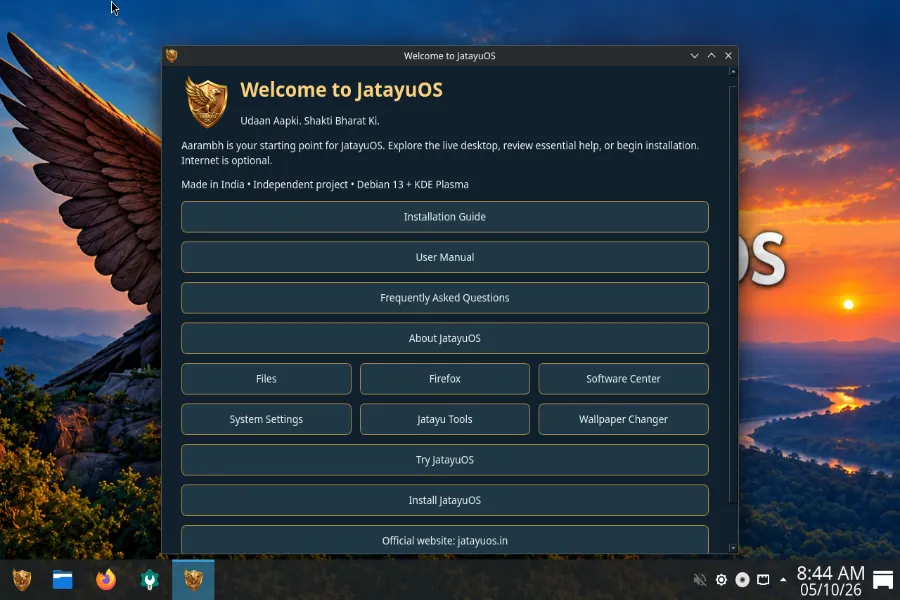
Aarambh is the project’s dedicated welcome application.
Its name means beginning, which is appropriate for an application intended to help users get started.
Aarambh provides introductory information, documentation links, useful shortcuts, and access to selected system-related functions.
This is particularly helpful for people installing Linux for the first time. Even with a familiar desktop layout, locating the right setting or documentation page can take some exploration.
Aarambh gives them a convenient starting point.
Jatayu Tools Creative Studio
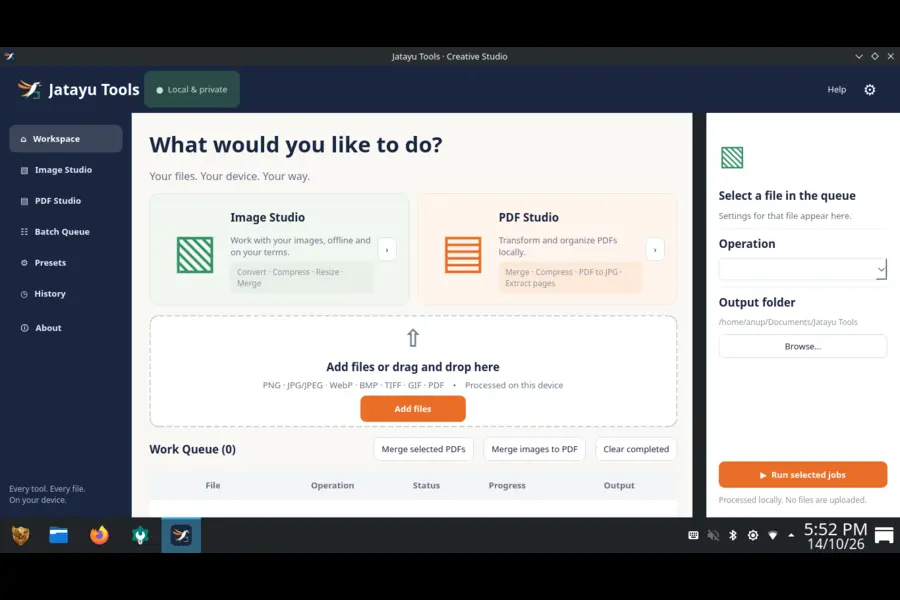
Creative Studio brings image and PDF-related utilities into the JatayuOS environment.
These are everyday tasks that arise when preparing documents, working with pictures, or handling personal files.
Rather than positioning Creative Studio as a replacement for professional editing software, the project includes it as a convenient addition to the desktop.
Advanced applications such as GIMP, Krita, and Inkscape remain available through supported software sources.
Jatayu Wallpaper Changer
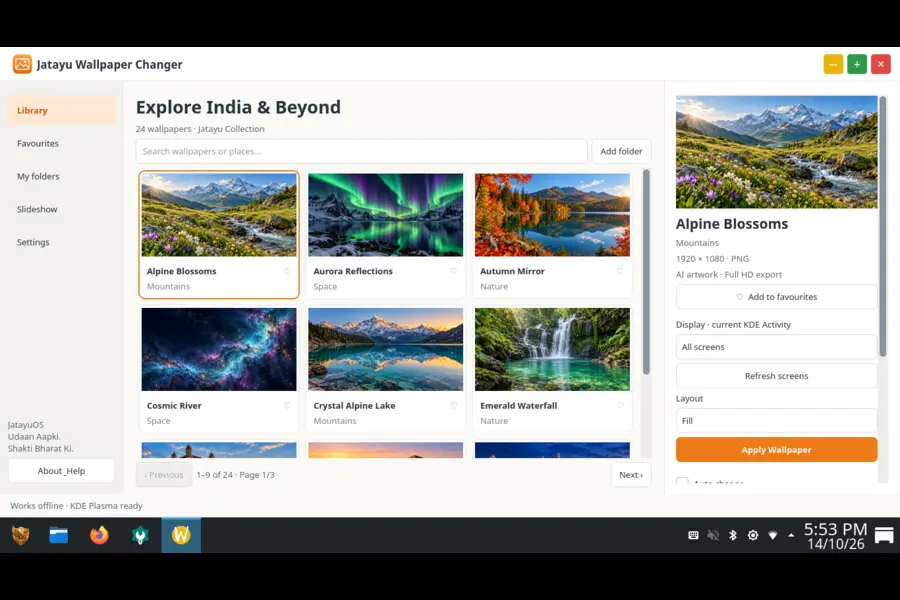
The distribution includes its own Wallpaper Changer application with a collection of bundled backgrounds.
Users can browse the included wallpapers and personalize their desktop without downloading additional images.
It is a relatively small addition, but one that reinforces the operating system’s visual identity.
Kavach, Sarkar Setu and Utsav
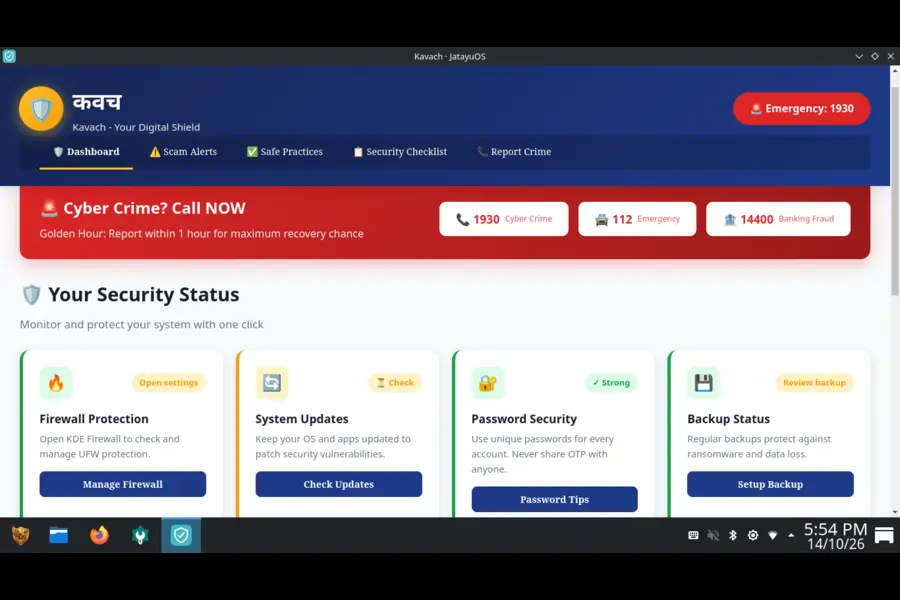
Kavach provides guidance and shortcuts for selected system functions, including firewall configuration, updates, and backup-related tools.
Sarkar Setu offers links to selected Indian online services. These are external services rather than government applications built into the operating system.
Utsav adds another India-oriented component to the JatayuOS application collection.
Together, these utilities illustrate the project’s focus on making Linux feel relevant to everyday computing needs, particularly in India.
JatayuOS is an independent project and is not affiliated with or endorsed by the Government of India.
Firefox, LibreOffice and Everyday Software Included
A desktop operating system is more convenient when essential applications are available from the beginning.
JatayuOS includes several established open-source programs.
- Mozilla Firefox ESR: Web browsing, online services, and research.
- LibreOffice: Documents, spreadsheets, and presentations.
- Dolphin: File management and browsing storage devices.
- Discover: Graphical software installation and updates.
- KDE System Settings: Desktop appearance, display, networking, and other configuration options.
LibreOffice is particularly useful for students and office users who regularly work with documents.
Writer handles text documents, Calc provides spreadsheet functionality, and Impress is used for presentations.
Firefox ESR offers a familiar browsing experience with Mozilla’s extended-support release approach.
For a student preparing a college assignment, these applications cover the essentials: researching a topic, writing the report, creating a presentation, and organizing the files.
Users can add more software through APT or Flatpak.
The combination of Debian repositories and Flatpak support provides access to a broad collection of desktop applications without requiring users to rely on a single software source.
Optional Android Support Through Waydroid
JatayuOS also offers an optional setup path for Waydroid, which can run an Android environment on compatible Linux systems.
Waydroid uses container technology rather than conventional full-system emulation.
It may interest users who want to explore Android applications alongside their desktop Linux software.
The feature requires additional setup, including Android image downloads. Compatibility depends on the computer’s hardware, kernel capabilities, and graphical session.
Google Play services are not included by default.
This makes Waydroid an optional feature to explore rather than a fully configured Android environment immediately available after installation.
JatayuOS vs Debian, Ubuntu and Linux Mint
JatayuOS enters a Linux desktop ecosystem with several well-established distributions.
Each has a different approach to providing a desktop experience.
| Feature | JatayuOS 1.0 | Debian 13 | Ubuntu 26.04 LTS | Linux Mint 22.x |
|---|---|---|---|---|
| Foundation | Debian 13 | Debian | Ubuntu | Ubuntu 24.04 LTS |
| Main desktop | KDE Plasma | Multiple choices | GNOME | Cinnamon |
| Software formats | APT, Flatpak | APT | APT, Snap | APT, Flatpak |
| Welcome application | Aarambh | Desktop-dependent | Ubuntu onboarding | Welcome Screen |
| India-focused utilities | Included | Not by default | Not by default | Not by default |
| Graphical installer | Calamares | Debian Installer | Ubuntu Installer | Mint Installer |
This comparison reflects standard desktop offerings in October 2026. Individual installations may differ.
Debian offers users a broad selection of desktop environments and configuration options.
Ubuntu provides a GNOME-based experience with its own integrated tools, while Linux Mint focuses on a familiar desktop through Cinnamon.
JatayuOS combines Debian with KDE Plasma, a customized appearance, and its own utility collection.
Its distinguishing feature is not a new kernel or package format. It is the way familiar Linux components are assembled into a desktop with a distinct Indian identity.
JatayuOS System Requirements: Can It Run on Older PCs?
JatayuOS supports compatible 64-bit Intel and AMD laptops and desktop computers, including many existing systems.
The minimum requirement is 4 GB RAM, with 8 GB or more recommended.
For anyone interested in refreshing an existing computer with a Linux desktop, JatayuOS offers a free option to explore.
The live USB environment is especially useful here. It allows users to start the operating system, explore the desktop, and check basic hardware functionality before installation.
| Hardware | Minimum | Recommended |
|---|---|---|
| Processor | 64-bit Intel/AMD | Modern 64-bit Intel/AMD |
| RAM | 4 GB | 8 GB or more |
| Storage | 25 GB | 40 GB or more |
| Display | 1024 × 768 | Full HD |
| Installation media | Bootable USB | Bootable USB |
Actual performance depends on the hardware and applications being used.
How to Install JatayuOS 1.0
JatayuOS uses Calamares, a graphical installer that guides users through regional settings, account creation, disk selection, and installation.
One practical feature is offline installation.
Once the ISO has been downloaded and written to a USB drive, an active internet connection is not required to complete the basic installation.
Installation Steps
- Visit the official JatayuOS download page.
- Download the JatayuOS 1.0 ISO from SourceForge.
- Verify the downloaded file against its published SHA256 checksum.
- Create a bootable USB using Rufus, balenaEtcher, or another trusted image-writing application.
- Boot the computer from the USB drive.
- Explore the live desktop and check basic hardware functions.
- Launch the Calamares installer.
- Review the disk and account settings before confirming installation.
Users should back up important files before changing disk partitions, particularly when installing Linux alongside Windows.
The project’s installation guide provides additional instructions.
Live USB Username and Password
| Detail | Value |
|---|---|
| Username | jatayuos |
| Password | live |
These credentials are for the live session. Users create their own account and password during installation.
Download JatayuOS 1.0 Udaan ISO
JatayuOS 1.0 is available as a free AMD64 ISO hosted on SourceForge.
The official file is named JatayuOS-1.0-Udaan-amd64.iso, with a size of 2,373,058,560 bytes, approximately 2.37 GB.
Official resources include:
- JatayuOS Website
- Official Download Page
- SourceForge ISO Download
- GitHub Source Repository
- Documentation and User Manual
- Community Discussions
Verify the ISO Before Installing
The published SHA256 checksum for the official ISO is:
5a5dbc79f724c8353f1173e55edde3f905d9ddb287272d492930e6730650e040Linux users can verify it with:
sha256sum JatayuOS-1.0-Udaan-amd64.isoWindows users can use PowerShell:
Get-FileHash .\JatayuOS-1.0-Udaan-amd64.iso -Algorithm SHA256The calculated checksum should match the published value.
According to the project’s release documentation, the final Build #38 ISO passed maintainer boot and installation testing. Downloaded copies were also checksum-verified on October 13, 2026.
What’s Next for JatayuOS?
The public release gives JatayuOS a starting point for community feedback and future development.
Its website provides documentation and installation guidance, while GitHub hosts the project’s source code, issue tracker, and discussions.
Users can report problems, suggest improvements, and share their experiences with the distribution.
Further development could include improvements to Aarambh, Creative Studio, and other Jatayu Tools, along with a dedicated update mechanism for Jatayu-specific applications.
Debian packages and Flatpak applications already use their respective update systems. A signed repository for JatayuOS-specific applications has not yet been configured.
The project has not announced a confirmed date for its next major release.
Final Thoughts
JatayuOS 1.0 Udaan brings another independently developed Linux distribution into India’s open-source landscape.
It builds on established technologies rather than attempting to reinvent them. Debian provides the operating system foundation, KDE Plasma supplies the desktop, and Jatayu Tools gives the project its own character.
The Indian branding and regional utilities are part of its identity, but the operating system remains freely available to users worldwide.
For people who want to explore Linux, the familiar interface, included applications, and live USB option make JatayuOS an interesting distribution to try.
The first release also creates opportunities for community involvement as the project continues to develop.
JatayuOS 1.0 (Udaan) is available now through its official website and SourceForge.
Frequently Asked Questions (FAQs)
What is JatayuOS 1.0 Udaan?
JatayuOS 1.0 Udaan is a free, Made-in-India Linux distribution based on Debian 13 (Trixie), featuring KDE Plasma 6 and applications for everyday computing.
When was JatayuOS 1.0 released?
JatayuOS 1.0 became publicly available as an official downloadable ISO on October 11, 2026, through SourceForge.
Is JatayuOS only for Indian users?
No. JatayuOS focuses on Indian computing needs but is free and available to users worldwide.
Is JatayuOS based on Debian or Ubuntu?
JatayuOS is based directly on Debian 13 (Trixie) and uses Debian’s APT package-management ecosystem.
Is JatayuOS free to download?
Yes. JatayuOS is free to download and use, with project source code available through GitHub.
What are the minimum requirements for JatayuOS?
JatayuOS requires a 64-bit Intel or AMD processor, at least 4 GB RAM, 25 GB of free storage, and a display supporting 1024 × 768 resolution.
Can JatayuOS be installed without the internet?
Yes. JatayuOS supports offline installation from a prepared USB drive, although internet access is needed for updates, additional downloads, and online services.
Does JatayuOS include Firefox and LibreOffice?
Yes. JatayuOS 1.0 includes Mozilla Firefox ESR for browsing and LibreOffice for documents, spreadsheets, and presentations.
Can JatayuOS run Android applications?
JatayuOS offers optional Waydroid setup, which can run an Android environment on compatible Linux systems after additional configuration.
Where can I download JatayuOS 1.0?
JatayuOS 1.0 can be downloaded through the official website, which links to its ISO hosted on SourceForge.
Disclaimer: JatayuOS is developed and maintained by Anup Yadav, founder and editor of TechRefreshing.com. This article is based on official release information and project documentation. JatayuOS is an independent open-source project and is not affiliated with the Government of India.
Recommended Reading
Explore useful Linux troubleshooting guides and software reviews from TechRefreshing.