If you’ve been searching for a Linux distro that gives you Debian’s legendary stability without making you spend a weekend configuring codecs, drivers, and desktop polish, then the RefreshOS 3 Review 2026 belongs on your reading list. Released on June 9, 2026, RefreshOS 3.0 — codenamed “Colorful Cosmos” — is a significant leap forward from the 2.x series. Developed and maintained by eXybit Technologies, this release combines the rock-solid foundation of Debian 13 (Trixie) with the modern beauty of KDE Plasma 6. The result is something that feels rare in the Linux world: a distro that’s genuinely ready to use from the moment you boot it.
This review covers everything you need to know — what’s new, how it performs, what it does well, where it falls short, and who should actually be running it.
What Is RefreshOS? A Quick Background
RefreshOS is a Debian-based desktop distribution created by eXybit Technologies. The project’s philosophy is straightforward: take Debian Stable’s ultra-reliable base, layer on a polished desktop environment, and ship everything pre-configured so users spend time using their computer instead of setting it up.
The 2.x series built a modest but loyal following by delivering exactly that on top of Debian 12 (Bookworm) with KDE Plasma 5. Version 3.0 raises the bar considerably, upgrading the entire desktop stack to Debian 13 (Trixie) and KDE Plasma 6 — both major milestones in their own right.
It’s worth being clear about what RefreshOS is not. It’s not a rolling release. It’s not trying to compete with Arch or Fedora on cutting-edge package versions. It’s a curated, stable, pre-configured desktop for people who want things to work and keep working.
Quick Specs Summary
| Base OS | Debian 13 “Trixie” (v13.5) |
| Desktop Environment | KDE Plasma 6.3.6 |
| Framework | Qt 6 |
| Linux Kernel | 6.12 |
| Default Browser | Brave |
| File Manager | Nemo |
| Office Suite | LibreOffice |
| Installer | Calamares (GUI) |
| Package Manager | APT (Debian Repositories) |
| Snap / Flatpak | Not Included by Default |
| Architecture | amd64 (64-bit) |
| Developer | eXybit Technologies |
| Release Date | June 9, 2026 |
| Codename | Colorful Cosmos |
What’s New in RefreshOS 3.0 (June 2026)
The jump from RefreshOS 2.x to 3.0 isn’t just an incremental update — it’s a generational shift in the underlying stack.
New Core Stack
- Debian 13 “Trixie” (v13.5) as the base OS
- KDE Plasma 6.3.6 as the default desktop environment
- Qt 6 replacing the older Qt 5 framework
- Linux Kernel 6.12 for improved hardware support
The move to KDE Plasma 6 is the headline change. Plasma 6 brings a fully Wayland-first experience, a refreshed default visual theme, better multi-monitor handling, and significantly improved performance on modern hardware. Qt 6 under the hood means faster rendering and better HiDPI support across the board.
Visual Redesign: “Colorful Cosmos” Theme
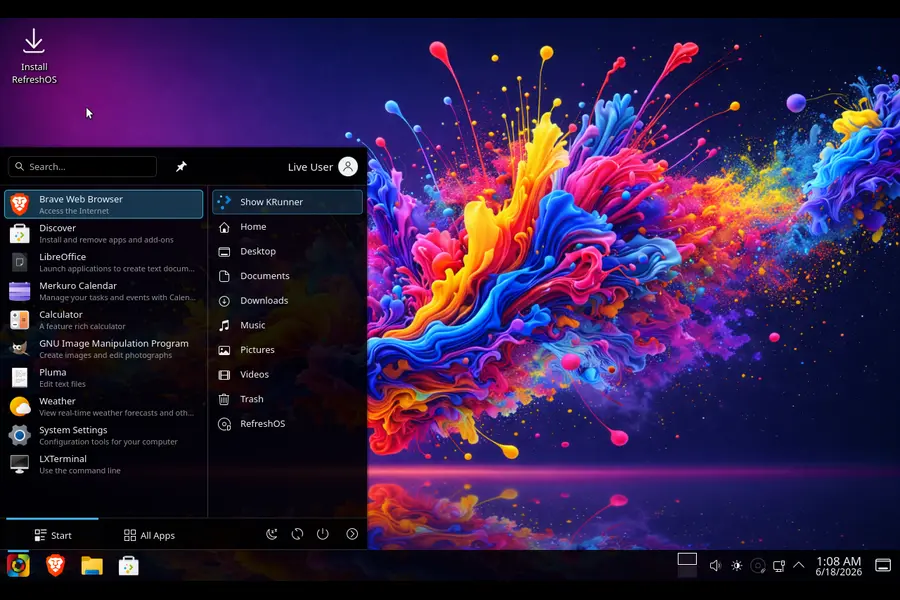
RefreshOS 3 ships with a freshly designed visual identity. Custom icons, updated cursor themes, new window decoration styling, and a refined color palette give the desktop a coherent, polished look that feels intentional rather than assembled from defaults.
The New Reload Menu
One of the more distinctive new additions is the Reload Menu — a custom application launcher that replaces the standard KDE application menu. It’s designed to feel fast and clean, making it easy to find and launch apps without digging through layers of categories. This is a small but noticeable quality-of-life improvement that reinforces the distro’s “ready to use” identity.
Out-of-the-Box Hardware Support
RefreshOS 3 ships with pre-configured drivers, firmware, media codecs, power optimization settings, and audio tuning. On a fresh Debian install, you’d normally spend time hunting down these pieces manually. Here, they’re already in place.
Installation Experience
Installation is handled through a live ISO and the Calamares graphical installer — the same friendly, step-by-step installer used by many popular distros including Manjaro and KDE Neon.
The process is straightforward:
- Download the ISO from the official RefreshOS website
- Flash it to a USB drive using tools like Balena Etcher or Rufus (the ISO is a hybrid format compatible with both)
- Boot into the live environment to try before installing
- Launch Calamares and follow the guided steps
- Reboot into a fully configured desktop
No terminal commands are required. No manual partitioning tricks. The live environment itself runs smoothly enough to evaluate whether the system works with your hardware before committing to the install.
For first-time Linux users, this is one of the smoother installation experiences available on any Debian-based distro. The fact that drivers and codecs are already bundled means that what you see in the live session is exactly what you get after installation — no post-install surprises.
Desktop Environment: KDE Plasma 6 on Debian 13
KDE Plasma 6 is where RefreshOS 3 really shines. Plasma 6 was a landmark release for the KDE project — it introduced native Wayland as the primary session (with X11 still available), a streamlined settings system, and noticeably snappier performance even on modest hardware.
Running Plasma 6 on top of Debian 13 Stable creates an interesting combination. You get the very latest in KDE’s desktop development paired with Debian’s conservative, rigorously tested package base. It’s a bit like getting a modern sports car body on a tried-and-tested, well-maintained chassis.
Desktop Features Worth Noting
- Wayland-first session with improved stability compared to earlier Wayland implementations
- Virtual desktops built in, making multitasking and workspace organization genuinely useful
- KDE Connect integration for pairing Android devices
- Discover package manager for GUI-based software management
- System Monitor for keeping tabs on resource usage
One nuance worth mentioning: RefreshOS isn’t a pure KDE stack. Despite running Plasma 6, the distro includes apps from other desktop projects where they make sense. Nemo (from Cinnamon) is the default file manager instead of Dolphin, and LXTerminal is used over Konsole. This hybrid approach prioritizes usability and familiarity over desktop ecosystem purity — a pragmatic choice that mostly works well.
Pre-installed Software
RefreshOS 3 ships with a carefully chosen default software set that covers most everyday use cases without bloating the system. Here’s what you get out of the box:
Productivity:
- LibreOffice (Writer, Calc, Impress) for documents, spreadsheets, and presentations
- Thunderbird for email
Web & Communication:
- Brave Browser as the default web browser (privacy-focused, Chromium-based)
Multimedia:
- VLC for video playback
- Elisa for music
- KWave for audio editing
Creative Tools:
- GIMP for image editing
- Kdenlive for video editing
- KolourPaint for simple painting tasks
- PhotoQt for image viewing
System Tools:
- Nemo file manager
- LXTerminal
- KDE Discover for software management
- System Monitor
This is a thoughtful selection. You’re getting a full productivity suite, solid media tools, and creative applications without having to immediately open a package manager after installation. For a typical home user or remote worker, this lineup covers the basics and then some.
What’s notably absent by design: no Snap, no Flatpak. RefreshOS sticks to the traditional APT package management system using Debian’s official repositories. This is a deliberate choice — it keeps the system lean and predictable, though it does mean some newer or proprietary applications that primarily distribute through Flatpak or Snap require additional steps to install.
Performance
System Requirements and Real-World Feel
RefreshOS 3 runs on 64-bit (amd64) hardware. KDE Plasma 6 with Qt 6 is actually more efficient than Plasma 5 was in its early days, and on mid-range hardware from the last few years, the experience is noticeably smooth.
Boot times are reasonable for a Debian Stable base. Application launch times feel snappy thanks to KDE’s optimizations in Plasma 6. The desktop remains responsive even with multiple applications open simultaneously, and the pre-configured power settings help on laptops.
Where performance holds up well:
- General desktop use and web browsing
- Document editing and productivity tasks
- Media playback (VLC handles even high-bitrate files well)
- Multi-monitor setups under Wayland
Where you might notice limits:
- Older or low-RAM systems (4GB works, 8GB is more comfortable for heavier multitasking)
- Heavy GPU-accelerated workloads depend on driver quality, which varies by hardware
- Rolling-release distributions will always have newer package versions, which can matter for certain developer workflows
Stability
This is arguably RefreshOS 3’s strongest suit. Debian 13 Stable is exactly what it sounds like — a distribution base that has been tested extensively before release and receives updates on a conservative, security-focused schedule. You are not going to wake up to a broken desktop after a routine system update. For users who have been burned by rolling-release instability or unexpected breakage after upgrades, this is genuinely reassuring.
Pros of RefreshOS 3
Here’s a summary of where RefreshOS 3 genuinely delivers:
- Ready to use immediately. Drivers, codecs, power settings, and apps are pre-configured. You’re not doing post-install setup for an hour.
- KDE Plasma 6 on a stable base. Getting Plasma 6’s modern features without the unpredictability of a rolling release is a real differentiator.
- Polished visual design. The “Colorful Cosmos” theme, custom icons, cursor, and Reload Menu give it a cohesive, premium feel.
- Friendly to Linux newcomers. The Calamares installer and sensible defaults lower the barrier to entry significantly.
- Long-term reliability. Debian 13 Stable foundation means the system stays predictable over time.
- No Snap/Flatpak overhead. A clean APT-based system without container bloat.
- Excellent hardware compatibility. Bundled firmware and driver support means fewer struggles with Wi-Fi cards, Bluetooth, and GPU drivers.
- Good software selection. LibreOffice, GIMP, Kdenlive, VLC, and Brave cover a lot of ground without overstuffing the default install.
Cons of RefreshOS 3
No distro is perfect, and RefreshOS 3 has some real trade-offs worth knowing before you commit:
- Packages lag behind cutting-edge. Debian Stable’s conservative approach means some packages are older versions compared to Arch, Fedora, or even Ubuntu. Developers who need the latest toolchain versions may find this limiting.
- No Flatpak or Snap by default. While this keeps things clean, it complicates installing some modern applications that distribute primarily through those channels.
- Small community. RefreshOS doesn’t have the massive forums, Reddit communities, or extensive third-party documentation that Ubuntu or Mint enjoy. Troubleshooting unusual issues may require leaning on Debian resources instead.
- Mixed desktop app ecosystem. Using Nemo alongside Plasma 6 is practical but can feel inconsistent to users who prefer a unified KDE experience.
- Less frequently updated than rolling distros. Major software updates come with Debian release cycles, not continuously.
- Limited to amd64. No ARM support is offered at this time, which matters if you’re on a Raspberry Pi or Apple Silicon device.
- End of life for 2.x. If you’re running RefreshOS 2.0 or 2.5, you’ll need to do a fresh install to move to 3.0 — there’s no in-place upgrade path.
Who Should Use RefreshOS 3?
RefreshOS 3 hits a specific sweet spot, and it’s worth being honest about who it suits best.
Great fit for:
- Longtime Windows or macOS users exploring Linux who want a polished, low-friction experience
- Users who tried Ubuntu or Mint but want something cleaner and KDE-focused
- Debian fans who were frustrated by the effort required to get Plasma 6 running on vanilla Debian Stable
- Casual users, students, content creators, and remote workers who need a reliable daily driver
- People who’ve been burned by rolling-release instability and want something that just works
Probably not the best fit for:
- Developers who need the absolute latest versions of programming languages, compilers, or toolchains
- Users heavily invested in the Flatpak ecosystem
- Power users who prefer to build their own system from the ground up
- Anyone needing ARM support
RefreshOS 3 vs. The Competition
How does RefreshOS 3 stack up against some obvious alternatives?
vs. KDE Neon: KDE Neon ships the very latest KDE software on an Ubuntu LTS base. If you specifically want the bleeding edge of KDE development, Neon delivers that. But it’s less opinionated about pre-configuration and targets KDE enthusiasts more than general users. RefreshOS is more complete out of the box.
vs. Linux Mint: Mint (Cinnamon or KDE edition) is the go-to recommendation for Linux newcomers and runs a fantastic experience on Ubuntu. If you want a giant support community and Ubuntu compatibility, Mint wins there. But RefreshOS offers a more refined KDE experience and the Debian base appeals to users who prefer it over Ubuntu.
vs. MX Linux: MX Linux is another Debian Stable-based distro with a strong following. MX uses Xfce or KDE and has a very mature toolset for intermediate users. RefreshOS is arguably more polished visually and friendlier to complete newcomers, while MX Linux has a larger community and more advanced configuration tools.
vs. Vanilla Debian 13 with KDE: If you’re comfortable with Debian, you can achieve something similar by installing Debian 13 and configuring KDE Plasma 6 yourself. But that takes time, knowledge, and post-install effort. RefreshOS packages that work into a ready-made experience — that’s the entire value proposition.
Final Verdict
The RefreshOS 3 Review 2026 story is ultimately a positive one. This is a distro that knows what it’s trying to be and executes on that vision cleanly. The combination of Debian 13 Stable’s reliability with KDE Plasma 6’s modern, polished desktop creates something that genuinely feels like a complete, thought-through product rather than a hobbyist project. The “Colorful Cosmos” theme, the Reload Menu, the pre-configured hardware support, and the curated default application set all point to a team that cares about the end-user experience.
It’s not for everyone — rolling-release enthusiasts, Flatpak-first users, and ARM device owners will need to look elsewhere. But for the user who wants a stable, good-looking Linux desktop that’s ready to use the moment installation finishes, RefreshOS 3 deserves serious consideration. With Debian 2.x support now retired and the 3.0 branch established as the active development line, this is a good time to jump in.
If you’ve been waiting for the right moment to try a Debian-based KDE desktop — this is it.
Disclaimer
This review is based on publicly available information and official release data from eXybit Technologies as of June 2026. Performance and experience may vary depending on your hardware configuration. All product names and trademarks mentioned belong to their respective owners. This article is intended for informational purposes only.