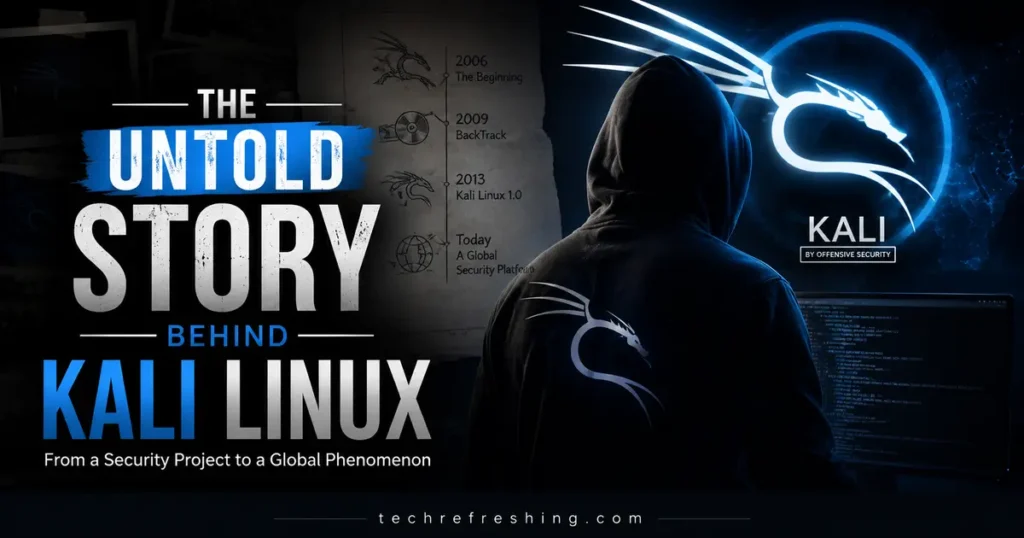
If you’ve spent any time in cybersecurity, you’ve encountered Kali Linux. It shows up in training labs, penetration testing engagements, certification programs, and even mainstream TV shows. But most people who use it don’t know how it got here. The Untold Story Behind Kali Linux is really a story about how the security community outgrew its own tools — and had to build something better from scratch.
What Is Kali Linux?
Kali Linux is a Debian-based Linux distribution built specifically for penetration testing, digital forensics, security research, and reverse engineering. It’s maintained and funded by OffSec (formerly Offensive Security) and is available free of charge.
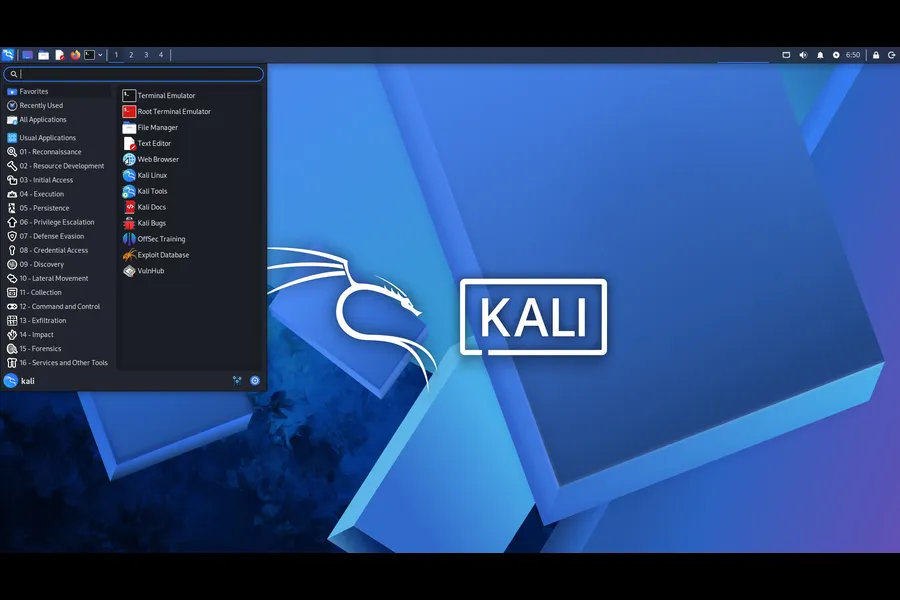
Unlike general-purpose distributions such as Ubuntu or Fedora, Kali is purpose-built. Every package, every default setting, and every design decision is made with offensive security work in mind. It ships with hundreds of pre-installed tools covering everything from network scanning and password cracking to wireless analysis and exploit development.
The target audience is clear from the documentation: security professionals, penetration testers, forensic analysts, and researchers. Kali is not designed to be a daily driver for casual computing. It’s designed to work.
Why Kali Linux Was Created
Before Kali existed, security professionals had a problem. The tools they needed were scattered across dozens of repositories, each with different dependencies, update cycles, and installation requirements. Setting up a reliable testing environment before an engagement could take hours. Keeping it up to date took even more.
BackTrack Linux addressed some of this by bundling tools into a single bootable environment, and for its time, it worked well. But as penetration testing methodologies became more sophisticated and attack surfaces expanded, BackTrack started showing its age.
The file system wasn’t organized according to Linux standards. Package management was difficult to maintain. Some tools shipped with outdated versions. And the underlying Ubuntu base introduced dependencies and constraints that made deep customization cumbersome.
OffSec’s goal was to build something that security professionals could actually rely on in real-world environments — a distribution built on solid engineering, not just a collection of tools thrown together.
From BackTrack to Kali Linux
BackTrack Linux first appeared in 2006, born from the merger of two earlier security-focused distributions: WHAX, a Slax-based toolkit developed by Mati Aharoni, and Auditor Security Collection, a Knoppix-based forensics toolset developed by Max Moser. Early versions ran as live CDs, letting testers boot directly from portable media without touching the underlying system.
Over the years, BackTrack evolved. BackTrack 4 (2010) shifted to an Ubuntu base and added a graphical installer. BackTrack 5 (2011) refined the toolset further and built a real community around the distribution. But structural problems persisted.
On March 13, 2013, OffSec announced Kali Linux at Black Hat Europe in Amsterdam. It wasn’t a renamed version of BackTrack. It was a complete rebuild — same mission, new foundation.
| Feature | BackTrack Linux | Kali Linux |
|---|---|---|
| Base OS | Ubuntu (Knoppix in early versions) | Debian (testing branch) |
| Release model | Fixed releases | Rolling release |
| File system standard | Non-standard | FHS compliant |
| Package management | Complex, inconsistent | APT with Debian repos |
| First released | 2006 | 2013 |
| Current status | Discontinued (2013) | Actively maintained |
| ARM support | Limited | Extensive |
| WSL support | No | Yes |
| Default shell | Bash | Zsh (since 2020) |
| Customization | Limited | Highly flexible |
The shift to Debian brought real advantages. Debian’s package management is stable, well-documented, and widely understood. It meant that Kali could sync with upstream packages more predictably and that security professionals using Debian in other contexts would find the environment familiar.
How Kali Linux Works
Kali runs on a rolling release model, which means there are no major version upgrades to wait for. Updates roll in continuously, keeping tools and the underlying system current. OffSec typically publishes a numbered release (2026.1, 2025.4, and so on) every few months to mark accumulated changes, but between those releases, the system updates like any other rolling distribution.
Package management uses APT, the same system Debian uses. Tools are available through the official Kali repositories, and metapackages let users install curated groups of tools — for example, kali-tools-web for web application testing or kali-tools-forensics for digital forensics work.
By default, Kali applies a security-focused configuration. The root account behavior has evolved over time; since version 2020.1, Kali runs as a standard user by default rather than root, which aligns better with modern security practices. Services like SSH and network services are disabled by default and must be explicitly enabled, reducing the attack surface of the testing environment itself.
The default desktop environment is Xfce, chosen for its lightweight footprint. GNOME and KDE Plasma are available as alternatives.
Key Features That Made Kali Linux Popular
Hundreds of integrated tools. Kali ships with tools organized across categories: information gathering, vulnerability analysis, web application testing, wireless attacks, password attacks, exploitation, forensics, reverse engineering, social engineering, and reporting. Having everything in one place, pre-configured and ready to use, is a significant time saver in professional engagements.
Open source and free. There’s no license fee. The distribution, the tools, and the documentation are all freely available. This lowered the barrier for security training and made Kali accessible to independent researchers and small organizations that couldn’t afford commercial alternatives.
Hardware compatibility. Kali supports a wide range of hardware, from enterprise workstations to single-board computers. ARM builds have been available for years, covering devices like Raspberry Pi, which is commonly used to build small, portable testing rigs.
Kali NetHunter. This is the mobile arm of the project — an official Android-based penetration testing platform that extends Kali’s capabilities to smartphones and tablets. In real-world usage, NetHunter enables wireless frame injection, man-in-the-middle attacks, and HID attacks from a device that fits in a pocket.
Cloud and virtualization. Pre-built images are available for VMware, VirtualBox, and cloud providers. Penetration testing teams can spin up an environment in minutes without configuring anything from scratch.
Containers. Kali is available as a Docker image (kalilinux/kali-rolling), which is useful for integrating specific tools into automated pipelines or running Kali tooling without a full VM.
WSL support. Kali runs on Windows Subsystem for Linux, allowing security professionals on Windows machines to access Kali tools without dual-booting or virtualization overhead.
Kali Purple. Introduced in 2023, this variant focuses on defensive security. It ships with tools organized according to the NIST Cybersecurity Framework, making it useful for blue teams alongside the traditional offensive tooling.
Most Important Kali Linux Tools
| Tool | Purpose | Typical Use Case |
|---|---|---|
| Metasploit Framework | Exploit development and delivery | Exploiting known vulnerabilities in controlled environments |
| Nmap | Network discovery and port scanning | Mapping network topology and identifying open services |
| Wireshark | Network protocol analysis | Capturing and analyzing live network traffic |
| Aircrack-ng | Wireless network security testing | Auditing WPA/WEP-protected wireless networks |
| Burp Suite | Web application security testing | Intercepting and manipulating HTTP/HTTPS traffic |
| John the Ripper | Password cracking | Offline password hash recovery |
| Hashcat | GPU-accelerated password recovery | High-speed cracking of captured hashes |
| Nikto | Web server scanning | Identifying outdated software and misconfigurations |
| SQLmap | SQL injection testing | Automated detection of SQL injection vulnerabilities |
| Hydra | Network login brute-forcing | Testing credential security on login services |
| BloodHound | Active Directory analysis | Mapping attack paths in Windows environments |
| Maltego | Open-source intelligence gathering | Building relationship graphs from public data |
How Kali Linux Has Evolved Over the Years
2006 — BackTrack 1 released. Born from the merger of WHAX and Auditor Security Collection. Distributed as a live CD.
2008 — BackTrack 3. Kernel 2.6.21.5. Added tools like Saint and Maltego.
2010 — BackTrack 4. Moved to Ubuntu base. Improved hardware support, graphical installer added.
2011 — BackTrack 5. Ubuntu Lucid LTS base. Broader tool coverage, stronger community.
March 13, 2013 — Kali Linux 1.0 released at Black Hat Europe. Complete rebuild on Debian. Over 300 tools included at launch.
2015 — Kali 1.1.0. First dot release after two years, new kernel, expanded toolset.
2019 — Kali 2019.4. Default interface switched from GNOME to Xfce. Undercover mode introduced to make Kali look like Windows for discreet use.
2020 — Kali 2020.1. Default user changed from root to standard user. Default shell changed from Bash to Zsh in 2020.3.
2022 — Expanded ARM support, NetHunter improvements, cloud image availability broadened.
2023 — Kali Purple introduced. Defensive security variant with NIST-aligned tooling. OffSec renames from Offensive Security to OffSec.
2024 — Kali 2024.4. Kernel 6.11 introduced. Official support for 32-bit images dropped. DSA keys deprecated for OpenSSH.
March 24, 2026 — Kali 2026.1 released. Kernel 6.18, Xfce 4.20.6. Annual theme refresh, BackTrack Mode added to Kali-Undercover to mark the 20th anniversary of BackTrack. Eight new tools added including AdaptixC2, Atomic-Operator, Fluxion, and GEF. Kali menu reorganized around the MITRE ATT&CK framework structure in 2025.2.
Kali Linux vs Ubuntu
Both Kali and Ubuntu are Linux distributions. That’s roughly where the similarities end.
| Criteria | Kali Linux | Ubuntu |
|---|---|---|
| Primary purpose | Penetration testing and security research | General-purpose computing |
| Base | Debian (testing branch) | Debian (stable) |
| Default tools | Security and hacking tools | Office, media, productivity tools |
| Release model | Rolling release | Fixed release (LTS every 2 years) |
| Target users | Security professionals, testers, researchers | Developers, general users, businesses |
| Stability | Good; occasional rolling-release edge cases | Very stable, especially LTS versions |
| Learning curve | Steeper; assumes Linux familiarity | Gentler; designed for newcomers |
| Security configuration | Hardened defaults, services off by default | More permissive defaults for usability |
| Community | Security-focused forums and documentation | Broad, general community |
| Best for | CTFs, pentests, forensics, security labs | Development environments, servers, everyday use |
If you’re learning cybersecurity, Kali is the right choice for hands-on practice. If you’re a developer who needs a reliable workstation, Ubuntu is the better fit. In cybersecurity environments, many professionals actually run Ubuntu as their daily driver and spin up Kali in a VM when they need it — the two distributions serve different moments in the workflow.
Kali Linux in Modern Cybersecurity
In penetration testing, Kali is the industry default. Most professional pentesters and security auditors are trained on it, and engagements are typically scoped with the assumption that Kali’s toolset represents standard capability. From user feedback and professional practice, it’s become a common language for the field.
For red teaming, Kali provides the infrastructure for adversary simulation. Tools like Metasploit, BloodHound, and the newly added AdaptixC2 (introduced in 2026.1) support the kind of multi-stage, post-exploitation workflows that red teams run against organizations.
Security audits use Kali to validate controls. Nmap, Nikto, and web application tools let auditors verify that defenses are working as expected rather than just checking boxes.
Training and certifications are tightly coupled to Kali. OffSec’s OSCP (Offensive Security Certified Professional) certification — one of the most respected hands-on credentials in the field — is based entirely on Kali Linux. PWK (Penetration Testing with Kali Linux) is the associated training course. Other certifications from eLearnSecurity and various bootcamps similarly build their labs around Kali environments.
CTF (Capture the Flag) competitions almost universally assume participants are working from Kali or a comparable environment. The toolset and the skill set have become inseparable.
Common Myths About Kali Linux
“Kali Linux is illegal.”
The distribution itself is completely legal. It’s an open-source operating system. Using it to test systems you don’t own or have permission to test is where legal questions arise — and that’s true of any security tool, not Kali specifically.
“Kali automatically hacks systems.”
Kali is a toolbox. It doesn’t do anything on its own. A professional using Kali still needs deep technical knowledge to get results. The tools are sophisticated; so is the knowledge required to use them effectively.
“Only experts can use Kali Linux.”
Kali is accessible to beginners. The documentation at kali.org is comprehensive, and the community forums are active. That said, getting real value out of the toolset does require learning. Kali doesn’t lower the barrier to expertise — it gives you the tools once you’re developing it.
“Kali Linux is the most secure operating system.”
Kali is designed for offensive work, not for hardened personal security. Distributions like Tails or Qubes OS are built for privacy and security-first computing. Kali’s defaults are tuned for testing capability, not personal operational security.
Pros and Cons of Kali Linux
| Pros | Cons |
|---|---|
| Hundreds of pre-installed security tools | Not designed as a daily-use desktop OS |
| Rolling release keeps tools current | Rolling updates can occasionally introduce instability |
| Strong documentation and community | Steep learning curve for Linux newcomers |
| Free and open source | Some hardware compatibility edge cases |
| Runs on VMs, containers, WSL, ARM, mobile | Over-reliance on root in older versions |
| Industry standard for certifications | Can be overwhelming without a structured learning path |
| Kali Purple adds defensive tooling | SDR toolchain currently unstable in 2026.1 |
Is Kali Linux Still Relevant in 2026?
Yes — and the evidence is in the release cadence. OffSec published Kali 2026.1 on March 24, 2026, with kernel 6.18, eight new tools, and 183 package updates. The project is actively maintained, regularly updated, and still the reference point for professional penetration testing.
The 2026.1 release added a BackTrack Mode to Kali-Undercover, celebrating the 20th anniversary of BackTrack Linux. It’s a small but telling detail — the project is aware of its history and is still building on it.
More substantively, the Kali menu was reorganized in 2025.2 to follow the MITRE ATT&CK framework, which is how modern red teams and threat intelligence professionals structure their thinking. That’s not a cosmetic change. It reflects how the field uses Kali and how OffSec intends it to grow.
LLM integration is also on the roadmap. OffSec has been exploring how natural language can interface with Kali tooling, translating plain-language descriptions of desired actions into technical commands. Based on testing and early documentation, this is positioned as an alternative interaction model, not a replacement for terminal proficiency.
Kali NetHunter continues to expand mobile capabilities. The 2026.1 release added wireless injection support for Qualcomm QCACLD 3.0 hardware, broadening the range of devices that can perform real packet injection.
Alternatives exist — Parrot OS, BlackArch, and containerized approaches like Exegol all have their advocates. But for standardization, documentation depth, and certification alignment, Kali remains the default in cybersecurity environments.
Conclusion
From a merger of two live CDs in 2006 to the industry-standard penetration testing platform it is today, the full arc of The Untold Story Behind Kali Linux is really the story of an entire field maturing. The move from BackTrack to Kali wasn’t just a technical upgrade — it was a commitment to building infrastructure that professionals could depend on at scale.
In 2026, Kali is still being actively developed, still expanding to new platforms, and still setting the standard for what a security testing environment looks like. If you’re serious about cybersecurity work, understanding what Kali is and how it got here isn’t just interesting history — it’s context that makes you better at using it.
FAQ
What is Kali Linux used for?
Kali Linux is used for penetration testing, vulnerability assessment, digital forensics, security research, and reverse engineering. It is the standard platform for professional security assessments and ethical hacking certifications.
Is Kali Linux free?
Yes. Kali Linux is free and open source. It can be downloaded directly from kali.org at no cost, including all pre-installed tools and official documentation.
Is Kali Linux legal?
Kali Linux is a legal operating system. Using its tools to test systems without proper authorization is illegal. Always ensure you have explicit permission before conducting any security testing.
Who develops Kali Linux?
Kali Linux is developed and maintained by OffSec (formerly Offensive Security), the same organization that created BackTrack Linux and the OSCP certification program.
Is Kali Linux based on Debian?
Yes. Kali Linux is based on the Debian testing branch. Most of its packages are imported from Debian repositories, and it uses APT for package management.
Disclaimer
This article is intended for educational purposes only. The information provided about Kali Linux, its tools, and its use cases is meant to inform cybersecurity students, researchers, and professionals. Using penetration testing tools on systems, networks, or devices without explicit written authorization from the owner is illegal and unethical. TechRefreshing.com and its contributors do not condone or support any unauthorized or malicious use of the tools or techniques discussed in this article. Always ensure you have proper permission before conducting any form of security testing.