

If you’ve been keeping an eye on the Arch-based Linux space, you probably already know that EndeavourOS has been on a roll lately. Just six weeks after dropping their major Titan release in March 2026, the team came back with a polished refresh called Titan Neo — officially released on May 1, 2026. This EndeavourOS Titan Neo review digs into everything that changed, what actually got better, what was fixed, and whether it’s worth a fresh install or just another routine update.
Spoiler: for new users considering EndeavourOS, Titan Neo is the cleanest entry point the project has offered in a long time.
What Is EndeavourOS Titan Neo?
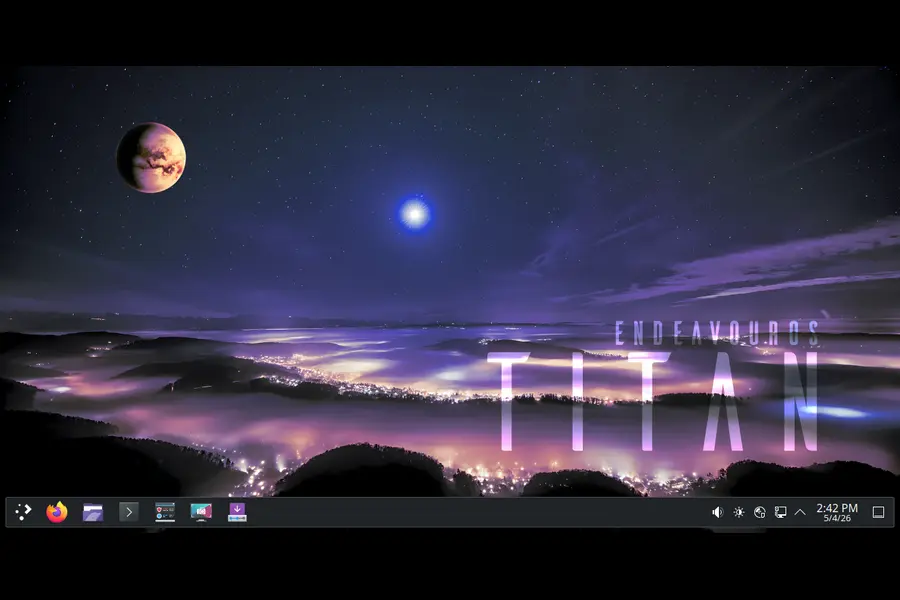
Before we get into the specifics, a quick bit of context. EndeavourOS follows a rolling release model, which means once you install it, your system stays up-to-date through regular package updates via sudo pacman -Syu. You never need to reinstall to get the latest software.
That said, the team periodically refreshes their ISO — the installation image — to bundle the latest packages, fix installer bugs, and improve the out-of-box experience for new users. Titan Neo (ISO version 2026.04.27) is one of those refreshes. It builds directly on the Titan release from March 12, 2026, which was a named major release inspired by Saturn’s largest moon.
Here’s the key point the EndeavourOS team made very clearly in their announcement:
“Running systems don’t have to ‘upgrade’ to Titan Neo; if you update regularly, your system is fine.”
What’s Inside: Titan Neo Core Specs
Titan Neo ships with a very current software stack. Here’s what the live environment and offline installer include out of the box:
| Component | Version |
|---|---|
| Linux Kernel | 6.19.14.arch1-1 |
| KDE Plasma | 6.6.4 |
| KDE Frameworks | 6.25 |
| KDE Gear | 26.04 |
| Calamares Installer | 26.03.2.3-1 |
| Firefox | 150.0-1 |
| Mesa | 1:26.0.5-1 |
| Xorg Server | 21.1.22-1 |
| NVIDIA Utils | 595.58.03-2 |
Compared to Titan’s launch configuration — which shipped with Linux 6.19.6, KDE Plasma 6.6, and Firefox 148 — every major component here has been bumped. That’s meaningful progress packed into six weeks.
KDE Plasma 6.6.4: Noticeably Smoother
Let’s talk about the desktop experience, because that’s where most users spend their time.
The jump from KDE Plasma 6.6 (shipped with Titan) to KDE Plasma 6.6.4 in Titan Neo brings a round of under-the-hood fixes and performance refinements. Paired with KDE Frameworks 6.25 and the freshly released KDE Gear 26.04, the overall Plasma environment feels tighter and more responsive.
KDE Gear 26.04 is particularly worth mentioning because it represents the April 2026 coordinated KDE apps release — meaning your bundled KDE applications (Dolphin, Okular, Konsole, Kate, and the rest) are all at their most current stable builds. This matters for productivity users who rely on these tools daily.
The Wayland experience continues to mature in this release. While EndeavourOS still ships both Xorg and Wayland support (Xorg Server 21.1.22-1 is bundled), Plasma 6.6.4 on Wayland has reached a point where most people won’t need to fall back to X11 for day-to-day use.
The NVIDIA Situation: A Long-Overdue Fix
One of the most practically significant changes in Titan Neo is how NVIDIA GPU users are handled during installation.
Previously, KDE Plasma setups on EndeavourOS used SDDM (Simple Desktop Display Manager) as the login manager. For most hardware, SDDM works fine. But for systems running proprietary NVIDIA drivers, it has been a consistent source of frustration — login screen glitches, black screens, and Wayland session issues are well-documented in the EndeavourOS forums.
Titan Neo addresses this head-on. The team has switched from SDDM to plasma-login-manager for KDE Plasma installations that use NVIDIA’s proprietary driver stack. According to the official announcement, this change “significantly improves compatibility when running proprietary Nvidia drivers.”
This is not a trivial tweak. For the large portion of Linux users on NVIDIA hardware, this single change could be the difference between a smooth first-boot experience and an hour spent troubleshooting from a TTY. The EndeavourOS team deserves credit for tackling this directly rather than leaving it as a community wiki workaround.
The NVIDIA Utils package itself is also updated to 595.58.03 in this ISO, which is the current stable proprietary driver release.
Installer Improvements: Calamares 26.03
The Calamares graphical installer has been updated to version 26.03.2.3-1 in Titan Neo. This iteration continues the work started with the Titan release, which introduced a significantly improved installer experience.
What Titan (and now Titan Neo) Brought to the Installer
The Titan release itself was notable for installer overhauls, and Titan Neo carries these improvements forward:
- Improved mirror ranking support, including an optimised mirror list even when the installer is running offline — helpful for regions with inconsistent internet access.
- Additional GPU driver installation out of the box, covering Vulkan drivers and hardware-accelerated video decoding packages where applicable.
- The new eos-hwtool — a hardware detection utility introduced in Titan that helps the installer make smarter decisions based on your system configuration.
Titan Neo also resolves a specific Calamares bug where eos-settings packages using skel were being installed after user creation rather than before. In plain terms: your personal configuration files and defaults are now applied in the correct order during setup. This is the kind of subtle bug that doesn’t break things dramatically but can cause confusing inconsistencies for new users.
Package Cleanup: Leaner Installs
The EndeavourOS team used Titan Neo to trim some dead weight from the default installation options. These are small changes but they matter for keeping the system clean:
XFCE Desktop
The xfce4-datetime-plugin package has been removed from the XFCE desktop installation list because it’s no longer available in the Arch repositories. Previously, selecting the XFCE desktop option would fail or produce a warning because of this missing package. Now, the package list accurately reflects what’s actually installable.
Printing Support
The splix package has been dropped from the “Support for printing (Cups)” netinstall option. The splix driver is outdated and the package has largely been superseded by better alternatives. Removing it keeps the printing support option lean and reduces unnecessary dependency baggage.
These aren’t headline features, but they signal good housekeeping. A distro that actively prunes obsolete packages is a healthier distro.
Download Improvements: Faster Torrents
A small but practical addition: torrent downloads have been improved to deliver faster download speeds. If you’re in a region where torrent-based downloads make sense — or if you’re helping seed the EndeavourOS ISO for the community — this is a welcome improvement. The team has historically relied on community mirrors and torrent seeding to handle download load, so improving torrent performance benefits everyone in the ecosystem.
Linux Kernel 6.19.14 and Mesa 26.0.5
The kernel bump from 6.19.6 (Titan) to 6.19.14 in Titan Neo brings three months’ worth of mainline bug fixes and hardware support improvements. The 6.19 series has been solid for most hardware configurations, and 6.19.14 represents a mature, well-patched point in that series.
It’s worth noting that after applying a system update post-installation, the kernel will jump to 7.0.3 — since EndeavourOS is a rolling release and kernel 7.0 landed in the Arch repositories in early May 2026. So your freshly installed Titan Neo system will fairly quickly move to Linux 7.0.x during its first full update.
Mesa 26.0.5 (the open-source graphics driver stack) is bundled with this ISO, providing the latest stable AMD, Intel, and open-source NVIDIA driver support. For AMD and Intel GPU users, Mesa 26.0.5 delivers current state-of-the-art open graphics performance without needing to add any additional repositories.
Who Is EndeavourOS Titan Neo For?
It’s worth stepping back and answering this honestly, because EndeavourOS occupies a specific niche.
Perfect For:
- Arch enthusiasts who want a smoother setup experience. EndeavourOS gives you an Arch base without requiring you to manually partition, configure, and bootstrap your system from scratch. The philosophical commitment to staying close to Arch is genuine — there’s minimal extra tooling layered on top.
- KDE Plasma users. The Titan Neo ISO is clearly optimised for KDE Plasma as the flagship desktop, and the Plasma 6.6.4 experience here is polished.
- NVIDIA users who have historically struggled with Arch-based installs. The SDDM-to-plasma-login-manager switch is a real quality-of-life improvement.
- Experienced Linux users who want a rolling release they can forget about reinstalling indefinitely.
Less Ideal For:
Complete Linux beginners who want hand-holding beyond the installation phase. EndeavourOS is friendlier than base Arch, but once you’re installed, you’re working with a fairly bare Arch system. The learning curve is real.
Users who prefer Ubuntu/Debian-based stability. Rolling releases mean you’re always on the bleeding edge. Most of the time that’s fine, but it does occasionally mean dealing with a package update that breaks something.
Those wanting a highly curated, opinionated desktop. EndeavourOS deliberately avoids heavy customisation. You get a minimal, clean Arch system — the “rice it yourself” philosophy is built in.
Titan Neo vs. Its Predecessor: How Much Changed?
Let’s put the two releases side by side to see the actual delta:
| Feature | Titan (March 2026) | Titan Neo (May 2026) |
|---|---|---|
| Linux Kernel | 6.19.6 | 6.19.14 |
| KDE Plasma | 6.6.0 | 6.6.4 |
| KDE Frameworks | 6.23 | 6.25 |
| KDE Gear | 26.01 | 26.04 |
| Firefox | 148 | 150 |
| Mesa | 26.0.1 | 26.0.5 |
| NVIDIA Utils | ~570 series | 595.58.03 |
| Calamares Installer | 26.03.1.3 | 26.03.2.3 |
| Login Manager (KDE/NVIDIA) | SDDM | plasma-login-manager |
| skel bug | Present | Fixed |
| xfce4-datetime-plugin | Included (broken) | Removed |
| splix in CUPS option | Included | Removed |
The jump is meaningful across the board. This isn’t a token refresh.
Pros and Cons of EndeavourOS Titan Neo
✅ Pros
- Up-to-date software stack — KDE Plasma 6.6.4, Kernel 6.19.14, Firefox 150, Mesa 26.0.5 all bundled from day one.
- NVIDIA compatibility genuinely improved — the switch to plasma-login-manager is a practical fix that addresses a long-standing pain point.
- Clean, lightweight install — no forced applications, no bloat. You get what you choose.
- Skel bug fixed — default configurations apply correctly in the right order during setup.
- Package list hygiene — defunct packages removed, reducing installation errors and unnecessary dependencies.
- Rolling release model — install once, update forever. Titan Neo is your entry ticket, not a version you’ll need to reinstall next year.
- Strong community — active forum and Telegram groups with experienced users.
- Faster torrent delivery — a nice practical touch for download convenience.
❌ Cons
- Not a major release — Titan Neo is a point refresh. Most of the changes are fixes and package bumps, not new features. Power users already on EndeavourOS see no change through pacman anyway.
- KDE-centric ISO — while other desktops (XFCE, GNOME, i3, etc.) are installable via netinstall, the ISO and live environment is clearly optimised around KDE Plasma.
- Learning curve post-install — EndeavourOS doesn’t hold your hand once you’re running. Configuration, AUR management, and troubleshooting require some Arch familiarity.
- XFCE users get less love — the xfce4-datetime-plugin removal is a fix, yes, but it also highlights that XFCE support is maintained somewhat reactively rather than proactively.
- Rolling release risk — inherent to any Arch-based system. Occasional updates can introduce breakage that requires manual intervention.
What’s Coming Next: EndeavourOS Triton
The EndeavourOS team used the Titan Neo announcement to give a brief teaser of what’s coming next: EndeavourOS Triton.
While details are intentionally sparse at this point, the team confirmed that Triton will introduce new desktop environment and window manager options — an expansion of what you can install from the welcome application. Interestingly, they also noted that some current installation options will be retired in Triton.
Based on signals from the 9to5Linux coverage, Triton is expected to arrive with KDE Plasma 6.7 and Linux kernel 7.0 as its baseline. Given that kernel 7.0 has already landed in Arch repos as of May 2026, Triton’s development is clearly tracking a very current software stack.
Titan Neo is explicitly described by the team as “the last installment in the EndeavourOS Titan series.” So if you’re installing now, you’re setting up a system that will naturally evolve toward whatever Triton brings — with no reinstallation required.
Download EndeavourOS Titan Neo
You can grab the official Titan Neo ISO directly from the EndeavourOS homepage. Both direct download and torrent options are available. The ISO carries version number 2026.04.27.
Minimum system requirements:
- 64-bit (x86_64) processor
- 2.5 GB of RAM (4 GB recommended for comfortable use)
- 8 GB of disk space (30 GB or more recommended)
- Internet connection recommended for netinstall options
Final Verdict
The EndeavourOS Titan Neo review conclusion is fairly clear: this is a well-executed ISO refresh that delivers on its modest promises. It’s not trying to be a revolutionary release — it’s a six-week cleanup of Titan that ensures new installers get a polished, bug-free starting point.
The NVIDIA login manager fix alone makes it a better release than Titan for a significant chunk of the user base. The updated software stack is current, the package cleanup is sensible, and the installer works as it should — which, honestly, is everything you want from a point release.
If you’re already on EndeavourOS, keep updating with pacman and carry on. If you’re considering a fresh install of an Arch-based distro and want something that balances Arch purity with a workable setup experience, Titan Neo is the image to download right now.
Rating: 4.2 / 5
Excellent for new Arch-curious installs. Minor release by design, but quality shows.
Disclaimer
This article is written for informational purposes only. All information is based on publicly available official sources and community data at the time of publication (May 2026). While every effort has been made to ensure accuracy, software specifications and features may change over time. We are not affiliated with or sponsored by EndeavourOS or the Arch Linux project. Always refer to the official EndeavourOS website for the most up-to-date information before making any installation decisions.
🔗 Related Articles You Should Read


